
ALLIMITY RC43157
ALLIMITY RC43157 Replacement Remote Control User Manual
Model: RC43157 | Brand: ALLIMITY
1. Introduction
The ALLIMITY RC43157 is a replacement remote control designed to operate various Westwood and EDENWOOD television models. This remote control is ready to use without any programming required; simply insert the batteries, and it will function immediately, replicating all the essential functions of your original remote.
2. Setup and Battery Installation
Follow these simple steps to begin using your ALLIMITY RC43157 replacement remote control:
- Open the Battery Compartment: Locate the battery compartment cover on the back of the remote control. Slide or press the latch to open it.
- Insert Batteries: Insert two new AAA alkaline batteries (not included) into the compartment. Ensure the positive (+) and negative (-) terminals of the batteries match the markings inside the compartment.
- Close the Compartment: Replace the battery compartment cover, ensuring it clicks securely into place.
- Test the Remote: Point the remote control towards your compatible Westwood or EDENWOOD TV and press the Power button. The TV should respond. No additional programming is required.

Image 1: Front view of the ALLIMITY RC43157 remote control. This image displays the full layout of buttons, including number keys, navigation, volume, channel, and dedicated app buttons.
3. Operating Instructions (Button Functions)
The ALLIMITY RC43157 remote control features a standard layout for easy operation of your television. Below is a description of the main button functions:
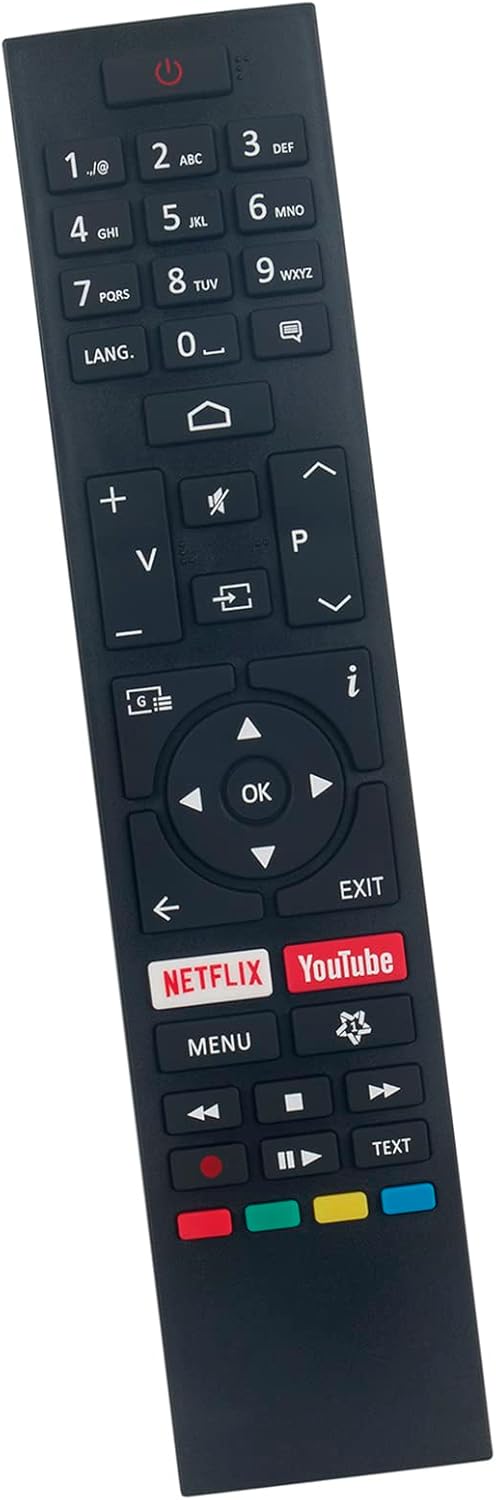
Image 2: Angled view of the ALLIMITY RC43157 remote control, highlighting the ergonomic design and button placement.
- ⏻ Power: Turns the TV on or off.
- Number Buttons (0-9): Selects channels directly or enters numerical input.
- LANG: Changes audio language or subtitle options.
- ⌂ Home: Accesses the TV's main menu or smart TV interface.
- V+/V- (Volume Up/Down): Adjusts the sound volume.
- 🔇 Mute: Mutes or unmutes the TV sound.
- ⎌ Input/Source: Selects the input source (HDMI, AV, etc.).
- P+/P- (Channel Up/Down): Changes TV channels.
- i (Info): Displays information about the current program.
- ◀ ▶ ▲ ▼ (Navigation Arrows): Navigates through menus and options.
- OK: Confirms selections in menus.
- EXIT: Exits the current menu or function.
- NETFLIX: Direct access to the Netflix application.
- YouTube: Direct access to the YouTube application.
- MENU: Opens the TV's main settings menu.
- ⏪, ⏸, ⏹, ⏩ (Playback Controls): Controls media playback (Rewind, Play/Pause, Stop, Fast Forward).
- Color Buttons (Red, Green, Yellow, Blue): Functions vary depending on the TV model and current on-screen prompts.
- TEXT: Accesses teletext services (if supported by TV).
4. Compatible TV Models
The ALLIMITY RC43157 remote control is compatible with the following Westwood and EDENWOOD television models:
- EDENWOOD ED32C01HD-VE
- EDENWOOD ED50C02UHD-VE
- EDENWOOD ED43C00UHD-VE
- EDENWOOD ED43C01UHD-VE
- EDENWOOD ED50C00UHD-VE
- EDENWOOD ED50C01UHD-VE
- EDENWOOD ED55C00UHD-VE
- EDENWOOD ED55C01UHD-VE
- EDENWOOD ED65C01UHD-VE
- Westwood WTA55UHD20B
- Westwood WTA58UHD20B
This remote is designed to replace your original remote for these specific models without the need for complex setup procedures.
5. Troubleshooting
If you experience issues with your remote control, please refer to the following common troubleshooting steps:
- Remote Not Responding:
- Ensure the batteries are inserted correctly with the correct polarity (+/-).
- Replace old batteries with new AAA alkaline batteries.
- Check for any obstructions between the remote control and the TV's infrared sensor.
- Ensure you are within the effective operating range (up to 10 meters) and pointing the remote directly at the TV.
- Specific Buttons Not Working:
- Press the button firmly. Sometimes, debris can get under the button.
- Remove and reinsert the batteries to reset the remote.
- If only one or a few buttons are consistently unresponsive, the remote may be faulty.
- Intermittent Functionality:
- This can often be caused by low battery power. Replace the batteries.
- Ensure there are no strong light sources (like direct sunlight or bright fluorescent lights) interfering with the IR signal.
If the problem persists after trying these steps, please contact the seller for further assistance.
6. Product Specifications
| Brand | ALLIMITY |
| Model Name | RC43157 |
| Special Feature | No programming required |
| Color | Black |
| Connectivity Technology | Infrared |
| Maximum Range | 10 Meters |
| Battery Type | Alkaline (AAA, not included) |
| Smart Home Compatibility | Not compatible with smart home systems |
| Country of Origin | China |
7. Warranty and Support
This product is covered by a standard manufacturer's warranty. For specific warranty details, duration, and terms, please refer to the information provided at the time of purchase or contact the seller directly.
For technical support, troubleshooting assistance beyond what is provided in this manual, or inquiries regarding product defects, please reach out to the ALLIMITY customer support or the retailer from whom you purchased the remote control. Please have your purchase details and model number (RC43157) ready when contacting support.
Related documentsRC43157

Ask a question about this manual
Ask about setup, troubleshooting, compatibility, parts, safety, or missing instructions. Manuals+ will review the question and use this page’s manual context to help answer it.