
1. Introduction
The maXpeedingrods Automatic Transfer Switch (ATS) DES668 is designed to provide a reliable and safe solution for managing power supply between your main utility grid and a backup generator. This unit automatically detects power outages and seamlessly switches to generator power, ensuring continuous electricity for your home or business. It is compatible with maXpeedingrods MXR6000 PRO and MXR9000 inverter generators equipped with a 7-pin ATS connector.
This manual provides essential information for the proper installation, operation, and maintenance of your ATS unit. Please read it thoroughly before installation and use.

Image 1.1: maXpeedingrods Automatic Transfer Switch (ATS) banner.
2. Safety Information
WARNING: RISK OF ELECTRICAL SHOCK. DO NOT REMOVE COVER. NO USER SERVICEABLE PARTS INSIDE. REFER SERVICING TO QUALIFIED SERVICE PERSONNEL.
- Always disconnect all power sources before installing or servicing the ATS unit.
- Installation must be performed by a qualified electrician in accordance with all local and national electrical codes.
- Ensure the generator is properly grounded.
- Do not operate the ATS unit if it is damaged.
- Keep children and unauthorized personnel away from the ATS unit and generator during operation.
- The ATS unit is designed for indoor or outdoor installation, but must be protected from direct weather exposure if installed outdoors.

Image 2.1: Always ensure proper electrical safety procedures are followed during installation.
3. Package Contents
Verify that all items are present in the package:
- maXpeedingrods Automatic Transfer Switch (ATS) Unit
- 7-Pin Connection Cable
- User Manual

Image 3.1: Contents of the maXpeedingrods ATS package, including the ATS unit, 7-pin cable, and user manual.
4. Product Features
- Automatic Power Transfer: Seamlessly switches between utility power and generator power during outages.
- High Capacity: Supports generators up to 10,000 W (10 KW/KVA) and 50 Amps.
- Safety Interlock: Prevents simultaneous feeding of power from both the utility grid and the generator to your household circuits.
- Simplified Installation: Optimized design for easier circuit changeover, suitable for residential, warehouse, and small commercial installations.
- Multi-Circuit Power: Allows a single cable to power multiple or all essential electrical circuits in your home.
- Automatic Generator Control: Initiates generator start-up upon power failure and shuts it down when utility power is restored.

Image 4.1: The ATS unit supports a maximum load capacity of up to 10KW, depending on the generator's maximum output.
5. Setup and Installation
Proper installation is critical for the safe and effective operation of the ATS unit. This process should be carried out by a qualified electrician.
- Mount the ATS Box: Securely mount the ATS box on an exterior wall or in an appropriate outdoor location, ensuring it is protected from direct weather.
- Connect Terminals: Route the main utility power, household load, and generator power cables through the designated holes at the bottom of the ATS box. Connect them to the corresponding terminals labeled CITY, LOAD, and GENERATOR.
- Connect Generator Control Cable: Use the supplied 7-pin white cable to connect the ATS port on the box to the ATS connector on your compatible maXpeedingrods generator (e.g., MXR6000 PRO, MXR9000).
- Select Mode: Choose between manual or automatic mode on the ATS unit as required for your operational preference.
- Generator Settings: Configure your generator settings according to the selected mode on the ATS unit.
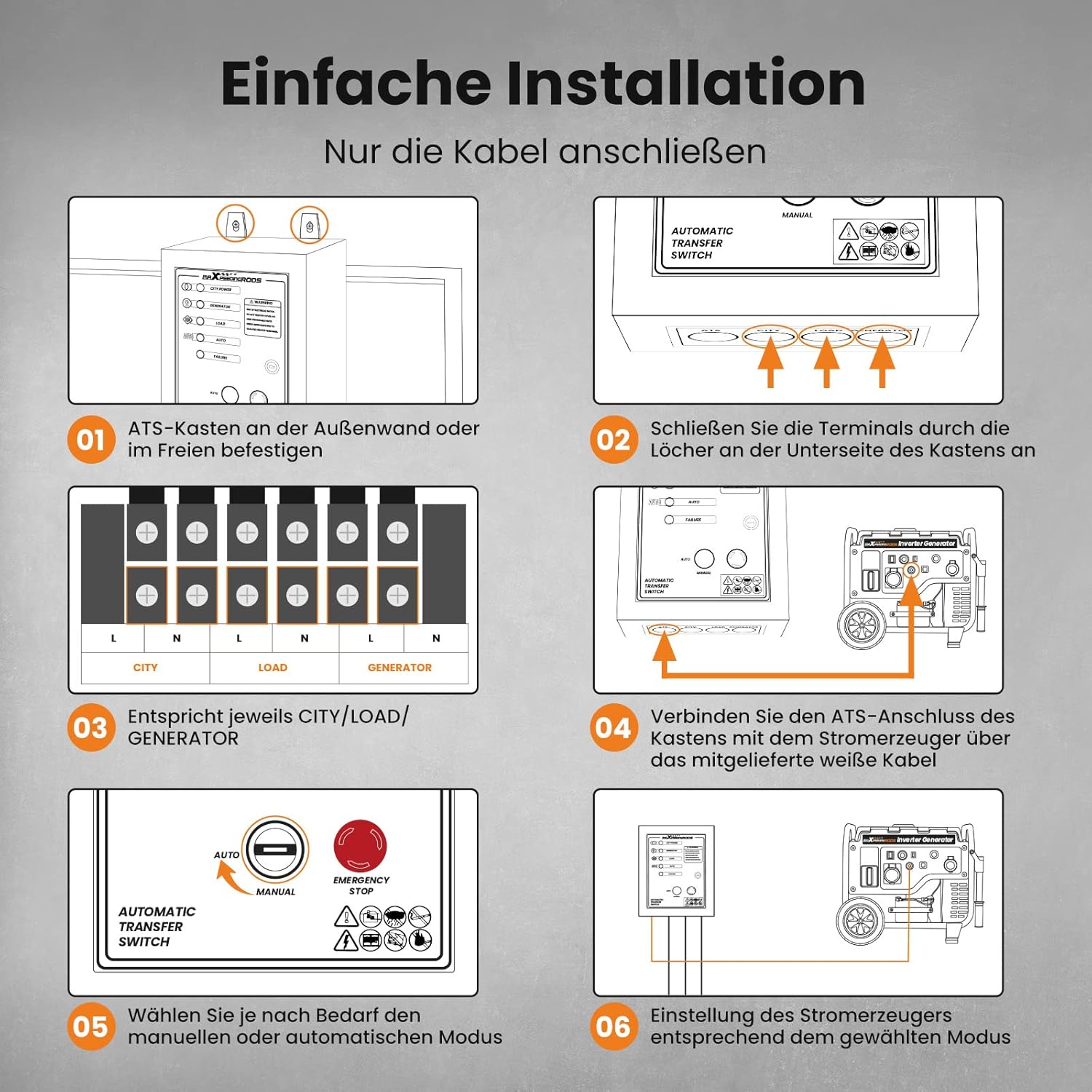
Image 5.1: Step-by-step guide for the simple installation of the ATS unit, primarily involving cable connections.

Image 5.2: The ATS unit connected to the household power grid and a generator for backup power.

Image 5.3: An installed ATS unit operating in conjunction with a maXpeedingrods generator.
6. Operating Instructions
The ATS unit is designed for automatic operation, but also offers a manual override.
6.1 Automatic Mode
In automatic mode, the ATS unit continuously monitors the utility power supply. In the event of a power outage:
- The ATS detects the loss of utility power.
- After a brief delay (approximately 15 seconds), the ATS sends a start command to the connected generator.
- The generator attempts to start (up to 5 attempts with 5-second pauses). If the generator fails to start, a fault indicator will illuminate.
- Once the generator starts, the ATS waits for a warm-up period (approximately 30 seconds) before transferring the household load to generator power.
- When utility power is restored, the ATS switches the load back to the utility grid and signals the generator to shut down after a cool-down period (approximately 30 seconds).
6.2 Manual Mode
The ATS unit can be manually operated for testing or specific situations. Refer to the control panel for manual switch operation.
6.3 Control Panel Overview
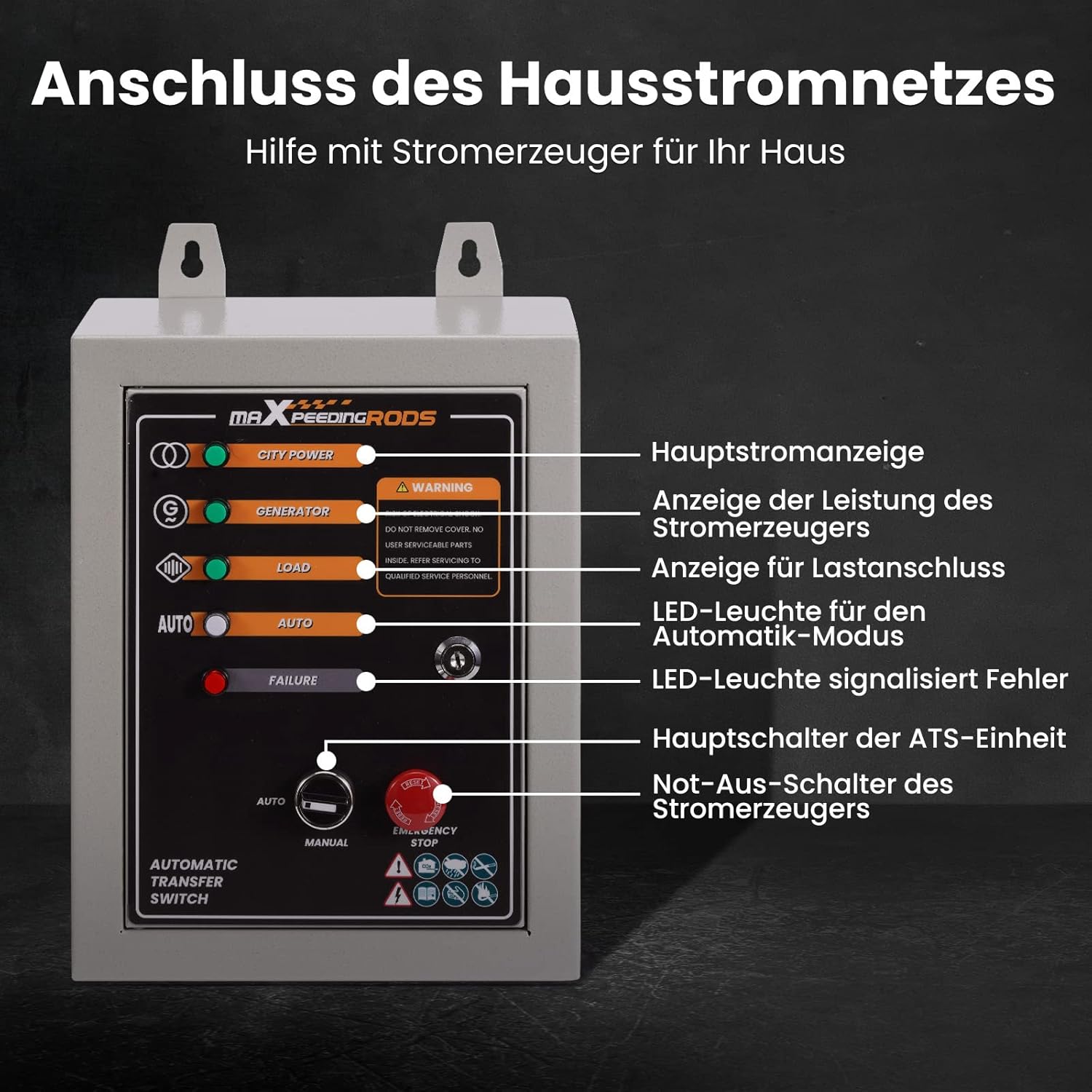
Image 6.1: ATS control panel with indicators and switches.
- CITY POWER Indicator: Illuminates when utility power is present.
- GENERATOR Indicator: Illuminates when the generator is running and providing power.
- LOAD Indicator: Illuminates when power is being supplied to the household load.
- AUTO Mode LED: Indicates the unit is in automatic transfer mode.
- FAILURE LED: Illuminates to signal a fault or failure in operation.
- Main Switch (Key): Controls the main power to the ATS unit.
- Emergency Stop Button: Immediately stops the generator in an emergency.
- AUTO/MANUAL Selector: Switches between automatic and manual operating modes.

Image 6.2: Diagram showing the automatic power flow from the generator during a power outage.

Image 6.3: The ATS unit is well-suited for household emergencies, connecting to the distribution box and the main power grid. Ensure the generator is placed at a safe distance from the house.
7. Maintenance
The maXpeedingrods ATS DES668 is designed for minimal maintenance. However, regular checks are recommended to ensure optimal performance and safety.
- Visual Inspection: Periodically inspect the unit for any signs of physical damage, loose connections, or corrosion.
- Cleanliness: Keep the unit clean and free from dust, dirt, and debris. Use a dry cloth for cleaning. Do not use liquids.
- Professional Inspection: It is recommended to have a qualified electrician inspect the ATS unit and its connections annually.
- Generator Maintenance: Ensure your connected generator is maintained according to its manufacturer's instructions.
8. Troubleshooting
If you encounter issues with your ATS unit, refer to the following basic troubleshooting steps. For complex problems, contact qualified service personnel.
- No Power Transfer:
- Check if the utility power is completely out.
- Ensure the generator is running and producing power.
- Verify all connections are secure.
- Check the ATS unit's main switch is in the ON position.
- Generator Not Starting:
- Ensure the generator has fuel and oil.
- Check the generator's battery (if applicable).
- Verify the 7-pin control cable connection between the ATS and the generator.
- Ensure the ATS is in AUTO mode.
- FAILURE LED On:
- This indicates a fault. Consult the generator's manual for specific error codes or contact service personnel.
9. Specifications
| Manufacturer | maXpeedingrods |
| Model Number | DES668 |
| Product Dimensions (L x W x H) | 41 x 33 x 22 cm |
| Item Weight | 6.26 kg |
| Voltage | 230 Volts |
| Max Power Capacity | 10000 Watts (10 KW/KVA) |
| Max Current | 50 Amps |
| Power Source Type | Fuel Powered (Generator) |
| Special Features | Automatic Transfer Switch, Multi-Circuit Power, Safety Features |
| Included Components | Power Cord (7-pin connection cable) |
10. Warranty and Support
For warranty information and technical support, please refer to the documentation provided with your purchase or visit the official maXpeedingrods website. Keep your proof of purchase for warranty claims.