
1. Introduction
Thank you for choosing the XVIM Solar Security Camera. This manual provides detailed instructions for the installation, operation, and maintenance of your new wireless outdoor security camera. Designed for home security, this camera features 2.5K resolution, pan/tilt capabilities, PIR detection, two-way audio, and flexible storage options. Please read this manual thoroughly before use to ensure proper functionality and safety.
2. Safety Information
- Ensure the camera is installed securely to prevent falling.
- Do not expose the camera to extreme temperatures outside its operating range (-10°C to 55°C).
- Keep the solar panel clean to ensure efficient charging.
- Use only the specified charging methods (solar panel or USB cable).
- Avoid disassembling the camera, as this may void the warranty and cause damage.
3. Package Contents
Please check the package for the following items:
- XVIM Solar Security Camera(s)
- Solar Panel(s)
- Mounting Bracket(s)
- USB Charging Cable
- Mounting Screws and Anchors
- User Manual (this document)
4. Product Overview
The XVIM Solar Security Camera is designed for robust outdoor surveillance. Key components include the camera lens, infrared lights, spotlights, microphone, speaker, solar panel connector, and mounting points.

Figure 4.1: XVIM Solar Security Camera System
This image displays two XVIM solar security cameras, each with an attached solar panel, ready for outdoor installation. The cameras are white and black, featuring multiple lenses and light sensors on the front.
5. Setup
5.1 Initial Charging
Before first use, fully charge the camera's built-in 6000mAH rechargeable battery using the provided USB cable. This ensures the camera has sufficient power to connect to your Wi-Fi network and begin operation.
5.2 App Installation
Download the 'HoMeYe Pro' app from your smartphone's app store (available for Android and iOS). Follow the on-screen instructions to create an account and log in.
5.3 Connecting to Wi-Fi
The camera supports 2.4GHz Wi-Fi only. 5GHz Wi-Fi networks are not supported. Ensure your smartphone is connected to a 2.4GHz Wi-Fi network during the setup process. Follow the in-app instructions to add your camera and connect it to your home Wi-Fi network.
5.4 Mounting the Camera
The camera is designed for wall mounting. Choose a location that provides optimal surveillance coverage and receives ample sunlight for the solar panel. Use the provided mounting bracket, screws, and anchors to securely attach the camera to a wall or suitable surface.

Figure 5.1: Camera and Solar Panel Mounting Example
This image illustrates an XVIM solar security camera mounted on an exterior wall, with its solar panel positioned above to maximize sun exposure for continuous power.
6. Operating the Camera
6.1 Pan/Tilt Remote Control
The camera offers 355° horizontal pan and 90° vertical tilt capabilities. You can control the camera's viewing angle remotely through the 'HoMeYe Pro' app. Navigate to the PTZ (Pan/Tilt/Zoom) page within the app and slide the blue button to adjust the camera's position for 360° all-around protection.

Figure 6.1: Pan/Tilt Remote Control Interface
This image shows the 'HoMeYe Pro' app interface on a smartphone, demonstrating how users can remotely control the camera's 355-degree horizontal pan and 90-degree vertical tilt to cover a wide area.
6.2 2.5K HD Image and Night Vision
The XVIM solar outdoor wireless security camera provides 2.5K HD resolution for clearer images and videos. It is equipped with both IR light and a spotlight, supporting two night vision modes:
- Black and White IR Night Vision: For standard low-light surveillance.
- Full Color Night Vision: Utilizes the spotlight to provide full-color video even in complete darkness.

Figure 6.2: 2.5K HD vs. 1080P Image Quality
This visual comparison highlights the superior clarity and detail offered by the 2.5K HD resolution compared to standard 1080P, showcasing the enhanced image quality of the XVIM camera.
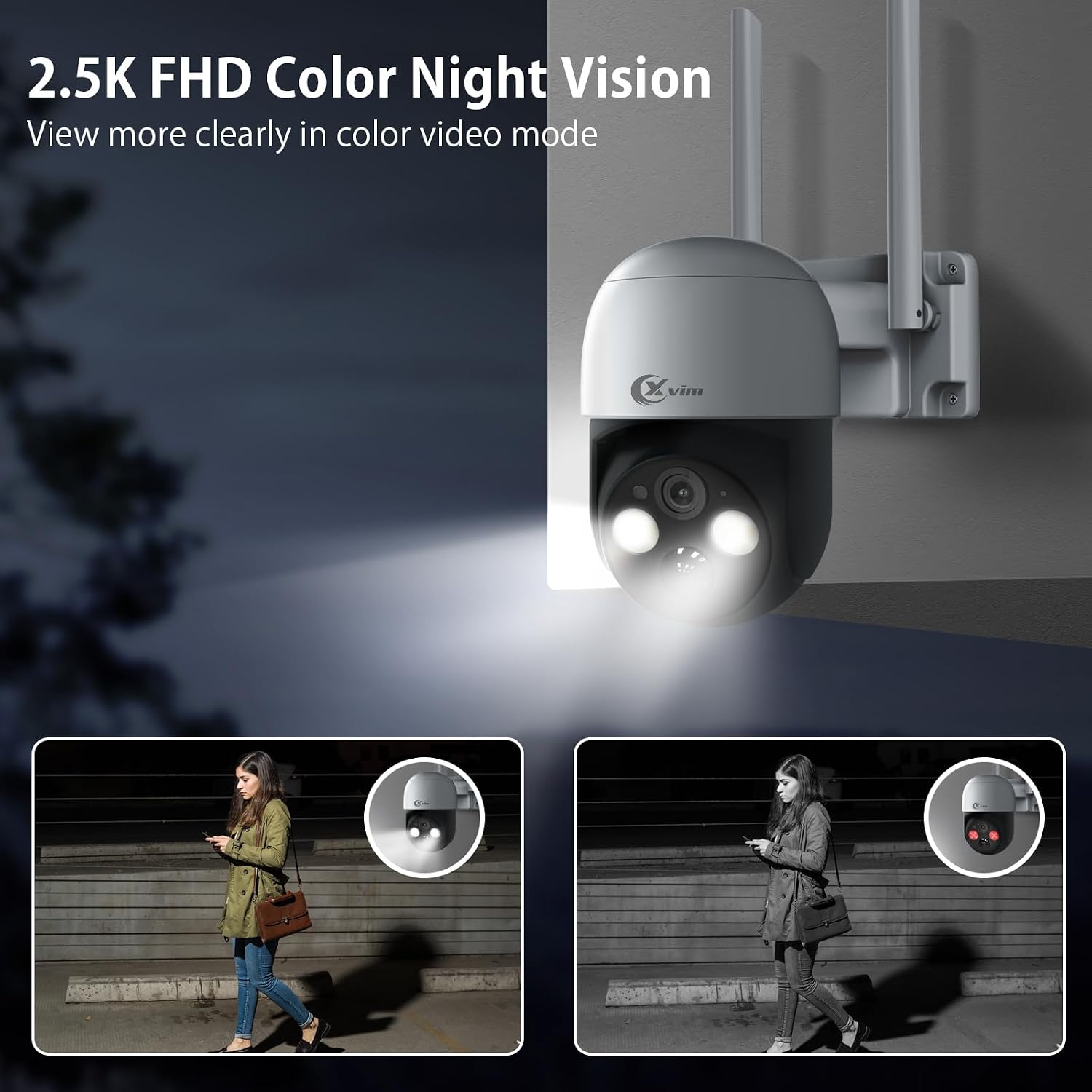
Figure 6.3: Full Color Night Vision in Action
This image illustrates the camera's 2.5K Full HD Color Night Vision, where the integrated spotlight illuminates a dark scene, allowing for clear, color video recording at night.
6.3 Two-way Talk and PIR Motion Detection
The camera features a two-way talk function, allowing you to communicate with visitors or deter intruders directly through the app. It also includes a highly sensitive PIR (Passive Infrared) motion sensor. When the Human Detection feature is enabled in the app, the camera will send real-time alerts to your smartphone upon detecting a human form, minimizing false alarms.

Figure 6.4: Two-Way Talk and Human Detection
This image depicts the camera's two-way talk functionality, showing a user interacting with a delivery person via the app, alongside the PIR human motion detection feature that sends alerts upon detecting human presence.
6.4 Spotlight and Siren Functions
For enhanced security, the camera can activate a spotlight and siren upon detecting suspicious activity. These features can be customized within the app to warn off unwanted visitors and protect your property.

Figure 6.5: Spotlight and Siren Deterrence
This image illustrates the camera's active deterrence features, showing a spotlight illuminating an intruder and a siren sounding, designed to scare off potential threats.
6.5 Device Sharing and Smart Storage
The camera supports multi-user connection, allowing you to share access with family members. Video files can be stored locally on a Micro SD card (up to 128GB, not included) or via cloud storage (subscription required). All stored video files are accessible only through your registered account, ensuring data security.

Figure 6.6: Micro SD Card Storage
This image visually confirms the camera's support for local storage via a Micro SD card, highlighting its capacity of up to 128GB.

Figure 6.7: Cloud Storage Option
This image shows the cloud service interface within the app, indicating the availability of a free 30-day trial for cloud storage, providing an alternative to local SD card storage.
7. Maintenance
7.1 Battery Charging
The camera's built-in 6000mAH battery is continuously charged by the solar panel. Ensure the solar panel is positioned to receive maximum direct sunlight throughout the day for uninterrupted power supply. In periods of low sunlight, the camera can also be charged via its USB port.
7.2 Weather Resistance (IP65)
The camera boasts an IP65 waterproof rating, meaning it is protected against dust ingress and low-pressure water jets from any direction. This allows it to operate safely in various weather conditions, including rain, sunlight, and snow. Regularly check for any debris accumulating on the lens or solar panel and clean gently with a soft cloth.

Figure 7.1: IP65 Waterproof Design
This image demonstrates the camera's IP65 waterproof capability, showing it functioning effectively outdoors during rainfall, highlighting its durability in various weather conditions.
8. Troubleshooting
| Problem | Possible Cause | Solution |
|---|---|---|
| Camera not connecting to Wi-Fi. | Attempting to connect to a 5GHz Wi-Fi network. | Ensure your router is broadcasting a 2.4GHz network and your phone is connected to it during setup. The camera only supports 2.4GHz Wi-Fi. |
| App is slow or takes long to load live view. | Poor network connection (Wi-Fi or cellular) or app server issues. | Check your internet connection speed. Restart the app or your phone. If the issue persists, contact customer support. |
| Camera not recording to SD card. | SD card not inserted correctly, not formatted, or full. | Ensure the SD card is inserted correctly. Format the SD card via the app settings. Check if the card is full and delete old recordings or replace it. |
| Battery not charging via solar panel. | Insufficient sunlight or dirty solar panel. | Relocate the solar panel to an area with more direct sunlight. Clean the surface of the solar panel regularly. |
9. Specifications
| Feature | Detail |
|---|---|
| Model Name | N1060 |
| Indoor/Outdoor Usage | Outdoor |
| Power Source | Solar Powered |
| Connectivity Protocol | Wi-Fi (2.4GHz only) |
| Video Capture Resolution | 4 MP (2.5K HD) |
| Pan/Tilt Range | 355° Horizontal, 90° Vertical |
| Night Vision | Full Color Night Vision/Infrared Night Vision |
| Motion Detection | PIR Human Detection |
| Two-way Audio | Yes |
| Storage Options | Micro SD Card (up to 128GB), Cloud Storage |
| Battery Capacity | 6000mAH (Rechargeable Lithium Ion) |
| Operating Temperature | -10°C to 55°C |
| International Protection Rating | IP65 |
| Mounting Type | Wall Mount |
10. Warranty and Support
For warranty information and technical support, please refer to the official XVIM website or contact their customer service directly. An installation manual in PDF format is also available for download: Installation Manual (PDF).
Manufacturer: XVIM

