
1. Introduction
Thank you for choosing the SHIWOJIA ST-528-4G Outdoor 4G SIM Solar Security Camera. This manual provides comprehensive instructions for the proper installation, operation, and maintenance of your security camera. Please read this manual carefully before use and retain it for future reference.
This advanced security camera is designed for outdoor use, offering 2K 4MP resolution, 360° PTZ (Pan-Tilt-Zoom) capabilities, and operates independently using a 4G SIM card and solar power. It features a 12000 mAh rechargeable battery, PIR human detection with red-blue light alerts, two-way audio, and color night vision for reliable surveillance in various environments.
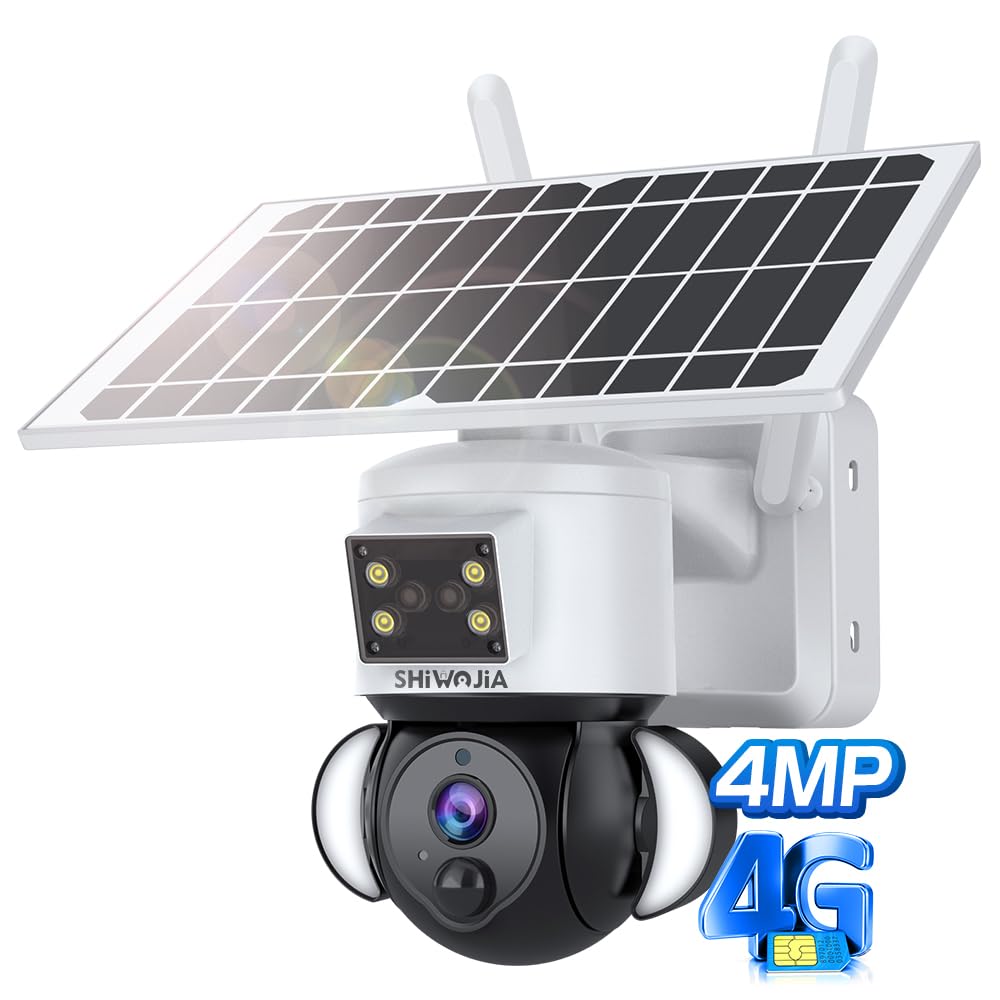
Figure 1: SHIWOJIA ST-528-4G Camera Overview
This image displays the SHIWOJIA ST-528-4G outdoor security camera, highlighting its compact design and integrated solar panel.
2. Package Contents
Please check the package contents upon unboxing to ensure all items are present and in good condition.
- SHIWOJIA ST-528-4G Security Camera
- Solar Panel
- Mounting Bracket and Screws
- USB Charging Cable
- User Manual
- (SIM card and Micro SD card are not included and must be purchased separately)
3. Setup and Installation
3.1 SIM Card and Micro SD Card Installation
- Locate the SIM card slot and Micro SD card slot on the camera.
- Important: Before inserting the SIM card, ensure that any PIN code protection on the SIM card has been disabled using a mobile phone.
- Insert an activated 4G SIM card into the SIM card slot. Ensure it is inserted correctly according to the diagram (usually with the notched corner facing the correct direction).
- Insert a Micro SD card (up to 128GB, not included) into the Micro SD card slot for local video storage.
- Close the protective cover securely to maintain the camera's IP66 waterproof rating.

Figure 2: SIM Card Installation and 4G Connectivity
This image illustrates the camera's 4G LTE capability, requiring only a SIM card for operation without Wi-Fi. It also shows various application scenarios like campsites, construction sites, ranches, and farms.
3.2 Charging the Battery
The camera is equipped with a 12000 mAh rechargeable battery and a solar panel for continuous power.
- Before initial use, it is recommended to fully charge the camera battery using the provided USB cable.
- Connect the solar panel to the camera. The solar panel will continuously charge the battery when exposed to sunlight.

Figure 3: High-Efficiency Solar Panel Connection
This image highlights the camera's high-efficiency solar panel, providing non-stop power and extending battery life for up to 365 days of work time.
3.3 Mounting the Camera
The camera is designed for wall mounting. Choose a location that provides a clear view of the area you wish to monitor and receives adequate sunlight for the solar panel.
- Mark the drilling points on the wall using the mounting bracket as a template.
- Drill holes and insert wall plugs if necessary.
- Secure the mounting bracket to the wall with the provided screws.
- Attach the camera to the mounting bracket and adjust its angle as needed.
- Ensure the solar panel is positioned to receive maximum direct sunlight throughout the day.

Figure 4: Camera Mounted Outdoors
This image shows the SHIWOJIA ST-528-4G camera mounted on an exterior wall, demonstrating its outdoor installation and weather resistance.
3.4 App Connection
To access and control your camera, download the dedicated mobile application (e.g., UBOX, as indicated in specifications).
- Download the UBOX app from your smartphone's app store (iOS or Android).
- Register for an account and log in.
- Follow the in-app instructions to add your camera. This typically involves scanning a QR code on the camera or manually entering its ID.
- Once connected, you can view live footage, control PTZ, and manage settings.
4. Operation
4.1 Live View and PTZ Control
Access the live feed through the mobile application. The camera offers 355° horizontal pan and 90° vertical tilt, along with 4x digital zoom.
- In the app's live view, use the on-screen controls to pan (move horizontally) and tilt (move vertically) the camera lens.
- Pinch to zoom in or out on the live feed for digital zoom.

Figure 5: 360° PTZ Functionality
This image illustrates the camera's 355° pan and 90° tilt capabilities, allowing for a wide coverage area and remote adjustment of the viewing angle.
4.2 Motion Detection and Alerts
The camera features PIR (Passive Infrared) human detection to minimize false alarms. When human motion is detected, the camera will trigger alerts and actions.
- Human Detection: The camera intelligently identifies human shapes, reducing alerts from animals or inanimate objects.
- Red-Blue Light Alert: Upon detection, the camera activates flashing red and blue lights as a visual deterrent.
- Floodlight: Integrated floodlights can illuminate the area upon detection, enhancing visibility and deterrence.
- Push Notifications: You will receive instant alerts on your smartphone via the app.
- Automatic Recording: The camera automatically records video clips to the Micro SD card or cloud storage (if subscribed) when motion is detected.

Figure 6: PIR Human Detection and Alert System
This image demonstrates the camera's PIR human detection, triggering red-blue light alerts and floodlights to deter intruders, with real-time notifications sent to the user's phone.
4.3 Two-Way Audio
The built-in microphone and speaker allow for two-way communication. Use the mobile application to speak through the camera and listen to audio from its surroundings.
4.4 Night Vision
The camera provides clear surveillance even in low-light or no-light conditions.
- Infrared (IR) Night Vision: Equipped with 8 IR LEDs for black and white night vision up to 30 meters.
- Color Night Vision: Utilizes 4 white LED lights and 2 floodlights to provide full-color video at night when motion is detected.

Figure 7: Color and IR Night Vision Modes
This image compares the camera's color night vision (with floodlights) and traditional infrared (IR) night vision, showing the enhanced detail provided by color night vision.
4.5 Video Quality and Storage
The camera records in 2K 4MP resolution, providing clear and detailed footage.
- Resolution: 2K 4MP (2560x1440 pixels) for superior image clarity.
- Compression: Uses H.265 video compression for efficient storage without compromising quality.
- Storage: Supports Micro SD card storage (up to 128GB) and optional cloud storage.

Figure 8: 2K HD Image Quality
This image visually compares 2K Ultra HD resolution with 1080P resolution, demonstrating the superior clarity and detail provided by the camera's 2K 4MP sensor.
5. Maintenance
5.1 Cleaning
The camera has an IP66 waterproof rating, making it resistant to dust and water, ensuring reliable operation in various outdoor conditions.
- Periodically wipe the camera lens and solar panel with a soft, damp cloth to remove dust, dirt, or debris that may obstruct the view or reduce solar charging efficiency.
- Do not use harsh chemicals or abrasive cleaners.
5.2 Battery Management
- Ensure the solar panel is always exposed to direct sunlight for optimal charging.
- In periods of prolonged cloudy weather or low sunlight, the camera can be temporarily charged via its USB port.
- Monitor battery levels through the mobile application.
6. Troubleshooting
6.1 Camera Not Connecting to 4G Network
- Check SIM Card PIN: Ensure the PIN code on the SIM card has been disabled before insertion.
- SIM Card Activation: Verify that the 4G SIM card is active and has a data plan.
- Signal Strength: Check the 4G signal strength at the camera's location. Move the camera to an area with better signal if necessary.
- Reinsert SIM: Remove and reinsert the SIM card to ensure proper contact.
6.2 Battery Not Charging or Low Battery Life
- Solar Panel Exposure: Ensure the solar panel is clean and receives direct sunlight for several hours daily. Trim any obstructions (trees, eaves).
- Solar Panel Connection: Verify the solar panel cable is securely connected to the camera.
- Initial Charge: Ensure the battery was fully charged via USB before initial solar use.
- Environmental Factors: Extreme cold or heat can affect battery performance.
6.3 Motion Detection Not Working or False Alarms
- Sensitivity Settings: Adjust the PIR motion detection sensitivity in the app.
- Detection Zone: Configure the detection zone to exclude areas with constant movement (e.g., busy roads, swaying branches).
- Obstructions: Ensure there are no physical obstructions blocking the PIR sensor.
- Firmware Update: Check the app for any available firmware updates for the camera.
6.4 Poor Image Quality
- Clean Lens: Clean the camera lens carefully with a soft cloth.
- Resolution Settings: Ensure the camera is set to record at 2K 4MP resolution in the app settings.
- Lighting: Ensure adequate lighting for optimal image quality, especially at night (utilize floodlights/color night vision).
7. Specifications
| Feature | Detail |
|---|---|
| Model Name | ST-528-4G |
| Brand | SHIWOJIA |
| Connectivity Technology | Wireless (4G SIM) |
| Video Recording Resolution | 4 MP (2K) |
| Effective Video Resolution | 4 MP |
| Special Features | PTZ Technology, PIR Motion Detection, Red-Blue Light Alert, Two-Way Audio, Color Night Vision |
| Pan/Tilt Angle | Pan: 355°, Tilt: 90° |
| Digital Zoom | 4x |
| Night Vision Range | 30 Meters |
| Power Source | Solar Energy, 3 Lithium-ion Batteries (included) |
| Power Consumption | 6 Watts |
| Material | Plastic |
| Waterproof Rating | IP66 |
| Mounting Type | Wall Mount |
| Recommended Use | Outdoor Security |
| Compatible Devices | Smartphone |
| Controller Type | UBOX App |
| Product Dimensions | 24.5 x 19.6 x 13.2 cm |
| Item Weight | 1.74 kilograms |
8. Warranty and Support
Information regarding specific warranty terms and customer support contact details is not available in the provided product data. Please refer to the product packaging or the seller's website for warranty information and technical support.


