
Introduction
Welcome to the Soul Ultra Wireless 2 Headphones user manual. This guide provides comprehensive instructions for setting up, operating, and maintaining your new headphones. Designed for superior sound quality, comfort, and convenience, the Ultra Wireless 2 offers an immersive audio experience with advanced features.
Package Contents
Ensure all items are present in your package:
- Soul Ultra Wireless 2 Headphones
- USB-C Charging Cable
- 3.5mm Audio Cable (Aux Cable)
- User Manual
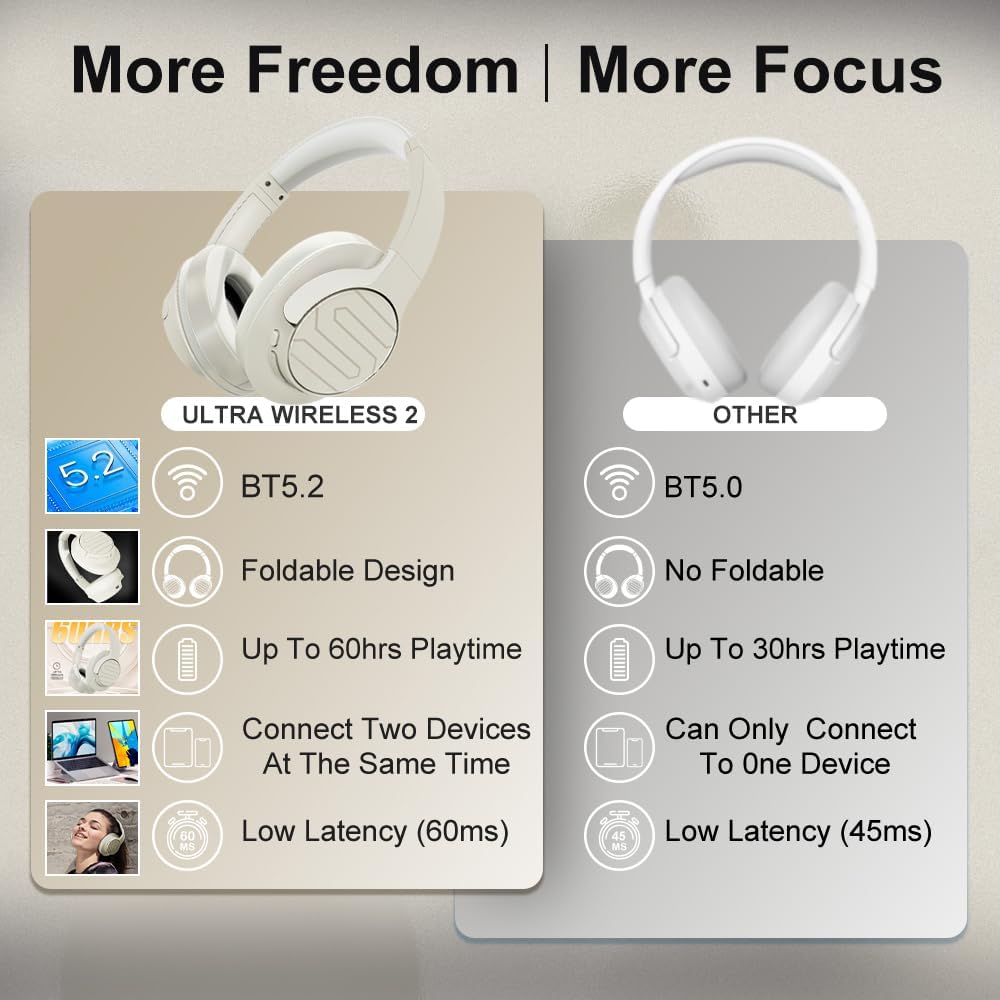
Image: Soul Ultra Wireless 2 headphones, USB-C charging cable, and 3.5mm audio cable.
Product Overview
Familiarize yourself with the headphone's controls and ports:

Image: Detailed view of headphone controls and ports.
- Power/Multi-function Button: Power on/off, play/pause, answer/end calls.
- Volume Up/Next Track Button: Increase volume, skip to next track (long press).
- Volume Down/Previous Track Button: Decrease volume, go to previous track (long press).
- Mode Button: Activate Low Latency Entertainment Mode.
- ANC Button: Toggle Active Noise Cancellation (ANC) on/off.
- USB-C Port: For charging the headphones.
- 3.5mm Audio Jack: For wired audio connection.
- LED Indicator: Displays power, pairing, and charging status.
Setup
1. Charging the Headphones
Before first use, fully charge your headphones. Connect the supplied USB-C charging cable to the headphone's USB-C port and a compatible USB power source. The LED indicator will show charging status and turn off when fully charged. A full charge takes approximately 1.5 hours and provides up to 60 hours of playtime.

Image: USB-C fast charging port on the headphones.
2. Powering On/Off
- Power On: Press and hold the Power/Multi-function button until the LED indicator lights up.
- Power Off: Press and hold the Power/Multi-function button until the LED indicator turns off.
3. Bluetooth Pairing
- Ensure the headphones are powered off.
- Press and hold the Power/Multi-function button until the LED indicator flashes blue and red, indicating pairing mode.
- On your device (smartphone, tablet, computer), enable Bluetooth and search for available devices.
- Select "Soul Ultra Wireless 2" from the list.
- Once connected, the LED indicator will show a solid blue light.
Operating Instructions
Music Playback & Call Management
- Play/Pause: Press the Power/Multi-function button once.
- Volume Up: Press the Volume Up button.
- Volume Down: Press the Volume Down button.
- Next Track: Long press the Volume Up button.
- Previous Track: Long press the Volume Down button.
- Answer/End Call: Press the Power/Multi-function button once.
- Reject Call: Long press the Power/Multi-function button.
Active Noise Cancellation (ANC)
Press the ANC button to toggle Active Noise Cancellation on or off. ANC helps reduce ambient noise for a more focused listening experience.
Low Latency Entertainment Mode
Activate the Low Latency Entertainment Mode by pressing the Mode button. This mode minimizes audio lag, providing synchronized audio and video for gaming and multimedia content.
Multipoint Technology
The Ultra Wireless 2 supports Multipoint Technology, allowing simultaneous connection to two devices. This enables seamless switching between music on one device and calls on another.
Video: Soul Ultra Wireless 2 product overview, highlighting key features and design.
Maintenance
- Clean the headphones with a soft, dry cloth.
- Avoid exposing the headphones to extreme temperatures, moisture, or corrosive substances.
- Store the headphones in a cool, dry place when not in use. The foldable design helps in compact storage.

Image: Close-up of the comfortable protein earpads.
Troubleshooting
- No Power: Ensure the headphones are charged.
- No Sound: Check volume levels on both headphones and connected device. Ensure headphones are properly paired.
- Pairing Issues: Make sure headphones are in pairing mode (flashing blue/red LED). Turn off and on Bluetooth on your device.
- Poor Audio Quality: Ensure headphones are within Bluetooth range of your device. Avoid obstacles between headphones and device.
Specifications
| Feature | Detail |
|---|---|
| Model Name | ULTRA WIRELESS 2 |
| Bluetooth Version | 5.3 |
| Bluetooth Range | 100 Meters |
| Battery Life | Up to 60 hours (varies by volume level and content) |
| Charging Time | 1.5 hours (USB-C Quick Charging) |
| Audio Driver Type | Dynamic Driver |
| Noise Control | Sound Isolation (Active Noise Cancellation) |
| Headphones Jack | 3.5 mm Jack |
| Item Weight | 6.04 Ounces |
| Product Dimensions | 8.15 x 7.09 x 3.29 inches |
Warranty and Support
All Soul headphones come with one year of free maintenance service. For any requests or issues, please contact Soul Electronics customer support. Your problem will be addressed within 24 hours.
Visit the official Soul Electronics Store for more information and support.
Video: Detailed features and benefits of the Soul Ultra Wireless 2 headphones.


