
1. Introduction
This manual provides detailed instructions for the safe and efficient installation, operation, and maintenance of your Jebao Jecod SLW-10 Sine Wavemaker Pump. Please read this manual thoroughly before using the product and retain it for future reference. Proper use ensures optimal performance and longevity of the pump.
2. Product Overview and Components
The Jebao Jecod SLW-10 is a compact and powerful sine wavemaker pump designed for aquariums up to 24 inches in length. It features an external drive controller for enhanced durability and offers various flow patterns to simulate natural ocean currents.
Key Features:
- Power Output: 10W, delivering up to 1056 gallons per hour (gph).
- Tank Suitability: Recommended for aquariums less than 24 inches in length.
- Compact Design: Pump dimensions are approximately 2.4 x 2.0 x 2.2 inches.
- External Controller: No electronic components inside the pump unit, contributing to a longer lifespan.
- Adjustable Flow Direction: Features a 3D rotation angle for precise water output direction.
- Quiet Operation: Equipped with a super quiet motor.
- Wireless Control: Supports master and slave wireless control for synchronized operation of multiple units.
Components:

The product package includes the following items:
- SLW-10 Pump Unit
- SLW-10 SINE DRIVER Controller
- AC/DC Power Adapter
- Magnetic Mounting Bracket
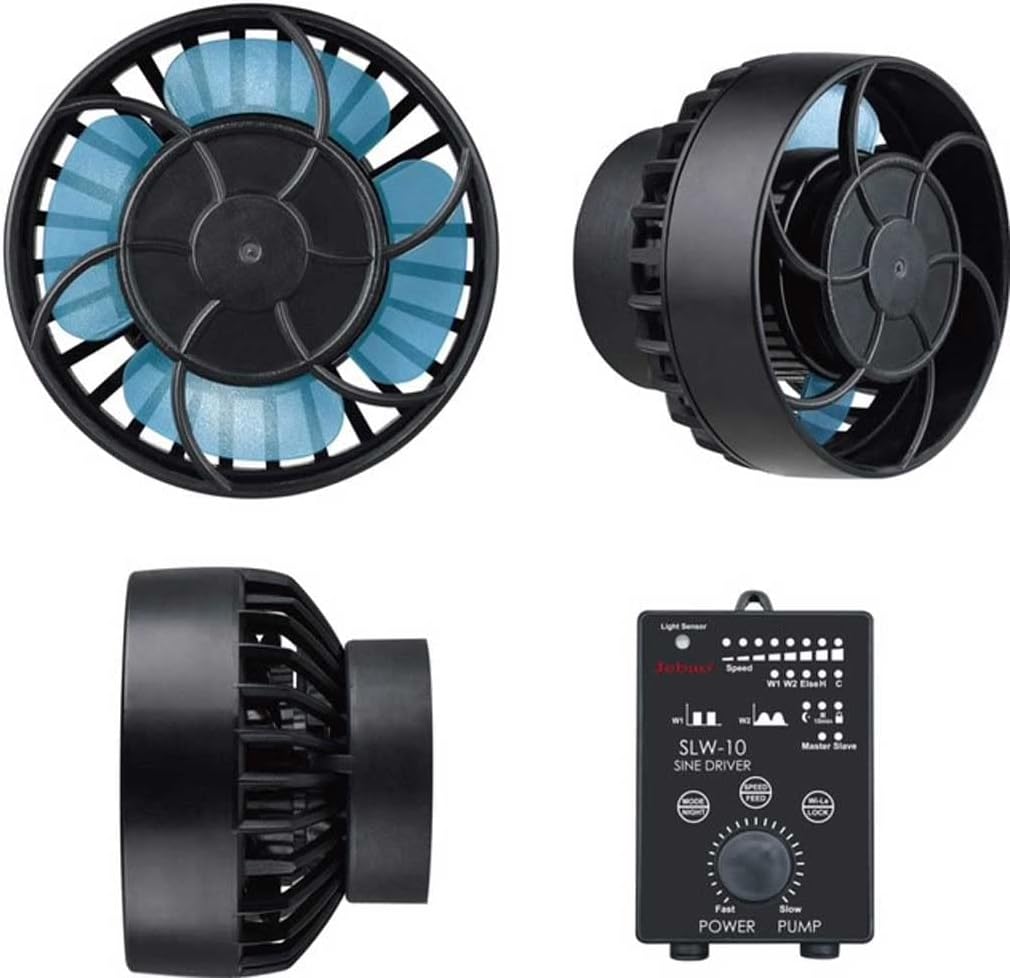
The pump unit is designed for submersible use and features a protective cage around the impeller.

The pump unit measures approximately 6cm x 6cm (diameter x depth), and the controller is approximately 6.5cm x 9cm. The pumping power line and power cord are each approximately 150cm long.
3. Setup and Installation
Follow these steps for proper installation of your wavemaker pump:
- Pump Placement: Select a location within your aquarium that allows for optimal water circulation. Avoid placing the pump directly against the substrate or too close to the water surface to prevent air intake.
- Magnetic Mounting:
- Place the pump unit inside the aquarium, ensuring the suction cup or magnetic base is clean.
- Align the external magnetic bracket on the outside of the aquarium glass, directly opposite the pump unit. The strong magnets will secure the pump in place.
- Ensure the pump is securely attached and will not detach during operation.
- Connect to Controller: Connect the pump unit's cable to the designated port on the SLW-10 SINE DRIVER controller. Ensure the connection is firm.
- Connect Power Adapter: Plug the AC/DC power adapter into the controller. Then, plug the power adapter into a suitable electrical outlet. Ensure the outlet has a drip loop to prevent water from running down the cord to the outlet.
- Adjust Direction: Once installed, you can adjust the direction of the water flow by gently rotating the pump unit on its magnetic mount. The 3D rotation allows for precise aiming of the water current.
Important Safety Note: Always unplug the power adapter before performing any installation, maintenance, or adjustments inside the aquarium.
4. Operating Instructions
The SLW-10 SINE DRIVER controller allows you to customize the pump's operation. Familiarize yourself with the control panel:

The controller features a speed dial, mode button, feed button, lock button, and indicators for speed, mode, and light sensor.
Controller Functions:
- Speed Dial (POWER PUMP): Rotate the dial to adjust the flow intensity from "Fast" to "Slow". The LED indicators above the dial will show the current speed setting.
- MODE/NIGHT Button:
- Press to cycle through different wave patterns and flow modes (e.g., constant flow, pulse mode, sine wave mode). Refer to the controller's specific mode indicators for details.
- Hold the button to activate/deactivate the Night Mode. In Night Mode, the pump operates at a reduced speed when the light sensor detects low light conditions, simulating natural nighttime currents.
- SPEED/FEED Button:
- Press to fine-tune the speed within the selected mode.
- Hold the button to activate the Feed Mode. This temporarily pauses the pump for a set duration (typically 10 minutes) to allow for feeding without food being immediately swept away. The pump will resume normal operation automatically.
- W.LL/LOCK Button:
- Press to activate/deactivate the Lock function. When locked, the current settings are saved and cannot be accidentally changed by pressing other buttons.
- The "W.LL" function (Wireless Link) is used for master/slave setup. Consult the full product manual for detailed pairing instructions.
- Light Sensor: The sensor on the controller detects ambient light. It is used for the automatic Night Mode function.
- Master/Slave Wireless Control: If you have multiple SLW-10 pumps, one controller can be set as the "Master" and others as "Slave" units. This allows for synchronized operation. Consult the full product manual for detailed pairing instructions.
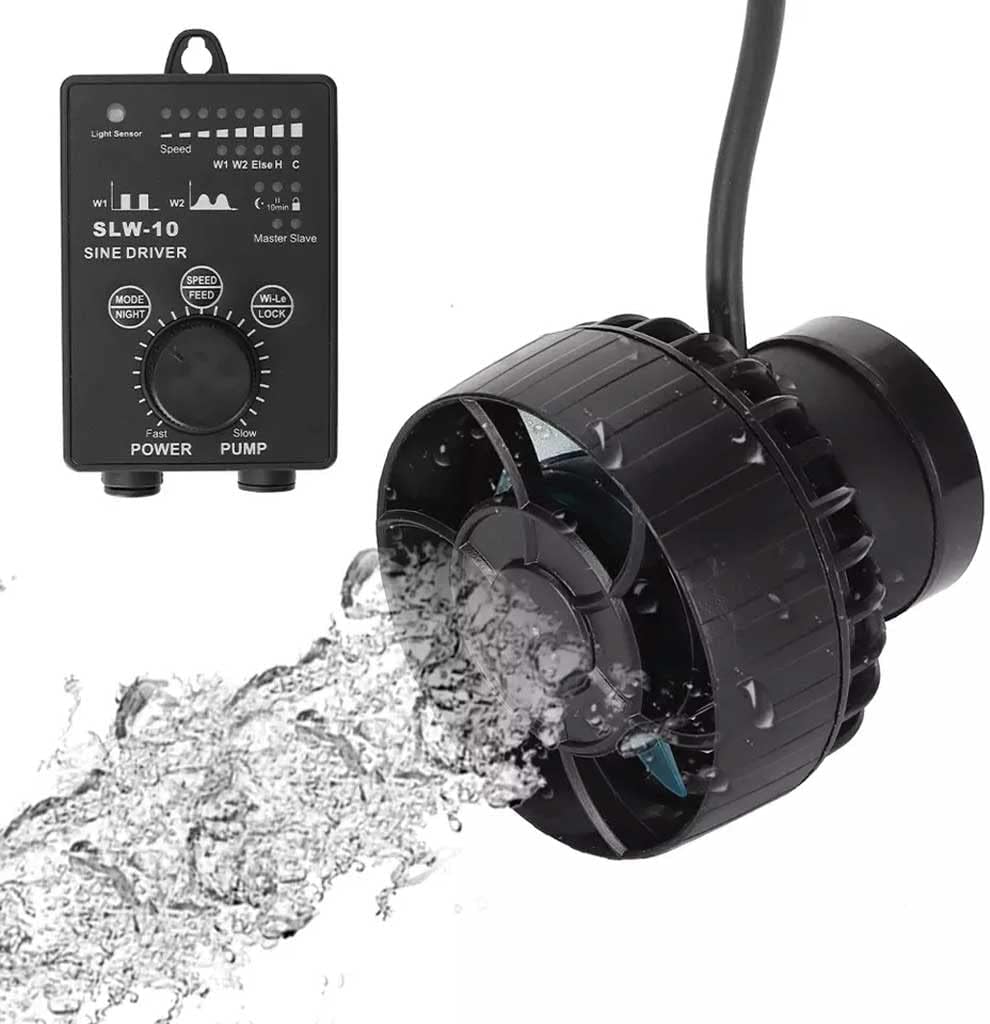
Observe the water flow patterns in your aquarium and adjust the pump's settings and direction to achieve the desired circulation for your aquatic inhabitants.
5. Maintenance
Regular maintenance is crucial for the longevity and efficient operation of your wavemaker pump.
- Disconnect Power: Always unplug the power adapter from the electrical outlet before performing any maintenance.
- Remove Pump: Carefully remove the pump unit from the aquarium.
- Disassembly for Cleaning:
- Gently twist and pull the front cover/cage to remove it.
- Carefully remove the impeller assembly. Note the orientation of all parts for reassembly.
- Cleaning:
- Rinse all components under clean running water.
- Use a soft brush (e.g., a toothbrush) to remove any algae, detritus, or calcium buildup from the impeller, impeller shaft, and pump housing.
- For stubborn calcium deposits, a mild vinegar solution or an aquarium-safe descaler can be used. Ensure all cleaning agents are thoroughly rinsed off before reassembly.
- Reassembly: Reassemble the pump in reverse order of disassembly, ensuring all parts fit snugly and correctly.
- Reinstallation: Reinstall the pump in the aquarium and reconnect the power.
It is recommended to clean the pump at least once a month, or more frequently if you notice reduced flow or increased noise.
6. Troubleshooting
| Problem | Possible Cause | Solution |
|---|---|---|
| Pump not operating | No power; loose connection; impeller jammed. | Check power adapter and outlet. Ensure all cables are securely connected. Disconnect power, remove pump, and check impeller for obstructions. |
| Reduced flow | Impeller dirty or obstructed; calcium buildup; incorrect speed setting. | Clean the impeller and pump housing. Adjust the speed dial on the controller. |
| Excessive noise or vibration | Impeller dirty or damaged; air in pump; improper mounting. | Clean the impeller. Ensure the pump is fully submerged and free of air bubbles. Re-secure the magnetic mount. Inspect impeller for damage; replace if necessary. |
| Controller not responding | Power issue; controller malfunction; Lock function active. | Check power supply. Ensure the Lock function is not active (press W.LL/LOCK button). If issues persist, contact customer support. |
7. Specifications
| Feature | Detail |
|---|---|
| Model Number | SLW-10 |
| Power Consumption | 10W |
| Maximum Flow Rate | 1056 gph (4000 L/H) |
| Recommended Tank Length | Less than 24 inches |
| Pump Dimensions (L x W x H) | Approximately 2.4 x 2.0 x 2.2 inches (6 x 5 x 5.6 cm) |
| Controller Dimensions (L x W) | Approximately 2.5 x 3.5 inches (6.5 x 9 cm) |
| Material | Plastic |
| Style | Submersible |
| Power Source | AC/DC Adapter |
| Manufacturer | JEBAO INC |
8. Safety Information
- Always ensure your hands are dry before plugging in or unplugging the power adapter.
- Never operate the pump out of water. Dry running can cause damage.
- Ensure a proper drip loop is formed with the power cord to prevent water from reaching the electrical outlet.
- Do not modify or attempt to repair the pump or controller yourself. Refer all servicing to qualified personnel.
- Keep the power adapter and controller away from water splashes.
- This appliance is not intended for use by persons (including children) with reduced physical, sensory or mental capabilities, or lack of experience and knowledge, unless they have been given supervision or instruction concerning use of the appliance by a person responsible for their safety.
9. Warranty and Support
For warranty information and technical support, please refer to the documentation provided with your purchase or contact the retailer or manufacturer directly. Keep your proof of purchase for warranty claims.
Manufacturer: JEBAO INC