
1. Introduction
Thank you for choosing the Jebao Jecod SLW-20 Sine Wavemaker Pump. This manual provides essential information for the safe and efficient installation, operation, and maintenance of your new wavemaker pump. Please read these instructions thoroughly before use and retain them for future reference.
2. Safety Instructions
- Always disconnect the power supply before performing any maintenance or installation on the pump.
- Ensure your hands are dry when handling the power plug and controller.
- The pump is designed for submersible use only. The controller and power adapter are not waterproof and must be kept dry.
- Do not operate the pump if the power cord or any part of the unit is damaged.
- This appliance is not intended for use by persons (including children) with reduced physical, sensory or mental capabilities, or lack of experience and knowledge, unless they have been given supervision or instruction concerning use of the appliance by a person responsible for their safety.
- Ensure the voltage and frequency of your power supply match the specifications on the pump's label.
3. Package Contents
Carefully unpack the box and ensure all items are present and undamaged. If any items are missing or damaged, please contact your retailer.
- Jebao Jecod SLW-20 Wavemaker Pump
- External Sine Wave Driver Controller
- Power Adapter
- Magnetic Mount
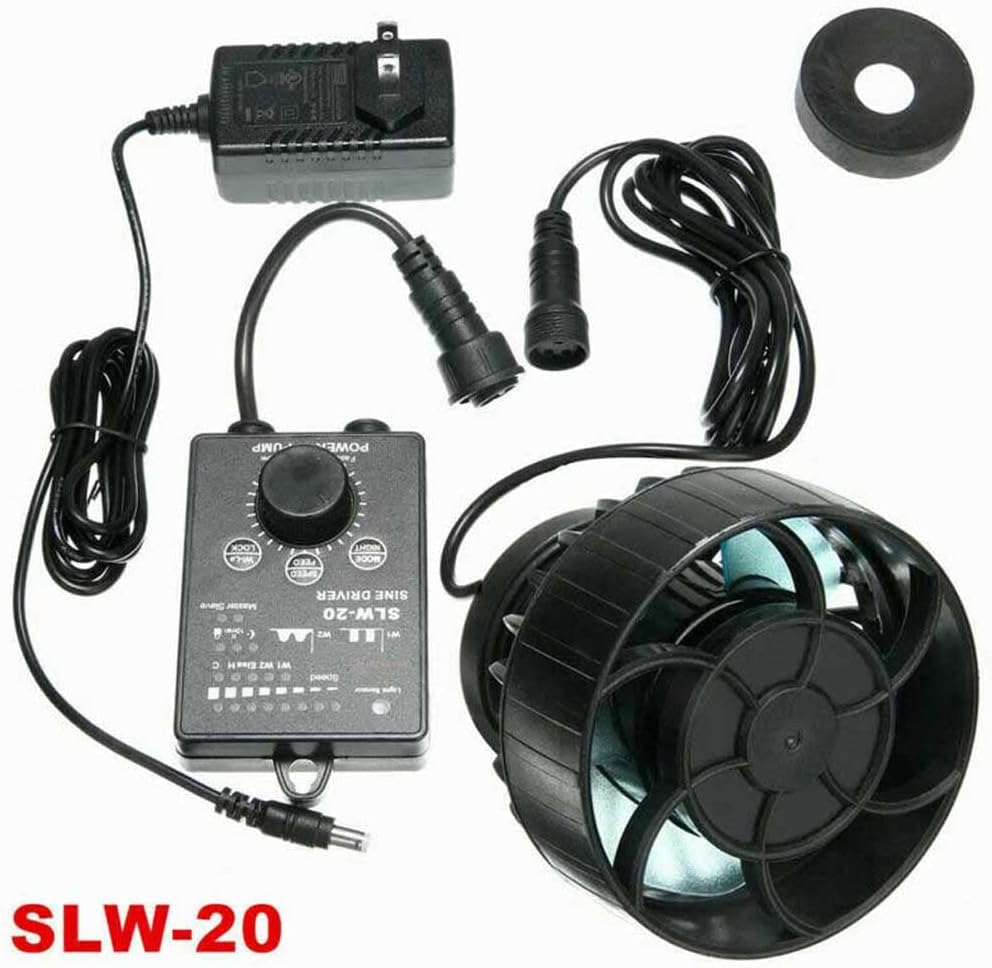
Image: All components of the Jebao Jecod SLW-20 Sine Wavemaker Pump system, including the pump, controller, power adapter, and magnetic mount.
4. Product Overview
The Jebao Jecod SLW-20 is a compact and powerful sine wavemaker pump designed to create natural water movement in aquariums. It features an external drive controller for enhanced durability and a 3D rotation angle for flexible water direction adjustment. The pump is suitable for tanks less than 40 inches in length.

Image: Top-down view of the Jebao Jecod SLW-20 wavemaker pump and its external sine wave driver controller, highlighting the compact design and control interface.
5. Setup
- Mounting the Pump: Position the pump inside the aquarium at the desired location. Use the magnetic mount to secure the pump to the aquarium glass. Ensure the external magnet is placed directly opposite the internal pump magnet on the outside of the glass. The pump can be rotated to adjust the water flow direction.
- Connecting the Controller: Connect the pump's cable to the designated port on the Sine Driver Controller.
- Connecting Power: Connect the power adapter to the controller, then plug the power adapter into a suitable electrical outlet.
- Initial Placement: Ensure the pump is fully submerged before powering on. Avoid placing the pump directly against the substrate or too close to the water surface to prevent air intake.
6. Operating Modes
The SLW-20 controller allows for various wave patterns and flow adjustments. Familiarize yourself with the control panel:
Image: Close-up of the Jebao Jecod SLW-20 Sine Driver Controller, showing the speed knob, mode buttons, and indicator lights.
- Speed Knob (POWER / PUMP): Adjusts the flow rate from minimum (Slow) to maximum (Fast).
- MODE / NIGHT Button: Press to cycle through different wave modes (W1, W2, Else, C). Hold to activate/deactivate Night Mode (indicated by a light sensor).
- SPEED / FEED Button: Press to adjust the wave pattern speed within the selected mode. Hold to activate Feed Mode, which temporarily pauses the pump for feeding.
- WI-LE / LOCK Button: Press to switch between Master and Slave wireless control. Hold to lock/unlock the controller settings.
- Light Sensor: Automatically detects ambient light and can activate Night Mode if enabled.
- Indicator Lights (W1, W2, Else, C): Indicate the currently active wave mode.
Wave Modes:
- W1 (Wave Mode): Creates a regular wave pattern. Adjust speed for wave intensity.
- W2 (Sine Wave Mode): Generates a smoother, more natural sine wave.
- Else (Random Mode): Produces a random flow pattern, simulating natural ocean currents.
- C (Constant Flow Mode): Provides a steady, continuous flow.

Image: The Jebao Jecod SLW-20 wavemaker pump actively generating water flow within an aquarium, demonstrating its operational capability.
7. Maintenance
Regular maintenance ensures optimal performance and longevity of your wavemaker pump.
- Cleaning the Pump: Disconnect power before removing the pump from the aquarium. Disassemble the pump housing and impeller. Clean all components with a soft brush and warm water to remove algae, calcium deposits, and debris. Do not use harsh chemicals.
- Impeller Inspection: Periodically check the impeller for wear or damage. Replace if necessary.
- Cable and Connection Check: Inspect all cables and connections for signs of wear, damage, or corrosion. Ensure all connections are secure.
- Controller Care: Keep the controller and power adapter dry and away from water splashes.
8. Troubleshooting
If you encounter issues with your SLW-20 pump, refer to the following common problems and solutions:
| Problem | Possible Cause | Solution |
|---|---|---|
| Pump not starting or weak flow | No power, clogged impeller, air in pump, damaged impeller. | Check power connection. Disconnect and clean impeller. Ensure pump is fully submerged. Inspect impeller for damage. |
| Excessive noise | Impeller obstruction, improper mounting, air in pump. | Clean impeller. Re-position pump to ensure secure mounting and full submersion. |
| Controller not responding | Power issue, locked controller. | Check power adapter connection. Hold WI-LE/LOCK button to unlock controller. |
| Pump stops during feeding | Feed Mode activated. | Feed Mode will automatically resume after a set time, or press SPEED/FEED button again to exit. |
9. Specifications
| Feature | Specification |
|---|---|
| Model | SLW-20 |
| Power Consumption | 20W |
| Maximum Flow Rate | 2641 GPH (44 Gallons Per Minute) |
| Recommended Tank Length | Less than 40 inches |
| Product Dimensions (Pump) | 2.8 x 2.2 x 2.6 inches (7 x 5.6 x 6.6 cm) |
| Material | Plastic |
| Style | Submersible |
| Power Source | AC/DC Adapter |
| Manufacturer | JEBAO INC |

Image: Diagram illustrating the dimensions of the Jebao Jecod SLW-20 wavemaker pump, controller, and power cords.
10. Warranty and Support
For warranty information and technical support, please refer to the documentation provided with your purchase or contact the retailer from whom you purchased the Jebao Jecod SLW-20 Sine Wavemaker Pump. Keep your proof of purchase for warranty claims.