
CXK T12 pro
CXK T12 Pro Wireless Bluetooth Earbuds User Manual
Model: T12 pro | Brand: CXK
Introduction
Thank you for choosing the CXK T12 Pro Wireless Bluetooth Earbuds. This manual provides detailed instructions on how to set up, operate, and maintain your earbuds to ensure optimal performance and longevity. Please read this manual thoroughly before using the product.

Image: The CXK T12 Pro Wireless Bluetooth Earbuds, black in color, resting inside their sleek charging case. The case features an LED power display showing battery levels for both earbuds and the case itself.
What's in the Box
- CXK T12 Pro Wireless Bluetooth Earbuds (Left and Right)
- Wireless Charging Case
- USB-C Charging Cable
- User Manual (this document)
Key Features
- Bluetooth 5.3: Ensures stable and efficient wireless connectivity.
- Extended Playtime: Up to 8 hours on a single charge for earbuds, with a total of 36 hours playtime including the charging case.
- LED Power Display: Digital display on the charging case shows battery percentage for the case and individual earbuds.
- Wireless Charging Case: Conveniently charge your earbuds and case wirelessly.
- 13mm Drivers: Deliver a wide soundstage with clear mids, detailed trebles, and powerful bass.
- IPX6 Waterproof: Designed to withstand splashes and sweat, suitable for workouts and outdoor activities.
- Comfortable Fit: Ergonomically designed for secure and comfortable wear.
- Single & Dual Ear Mode: Use either earbud independently or both together for stereo sound.
- Clear Call Quality: Built-in microphone provides clear audio for phone calls.

Image: A graphic highlighting the key features of the CXK T12 Pro Wireless Earbuds, including stable connection, stereo sound quality, LED power display, IPX6 waterproof rating, comfortable fit, and 36 hours of playing time.
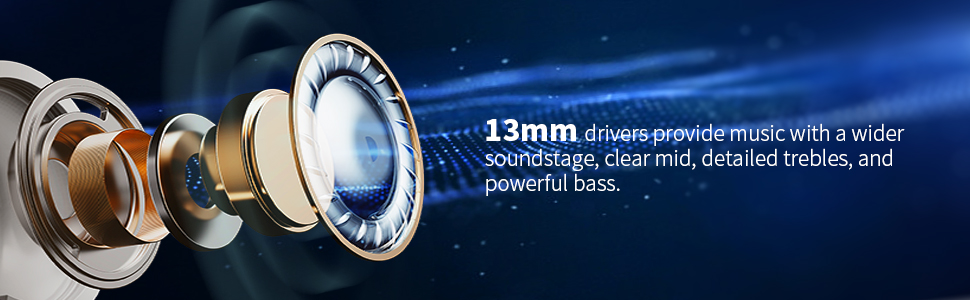
Image: An exploded view diagram illustrating the internal components of the earbud, emphasizing the 13mm drivers responsible for delivering rich audio with clear mids, detailed trebles, and powerful bass.
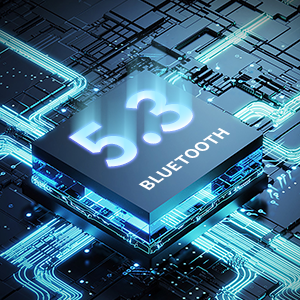
Image: A detailed view of a microchip, visually representing the advanced Bluetooth 5.3 technology integrated into the earbuds for superior connectivity.
Setup Guide
Initial Use and Charging
- Remove Protective Film: Before first use, open the charging case and remove the protective film from the charging contacts on both earbuds. This ensures proper charging.

Image: A visual guide demonstrating the removal of the protective film from the earbud charging contacts and an overview of the touch control functions.
- Charge Fully: Place the earbuds back into the charging case and close the lid. Connect the charging case to a power source using the provided USB-C cable or place it on a wireless charging pad. The LED display will show the charging progress. Ensure both earbuds and the case are fully charged before first use.
Pairing with Your Device
- Activate Bluetooth: Turn on Bluetooth on your smartphone, tablet, or other Bluetooth-enabled device.
- Open Case: Open the lid of the charging case. The earbuds will automatically enter pairing mode.
- Select "T12 pro": On your device's Bluetooth settings, search for available devices and select "T12 pro" from the list.
- Confirm Connection: Once connected, you will hear an audible confirmation from the earbuds. The LED display on the case will indicate successful pairing.

Image: The CXK T12 Pro earbuds positioned next to a smartphone displaying its Bluetooth settings, illustrating the pairing process.
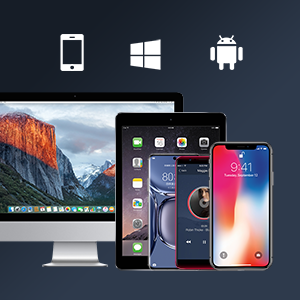
Image: An assortment of compatible devices, including smartphones, tablets, and a desktop computer, demonstrating the broad compatibility of the CXK T12 Pro earbuds.
Operating Instructions
Touch Controls
The CXK T12 Pro earbuds feature intuitive touch controls on each earbud. Refer to the diagram below for specific functions:
Image: A detailed diagram illustrating the touch control functions of the earbuds, including play/pause, voice assistant activation, answering/hanging up calls, and navigating music tracks.
- Play/Pause: Click either earbud once.
- Voice Assistant: Double click either earbud (iOS only).
- Answer Call: Click either earbud once.
- Hang up: Click either earbud once.
- Previous Song: Click earbud (L) and hold for 2 seconds.
- Next Track: Click earbud (R) and hold for 2 seconds.
Single & Dual Ear Mode
The earbuds support both single and dual ear modes, allowing for flexible usage:
- Dual Ear Mode: For stereo sound, simply take both earbuds out of the charging case. They will automatically connect to each other and your paired device.
- Single Ear Mode: To use only one earbud, take either the left or right earbud out of the case. It will connect independently. Place the other earbud back in the case.

Image: A diagram visually explaining the flexibility of using the earbuds in either single or dual ear mode, allowing users to switch freely between them.
Usage Scenarios

Image: A collage depicting individuals utilizing the CXK T12 Pro earbuds in diverse settings, including during workouts, while working, during leisure time, and while traveling, emphasizing their versatility.
Charging the Earbuds and Case
- Earbud Charging: Place the earbuds into the charging case. They will automatically begin charging. The LED display on the case will show the individual earbud battery levels.
- Case Charging (Wired): Connect the provided USB-C cable to the charging port on the case and the other end to a USB power adapter (not included). The LED display will show the case's battery percentage.
- Case Charging (Wireless): Place the charging case on a compatible wireless charging pad. Ensure the case is properly aligned for efficient charging. The LED display will show the charging status.

Image: The CXK T12 Pro charging case resting on a wireless charging pad, demonstrating its wireless charging capability.
- Charging Time: A full charge for the case and earbuds typically takes approximately 1.5 hours.
Maintenance and Care
- Cleaning: Regularly clean the earbuds and charging case with a soft, dry, lint-free cloth. Do not use harsh chemicals or abrasive materials.
- Charging Contacts: Ensure the charging contacts on both the earbuds and inside the case are clean and free of debris to maintain proper charging.
- Storage: When not in use, store the earbuds in their charging case to protect them and keep them charged. Store in a cool, dry place away from extreme temperatures.
- Water Resistance: While IPX6 waterproof, avoid submerging the earbuds in water. Dry them thoroughly if they get wet from sweat or splashes.
Troubleshooting
| Problem | Possible Solution |
|---|---|
| Earbuds not pairing/connecting. |
|
| Only one earbud playing sound. |
|
| Low volume or poor sound quality. |
|
| Charging case not charging. |
|
Specifications
| Feature | Detail |
|---|---|
| Model Name | T12 pro |
| Brand | CXK |
| Connectivity Technology | Wireless |
| Wireless Communication Technology | Bluetooth 5.3 |
| Ear Placement | In Ear |
| Form Factor | In Ear |
| Control Type | Touch Control, Media Control |
| Battery Life (Earbuds) | Up to 8 hours (approx.) |
| Battery Life (Total with Case) | Up to 36 hours |
| Charging Time | Approx. 1.5 hours |
| Included Components | Wireless Charging Case |
| Product Dimensions | 2.32 x 1.95 x 0.99 inches |
| Item Weight | 2.08 ounces |
| Manufacturer | Shenzhen Ocen Technology Co.Ltd |
| Specific Uses For Product | Calling, Music |
| Water Resistance | IPX6 (from A+ content) |
| Driver Size | 13mm (from video) |
Warranty and Support
CXK products are manufactured to the highest quality standards. For any issues or inquiries regarding your CXK T12 Pro Wireless Bluetooth Earbuds, please refer to your purchase documentation for warranty details and contact customer support through the retailer where the product was purchased.
Please retain your proof of purchase for warranty claims.
Ask a question about this manual
Ask about setup, troubleshooting, compatibility, parts, safety, or missing instructions. Manuals+ will review the question and use this page’s manual context to help answer it.