
Miele 11827020
Miele Triflex HX2 Pro Cordless Stick Vacuum Cleaner User Manual
Model: 11827020 | Brand: Miele
1. Introduction
This manual provides essential information for the safe and efficient operation, maintenance, and troubleshooting of your Miele Triflex HX2 Pro Cordless Stick Vacuum Cleaner. Please read it thoroughly before first use and keep it for future reference.
The Miele Triflex HX2 Pro is a versatile cordless stick vacuum cleaner designed for comprehensive home cleaning. It combines powerful suction with a patented 3-in-1 design, offering flexibility for various cleaning tasks.
Key Features:
- Cordless Upright Design: Lightweight and convenient, providing the cleaning power of a whole-home vacuum. Stands upright unaided.
- Patented 3-in-1 Design: Configurable in three ways for cleaning hard floors, carpets, furniture, and hard-to-reach areas.
- Extended Run-time: Up to 120 minutes of run-time with two replaceable VARTA Li-ion batteries and two charging options for uninterrupted cleaning.
- Automatic Floor Detection: The extra-wide electrobrush automatically adapts to the surface, featuring a BrilliantLight LED headlight and an additional Hardfloor Care Tool insert.
- HEPA Lifetime Filter: Maintenance-free filter with 99.999% dust retention capacity, capturing fine dust, allergens, and viruses, suitable for allergy sufferers and pet owners.
2. Setup and Assembly
Before first use, ensure all components are present and undamaged. Assembly is straightforward, with parts designed to click securely into place.
2.1 Unpacking and Component Check
Carefully remove all items from the packaging. Verify that the following components are included:
- Main PowerUnit (motor, dust bin, handle)
- Electrobrush Multi Floor XXL
- Suction Tube
- 2 x VARTA Li-ion Batteries
- Charging Dock
- Accessory Kit (Crevice Tool, Dusting Brush)
- Wall Bracket
- Hardfloor Care Tool insert
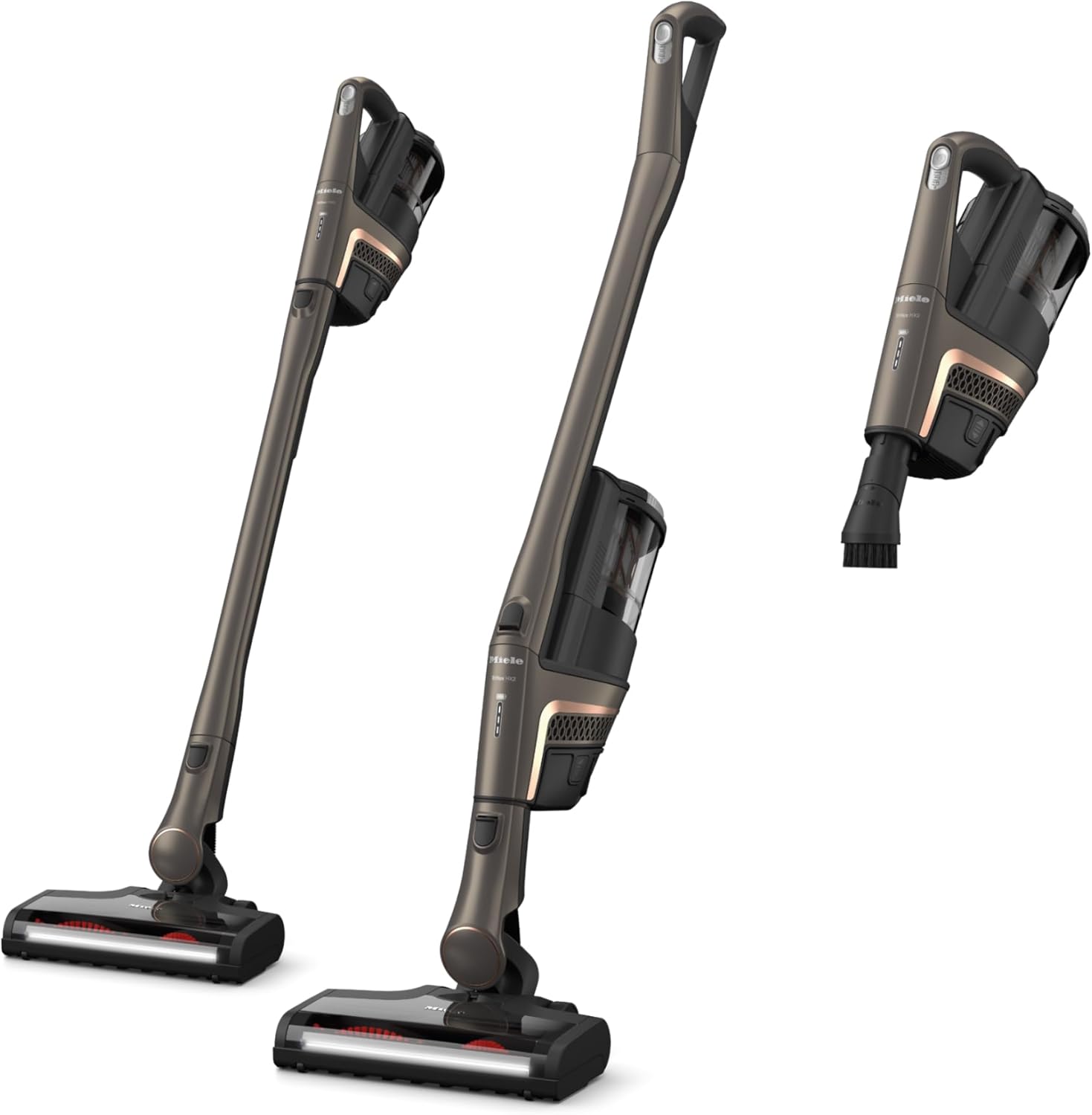
Image: All components of the Miele Triflex HX2 Pro Cordless Stick Vacuum Cleaner.
2.2 Initial Battery Charging
Fully charge both Li-ion batteries before first use. This ensures optimal battery life and performance.
- Connect the charging dock to a power outlet.
- Insert a battery into the charging dock. The charging indicator lights will illuminate.
- Allow the battery to charge completely. Charging time is approximately 240 minutes (4 hours) per battery.
- Repeat for the second battery.

Image: Two replaceable Li-ion batteries and the charging dock.
2.3 Assembling the Vacuum Cleaner
The Triflex HX2 Pro offers three configurations:
- Comfort Mode: PowerUnit at the bottom for ergonomic cleaning of large spaces.
- Reach Mode: PowerUnit at the top for cleaning hard-to-reach areas like ceilings or under furniture.
- Compact Mode: Handheld function for quick clean-ups.
To assemble, align the desired components (PowerUnit, suction tube, electrobrush) and push them together until they click securely. To change configurations, press the release buttons to detach components.

Image: The Miele Triflex HX2 Pro demonstrating its 3-in-1 design for versatile cleaning.

Image: The vacuum in Comfort Mode, with the PowerUnit at the bottom for ergonomic cleaning.

Image: The vacuum in Reach Mode, with the PowerUnit at the top for extended reach.

Image: The vacuum in Compact Mode, used as a handheld unit for quick clean-ups.
3. Operating Instructions
3.1 Powering On and Off
To turn the vacuum cleaner on or off, press the power button located on the PowerUnit. The vacuum will start in the last used power setting.
3.2 Adjusting Power Settings
The Triflex HX2 Pro features 3 power levels. Use the control method (touch/push button) on the PowerUnit to cycle through the settings:
- Setting 1: For light cleaning and maximum run-time.
- Setting 2: Standard cleaning for everyday dirt.
- Setting 3: Maximum suction for stubborn dirt and deep cleaning.
3.3 Automatic Floor Detection and BrilliantLight
The electrobrush automatically adjusts its speed and suction power based on the floor type (carpet or hard floor). The integrated BrilliantLight LED headlight illuminates the cleaning path, making dust and debris more visible, especially in dimly lit areas or under furniture.

Image: The electrobrush with BrilliantLight illuminating dust under furniture.

Image: The Multifloor XXL Electrobrush designed for all floor types.
3.4 Using Accessories
The included accessory kit enhances the vacuum's versatility:
- Crevice Tool: Ideal for narrow gaps, corners, and edges.
- Dusting Brush: For delicate surfaces, curtains, and upholstery.
- Hardfloor Care Tool Insert: For sensitive hard wood floors, preventing scratches.
4. Maintenance
Regular maintenance ensures optimal performance and longevity of your Miele Triflex HX2 Pro.
4.1 Emptying the Dust Bin
Empty the dust bin regularly, ideally after each significant use, to maintain suction power. The dust bin capacity is 1.1 pounds.
- Detach the PowerUnit from the vacuum.
- Position the dust bin over a waste receptacle.
- Open the dust bin release latch and empty the contents.
- Close the dust bin securely until it clicks.
Note: Some users find emptying the bagless dust bin can create a dust cloud. Consider emptying outdoors or into a larger vacuum for minimal dust dispersion.
4.2 Cleaning the HEPA Lifetime Filter
The HEPA Lifetime Filter is designed to be maintenance-free. However, for optimal filtration and air hygiene, periodically check for excessive build-up and gently tap it to dislodge dust if necessary. Do not wash the filter unless specified in the full product manual.

Image: Close-up of the HEPA Lifetime filter, ensuring maximum air hygiene.
4.3 Cleaning the Electrobrush
Periodically check the electrobrush for tangled hair or fibers. Use scissors to carefully cut and remove any obstructions from the brush roll to ensure effective cleaning.
5. Troubleshooting
This section addresses common issues you might encounter with your Miele Triflex HX2 Pro.
| Problem | Possible Cause | Solution |
|---|---|---|
| Vacuum does not turn on. | Battery not charged or not properly inserted. | Ensure battery is fully charged and securely clicked into place. |
| Reduced suction power. | Full dust bin, clogged filter, or obstructed electrobrush. | Empty dust bin, check and clean HEPA filter, remove any blockages from the electrobrush. |
| Short battery run-time. | Battery not fully charged, or operating on highest power setting. | Ensure batteries are fully charged. Use lower power settings for longer run-time. Remember the product comes with two batteries for extended use. |
| Electrobrush not rotating. | Obstruction in brush roll or incorrect assembly. | Check for and remove any tangled hair or debris. Ensure the electrobrush is correctly attached to the suction tube/PowerUnit. |
6. Specifications
| Feature | Detail |
|---|---|
| Brand | Miele |
| Model Name | HX2 |
| Item Model Number | 11827020 |
| Color | Infinity Grey Pearl Finish |
| Form Factor | Stick |
| Is Cordless? | Yes |
| Battery Type | Lithium-Ion (2 included) |
| Runtime | Up to 120 minutes (with 2 batteries, on power setting 1 without electrobrush) |
| Charging Time | Approx. 240 minutes (4 hours) per battery |
| Capacity | 1.1 Pounds (dust bin) |
| Filter Type | HEPA Lifetime Filter |
| Special Features | Bagless, HEPA, Headlight, Portable, 3-in-1 Design |
| Recommended Uses | Carpet, Hard Floor |
| Noise Level | 78 dB |
| Product Dimensions | 11.02"L x 10.24"W x 51.06"H |
| Item Weight | 16.12 pounds |
7. Warranty and Support
For detailed warranty information, please refer to the warranty card included with your product or visit the official Miele website. Miele products are known for their quality and durability, backed by extensive testing.
If you require technical assistance, spare parts, or have questions regarding your Miele Triflex HX2 Pro, please contact Miele Customer Service. Contact details can typically be found on the Miele website or in the product packaging.
You can also visit the Miele Store on Amazon for more information and product accessories.
Related documents11827020


Ask a question about this manual
Ask about setup, troubleshooting, compatibility, parts, safety, or missing instructions. Manuals+ will review the question and use this page’s manual context to help answer it.