
1. Introduction
This manual provides essential information for the safe and efficient operation of your Strong 32HF2003 32-inch HD LED TV. Please read it thoroughly before using the product and retain it for future reference.
The Strong 32HF2003 is a 32-inch HD LED television featuring USB media playback and Electronic Program Guide (EPG) functionality. It is designed for home entertainment and offers various connectivity options.
2. Safety Instructions
Always follow basic safety precautions when using this television to reduce the risk of fire, electric shock, and injury.
- Do not expose the TV to rain or moisture.
- Do not block ventilation openings.
- Ensure proper grounding for the power cord.
- Unplug the TV during lightning storms or when unused for long periods.
- Refer all servicing to qualified service personnel.
3. What's in the Box
Upon unpacking, ensure all items are present and undamaged:
- Strong 32HF2003 32-inch HD LED TV
- Remote Control (requires 2 AAA batteries, not included)
- Stand (for tabletop placement)
- Power Cord
- User Manual (this document)

Image: The Strong 32HF2003 television displayed with its remote control, illustrating the main components included.
4. Setup
4.1 Attaching the Stand
- Carefully place the TV screen-down on a soft, clean surface to prevent scratches.
- Align the stand components with the mounting holes on the bottom of the TV.
- Secure the stand using the provided screws. Do not overtighten.
- Carefully lift the TV to its upright position on a stable, level surface.

Image: The Strong 32HF2003 television with its stand attached, ready for placement.
4.2 Connecting External Devices
The TV offers various connection ports for external devices:
- HDMI: For high-definition audio and video from devices like Blu-ray players, game consoles, or set-top boxes. The TV has 2 HDMI 2.0 ports.
- USB: For connecting USB storage devices to play media files. The TV has 1 USB 2.0 port.
- AV In: For standard definition video and stereo audio from older devices.
- ANT In: For connecting an antenna for terrestrial broadcast reception.
- SAT In: For connecting a satellite dish for satellite broadcast reception.
- CI Slot: For Conditional Access Modules (CAM) to decrypt encrypted channels.
- S/PDIF: For digital audio output to an external audio system.
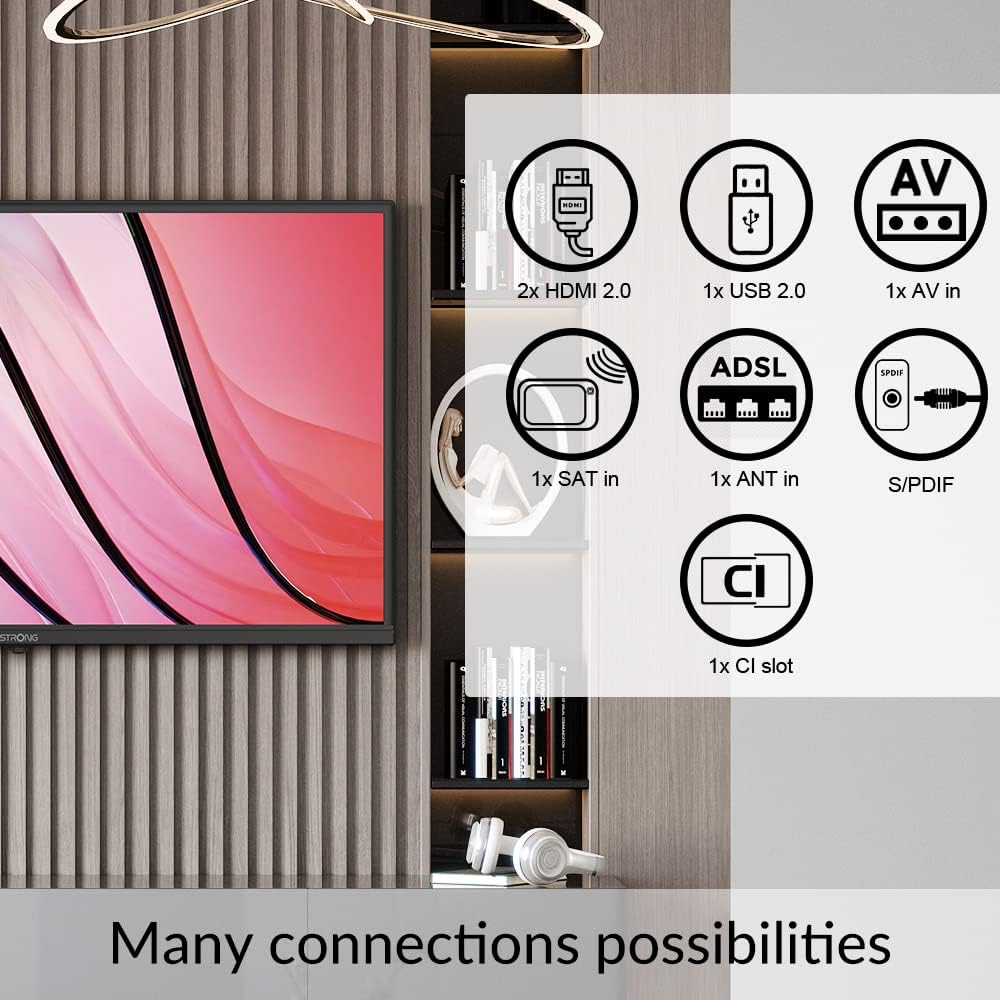
Image: A diagram illustrating the various connectivity options available on the Strong 32HF2003 television, including HDMI, USB, AV In, ANT In, SAT In, CI Slot, and S/PDIF.
To connect a USB device:

Image: A close-up view of the USB port on the television, demonstrating how to insert a USB drive for media playback.
4.3 Power Connection
After all external devices are connected, plug the power cord into the TV's power inlet and then into a suitable wall outlet.
5. Operating Instructions
5.1 Power On/Off
- Press the POWER button on the remote control or on the TV to turn the TV on or off.
- The TV will enter standby mode when turned off.
5.2 Initial Setup Wizard
The first time you turn on the TV, an initial setup wizard will guide you through language selection, country, time zone, and channel scanning. Follow the on-screen prompts.
5.3 Channel Selection and Volume Control
- Use the CH+/- buttons to change channels sequentially.
- Use the number buttons to directly enter a channel number.
- Use the VOL+/- buttons to adjust the volume level.
- Press the MUTE button to temporarily silence the audio.
5.4 Input Source Selection
To switch between connected devices (e.g., HDMI, AV, USB):
- Press the SOURCE or INPUT button on the remote control.
- Use the arrow buttons to navigate through the list of available input sources.
- Press OK or ENTER to select the desired source.
5.5 USB Media Playback
Insert a USB storage device into the USB port. The TV will typically detect the device and prompt you to open the media browser. You can then navigate and play supported video, audio, or image files.
5.6 Electronic Program Guide (EPG)
The EPG provides a schedule of current and upcoming programs for digital channels. Press the EPG button on your remote control to access it. You can view program details and set reminders.
5.7 Hotel Mode
This TV features a Hotel Mode, which allows for customization of settings suitable for hospitality environments. This mode typically restricts certain user adjustments and can be configured by authorized personnel.

Image: The Strong 32HF2003 television displayed in a hotel room environment, highlighting its Hotel Mode feature.
6. Maintenance
6.1 Cleaning the Screen
- Unplug the TV before cleaning.
- Use a soft, lint-free cloth to gently wipe the screen.
- For stubborn marks, lightly dampen the cloth with water or a specialized screen cleaner (do not spray directly onto the screen).
- Avoid using abrasive cleaners, alcohol, or benzene.
6.2 Cleaning the Cabinet
Wipe the TV cabinet with a soft, dry cloth. If necessary, use a slightly damp cloth, then dry immediately.
6.3 Battery Replacement (Remote Control)
When the remote control's range decreases, replace the two AAA batteries with new ones, ensuring correct polarity.
7. Troubleshooting
| Problem | Possible Cause | Solution |
|---|---|---|
| No power | Power cord not connected; no power from outlet. | Check power cord connection; test outlet with another device. |
| No picture, but sound is present | Incorrect input source selected; faulty cable connection. | Select correct input source; check cable connections. |
| No sound, but picture is present | Volume muted or too low; external audio system issue. | Unmute or increase volume; check external audio connections. |
| Remote control not working | Batteries depleted or incorrectly inserted; obstruction. | Replace batteries; ensure clear path to TV's IR sensor. |
| "No Signal" message | Antenna/cable not connected; incorrect input source. | Check antenna/cable connection; select correct input. |
If the problem persists after trying these solutions, please contact customer support.
8. Specifications
| Feature | Detail |
|---|---|
| Brand | Strong |
| Model Number | SRT32HF2003 |
| Screen Size | 32 Inches |
| Display Technology | LCD |
| Resolution | 720p (HD) |
| Refresh Rate | 60 Hz |
| Aspect Ratio | 16:9 |
| Connectivity Technology | USB |
| Special Feature | Flat, EPG, Hotel Mode |
| Included Components | Stand |
| Product Dimensions (with stand) | Approx. 28.84"W x 17.11"H x 3.17"D (732.5mm W x 480.2mm H x 19.69mm D - based on images and specs) |
| Item Weight | 3.7 Kilograms (8.14 pounds) |
| Voltage | 230 Volts (AC) |
| Output Wattage (Audio) | 5 Watts |
| Batteries Required (Remote) | 2 AAA batteries |

Image: A technical diagram illustrating the physical dimensions of the Strong 32HF2003 television in millimeters.

Image: The Dolby Audio logo superimposed on a television screen, indicating the audio technology supported by the device.
9. Warranty and Support
Your Strong 32HF2003 television is covered by a standard manufacturer's warranty. Please refer to the warranty card included with your product or visit the official Strong website for detailed warranty terms and conditions.
For technical support, troubleshooting assistance beyond this manual, or service inquiries, please contact Strong customer support through their official website or the contact information provided in your product packaging.
Note: Keep your purchase receipt as proof of purchase for warranty claims.