
LITFAD LT965889WS
LITFAD Rectangular Writing Desk with Locking Drawers (Model LT965889WS) - User Manual
Model: LT965889WS | Dimensions: 31.5"L x 19.7"W x 29.5"H | Color: White
1. Introduction
This manual provides comprehensive instructions for the assembly, operation, and maintenance of your LITFAD Rectangular Writing Desk. Designed for home office or study use, this desk features a durable wood construction, a spacious work surface, and integrated locking drawers for secure storage. Please read this manual thoroughly before beginning assembly or use to ensure proper setup and longevity of your product.
2. Safety Information
For your safety and to prevent damage to the product, please observe the following guidelines:
- Always follow the assembly instructions carefully.
- Ensure the desk is securely assembled and stable before use.
- This desk is not height-adjustable; ensure it is at a safe and comfortable height for all users.
- Do not overload the desk surface or drawers beyond their intended capacity.
- Keep small parts and assembly tools away from children.
3. Package Contents
Verify that all components are present before beginning assembly. The package should include:
- 1 x Desk Tabletop
- Desk Frame Components (legs, side panels, drawer housing)
- Drawer Components (fronts, sides, backs, bottoms)
- Locking Mechanisms and Keys
- Assembly Hardware (screws, dowels, cam locks, etc.)
- Assembly Tool (e.g., Allen wrench)
- Instruction Manual (this document)
If any parts are missing or damaged, please contact customer support.
4. Setup and Assembly Instructions
Assembly of the LITFAD Rectangular Writing Desk is designed to be straightforward. Please follow these steps carefully:
- Unpack Components: Carefully remove all parts from the packaging and lay them out on a clean, soft surface to prevent scratches. Identify each component using the parts list provided in the separate assembly guide.
- Attach Side Panels: Begin by attaching the side panels to the main desk frame using the provided hardware. Ensure all connections are aligned correctly.
- Install Drawer Housing: Secure the drawer housing into the designated area of the desk frame.
- Assemble Drawers: Construct the drawers by attaching the sides, back, and bottom to the drawer fronts. Install the drawer slides onto the drawers and the housing.
- Insert Drawers: Carefully slide the assembled drawers into their respective housings.
- Attach Tabletop: Place the tabletop onto the assembled base and secure it with the remaining hardware.
- Install Locks: Attach the locking mechanisms to the designated drawers and ensure they function correctly with the provided keys.
- Final Tightening: Once the entire structure is assembled, gently firm all screws and connections for maximum stability. Avoid over-tightening.

Figure 4.1: Desk dimensions for assembly reference. The desk measures 31.5 inches in length, 19.7 inches in width, and 29.5 inches in height.
5. Operating Instructions
5.1 General Use
Your LITFAD desk provides a stable and spacious surface for various activities, including writing, computer work, and studying. The reinforced beam design ensures stability for your office essentials.
5.2 Using Locking Drawers
The desk is equipped with locking drawers to secure your personal items. To operate the locks:
- To Lock: Insert the key into the lock cylinder on the drawer front. Turn the key clockwise until the drawer is secured. Remove the key.
- To Unlock: Insert the key into the lock cylinder. Turn the key counter-clockwise until the drawer mechanism disengages. Remove the key and pull the drawer open.
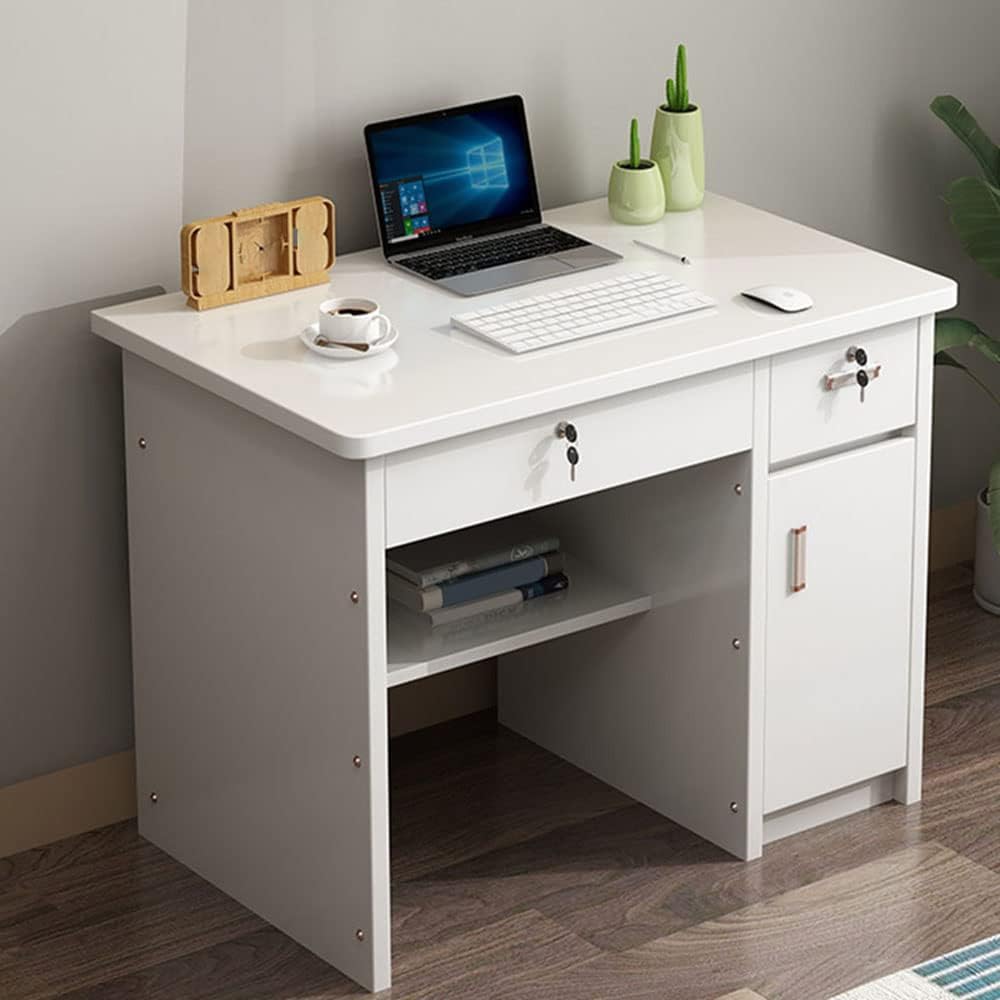
Figure 5.1: The fully assembled desk, showcasing the locking drawers and ample workspace.

Figure 5.2: Detail view of a locking drawer and the desk's smooth, white surface.
6. Maintenance
To maintain the appearance and longevity of your LITFAD desk, follow these simple maintenance guidelines:
- Cleaning: The desk surface is scratch-resistant, anti-collision, and waterproof. For daily cleaning, wipe with a soft, damp cloth. Avoid abrasive cleaners or harsh chemicals that may damage the finish.
- Spills: Wipe up spills immediately to prevent staining or water damage.
- Inspection: Periodically check all screws and connections to ensure they remain tight. Re-tighten if necessary, but do not over-tighten.
- Avoid Direct Sunlight: Prolonged exposure to direct sunlight may cause fading or discoloration over time.
7. Troubleshooting
If you encounter any issues with your desk, consider the following:
- Desk Wobbles: Ensure all assembly screws are securely tightened. Check that the desk is placed on a level surface. If the floor is uneven, use furniture pads or shims to stabilize.
- Drawers Stick or Don't Close Properly: Verify that the drawer slides are correctly installed and free of obstructions. Ensure the drawer components are assembled squarely.
- Lock Mechanism Issues: Check that the key is fully inserted and turned correctly. Do not force the lock. If the lock is jammed, ensure no items inside the drawer are obstructing the mechanism.
For persistent issues, please refer to the support section.
8. Specifications
| Brand | LITFAD |
| Model Number | LT965889WS |
| Product Dimensions (L x W x H) | 31.5" x 19.7" x 29.5" |
| Color | White |
| Material | Wood |
| Style | Modern |
| Number of Drawers | 2 (with locking feature) |
| Assembly Required | Yes |
| Special Features | Scratch-resistant, Anti-collision, Waterproof surface |
9. Support
For any questions regarding your LITFAD Rectangular Writing Desk, including assembly assistance, missing parts, or operational concerns, please do not hesitate to contact our customer support team. We are committed to assisting you.
Contact Information: Please refer to your purchase documentation or the seller's contact details on the platform where the product was purchased for specific support channels.
For more products from LITFAD, visit the official LITFAD Store on Amazon.
Ask a question about this manual
Ask about setup, troubleshooting, compatibility, parts, safety, or missing instructions. Manuals+ will review the question and use this page’s manual context to help answer it.