
1. Introduction and Product Overview
The Schneider Electric Surgelogic Type EMA series Surge Protective Device (SPD) is engineered to provide comprehensive surge suppression for electrical systems. These units are designed for installation at service entrance panels or critical branch panel applications, offering protection against transient voltage surges and noise filtration. The modular design allows for flexible and efficient surge suppression throughout the electrical distribution system.
This SPD is UL Listed to the UL 1449 standard (US and Canadian), complies with the requirements of NEC Article 285 and CSA 22.2 No. 8-M1986, and meets UL 96A 12th Edition Master Label requirements for Lightning Protection Systems.
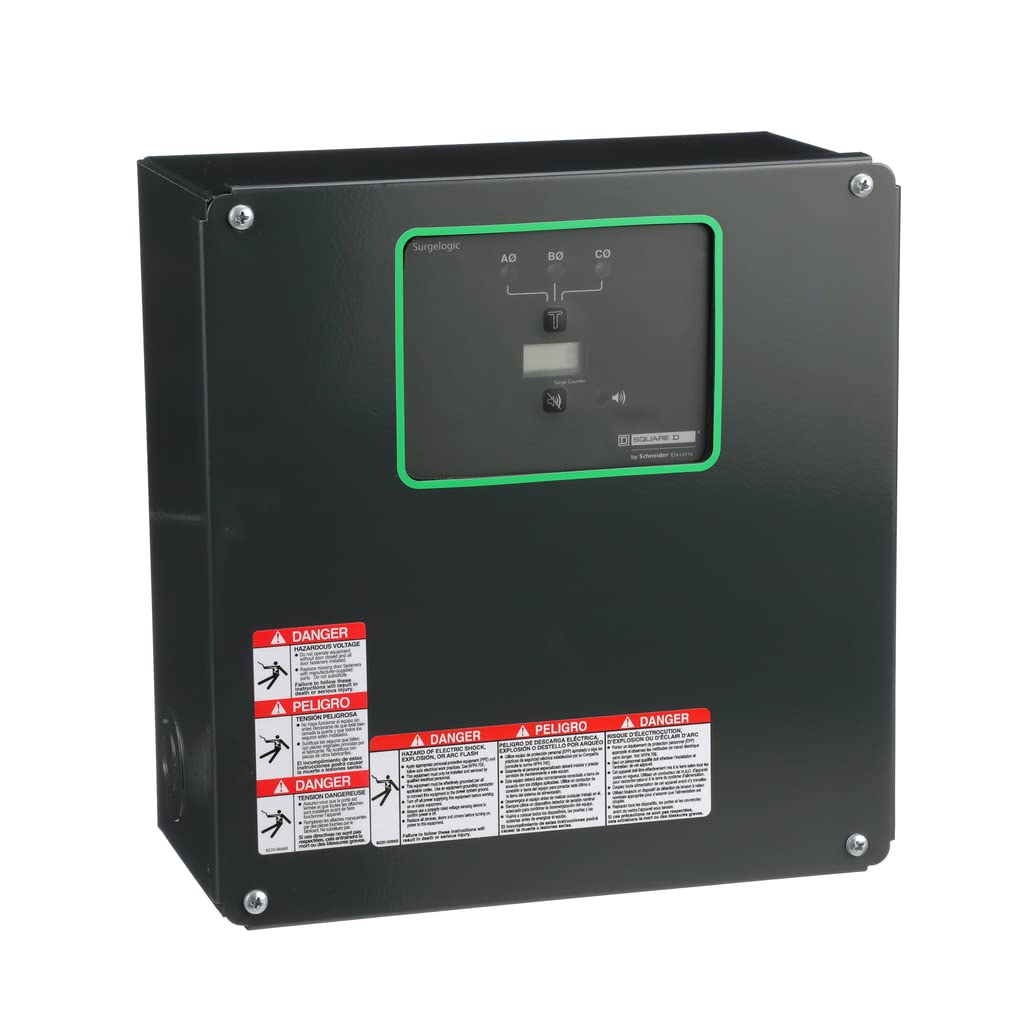
Figure 1: Front view of the Schneider Electric Surgelogic Type EMA Surge Protective Device.
Video 1: An overview of Schneider Electric's commitment to energy management and sustainability, showcasing various applications and the company's mission. This video provides context on the broader impact of products like the Surgelogic Type EMA SPD.
2. Installation and Setup
The Surgelogic Type EMA SPD is a UL 1449 Type 1 device, meaning it can be installed at any point within the electrical system, either on the line side or load side of the equipment overcurrent device. Proper installation by a qualified electrician is crucial to ensure safety and optimal performance.
2.1 Pre-Installation Checks
- Verify that the electrical system voltage and configuration match the SPD's specifications (480Y/277VAC, 3-Phase, 4-Wire + Ground).
- Ensure the installation location is suitable for a NEMA 1 enclosure rating.
- Confirm compliance with local electrical codes and regulations, including NEC Article 285 and CSA 22.2 No. 8-M1986.
2.2 Mounting and Wiring
- De-energize the electrical panel where the SPD will be installed. Confirm power is off using appropriate testing equipment.
- Mount the SPD enclosure securely to a flat surface near the service entrance or critical branch panel.
- Connect the SPD's wiring to the appropriate phases, neutral, and ground terminals within the electrical panel. Follow the wiring diagram provided with the unit for correct connections.
- Ensure all connections are tight and secure.
- Re-energize the electrical panel.
Warning: Installation must be performed by qualified personnel only. Failure to follow proper installation procedures can result in serious injury or damage to equipment.
3. Operating Instructions
The Surgelogic Type EMA SPD operates automatically to protect your electrical system from voltage surges. Its operational status is indicated by built-in LED lights.
3.1 LED Status Indicators
- Green LED: A green LED light indicates normal operation for the corresponding phase. All phases should display a green LED under normal conditions.
- Red LED: A red LED light indicates a fault condition for the corresponding phase. This typically means the surge protection module for that phase has been compromised and requires attention.
4. Maintenance
The Surgelogic Type EMA SPD features a modular design, allowing for easy maintenance and replacement of individual surge suppression modules. This design contributes to lower life cycle costs and simplifies servicing.
4.1 Module Replacement
If a red LED indicator is observed, it signifies a fault in the corresponding surge suppression module. These modules are designed to be replaceable. Refer to the specific module replacement instructions provided with your device or consult a qualified technician for assistance. Always de-energize the unit before attempting any module replacement.
5. Troubleshooting
Troubleshooting for the Surgelogic Type EMA SPD primarily involves monitoring the LED status indicators.
- No LED indication: If no LEDs are illuminated, verify that the SPD is properly powered and connected to the electrical system. Check circuit breakers and wiring.
- Red LED on one or more phases: A red LED indicates that the surge protection module for that phase has failed or been damaged due to a significant surge event. The device may still provide protection on other phases if their LEDs are green. The faulty module(s) should be replaced promptly to restore full protection.
- Persistent Red LED after module replacement: If a new module also immediately shows a red LED, there may be an underlying issue with the electrical system or the SPD unit itself. Consult a qualified electrician or Schneider Electric support.
6. Specifications
| Feature | Specification |
|---|---|
| Model Number | SSP04EMA24 |
| Surge Current Rating | 240kA |
| Voltage Rating | 480Y/277VAC |
| Phase Configuration | 3-Phase, 4-Wire + Ground |
| Enclosure Rating | NEMA 1 |
| Manufacturer | Schneider Electric |
| Item Weight | 15.88 pounds |
| Product Dimensions | 12 x 13.5 x 6 inches |
| Compliance | UL 1449, NEC Article 285, CSA 22.2 No. 8-M1986, UL 96A 12th Edition |
7. Warranty Information
Specific warranty details for the Schneider Electric Surgelogic Type EMA Surge Protective Device (Model SSP04EMA24) are not provided in the available product information. Please refer to the warranty documentation included with your purchase or contact Schneider Electric directly for comprehensive warranty terms and conditions.
8. Support
For technical assistance, installation inquiries, troubleshooting, or to obtain replacement parts for your Schneider Electric Surgelogic Type EMA Surge Protective Device, please contact Schneider Electric customer support. Contact information can typically be found on the manufacturer's official website or on the product packaging.