
1. Introduction
Thank you for choosing the Vente-unique ARUBA Bathroom Column Cabinet. This manual provides essential information for the safe assembly, installation, operation, and maintenance of your new cabinet. Please read these instructions carefully before beginning assembly and retain them for future reference.
The ARUBA cabinet is designed to offer practical storage in compact spaces, featuring a contemporary design with a natural wood and white finish, a soft-close door, and an adjustable internal shelf.

Image 1.1: The Vente-unique ARUBA Bathroom Column Cabinet in its closed state, showcasing its natural wood and white finish.
2. Safety Information
- Always assemble the product on a clean, soft surface to prevent scratches.
- Ensure all hardware is securely tightened before use. Periodically check and re-tighten if necessary.
- Do not overload the shelves. Distribute weight evenly.
- For wall-mounted installation, use appropriate fasteners for your wall type and ensure the cabinet is securely anchored to prevent tipping.
- Keep small parts and packaging materials away from children during assembly.
3. Package Contents
Please verify that all components are present before beginning assembly. If any parts are missing or damaged, contact customer support.
- Cabinet Body Panels (Top, Bottom, Sides, Back)
- Cabinet Door
- Adjustable Shelf
- Hinges (with soft-close mechanism)
- Assembly Hardware (screws, dowels, shelf pins, wall mounting brackets/screws)
4. Assembly Instructions
Follow these steps carefully for proper assembly. A Phillips head screwdriver and possibly a drill (for wall mounting) will be required.
- Prepare Panels: Lay out all cabinet panels on a soft, flat surface. Identify the top, bottom, side, and back panels.
- Assemble Cabinet Frame: Attach the side panels to the bottom panel using the provided dowels and screws. Ensure the pre-drilled holes align. Secure the top panel in the same manner.
- Install Back Panel: Slide or fasten the back panel into the grooves or attach it to the rear of the assembled frame using small nails or screws.
- Attach Hinges to Door: Secure the soft-close hinges to the cabinet door using the designated screws.
- Attach Door to Cabinet: Mount the door onto the cabinet frame by attaching the hinges to the pre-drilled holes on one of the side panels. Adjust the hinges as needed to ensure the door closes flush and operates smoothly.
- Insert Shelf: Place the shelf pins into the desired height holes inside the cabinet. Rest the adjustable shelf on these pins.

Image 4.1: The ARUBA cabinet with its door open, revealing the adjustable internal shelf.
5. Installation
The ARUBA cabinet is designed for wall mounting. Proper installation is crucial for stability and safety.
- Choose Location: Select a suitable wall location in your bathroom, ensuring it is free from electrical wires or plumbing.
- Mark Drilling Points: Hold the cabinet against the wall at the desired height and use a pencil to mark the positions for the wall mounting brackets.
- Drill Holes: Using an appropriate drill bit for your wall type (e.g., masonry, drywall), drill pilot holes at the marked positions. Insert wall anchors if necessary.
- Attach Brackets: Secure the wall mounting brackets to the wall using the provided screws.
- Mount Cabinet: Carefully lift the cabinet and align its pre-installed hanging mechanisms with the wall brackets. Ensure the cabinet is level and securely seated on the brackets.
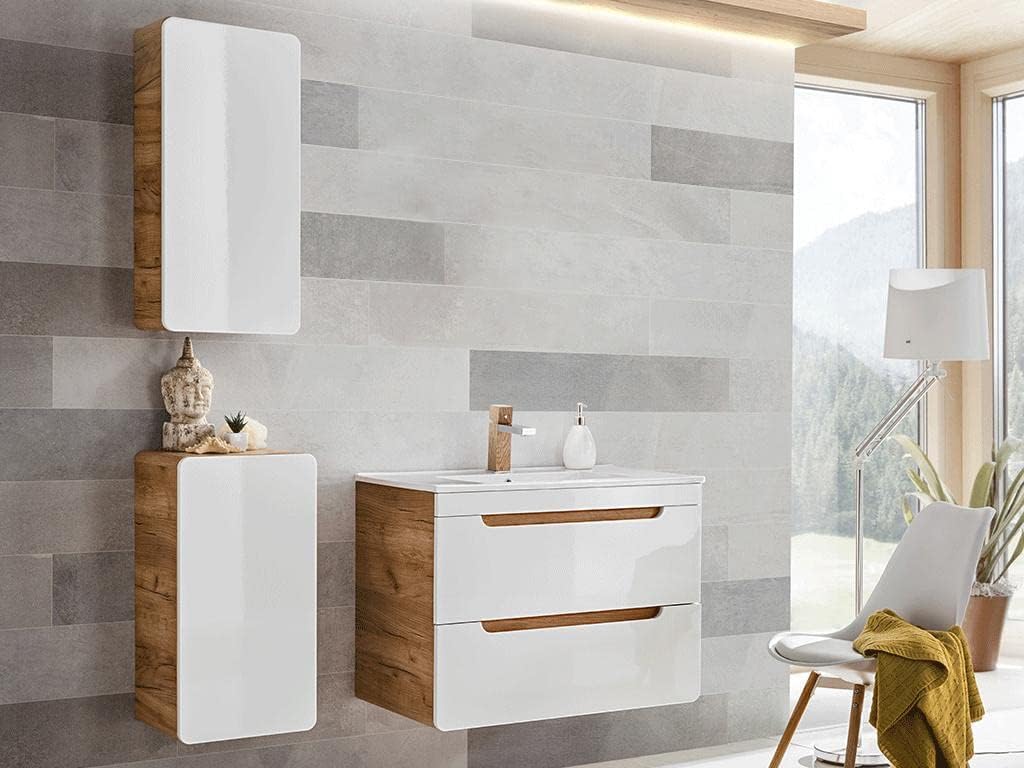
Image 5.1: Example of the ARUBA cabinet installed in a bathroom setting, demonstrating its wall-mounted placement.
6. Operation
- Door Operation: The cabinet features a soft-close door mechanism. Gently push the door to close it, and the mechanism will engage to ensure a quiet and smooth closure.
- Adjusting Shelf: The internal shelf can be adjusted to different heights. To do this, remove any items from the shelf, lift the shelf, remove the shelf pins, reposition the pins into new holes, and then place the shelf back on the pins.
7. Maintenance and Care
- Cleaning: Wipe the cabinet surfaces with a soft, damp cloth. Avoid abrasive cleaners, harsh chemicals, or solvents, as these can damage the finish.
- Spills: Immediately wipe up any spills to prevent moisture damage, especially in a bathroom environment.
- Hardware: Periodically check all screws and fittings to ensure they remain tight. Re-tighten if necessary.
- Ventilation: Ensure adequate ventilation in the bathroom to minimize humidity, which can affect wood-based furniture over time.
8. Troubleshooting
| Problem | Possible Cause | Solution |
|---|---|---|
| Door does not close properly or is misaligned. | Hinges are loose or require adjustment. | Tighten hinge screws. Adjust hinge settings (usually via screws on the hinge body) to align the door. |
| Cabinet feels wobbly after assembly. | Screws are not fully tightened. | Ensure all assembly screws are fully tightened. If wall-mounted, check wall anchors and bracket security. |
| Shelf is not stable. | Shelf pins are not fully inserted or are missing. | Ensure all four shelf pins are fully inserted into the corresponding holes and the shelf rests evenly on them. |
9. Specifications
| Feature | Detail |
|---|---|
| Brand | Vente-unique |
| Model | ARUBA |
| Color | Natural Clear, White |
| Material | MDF, Wood |
| Dimensions (L x W x H) | 35 cm x 22 cm x 75 cm |
| Weight | 11 Kilograms |
| Special Features | Soft-close door, Handle-less design |
| Storage Type | 1 Adjustable Shelf |
| Assembly Required | Yes |
10. Warranty and Support
This product is covered by a 31-day return policy from the date of purchase. For specific warranty details or to initiate a return, please refer to your purchase documentation or contact the retailer directly.
For technical assistance, missing parts, or any questions regarding your Vente-unique ARUBA cabinet, please contact Vente-unique customer support through the retailer's platform or visit the official Vente-unique website for contact information.
Please note that information regarding the availability of spare parts is not provided at this time.