Introduction
Thank you for purchasing the Philco Stereo Shelf System. This compact audio system features a tray-loading CD player, digital FM radio, Bluetooth streaming, and USB input, offering versatile audio playback options. Please read this manual carefully before operating the unit to ensure proper use and to maximize its performance. Keep this manual for future reference.

The Philco Stereo Shelf System, showcasing its main unit, two detachable speakers, and the included remote control. This system is designed for compact spaces while delivering clear audio.
What's in the Box
Before you begin, please check the contents of the package to ensure all items are present and undamaged:
- Philco Stereo Shelf System Main Unit
- Two (2) Speakers
- Remote Control
- Power Cord
- User Guide (this manual)

An illustration detailing the components included in the Philco Stereo Shelf System package, along with their approximate dimensions for reference.
Setup
1. Placement
Place the main unit and speakers on a stable, flat surface. Ensure there is adequate ventilation around the unit. Avoid placing it near heat sources, direct sunlight, or in humid environments.
2. Connecting Speakers
Connect the speaker wires from each speaker to the corresponding speaker terminals on the rear of the main unit. Ensure the polarity (+ to + and - to -) is correct for optimal sound quality.
3. Power Connection
Plug the power cord into the AC IN jack on the rear of the main unit, then plug the other end into a standard AC wall outlet (120V ~ 60Hz).
4. Remote Control Battery Installation
Open the battery compartment on the back of the remote control. Insert two AAA batteries (not included), ensuring the correct polarity (+ and -). Close the battery compartment securely.
Operating Instructions
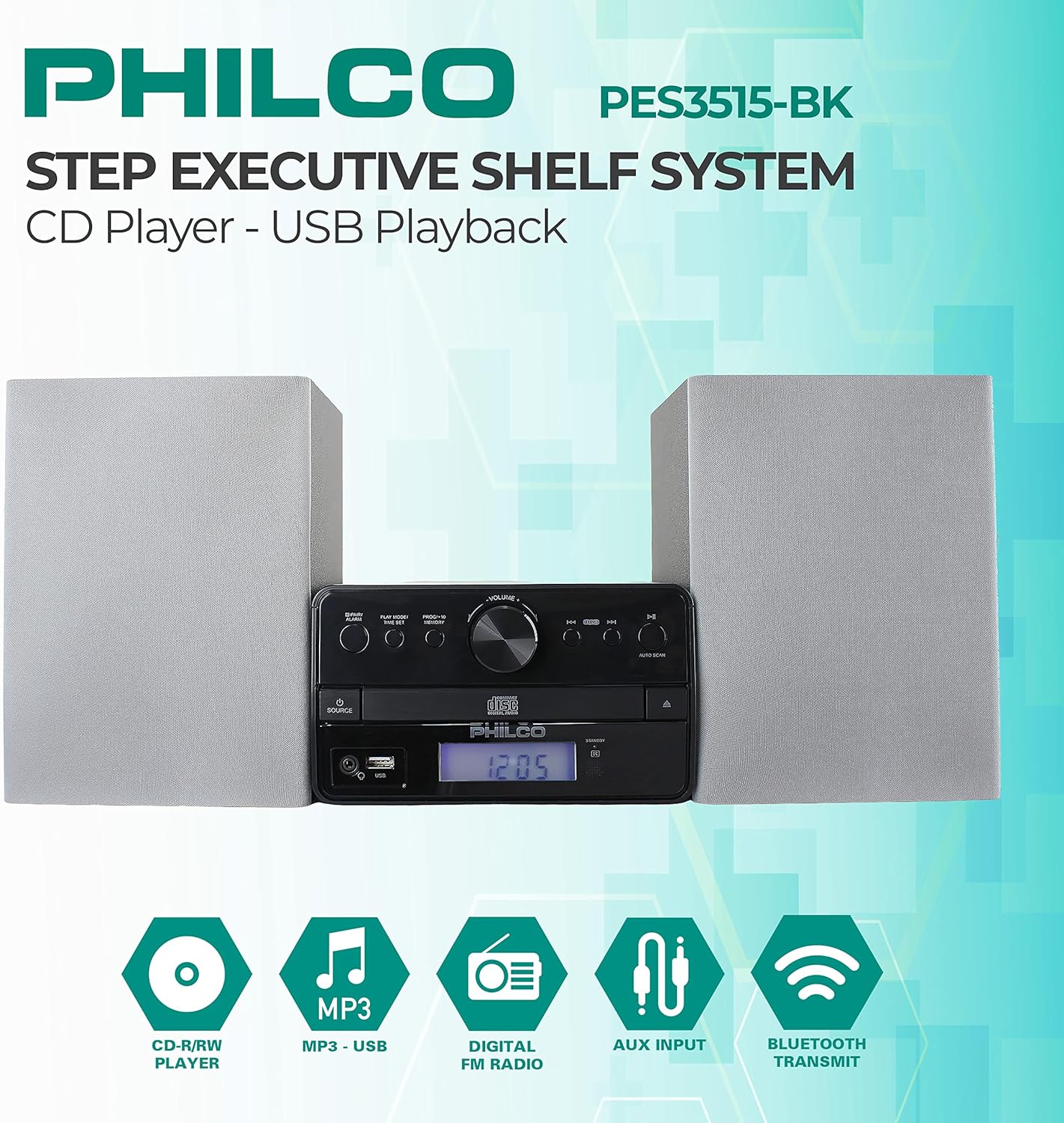
A detailed view of the Philco Stereo Shelf System's front panel, highlighting the various controls and the digital display for easy operation.
General Controls
- POWER Button: Press to turn the unit ON or OFF.
- VOLUME Knob: Rotate clockwise to increase volume, counter-clockwise to decrease.
- SOURCE Button: Press repeatedly to cycle through input modes: CD, USB, FM, Bluetooth, AUX.
- LCD Display: Shows current mode, track information, radio frequency, and time.
CD Player Operation
- Press the SOURCE button to select CD mode.
- Press the OPEN/CLOSE button to open the CD tray.
- Place a CD (Audio CD, CD-R/RW) with the label side facing up into the tray.
- Press the OPEN/CLOSE button again to close the tray. The unit will read the disc.
- Press the PLAY/PAUSE (►/−−) button to start or pause playback.
- Press the SKIP (►►) or SKIP (◄◄) buttons to skip to the next or previous track. Hold to fast forward/rewind.
- PROGRAM Function: In stop mode, press PROG/MEM to program tracks for playback.
FM Radio Operation
- Press the SOURCE button to select FM mode.
- Extend the FM antenna for better reception.
- Auto Scan: Press the AUTO SCAN button to automatically scan and save available FM stations.
- Manual Tuning: Press the TUNE +/- buttons to manually tune to a desired frequency.
- Preset Stations: Use the PRESET +/- buttons to navigate through saved stations.
Bluetooth Streaming
- Press the SOURCE button to select Bluetooth mode. The display will show "BT" and flash, indicating it's ready for pairing.
- On your Bluetooth-enabled device (smartphone, tablet, etc.), enable Bluetooth and search for new devices.
- Select "PHILCO PES3515-BK" from the list of available devices.
- Once paired, the unit will emit a confirmation tone, and the "BT" indicator will stop flashing.
- You can now play audio from your device through the stereo system. Use your device or the system's controls for playback.
USB Playback
- Insert a USB flash drive into the USB port on the front of the unit.
- Press the SOURCE button to select USB mode.
- The unit will automatically detect and begin playing compatible audio files (e.g., MP3).
- Use the PLAY/PAUSE and SKIP buttons for playback control.
AUX Input
- Connect an external audio device (e.g., MP3 player, smartphone) to the AUX IN port on the front of the unit using a 3.5mm audio cable (not included).
- Press the SOURCE button to select AUX mode.
- Play audio from your connected device. The volume can be controlled via the stereo system or the external device.
Maintenance
Cleaning
To clean the unit, use a soft, dry cloth. For stubborn stains, dampen the cloth slightly with water. Do not use abrasive cleaners, waxes, or solvents as they may damage the finish. Ensure the unit is unplugged before cleaning.
Storage
If the unit is not used for an extended period, unplug it from the power outlet. Store it in a cool, dry place, away from direct sunlight and extreme temperatures.
Safety Precautions
- Do not block any ventilation openings.
- Do not expose the unit to rain or moisture.
- Do not open the casing. Refer all servicing to qualified personnel.
- Keep the unit away from strong magnetic fields.
Troubleshooting
If you encounter any issues with your Philco Stereo Shelf System, please refer to the following common problems and solutions:
| Problem | Possible Cause | Solution |
|---|---|---|
| No Power | Power cord not securely connected; Power outlet not active. | Ensure power cord is firmly plugged into the unit and a working wall outlet. Try a different outlet. |
| No Sound | Volume too low; Speakers not connected properly; Incorrect source selected. | Increase volume. Check speaker connections and polarity. Ensure correct input source is selected. |
| CD Not Playing | CD inserted incorrectly; Disc is dirty or scratched; Disc format not supported. | Re-insert CD with label side up. Clean the disc with a soft cloth. Ensure it's an Audio CD, CD-R, or CD-RW. |
| Bluetooth Not Connecting | Unit not in pairing mode; Device too far; Bluetooth on device is off. | Ensure unit is in Bluetooth mode and flashing. Move device closer. Turn Bluetooth on your device ON. |
| Poor FM Reception | Antenna not extended; Interference. | Fully extend the FM antenna. Try repositioning the unit or antenna. |
Specifications
| Feature | Specification |
|---|---|
| Model Number | PES3515-BK |
| Product Dimensions (L x W x H) | 9.57 x 21.02 x 7.13 inches |
| Item Weight | 7.17 pounds |
| Total RMS Output | 15W (2 x 7.5W) |
| Connectivity Technology | Bluetooth, USB, AUX |
| Disc Compatibility | Audio CD, CD-R/RW |
| Radio Tuner | Digital FM |
| Headphone Jack | 3.5mm |
| Color | Silver |
Warranty and Support
Philco products are designed and manufactured to the highest quality standards. For information regarding warranty coverage, terms, and conditions, please refer to the warranty card included with your product or visit the official Philco website. For technical support, troubleshooting assistance beyond this manual, or service inquiries, please contact Philco customer support through the contact information provided on the official website or your product's packaging.
Please retain your proof of purchase for warranty purposes.


