
Introduction
This manual provides instructions for the Akozon Replacement Remote Control, designed specifically for Midea R07/BGE and R07B/BGE air conditioner models. This remote offers a convenient and reliable way to control your air conditioning unit, replacing your original or damaged remote.
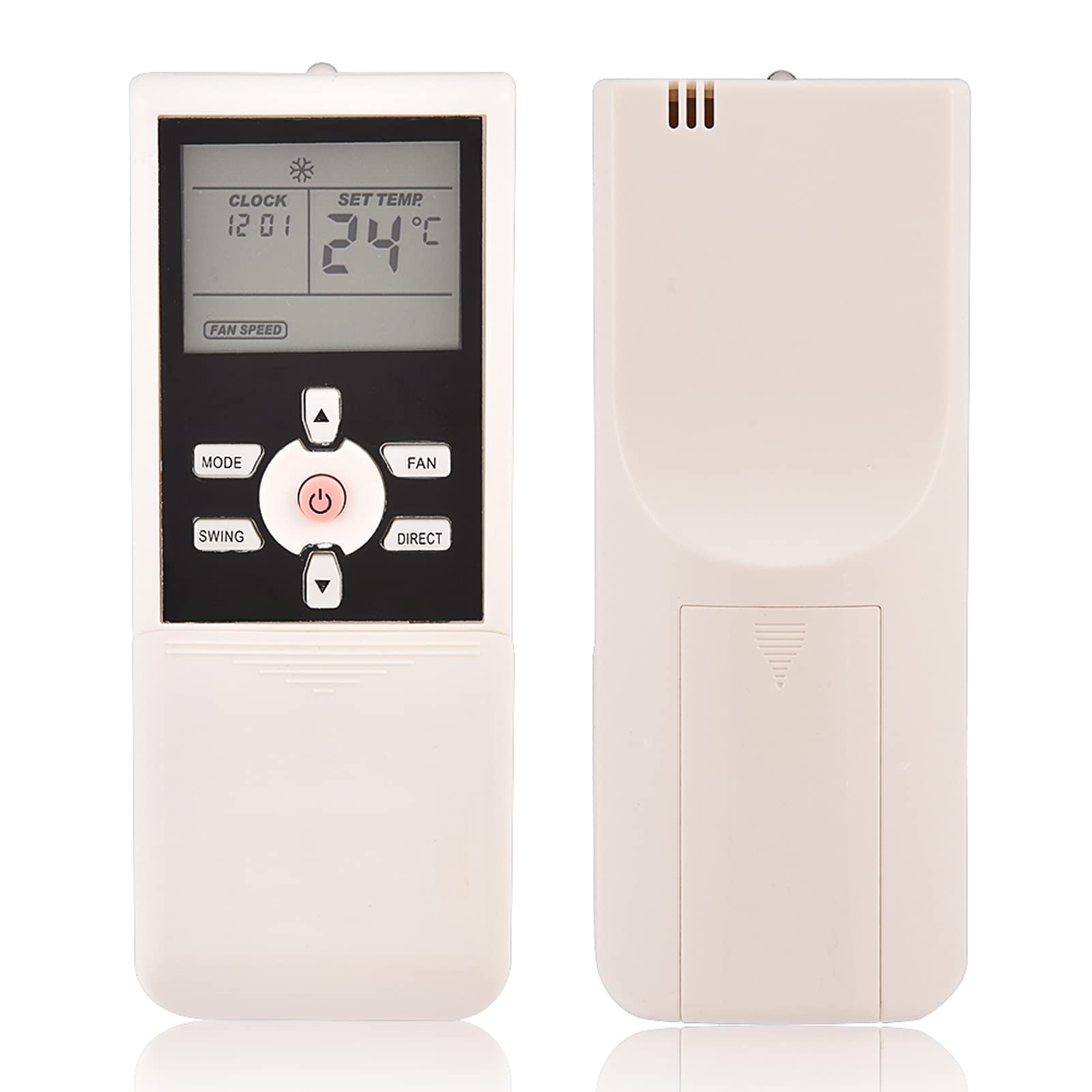
Figure 1: Overview of the Akozon Replacement Remote Control.
Setup
1. Battery Installation
The remote control requires two AAA batteries (not included) for operation. Follow these steps to install the batteries:
- Locate the battery compartment cover on the back of the remote control.
- Slide the cover downwards or press the latch to open it.
- Insert two AAA batteries, ensuring the positive (+) and negative (-) terminals match the markings inside the compartment.
- Close the battery compartment cover securely.

Figure 2: Rear view showing the battery compartment. Ensure correct battery polarity.
2. Compatibility Check
This remote control is designed to be compatible with Midea R07/BGE and R07B/BGE air conditioner models. No programming is typically required; it should work directly out of the box with compatible units.

Figure 3: Remote control in use with a compatible air conditioning unit.
Operating Instructions
Point the remote control directly at the air conditioner's receiver. The maximum effective operating distance is approximately 10 meters (33 feet).

Figure 4: Illustrates the effective operating range of the remote control.
Button Functions:

Figure 5: Detailed view of the remote control's front panel and buttons.
- Power Button (⑂): Turns the air conditioner ON or OFF.
- MODE: Cycles through operating modes (e.g., Cool, Heat, Fan, Dry, Auto).
- FAN: Adjusts fan speed (e.g., Low, Medium, High, Auto).
- SWING: Controls the louver swing function for air direction.
- DIRECT: Adjusts the louver position directly.
- Temperature Up/Down Arrows: Increases or decreases the set temperature.
- CLOCK: Sets the current time.
- TIMER: Sets the ON/OFF timer for the air conditioner.
- SLEEP: Activates or deactivates sleep mode for comfortable night operation.
- TURBO: Engages maximum cooling or heating for rapid temperature change.
- LED: Turns the display light on the air conditioner unit ON or OFF.
- CANCEL: Cancels current timer settings.
- RESET LOCK: (Located under the sliding cover) Used for resetting settings or locking the remote. Consult your air conditioner manual for specific use.

Figure 6: Additional function buttons located under the sliding cover.
Maintenance
Battery Replacement:
Replace batteries when the remote's display becomes dim or the remote fails to operate the air conditioner. Always replace both batteries simultaneously with new AAA batteries. Do not mix old and new batteries or different types of batteries.
Cleaning:
Wipe the remote control with a soft, dry cloth. Do not use liquid cleaners, sprays, or abrasive materials, as these can damage the remote's surface or internal components.
Storage:
If the remote control will not be used for an extended period, remove the batteries to prevent leakage and potential damage to the device.
Troubleshooting
- Remote not responding:
- Check if the batteries are installed correctly with the correct polarity.
- Replace old batteries with new AAA batteries.
- Ensure there are no obstructions between the remote control and the air conditioner's receiver.
- Confirm you are within the effective operating range (up to 10 meters / 33 feet).
- Limited operating range:
- Weak batteries can reduce the remote's range. Replace them.
- Strong light sources (e.g., direct sunlight, fluorescent lamps) can interfere with the infrared signal. Try operating the remote in a different environment.
- Air conditioner not performing desired function:
- Ensure the remote control is compatible with your specific Midea R07/BGE or R07B/BGE model.
- Refer to your air conditioner's original manual for specific function details, as some advanced features may vary.
Specifications
| Brand | Akozon |
| Model Compatibility | Midea R07/BGE, R07B/BGE |
| Material | ABS |
| Power Supply | 2 x AAA Batteries (not included) |
| Operating Distance | Up to 10 meters (33 feet) |
| Dimensions (Approx.) | 13 cm x 4.5 cm x 2.5 cm (5.1 in x 1.8 in x 1 in) |
| Weight (Approx.) | 62 grams |
| Connectivity Technology | Infrared |
| Number of Buttons | 10 (main visible buttons) |

Figure 7: Approximate dimensions of the remote control.
Warranty & Support
Warranty Information:
This product comes with a 1 Year Warranty Against Manufacturer Defects. Please retain your proof of purchase for warranty claims.
Customer Support:
For any questions, technical assistance, or warranty inquiries, please contact your retailer or the Akozon customer service department. Refer to your purchase documentation for specific contact details.