
Introduction
This manual provides instructions for the safe and effective operation of the VIHELM HT-1891 Digital Manometer. This device is designed for measuring differential gas pressure, vacuum pressure, and gauge pressure in various applications.
Features
- 11 Selectable units of Measure
- Max / minimum / average, and with a relative time function
- Large LCD backlit dual display
- Zeroing, offset, and data compensation capabilities
- Low battery display and automatic shutdown
- Data Hold and Error code indication
Package Contents
- 1 x HT-1891 Digital Manometer
- Pouch & Tubing
Product Overview
The HT-1891 Digital Manometer features a clear LCD display, intuitive control buttons, and two pressure input ports at the top for differential measurements.
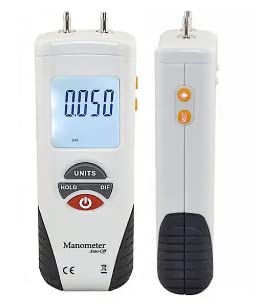
This image displays the front of the HT-1891 Digital Manometer, highlighting the large LCD screen, the power button (red), UNITS button, HOLD button, and DIF (differential) button. Two pressure input ports are visible at the top.
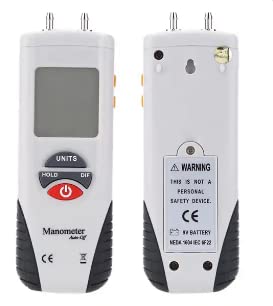
This image shows both the front and back of the HT-1891 Digital Manometer. The back panel includes a warning label, battery compartment, and a hanging hole.
This image illustrates the physical dimensions of the HT-1891 Digital Manometer: 170mm height, 54.3mm width, and 35mm depth.
Setup
Battery Installation
The device requires one 9V battery (NEDA 1604 IEC 6F22) for operation.
- Locate the battery compartment on the back of the device.
- Open the battery compartment cover.
- Insert a 9V battery, ensuring correct polarity.
- Close the battery compartment cover securely.
Operating Instructions
Power On/Off
Press the red power button located on the front panel to turn the device on or off.
Unit Selection
Press the UNITS button to cycle through the available measurement units. The HT-1891 supports 11 different units, including InH2O, Psi, Mbar, kPa, inHg, mmHg, OzIn2, FtH2O, cmH2O, Kgcm2, and Bar.
Data Hold
Press the HOLD button to freeze the current reading on the display. Press the button again to release the hold function and resume live readings.
Differential Measurement (DIF)
Press the DIF button to activate differential measurement mode. This mode measures the pressure difference between the two input ports.
Zeroing and Compensation
The device supports zeroing, offset, and data compensation functions to ensure accurate measurements. Consult the display for specific indicators or error codes related to these functions.
Technical Specifications
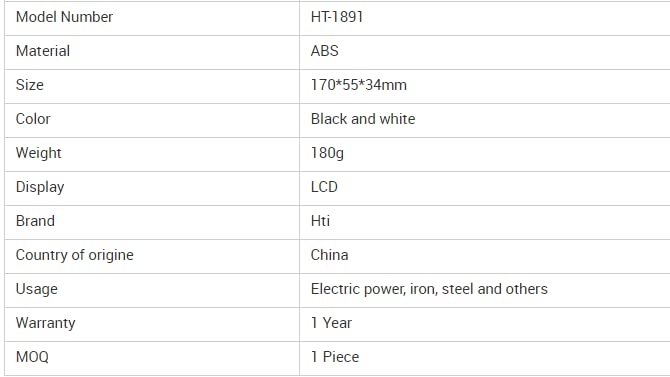
| Model Number | HT-1891 |
| Material | ABS |
| Size | 170mm x 54.3mm x 35mm |
| Color | Black and white |
| Weight | 180g |
| Display | Dual LCD, Backlit |
| Accuracy | ±0.3% FSO (25°C) |
| Repeatability | ±0.2% (Max ±0.5% FSO) |
| Linearity/Hysteresis | ±0.29% FSO |
| Operating Pressure Range | ±34 kPa (approximately ±4.93 PSI) |
| Maximum Overload Pressure | 20 PSI |
| Response Time | 0.5s Typical |
| Low Range Indicator | Err.1 |
| Under Range Indicator | Err.2 |
| Operating Conditions | 32°F to 122°F (0°C to 50°C) |
| Storage Conditions | 14°F to 140°F (-10°C to 60°C) |
| Power Supply | 1x9V Battery (NEDA 1604 IEC 6F22) or external 9VDC |
| Standard Accessories | Pouch & Tubing |
| UPC | 797447589235 |
| Date First Available | January 26, 2023 |
| Manufacturer | VIHELM |
| Warranty | 1 Year |
Measurement Ranges and Resolutions
| Function | Range | Resolution | Function | Range | Resolution |
|---|---|---|---|---|---|
| InH2O | ±138.3 | 0.01 | OzIn2 | 80 | 0.01 |
| Psi | ±5.000 | 0.001 | FtH2O | 11.53 | 0.001 |
| Mbar | ±344.7 | 0.1 | cmH2O | 351.5 | 0.1 |
| kPa | ±34.47 | 0.01 | Kgcm2 | 0.351 | 0.001 |
| inHg | ±1.018 | 0.001 | Bar | 0.344 | 0.001 |
| mmHg | ±258.5 | 0.1 |
Maintenance
- Keep the device clean and dry. Use a soft, damp cloth for cleaning. Do not use abrasive cleaners or solvents.
- Store the device in its protective pouch when not in use to shield it from dust and potential damage.
- Remove the battery if the device will not be used for an extended period to prevent battery leakage and potential damage to the unit.
Troubleshooting
Error Codes
- Err.1: Low Range Indicator. This indicates that the measured pressure is below the device's minimum detectable range.
- Err.2: Under Range Indicator. This indicates that the measured pressure is below the specified operating range.
General Issues
- Device does not power on: Check battery installation and ensure the battery has sufficient charge. Replace the battery if necessary.
- Inaccurate readings: Ensure the device is zeroed correctly before use. Check for any blockages in the pressure input ports or tubing that could affect readings.
Warranty and Support
This product comes with a 1-year warranty from the date of purchase. For technical support, warranty claims, or any inquiries, please contact your retailer or the manufacturer, VIHELM.
Manufacturer: VIHELM
ASIN: B0BT4NFG73