
1. Introduction
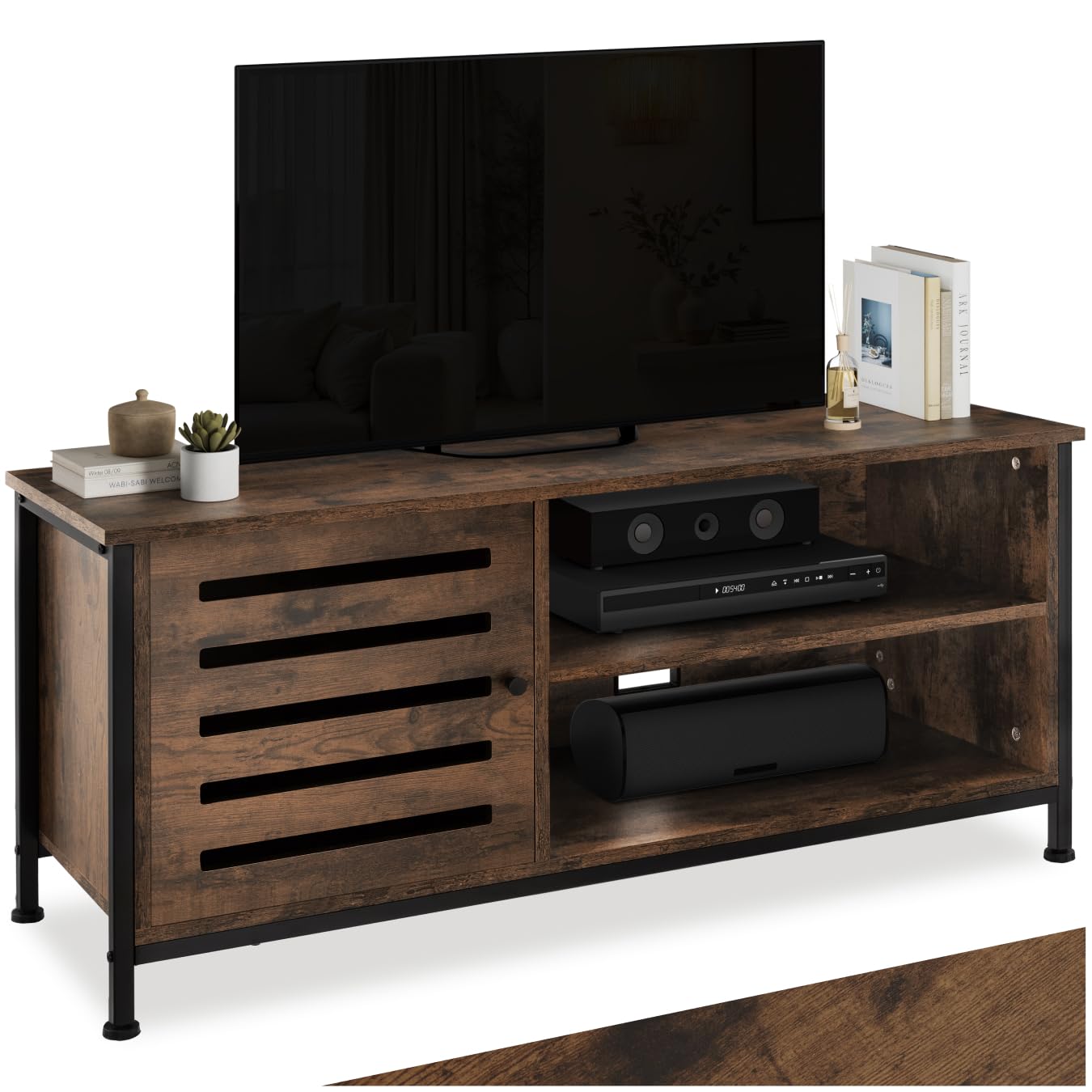
This manual provides essential information for the safe assembly, operation, and maintenance of your tectake Galway Industrial Wood TV Stand. Please read these instructions carefully before beginning assembly and retain them for future reference. Proper assembly and care will ensure the longevity and stability of your furniture.
2. Safety Information
To ensure safe use of this product, please observe the following guidelines:
- Always assemble the unit on a soft, clean surface to prevent scratches and damage.
- Ensure all screws and fasteners are securely tightened before use. Periodically check and re-tighten as necessary.
- Do not overload the TV stand. Refer to the 'Product Specifications' section for maximum weight capacities.
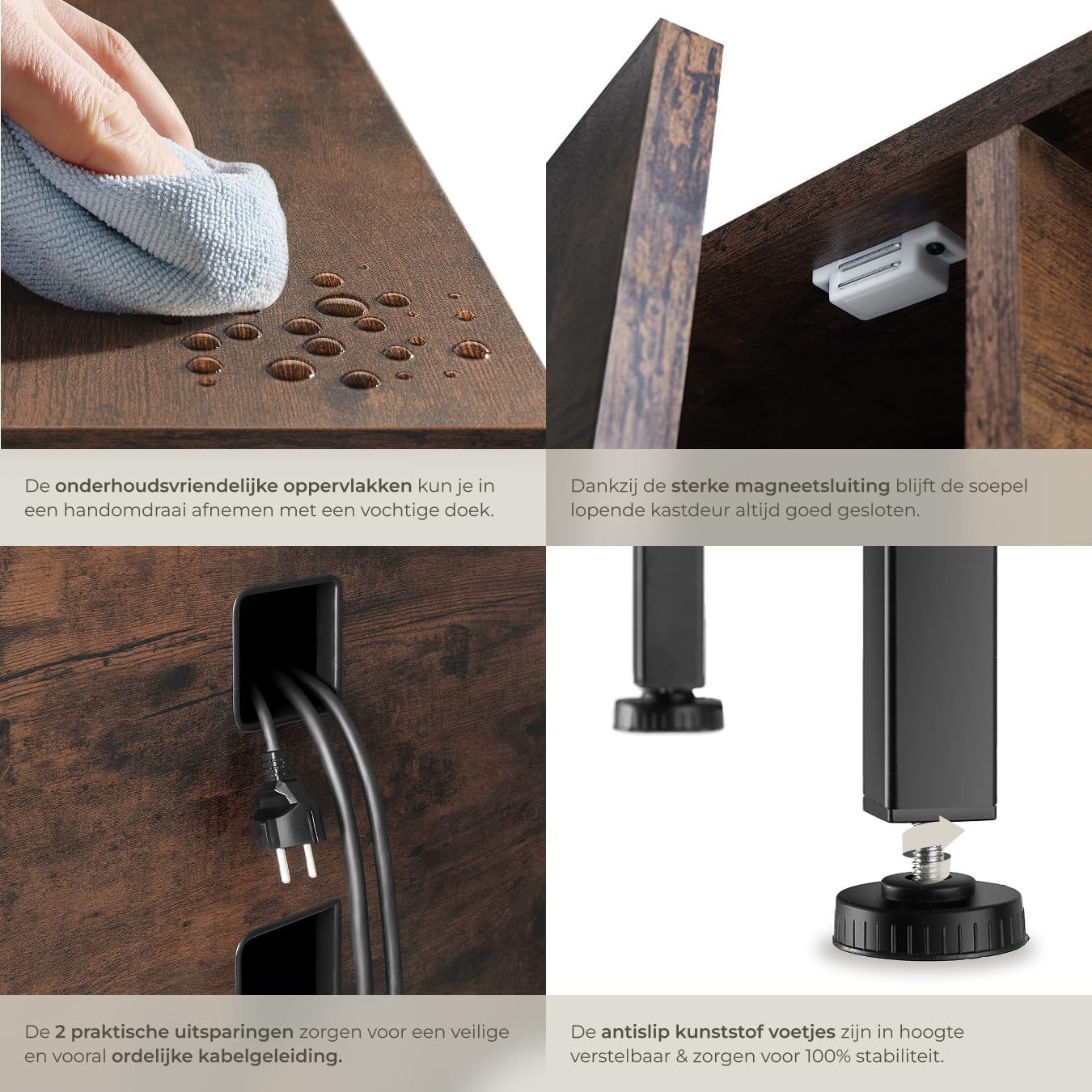
- Place the TV stand on a level and stable surface to prevent tipping. Use the adjustable feet to compensate for uneven floors.
- Keep small parts and packaging materials away from children during assembly to avoid choking hazards.
- Do not stand or climb on the TV stand.
- If wall anchoring is provided or recommended, ensure it is properly installed to prevent tip-over accidents, especially in households with children.
3. Package Contents
Before beginning assembly, carefully unpack all components and verify that all parts listed below are present and undamaged. If any parts are missing or damaged, please contact tectake customer support immediately.

Note: A detailed parts list with labels is typically included in the physical instruction manual. Please refer to that document for specific part identifiers.
| Component | Quantity |
|---|---|
| Top Panel | 1 |
| Bottom Panel | 1 |
| Side Panels | 2 |
| Inner Shelf Panels | 2 |
| Back Panel | 1 |
| Cabinet Door | 1 |
| Metal Frame Legs | 4 |
| Adjustable Feet | 4 |
| Assembly Hardware (screws, dowels, hinges, magnetic catch) | 1 set |
| Assembly Instructions | 1 |
4. Assembly Instructions
Follow these steps for quick and easy assembly. It is recommended to assemble the unit on a soft, clean surface to prevent scratches. Two people are recommended for assembly.
- Prepare the Workspace: Clear a spacious area and lay down a blanket or cardboard to protect the furniture pieces and your floor.
- Attach Adjustable Feet: Screw the adjustable plastic feet into the bottom of the metal frame legs. Ensure they are finger-tight for now; final adjustments will be made later.
- Assemble the Frame: Connect the metal frame components using the provided screws. Do not fully tighten all screws until the entire frame is assembled to allow for minor adjustments.
- Attach Side Panels: Secure the wooden side panels to the metal frame using the designated hardware.
- Install Inner Shelves: Slide and secure the inner shelf panels into their respective positions within the frame.
- Attach Top and Bottom Panels: Fasten the top and bottom wooden panels to the assembled frame.
- Install Back Panel: Attach the back panel to the rear of the unit. Ensure the cable management cutouts are correctly oriented.
- Mount Cabinet Door: Attach the hinges to the cabinet door and then to the main unit. Install the magnetic catch to ensure the door closes securely.
- Final Tightening and Leveling: Once all components are in place, fully tighten all screws. Place the TV stand in its desired location and adjust the feet to ensure it is perfectly level and stable.


5. Usage
Your tectake Galway TV stand is designed to provide a stable and organized platform for your television and media devices.
- Placing Your TV: Carefully place your television on the top surface of the stand. Ensure the TV's base is fully supported and does not overhang the edges. Refer to the specifications for the maximum weight capacity of the top panel.
- Organizing Media Devices: Utilize the open compartments for your cable box, gaming console, soundbar, or other electronic devices. The enclosed cabinet provides discreet storage for items you wish to keep out of sight.
- Cable Management: Use the integrated cable cutouts on the back panel to route and organize power cords and signal cables. This helps to keep your entertainment area tidy and reduces cable clutter.
6. Care and Maintenance
To maintain the appearance and longevity of your TV stand, follow these simple care instructions:
- Cleaning: Wipe surfaces with a soft, damp cloth. Avoid using harsh chemicals, abrasive cleaners, or polishes that may damage the finish.
- Spills: Immediately wipe up any spills with a dry cloth to prevent moisture damage.
- Heat and Moisture: Avoid placing hot items directly on the surface. Use coasters or protective pads. Keep the unit away from direct sunlight and excessive moisture.
- Hardware Check: Periodically check all screws and fasteners to ensure they remain tight. Re-tighten if necessary.

7. Troubleshooting
If you encounter any issues with your TV stand, please refer to the following common problems and solutions:
- Unit is Unstable/Wobbly:
Solution: Ensure the TV stand is placed on a level surface. Adjust the height of the plastic feet until the unit is stable and all feet are firmly on the ground. Double-check that all assembly screws are fully tightened. - Cabinet Door Does Not Close Properly:
Solution: Check the alignment of the hinges and the magnetic catch. Loosen hinge screws slightly, adjust the door position, and re-tighten. Ensure the magnetic catch is securely installed and aligned with its counterpart on the door. - Missing or Damaged Parts:
Solution: If you find any parts missing or damaged upon opening the package, do not proceed with assembly. Contact tectake customer support with your product model number and a description of the issue for assistance. - Difficulty During Assembly:
Solution: Review the assembly instructions carefully, paying close attention to diagrams. Ensure you are using the correct hardware for each step. If problems persist, consider seeking assistance from another person.
8. Product Specifications
Here are the detailed specifications for your tectake Galway Industrial Wood TV Stand:
| Feature | Detail |
|---|---|
| Model Number | 404714 |
| Brand | tectake |
| Overall Dimensions (L x W x H) | 110 x 41.5 x 50.5 cm (43.3 x 16.3 x 19.9 inches) |
| Weight | 23.3 Kilograms (51.4 lbs) |
| Material | Particle Board (Melamine coated), Alloy Steel (Frame), Plastic (Feet) |
| Color | Dark Brown |
| Maximum Weight Capacity | 50 Kilograms (110 lbs) |
| Number of Compartments | 3 (2 open, 1 enclosed) |
| Special Features | Adjustable feet, Cable management cutouts |
| Assembly Required | Yes |
| Style | Modern Industrial |
9. Warranty and Support
tectake products are manufactured to high-quality standards. For information regarding warranty coverage, please refer to the warranty card included with your purchase or visit the official tectake website.
If you require assistance with assembly, have questions about product features, or need to report a missing/damaged part, please contact tectake customer support. Have your model number (404714) and purchase information ready when contacting support for faster service.
You can typically find contact information on the tectake website or on your purchase receipt.