
Rengu Rengu0mwcdn4qv5-12
Rengu Smart Remote Car Key User Manual
Model: Rengu0mwcdn4qv5-12
Product Overview
The Rengu Smart Remote Car Key is an advanced keyless entry system designed to enhance convenience and security for your vehicle. Featuring a vibrant LCD screen and a durable zinc alloy frame, this key fob offers a range of smart functions including keyless door unlock, automatic locking, and personalized interface options. It is compatible with most car models equipped with a one-click start system.

Figure 1: Rengu Smart Remote Car Key with its LCD screen showing car control functions.
Package Contents
- 1 x Smart Remote Car Key
- 1 x User Manual
- 1 x OBD Module
- 1 x Wire Cable
- 1 x Charge Cable

Figure 2: All components included in the Rengu Smart Remote Car Key package.
Setup and Installation
Follow these steps carefully to set up your Rengu Smart Remote Car Key:
- Prepare Original Car Key Chip: Carefully remove the original car key chip from your existing key.
- Weld Connecting Harness: According to the schematic diagram provided in this manual (or the included operation manual), weld the connecting harness to each key function switch corresponding to your original car key. This step requires precision and may require professional assistance if you are not experienced with soldering.
- Connect Harness: After welding, connect the other end of the connecting cable to the designated socket on the Smart Remote Car Key.
- Install OBD Module: Insert the OBD module into the OBD interface position, typically located under the main driver's seat of your car.

Figure 3: Visual guide for the installation process, showing the key fob and text instructions.
Operating Instructions
The Rengu Smart Remote Car Key offers intuitive control through its LCD touchscreen and side buttons.
Key Features:
- Keyless Door Unlock: When you approach your car with the Smart Remote Car Key, the door locks will automatically open, allowing you to enter without physically taking out the key.

Figure 4: Keyless door unlock feature in action as the user approaches the vehicle.
- Automatic Lock: When you leave your car with the key, the door locks will automatically engage. For models that support automatic window lift, this function can be configured to activate after the car is automatically locked.
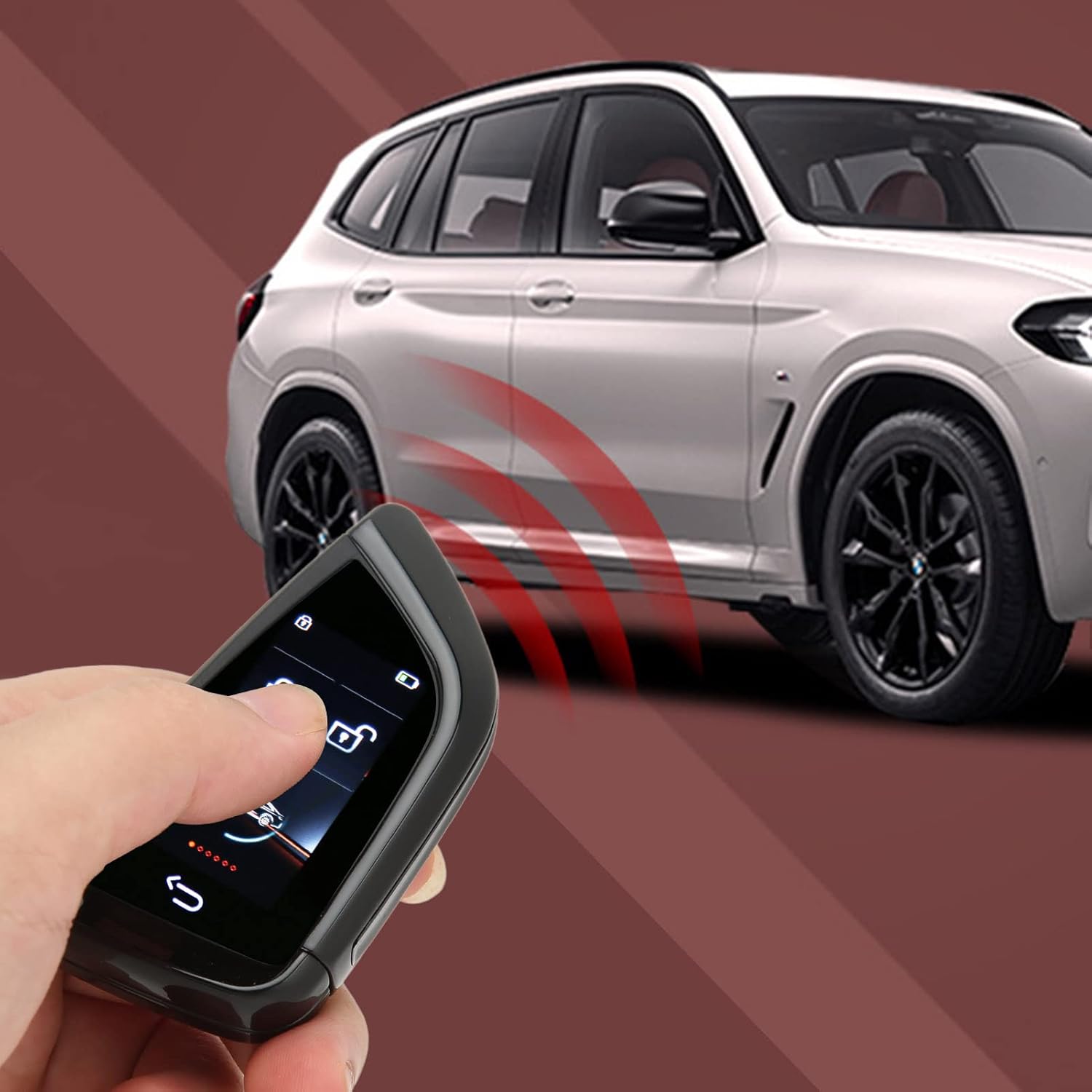
Figure 5: The key fob initiating automatic locking of the car.
- Personalized Style Design: The key allows for a personalized interface design, enabling you to customize the display to highlight your unique style.
Navigating the LCD Screen:
The LCD screen provides access to various controls and settings. Use the touch interface to navigate.
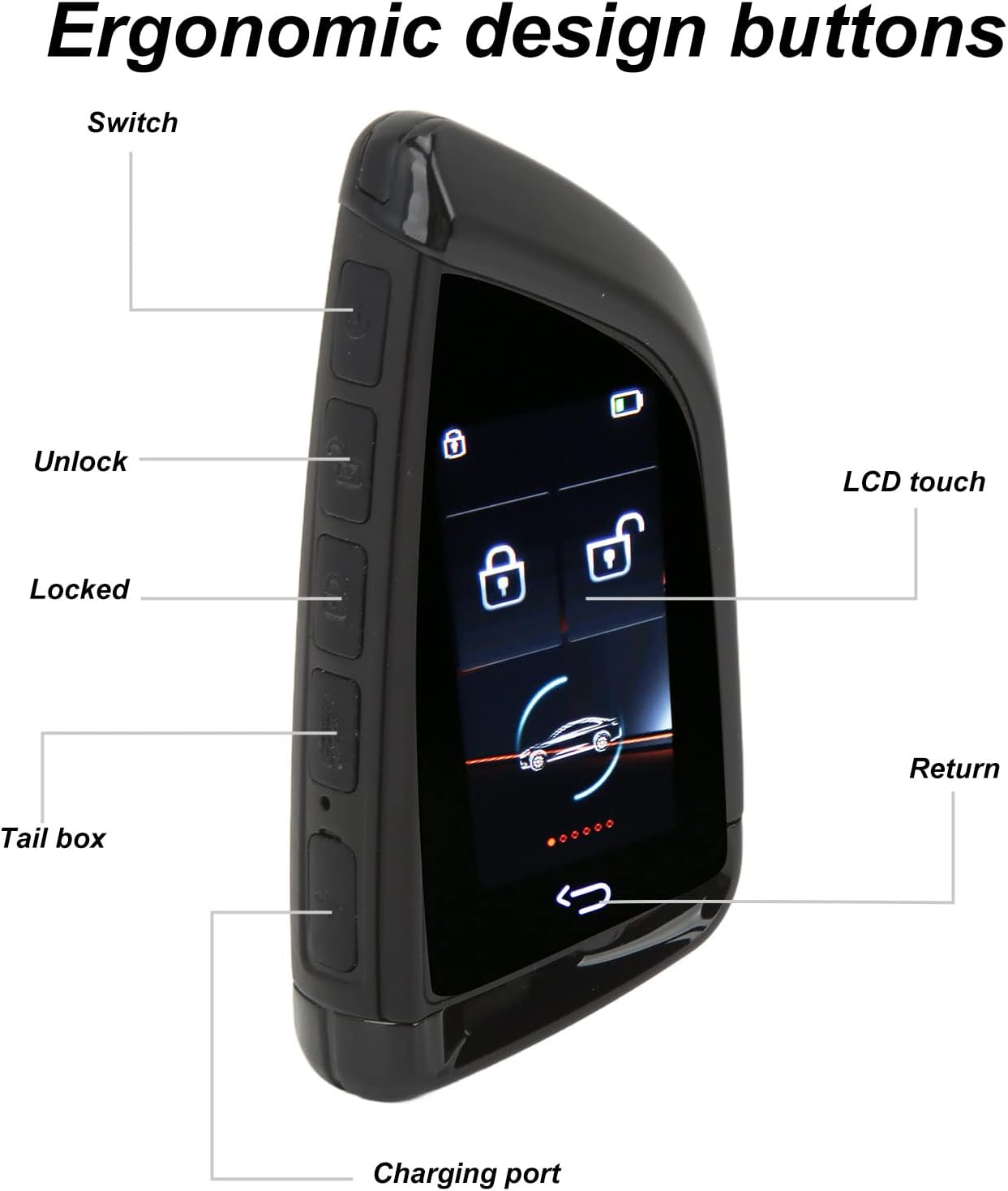
Figure 6: Overview of the key fob's ergonomic design buttons and LCD touch screen.
- Main Screen: Displays time, date, and battery status. Swipe up to unlock.
- Keydroid Control: After unlocking, you will see options for locking and unlocking the car.
- Smart Lock: Access settings related to automatic locking features.
- Smart Window: Configure automatic window lift functions (if supported by your vehicle).
- Owner Phone Number: Option to display owner contact information on the key fob in case of loss.
- Smart Trunk: Control the car's trunk.
- Setup: Access general settings for the device.
- Time Setting: Adjust the time displayed on the screen.
- Language: Change the display language (Chinese, English, Korean, Turkish are supported).
- Version: View the device's software version.
- Signal: Check signal strength.
- Smart Trunk: Further settings for trunk control.
Maintenance and Battery Life
The Rengu Smart Remote Car Key is designed for long-lasting performance:
- Standby Time: Up to 100 days on a single charge.
- Keyless Entry Usage: Approximately 200 days of use with keyless entry functions enabled.
- Physical Button Usage: Up to 365 days of use when primarily using physical buttons.
- Charging: Use the provided charge cable to recharge the device. The charging port is located on the side of the key fob.
Troubleshooting
If you encounter issues with your Rengu Smart Remote Car Key, consider the following:
- Device Not Responding: Ensure the device is charged. Connect it to the charge cable and allow it to charge for at least 30 minutes.
- Keyless Entry Not Working:
- Verify the OBD module is correctly inserted into your car's OBD interface.
- Check the connecting harness for secure connections and proper welding.
- Ensure your car model supports the keyless entry feature with this device.
- Automatic Window Lift Not Functioning: This feature is dependent on your car's existing capabilities. Confirm your vehicle supports automatic window lift and that the function is enabled in the key fob's "Smart Window" settings.
- Display Issues: If the screen is unresponsive or displays incorrectly, try restarting the device (if an option is available) or fully charging it.
- Signal Issues: Navigate to the "Setup" menu and check the "Signal" option to ensure proper communication with your vehicle.
For persistent issues, please refer to the detailed operation manual included in the package or contact customer support.
Specifications
| Feature | Specification |
|---|---|
| Material | Zinc alloy (bezel) |
| Screen Resolution | 240x320 |
| Connection Mode | Bluetooth 5.0 |
| Supported Languages | Chinese, English, Korean, Turkish |
| Battery Type | Built-In Lithium Battery |
| Battery Capacity | 800mAh |
| Applicable Models | All models with one-click start (Not suitable for models requiring mechanical or inserted key to enter) |
| Item Weight | 8.7 ounces |
| Package Dimensions | 6.46 x 3.94 x 2.17 inches |
Warranty and Support
For warranty information and customer support, please refer to the documentation included with your purchase or contact the manufacturer directly. Keep your proof of purchase for any warranty claims.
Manufacturer: Rengu
Ask a question about this manual
Ask about setup, troubleshooting, compatibility, parts, safety, or missing instructions. Manuals+ will review the question and use this page’s manual context to help answer it.