
1. Introduction
Thank you for choosing the JUNG CAMRY CR8073 Ice Cube Machine. This manual provides important information regarding the safe operation, maintenance, and troubleshooting of your new appliance. Please read it thoroughly before first use and keep it for future reference.
The JUNG CAMRY CR8073 is designed for quick and efficient ice production, perfect for home use, bars, or restaurants. It features a compact design, user-friendly controls, and intelligent indicators to ensure a continuous supply of fresh ice.
2. Safety Instructions
Always follow basic safety precautions when using electrical appliances to reduce the risk of fire, electric shock, and injury.
- Read all instructions before operating the appliance.
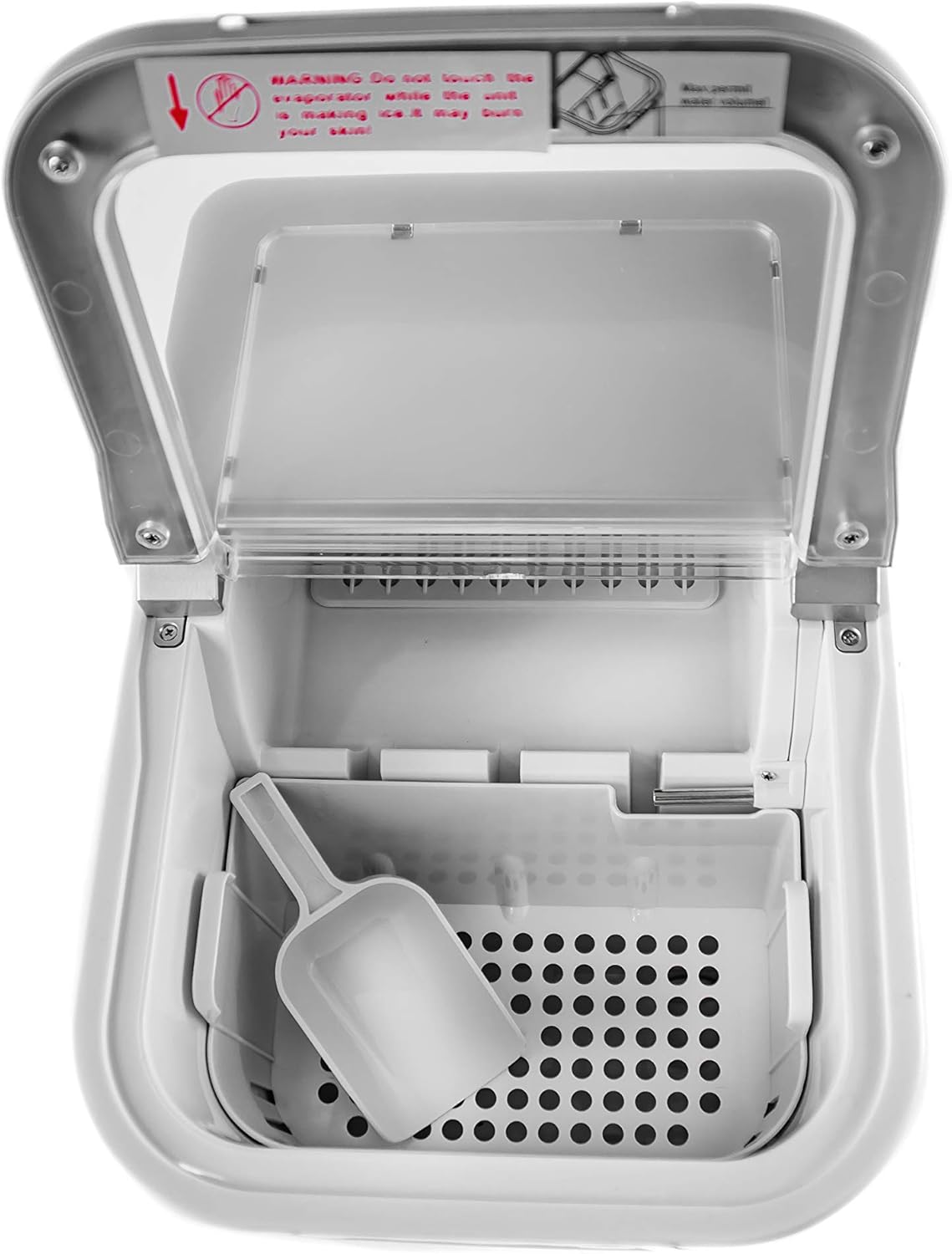
- Do not touch the evaporator while the unit is making ice, as it may cause burns.
- Ensure the appliance is placed on a stable, level surface.
- Allow the appliance to stand upright for at least 2 hours before first use to allow the refrigerant to settle.
- Do not immerse the power cord, plug, or any part of the appliance in water or other liquids.
- Unplug the appliance from the power outlet when not in use, before cleaning, or before performing any maintenance.
- Keep children away from the appliance.
- Do not operate any appliance with a damaged cord or plug, or after the appliance malfunctions or has been damaged in any manner.
- Use only manufacturer-recommended attachments.
- Do not use outdoors.
- Do not block ventilation openings.
- This appliance uses R600a refrigerant. Handle with care and ensure proper ventilation.
3. Product Components
Familiarize yourself with the parts of your JUNG CAMRY CR8073 Ice Cube Machine.
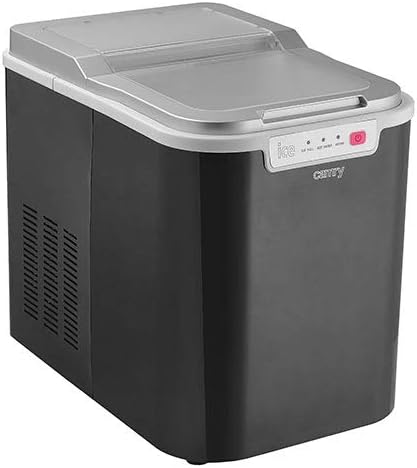
The machine includes:
- Main Unit with transparent lid
- Ice Basket
- Ice Scoop
- Control Panel with LED indicators
- Water Reservoir (internal)

The control panel features three indicator lights:
- ICE FULL: Illuminates when the ice basket is full.
- ADD WATER: Illuminates when the water reservoir needs refilling.
- WORK: Illuminates when the machine is actively producing ice.
4. Setup
- Unpacking: Carefully remove the ice cube machine from its packaging. Remove all packing materials, including any tape or protective films.
- Placement: Place the machine on a firm, level surface away from direct sunlight and other heat sources (e.g., stoves, furnaces, radiators). Ensure there is at least 10 cm (4 inches) of space around the machine for proper ventilation.
- Initial Standby: Before plugging in, allow the appliance to stand upright for a minimum of 2 hours. This allows the refrigerant to settle, preventing potential damage to the compressor.
- Cleaning: Before first use, clean the interior of the machine. Refer to the "Maintenance" section for detailed cleaning instructions.
- Power Connection: Plug the power cord into a grounded electrical outlet.
5. Operating Instructions
Follow these steps to produce ice with your JUNG CAMRY CR8073.
- Fill Water Reservoir: Open the lid and remove the ice basket. Fill the water reservoir with clean, potable water up to the MAX fill line. Do not overfill. The water tank capacity is 2.2 liters.
- Replace Ice Basket: Place the ice basket back into its position. Close the lid.
- Power On: Press the POWER button on the control panel. The WORK indicator light will illuminate, and the machine will begin the ice-making cycle.
- Ice Production: The first batch of ice cubes will be ready in approximately 12-17 minutes. The machine produces 9 ice cubes per cycle.
- Ice Collection: Once the ice basket is full, the ICE FULL indicator light will illuminate, and the machine will automatically pause operation. Use the provided ice scoop to remove ice cubes.
- Add Water: If the water level in the reservoir is too low, the ADD WATER indicator light will illuminate, and the machine will pause. Refill the water reservoir to resume ice production.
- Energy Saving Mode: The ice maker features an energy-saving mode and will automatically shut off after the program is completed or if left idle for an extended period.
- Turning Off: To turn off the machine, press the POWER button again.

The transparent viewing window allows you to monitor the ice production process without opening the lid.

6. Maintenance
Regular cleaning and maintenance will ensure the longevity and optimal performance of your ice cube machine.
- Daily Cleaning:
- Unplug the machine before cleaning.
- Remove the ice basket and wash it with mild detergent and warm water. Rinse thoroughly.
- Wipe the interior of the water reservoir and ice storage area with a soft cloth dampened with a mild cleaning solution.
- Dry all surfaces thoroughly before reassembling.
- Periodic Deep Cleaning:
- For thorough cleaning, a mixture of water and vinegar (1:1 ratio) can be used to descale the internal components.
- Run a cycle with this solution (without ice production), then drain and rinse several times with clean water.
- Ensure all cleaning solution residue is removed before making ice for consumption.
- Exterior Cleaning: Wipe the exterior of the machine with a soft, damp cloth. Do not use abrasive cleaners or solvents.
- Storage: If storing the machine for an extended period, drain all water, clean thoroughly, and ensure it is completely dry before storing in a cool, dry place.
7. Troubleshooting
Refer to the table below for common issues and their solutions.
| Problem | Possible Cause | Solution |
|---|---|---|
| Machine does not turn on. | No power supply. | Check if the power cord is securely plugged into a working outlet. |
| "ADD WATER" indicator is on. | Water reservoir is empty or low. | Refill the water reservoir to the MAX fill line. |
| "ICE FULL" indicator is on. | Ice basket is full. | Remove ice cubes from the basket. |
| Ice cubes are too small or not forming. | Water temperature is too high; ambient temperature is too high; insufficient water. | Use colder water. Ensure the machine is in a cool environment. Check water level. |
| Machine is noisy. | Normal operation sounds (compressor, water pump); machine not level. | Ensure the machine is on a stable, level surface. If noise is excessive or unusual, contact customer support. |
If the problem persists after trying the above solutions, please contact customer support.
8. Specifications
Key technical specifications for the JUNG CAMRY CR8073 Ice Cube Machine:
- Model: CR8073
- Water Tank Capacity: Max 2.2 Liters
- Ice Production Capacity: 12-15 kg / 24 hours
- Ice Storage Capacity: 0.8 kg
- Production Time per Cycle: 12-17 minutes (for 9 cubes)
- Cable Length: 164 cm
- Refrigerant: R600a / 24g
- Product Dimensions (L x W x H): 35.5 x 25 x 32 cm
- Weight: Approximately 9.9 kg
- Features: Energy-saving mode, transparent viewing window, alarm for full ice/low water, LED display.

9. Warranty and Support
For warranty information and customer support, please refer to the warranty card included with your purchase or visit the official JUNG website. Keep your proof of purchase for any warranty claims.
For technical assistance or service inquiries, please contact JUNG customer service through their official channels.
Note: Warranty terms may vary by region and retailer. Please consult your specific purchase documentation.