
1. Introduction
This manual provides detailed instructions for the safe and effective use of the IDEAL Electrical 61-327 600V Manual Range Multimeter. This device is designed for measuring AC/DC voltage, resistance, continuity, diodes, and testing batteries. It is a CAT III 600V rated instrument suitable for various electrical testing applications.

Figure 1.1: Front view of the IDEAL Electrical 61-327 Multimeter. This image displays the multimeter's main display, rotary dial, function buttons, and input jacks for test leads.
2. Safety Information
WARNING: To avoid electric shock or personal injury, read, understand, and follow all safety information and instructions before using this multimeter. Keep this manual for future reference.
- Always ensure the multimeter is in good working condition before use. Inspect test leads for damage.
- Do not apply more than the rated voltage, as marked on the meter, between the terminals or between any terminal and ground.
- Use caution when working with voltages above 30V AC RMS, 42V peak, or 60V DC. These voltages pose a shock hazard.
- Always disconnect the circuit power and discharge all high-voltage capacitors before testing resistance, continuity, or diodes.
- Do not operate the meter with the case open or the battery cover removed.
- Replace batteries immediately when the low battery indicator appears to ensure accurate readings.
- This multimeter is rated for CAT III 600V. Do not use it in environments exceeding this rating.
3. Product Features
The IDEAL Electrical 61-327 Multimeter offers a range of features designed for electrical professionals:
- UL Certified CAT III 600V: Ensures safety and reliability for AC/DC manual range measurements.
- Measurement Capabilities: Measures AC/DC voltage, resistance, continuity, diodes, and tests batteries.
- Non-Contact Voltage (NCV) Sensing: Detects AC voltage without direct contact, enhancing safety.
- Backlit Display: Improves visibility in poorly lit environments.
- Built-in Probe Tip Holders: Allows for convenient and safer measurement by securing one lead.
- Hanging Strap Clip: Compatible with IDEAL hanging straps (sold separately, e.g., UMHS-757) for hands-free operation.
- Rugged Overmolding: Enhances grip and provides drop protection.
- Hold Function: Freezes the displayed reading for easier recording.
- Selectable Auto Power Off: Conserves battery life.
4. Components and Controls
Familiarize yourself with the main components and controls of your multimeter:

Figure 4.1: Front view of the multimeter, highlighting the display, rotary switch, and function buttons. The display shows measurement values and indicators. The rotary switch selects measurement functions. Buttons include HOLD and Backlight.

Figure 4.2: Included test leads and AAA batteries. The red and black test leads are essential for making electrical measurements. The batteries power the device.

Figure 4.3: Rear view of the multimeter, showing the battery compartment cover and safety warnings. This view also illustrates the integrated test lead storage points.
5. Setup
5.1 Battery Installation
The multimeter requires three (3) 1.5V AAA batteries for operation. To install or replace batteries:
- Ensure the multimeter is turned OFF.
- Locate the battery compartment on the back of the meter (refer to Figure 4.3).
- Use a screwdriver to loosen the screw securing the battery cover.
- Remove the battery cover.
- Insert three new 1.5V AAA batteries, observing the correct polarity (+/-) as indicated inside the compartment.
- Replace the battery cover and tighten the screw securely.
5.2 Connecting Test Leads
Always connect the black test lead to the "COM" (Common) input jack. Connect the red test lead to the "VΩ" input jack for voltage, resistance, continuity, and diode measurements. Ensure connections are firm.
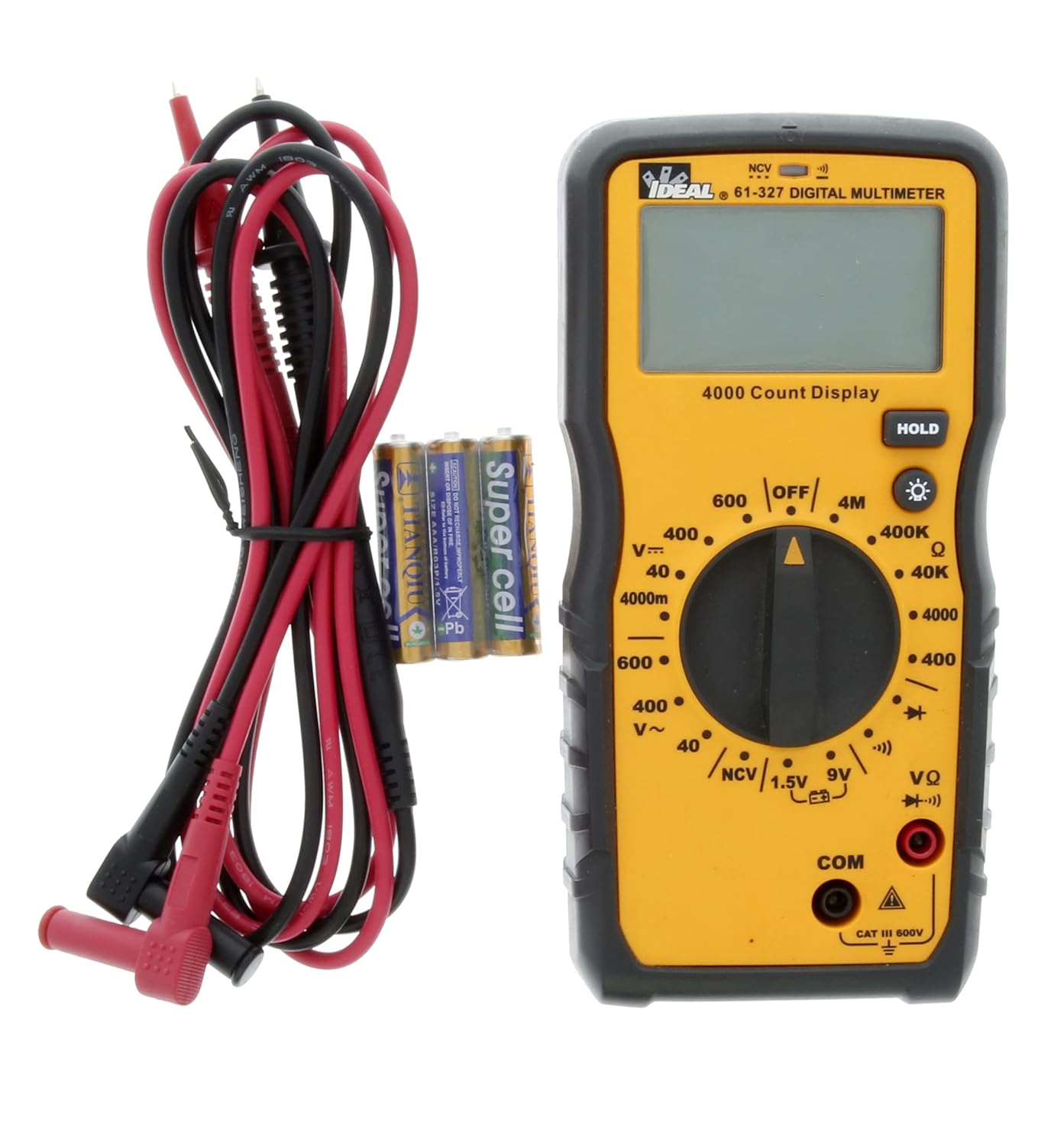
Figure 5.1: The multimeter shown with its test leads and batteries, ready for initial setup. The black lead connects to COM, and the red lead connects to VΩ.
6. Operating Instructions
This section details how to perform various measurements using the 61-327 Multimeter.
6.1 Measuring AC/DC Voltage
- Turn the rotary switch to the desired AC Voltage (V~) or DC Voltage (V=) range. Select a range higher than the expected voltage.
- Connect the black test lead to the "COM" jack and the red test lead to the "VΩ" jack.
- Connect the test probes in parallel to the circuit or component you wish to measure.
- Read the voltage value on the display.
6.2 Measuring Resistance (Ω)
- WARNING: Ensure the circuit is de-energized and all capacitors are discharged before measuring resistance.
- Turn the rotary switch to the desired Resistance (Ω) range.
- Connect the black test lead to the "COM" jack and the red test lead to the "VΩ" jack.
- Connect the test probes across the component where resistance is to be measured.
- Read the resistance value on the display.
6.3 Continuity Test
- WARNING: Ensure the circuit is de-energized before performing a continuity test.
- Turn the rotary switch to the Continuity (•))) position.
- Connect the black test lead to the "COM" jack and the red test lead to the "VΩ" jack.
- Touch the test probes to the two points you want to check for continuity.
- An audible tone indicates continuity (low resistance). The display will show the resistance value.
6.4 Diode Test
- WARNING: Ensure the circuit is de-energized before performing a diode test.
- Turn the rotary switch to the Diode (→|) position.
- Connect the black test lead to the "COM" jack and the red test lead to the "VΩ" jack.
- Connect the red test probe to the anode and the black test probe to the cathode of the diode.
- The display will show the forward voltage drop. Reverse the probes; the display should show "OL" (Open Loop) for a good diode.
6.5 Battery Test (1.5V / 9V)
- Turn the rotary switch to the 1.5V or 9V battery test position.
- Connect the black test lead to the "COM" jack and the red test lead to the "VΩ" jack.
- Connect the red test probe to the positive terminal of the battery and the black test probe to the negative terminal.
- Read the battery voltage on the display.
6.6 Non-Contact Voltage (NCV) Sensing
The NCV function allows for detection of AC voltage without direct contact with conductors.
- Turn the rotary switch to the NCV position.
- Move the top tip of the multimeter near the conductor or outlet to be tested.
- The meter will emit an audible tone and an illuminated red LED will flash when AC voltage is detected. The display may show "EF" or similar indication.

Figure 6.1: The multimeter being used to perform a Non-Contact Voltage (NCV) test near an electrical outlet. The display shows "EF" indicating voltage detection.
6.7 Using the HOLD Function
Press the "HOLD" button to freeze the current reading on the display. Press it again to release the hold and resume live readings.
6.8 Using the Backlight
Press the backlight button (light bulb icon) to illuminate the display for better visibility in dark conditions. Press it again to turn off the backlight.
7. Maintenance
7.1 Cleaning
Wipe the meter with a damp cloth and mild detergent. Do not use abrasives or solvents. Ensure the meter is completely dry before use.
7.2 Battery Replacement
Refer to Section 5.1 for instructions on battery installation and replacement. Always replace all three AAA batteries at the same time.
7.3 Test Lead Inspection
Regularly inspect test leads for any signs of damage, such as cuts, cracks, or frayed insulation. Replace damaged leads immediately to prevent electric shock.
8. Troubleshooting
| Problem | Possible Cause | Solution |
|---|---|---|
| Meter does not power on. | Dead or incorrectly installed batteries. | Check battery polarity; replace batteries (refer to Section 5.1). |
| "OL" (Overload) displayed. | Measurement exceeds selected range or open circuit. | Select a higher range or check for an open circuit in the component/wiring. |
| Inaccurate readings. | Low battery, incorrect range selection, or damaged test leads. | Replace batteries, select appropriate range, inspect and replace test leads if damaged. |
| No continuity tone. | Open circuit or high resistance. | Verify the circuit is closed; check for breaks in wiring or components. |
9. Specifications
Key technical specifications for the IDEAL Electrical 61-327 Multimeter:
- Model Number: 61-327
- Measurement Type: Manual Range Digital Multimeter
- Safety Rating: UL certified CAT III 600V AC/DC
- AC Voltage: Up to 600V
- DC Voltage: Up to 600V
- Resistance: Up to 4MΩ (4000kΩ)
- Continuity: Audible tone and resistance display
- Diode Test: Yes
- Battery Test: 1.5V, 9V
- Non-Contact Voltage (NCV): Yes
- Display: Backlit, 4000 Count
- Power Source: 3 x 1.5V AAA Batteries
- Auto Power Off: Selectable
- Hold Function: Yes
- Dimensions: Approximately 9.09 x 6.18 x 3.35 inches
- Weight: Approximately 1.1 Pounds
- Color: Yellow
- Manufacturer: Ideal Industries

Figure 9.1: A comparison table of various IDEAL digital multimeters, including the 61-327, detailing their features and specifications. This table provides a quick overview of the 61-327's capabilities relative to other models.
10. Warranty and Support
For warranty information, technical support, or service inquiries, please contact IDEAL Industries directly. Refer to the official IDEAL website or the product packaging for the most current contact details.
Additional resources, including a downloadable PDF user manual, may be available on the IDEAL Store on Amazon or the manufacturer's official website.


