
Paingone Fllow
Paingone Fllow EMS Medical Device User Manual
Model: Fllow | Brand: Paingone
Introduction
The Paingone Fllow is a drug-free medical device designed to improve blood circulation and provide temporary relief for tired, aching, painful legs and feet. It also helps reduce swelling and cramping, and can relieve knee joint pain. This manual provides detailed instructions for safe and effective use of your Fllow device.

Figure 1: Paingone Fllow EMS Medical Device and its packaging.
Safety Information
It is crucial to read and understand all safety information before using the Paingone Fllow device. Failure to do so may result in injury or device malfunction.
- Consult with a healthcare professional if pregnant or nursing.
- Use only as directed in this manual.
- Do not use the device on broken or irritated skin.
- Keep out of reach of children.
- Statements regarding dietary supplements have not been evaluated by the FDA and are not intended to diagnose, treat, cure, or prevent any disease or health condition.
- If you have suspected or confirmed epilepsy or heart disease, consult your doctor before use.
- Do not use if you have a pacemaker or other implanted electrical device.
- Do not use if you have undergone recent surgery or fractures, or are recovering from surgery.
What's in the Box
Verify that all components are present in your Paingone Fllow package:
- 1x Fllow Device (Main Unit)
- 1x Wireless Remote Control
- 1x Foot Cover
- 2x TENS Electrode pads
- 2x Connecting cables for TENS pads
- 1x Power Adaptor
- 1x Instruction Manual (this document)

Figure 2: Packaging side indicating included items.
Setup
Follow these steps to set up your Paingone Fllow device for first use:
- Charge the Device: Connect the power adapter to the Fllow device's magnetic power port and plug it into a wall outlet. The magnetic connection ensures easy and secure attachment. Allow the device to fully charge before initial use. The remote control also has a rechargeable battery and can be charged by placing it in its cradle on the main unit.

Figure 3: Connecting the magnetic power cable for charging.
- Position the Device: Place the Fllow device on a flat, stable surface where you can comfortably sit or recline. Ensure there is enough space for your legs and feet.
- Adjust for Comfort (Optional): The Fllow device features built-in legs that allow you to adjust its angle for maximum comfort, especially when reclining on a bed or couch. Extend these legs as needed.
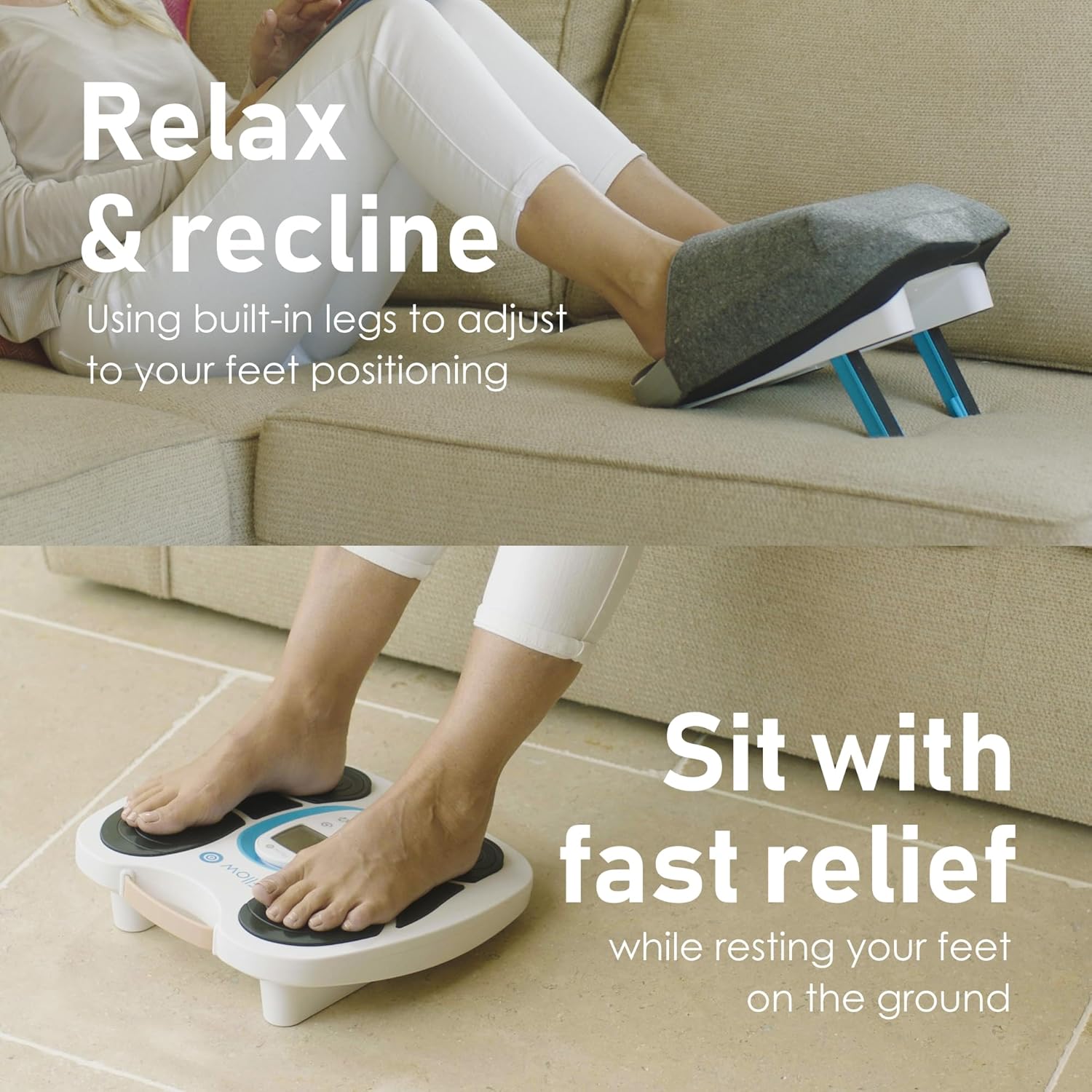
Figure 4: Fllow's 'Relax & Recline' feature for comfortable use.
Operating Instructions
The Paingone Fllow is designed for ease of use with its intuitive remote control.
Basic Operation (Feet & Legs)
- Power On: Press the power button on the main unit or the remote control to turn on the device. The screen on the remote will illuminate.
- Place Your Feet: Sit comfortably and place your bare feet on the designated footpads of the Fllow device. Ensure full contact for optimal stimulation.
- Select Mode: Use the remote control to select your desired therapy mode. The Fllow offers 3 main modes:
- Feet and Legs Mode: For general circulation stimulation in the lower limbs.
- Knee Pain Mode (with Arthro-Fllow pads): For targeted relief around the knee.
- Other Painful Areas Mode (with TENS pads): For localized pain relief on various body parts.
- Adjust Intensity: Use the '+' and '-' buttons on the remote to adjust the intensity level. The Fllow offers 150 intensity levels, allowing for gentle stimulation to powerful pulses. Start with a low intensity and gradually increase until you find a comfortable and effective level.
- Choose Waveform Patterns: The device includes 25 Opti-Fllow waveform patterns. Use the cycle button on the remote to cycle through these patterns and customize your program for varied stimulation.
- Set Session Time: Use the timer button on the remote to set the duration of your therapy session.
- Power Off: Once your session is complete, press the power button to turn off the device.

Figure 5: Overview of Fllow Expert features and remote control functions.
Video 1: An introductory video demonstrating the Paingone Fllow Expert for healthy legs and feet, showing its general use and benefits.
Video 2: Detailed video instructions for setting up and operating the Paingone Fllow Expert device, including various modes and features.
Additional Therapy Modes (TENS & Arthro-Fllow Pads)
The Fllow device comes with additional pads to expand your therapy options. These can be used simultaneously with the main footpad therapy.
- Connect Pads: Plug the connecting cables into the designated ports on the Fllow device. Attach the TENS or Arthro-Fllow pads to the other end of the cables.
- Apply Pads:
- Arthro-Fllow Pads: These are specifically designed for pain relief associated with arthritis of the knee. Apply them directly to the skin around your knee joint.
- TENS Pads: These can be applied to almost any other painful area of the body (e.g., back, arms, shoulders) for localized pain relief.

Figure 6: Fllow device shown with the included TENS and Arthro-Fllow pads.
- Adjust Settings: Use the remote control to adjust the intensity and waveform patterns for the connected pads independently or in conjunction with the footpad therapy.

Figure 7: Diagram illustrating the various therapy modes for feet, knees, and other body areas.
Maintenance
Proper maintenance ensures the longevity and optimal performance of your Paingone Fllow device.
- Cleaning: Wipe the device and footpads with a soft, damp cloth after each use. Do not use abrasive cleaners or immerse the device in water.
- Pad Care: The TENS and Arthro-Fllow pads are reusable. Clean them gently with a damp cloth and store them on their protective film after use to maintain their adhesive quality. Replace pads when they lose their stickiness.
- Foot Cover: The included foot cover can be removed and cleaned according to its care label. It helps keep feet warm during use, as bare feet are required for optimal contact with the footpads.

Figure 8: The convenient and comfortable foot cover for the Fllow device.
- Storage: Store the device in a cool, dry place away from direct sunlight and extreme temperatures.
Troubleshooting
If you encounter issues with your Paingone Fllow device, refer to the following common problems and solutions:
| Problem | Possible Cause | Solution |
|---|---|---|
| Device does not turn on. | Low battery; Power adapter not connected properly. | Charge the device fully. Ensure the power adapter is securely connected to both the device and the power outlet. |
| No sensation or weak sensation. | Feet not making full contact; Intensity too low; Pads not properly applied (if using); Pads are worn out. | Ensure bare feet are fully on the footpads. Increase intensity using the remote. If using pads, ensure they are firmly attached to clean, dry skin. Replace worn-out pads. |
| Remote control not responding. | Remote battery low; Remote not paired with device. | Place the remote in its cradle on the main unit to charge. If issues persist, refer to the pairing instructions in the full manual (if available). Use the "Find My Remote" button on the main unit if applicable. |
| Discomfort during use. | Intensity too high; Incorrect mode/waveform. | Reduce the intensity. Try a different waveform pattern or mode that feels more comfortable. Ensure skin is clean and moisturized if dry. |
Specifications
- Product Dimensions: 15.5 x 15.25 x 4.75 inches
- Item Weight: 6.45 Pounds
- Model Number: Fllow
- Brand: Paingone
- Color: White
- Power Source: Battery Powered (Rechargeable)
- Intensity Levels: 150
- Waveform Patterns: 25 Opti-Fllow
- Battery Life: Up to 36 hours (main unit)
- Manufacturer: Quality Health Innovations Ltd
- ASIN: B0BSMKKSMF
- First Available Date: January 18, 2023
Warranty and Support
For warranty information and customer support, please refer to the official Paingone website or contact their customer service directly. Keep your purchase receipt as proof of purchase for any warranty claims.
Manufacturer: Quality Health Innovations Ltd
Website: www.paingone.com (Please check the official website for the most up-to-date contact and warranty details.)