
NANLITE FORZA300II
Nanlite Forza 300 II LED Spotlight User Manual
Model: FORZA300II
Introduction
The Nanlite Forza 300 II is a powerful and versatile LED spotlight designed for professional photography and videography. It features a 5600K daylight-balanced output, advanced control options including Bluetooth app control and DMX, and built-in special effects. Its compact design and AC/battery power capabilities make it suitable for various production environments.
Safety Information
Please read this manual carefully before using the product to ensure proper operation and to prevent damage or injury. Keep this manual for future reference.
- Do not look directly into the light source when the fixture is powered on.
- Do not operate the fixture in wet or damp conditions.
- Ensure proper ventilation to prevent overheating.
- Use only approved power adapters and accessories.
- Keep out of reach of children.
- Disconnect power before cleaning or maintenance.
Package Contents
Verify that all items are included in your package:
- Forza 300 II LED Spotlight Fixture
- Control Unit
- Connecting Cable
- Power Cable
- Reflector
- Carrying Bag
- User Manual
Product Overview
Familiarize yourself with the main components of the Nanlite Forza 300 II.
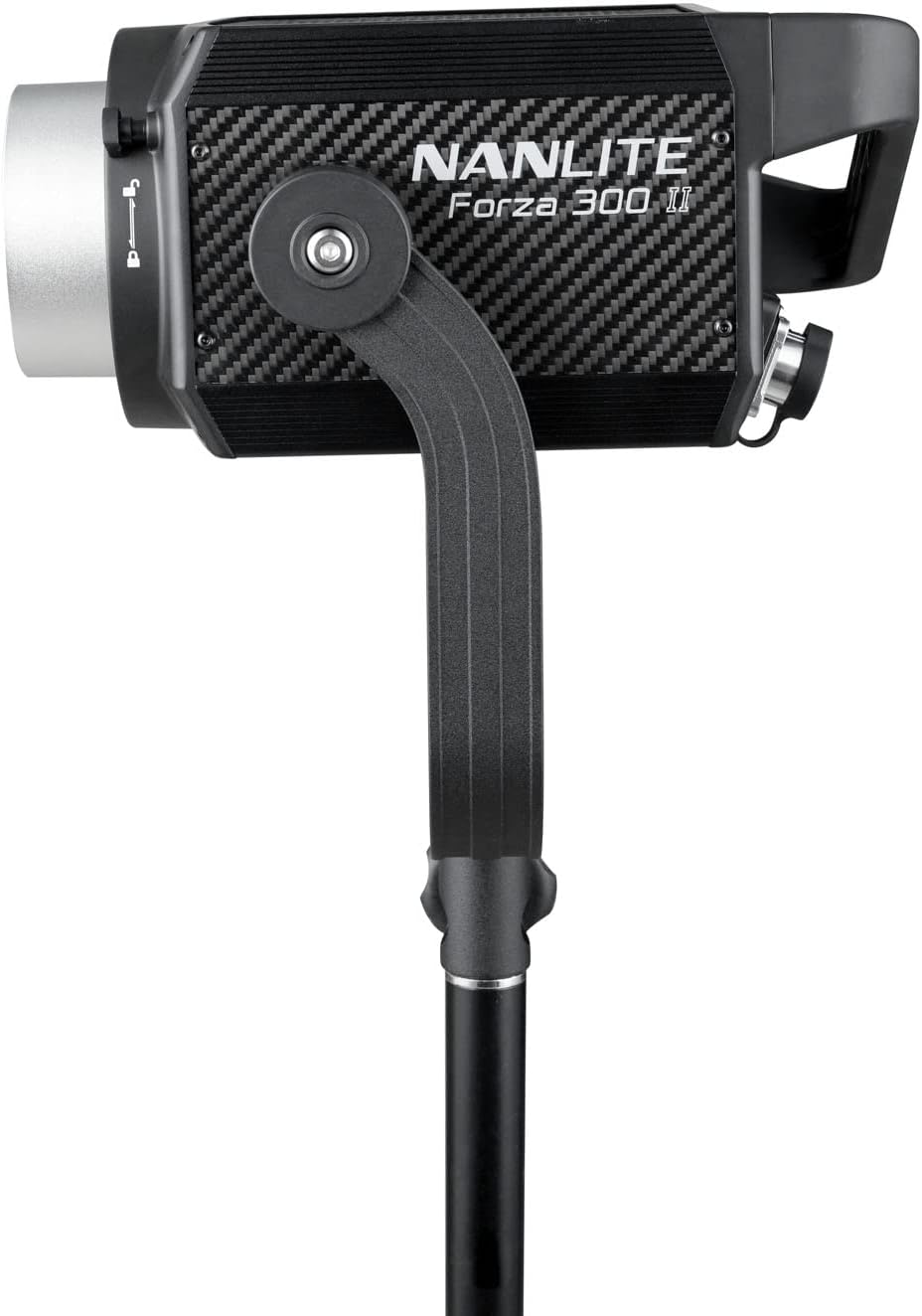
Figure 1: Front view of the Forza 300 II LED Spotlight, showing the light head with its yoke and stand mounting bracket.

Figure 2: The Forza 300 II Control Unit, featuring a display screen, control knobs for brightness and effects, and function buttons.

Figure 3: Rear view of the Forza 300 II Control Unit, highlighting the DMX input/output ports, power input, and output connections to the light fixture.
Key Components:
- Light Fixture: The main LED light source with Bowens mount for accessories.
- Control Unit: External unit housing the power supply, display, and control interface.
- Yoke: Adjustable bracket for mounting the light fixture onto a light stand.
- Quick-Release Clamp: Durable and versatile clamp for secure mounting.
Setup
Follow these steps for initial setup of your Forza 300 II.
- Mount the Light Fixture: Attach the Forza 300 II light fixture to a sturdy light stand using the integrated yoke and quick-release clamp. Ensure it is securely tightened.
- Connect the Control Unit: Connect the light fixture to the control unit using the provided connecting cable. Align the connectors and twist to lock them securely.
- Power Connection:
- AC Power: Connect the power cable to the control unit's AC input and then to a suitable power outlet (100-240V AC).
- Battery Power: For portable operation, insert compatible V-mount batteries into the battery plates on the control unit. The unit can run on one battery for extended life.
- Attach Reflector: Align the reflector with the Bowens mount on the front of the light fixture and twist clockwise until it locks into place.

Figure 4: The Forza 300 II light fixture connected to its control unit, demonstrating the power and data cable connections.
Operating Instructions
Learn how to operate your Forza 300 II for optimal performance.
1. Power On/Off
Locate the power switch on the control unit and flip it to the "ON" position to power on the light. Flip to "OFF" to power down.
2. Basic Operation
- Brightness Adjustment: Use the dedicated knob on the control unit to adjust the light intensity from 0% to 100%.
- G/M Adjustment: The W(RG) LED light source allows for Green-to-Magenta shift adjustment by +/- 80. Access this setting via the menu.
3. Control Modes
- On-Board Control: Use the display and knobs on the control unit for direct adjustments.
- Bluetooth App Control: Download the free NANLINK app for iOS & Android. Pair your device via Bluetooth for comprehensive control over settings, effects, and firmware updates.
- DMX/RDM: Connect to a DMX console using the locking DMX ports for professional studio integration. Refer to the DMX chart in the appendix (not included in this manual) for channel assignments.
- 2.4G Wireless Control: Compatible with the optional WS-RC-C2 Remote Control and WS-TB-1 Transmitter Box (sold separately).
4. Special Effects
The Forza 300 II includes built-in practical effects. Press the "EFFECT" button on the control unit to cycle through or select effects such as:
- Flash
- Pulse
- Storm
- TV
- Paparazzi
- Faulty Bulb
- Candle
- Fire
- Explosion
- Welding
Adjust parameters for each effect using the control knobs.
Maintenance
Proper maintenance ensures the longevity and optimal performance of your Forza 300 II.
- Cleaning: Use a soft, dry cloth to clean the exterior of the light fixture and control unit. Do not use harsh chemicals or abrasive materials.
- Ventilation: Ensure the fan vents are clear of dust and obstructions to maintain efficient cooling. The Forza 300 II features a quieter fan design.
- Storage: When not in use, store the light in its carrying bag in a cool, dry place, away from direct sunlight and excessive humidity.
- Cable Care: Avoid sharp bends or kinks in the power and connecting cables. The included cables are substantially longer and designed for durability.
Troubleshooting
If you encounter issues with your Forza 300 II, refer to the following common problems and solutions.
| Problem | Possible Cause | Solution |
|---|---|---|
| Light does not turn on. | No power, loose cable, faulty power supply. | Check power cable connection. Ensure AC outlet is working. If using batteries, check battery charge level and ensure they are properly seated. |
| Light flickers or is unstable. | Loose cable connection, power fluctuations, DMX signal issue. | Secure all cable connections. Try a different power outlet. If using DMX, check DMX cable and console settings. |
| Bluetooth connection fails. | Bluetooth not enabled, app issue, interference. | Ensure Bluetooth is enabled on the control unit and your mobile device. Restart the NANLINK app. Move closer to the light fixture. |
| Overheating warning. | Blocked vents, high ambient temperature. | Ensure fan vents are clear. Operate in a well-ventilated area. Allow the unit to cool down. |
Specifications
| Feature | Detail |
|---|---|
| Product Dimensions | 13 x 9 x 4.84 inches |
| Item Weight | 26.3 pounds |
| Item Model Number | FORZA300II |
| Brand | NANLITE |
| Connectivity Technology | Bluetooth |
| Flash Modes Description | Constant illumination, adjustable brightness, adjustable color temperature |
| Hardware Interface | Bluetooth |
| Manufacturer | Nanlite |
| Color Temperature | 5600K (Daylight) |
| CRI | 96 |
| TLCI | 97 |
| SSI | 73 |
| Output (1 meter) | 69400 Lux, 6447.4 fc |
Warranty and Support
Nanlite products typically come with a limited warranty. Please refer to the warranty card included with your product or visit the official Nanlite website for detailed warranty terms and conditions.
For technical support, service, or inquiries, please contact Nanlite customer service through their official website or authorized distributors. Keep your purchase receipt as proof of purchase for warranty claims.
Official Nanlite Website: www.nanlite.com
Related documentsFORZA300II


Ask a question about this manual
Ask about setup, troubleshooting, compatibility, parts, safety, or missing instructions. Manuals+ will review the question and use this page’s manual context to help answer it.