
Introduction
Thank you for choosing the LUBAIR 8,000 BTU Portable Air Conditioner. This versatile 3-in-1 unit provides powerful cooling, effective dehumidification, and efficient air circulation as a fan, designed to keep your space comfortable. Its portable design with built-in wheels and handles allows for easy movement between rooms, making it ideal for areas up to 300 sq.ft. Please read this manual thoroughly before operation to ensure proper use, maintenance, and safety.

Figure 1: LUBAIR Portable Air Conditioner Unit

Figure 2: Key Performance Metrics of the Portable AC

Figure 3: Versatile Application of the Portable AC in Different Spaces
Safety Information
Always follow basic safety precautions when using electrical appliances to reduce the risk of fire, electric shock, and injury.
- Read all instructions before using the appliance.
- Ensure the power supply matches the voltage specified on the unit's rating label.
- Do not operate the unit with a damaged cord or plug.
- Keep the unit away from heat sources and direct sunlight.
- Do not block air inlets or outlets.
- Always unplug the unit before cleaning or servicing.
- Do not allow children to operate the unit unsupervised. The unit features a child lock function for added safety.
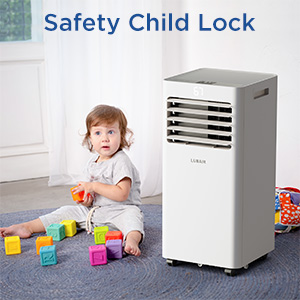
Figure 4: Safety Child Lock Feature
What's in the Box
Carefully unpack your LUBAIR Portable Air Conditioner and check that all items are present and undamaged:
- Portable Air Conditioner Unit
- Window and Exhaust Duct Installation Kit (includes slider bracket, air exhaust hose, hose inlet and outlet, locking screws)
- Drain Hose
- Remote Control
- User Manual (this document)

Figure 5: Package Contents
Setup
The LUBAIR Portable Air Conditioner is designed for easy installation and mobility. Follow these steps for initial setup:
1. Positioning the Unit
Place the unit on a flat, stable surface. Its 4 rotatable wheels and 2 built-in handles allow for easy movement to any room with a double-hung or sliding window.
Video 1: Demonstrates the easy mobility of the LUBAIR portable air conditioner, highlighting its wheels and handles.
2. Window Kit Installation
The window kit is essential for exhausting hot air outside. It is compatible with both vertically hanging and horizontal sliding windows.
- Connect the hose connector to one end of the exhaust hose.
- Connect the window kit connector to the other end of the exhaust hose.
- Measure your window size to adjust the length of the window kit slider bracket (30"-50" range).
- Fix the hose connector on the air outlet of the machine.
- Adjust the length of the exhaust hose and connect it to the window assembly.
- Plug in the power and set the temperature you want to enjoy.

Figure 6: Quick and Easy Installation Guide for Window Kit
Video 2: Step-by-step guide on how to set up the air conditioner with the window kit.
Operating Instructions
The LUBAIR Portable AC features an easy-to-operate digital display and a convenient remote control. All functions can be accessed from either the top control panel or the remote.

Figure 7: Easy Panel and Remote Control Overview
Video 3: Demonstrates the functions of the portable air conditioner's display and controls, including mode selection, speed, timer, and sleep mode.
Modes of Operation (3-in-1 Function)
- Cool Mode: Provides powerful cooling for rooms up to 300 sq.ft, with a temperature range of 63°F-86°F.
- Dry (Dehumidifier) Mode: Removes excess moisture from the air, improving comfort and preventing mold growth.
- Fan Mode: Circulates air without cooling, ideal for light ventilation.

Figure 8: Understanding the 3-in-1 Functions
Fan Speed Settings
Choose between two fan speed settings: High and Low, to adjust airflow intensity.

Figure 9: Airflow Capacity
Timer Function
The 24-hour on/off timer allows you to pre-set the unit to turn on or off at specific times, optimizing energy usage and convenience.
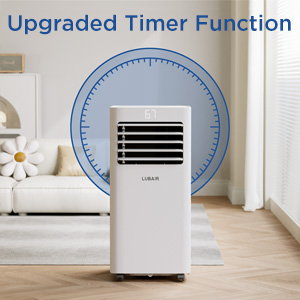
Figure 10: Upgraded Timer Function
Sleep Mode
Activate Sleep Mode for quiet operation (≤54dB) and a comfortable environment during the night, ensuring undisturbed rest.

Figure 11: Low Noise and Sleep Mode Benefits
Maintenance
Regular maintenance ensures optimal performance and longevity of your air conditioner.
Cleaning the Washable Air Filter
The rear filter can be easily removed for cleaning. Regular cleaning ensures fresh air and protects against dust and pet dander.
- Turn off and unplug the unit before cleaning.
- Remove the filter from the rear of the unit.
- Wash the filter with warm, soapy water.
- Rinse thoroughly and allow it to air dry completely before reinserting.
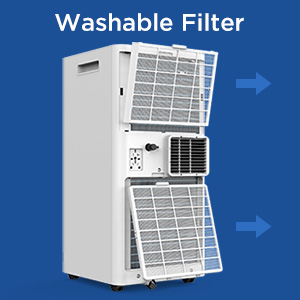
Figure 12: Washable Filter Removal
Draining the Unit
The unit has two drainage options for collected condensate:
- Continuous Drainage: Connect the included drain hose to the continuous drain port for constant water removal, especially useful in high humidity environments.
- Manual Drainage: For occasional drainage, remove the drain plug from the lower drain port and allow water to collect in a suitable container.

Figure 13: Two Ways to Drain the Unit
Troubleshooting
If you encounter issues with your LUBAIR Portable Air Conditioner, refer to the table below for common problems and solutions. If the problem persists, please contact customer service.
| Problem | Possible Cause | Solution |
|---|---|---|
| Unit does not turn on | No power; Power cord unplugged; Circuit breaker tripped | Check power outlet; Ensure plug is fully inserted; Reset circuit breaker |
| Unit not cooling effectively | Air filter dirty; Exhaust hose not properly installed; Room too large; Doors/windows open | Clean air filter; Reinstall exhaust hose securely; Ensure room size is within specifications; Close all doors and windows |
| Water leakage | Drain plug loose; Drain hose clogged or improperly connected; Water tank full (if not continuously draining) | Ensure drain plug is secure; Check drain hose for kinks/blockages; Empty water tank or set up continuous drainage |
| Unit is noisy | Unit not on a level surface; Fan speed too high; Obstruction in fan/air path | Place unit on a level surface; Reduce fan speed; Check for and remove any obstructions |
Specifications
| Feature | Specification |
|---|---|
| Brand | LUBAIR |
| Model Info | AIR-DW160 |
| Cooling Capacity | 8,000 BTU (ASHRAE) |
| Cooling Area | Up to 300 sq.ft |
| Functions | Cool, Dry (Dehumidifier), Fan |
| Noise Level | ≤54 dB |
| Voltage | 120 Volts |
| Wattage | 804 watts |
| Item Weight | 51.9 pounds |
| Product Dimensions (D x W x H) | 11.4 x 11.4 x 27.6 inches |
| Water Tank Capacity | 8.5 Liters |
| Installation Type | Window (with included kit) |

Figure 14: Product Dimensions
Warranty and Support
LUBAIR is committed to providing high-quality products and excellent customer service.
- 30-Day Free Return: If you are not satisfied with your purchase, you may return it within 30 days for a full refund.
- 365-Day Full Warranty: The unit is covered by a 365-day full warranty from the date of purchase.
- 5-Year Limited Warranty: A 5-year limited warranty applies to the refrigeration system. Please note that man-made damage is excluded from warranty coverage.
For any questions or concerns regarding your LUBAIR air conditioner, please contact customer service directly. We aim to reply to all inquiries within 24 hours.

Figure 15: Warranty Details


