
GROWATT VITA 550
GROWATT VITA550 Portable Power Station User Manual
Model: VITA 550 | Brand: GROWATT
1. Introduction
The GROWATT VITA550 is a compact and powerful portable power station designed to provide reliable electricity for various applications, from outdoor adventures to home backup during power outages. Featuring a durable LiFePO4 battery, multiple output ports, and fast charging capabilities, it offers a versatile energy solution.

Figure 1.1: GROWATT VITA550 Portable Power Station and included 200W Solar Panel.
2. Safety Instructions
Please read and understand all safety instructions before operating the VITA550. Failure to follow these instructions may result in electric shock, fire, or serious injury.
- Do not disassemble, repair, or modify the unit.
- Keep the unit away from heat sources, direct sunlight, and flammable materials.
- Ensure proper ventilation during use and charging.
- Do not expose the unit to water or excessive humidity.
- Keep out of reach of children and pets.
- Use only original or certified accessories.
3. Package Contents
Verify that all items are included in your package:
- 1 x VITA 550 Portable Power Station
- 1 x 200W Solar Panel
- 1 x AC Charging Cable (1.8m)
- 1 x Solar Panel Charging Cable
- 1 x User Manual and Warranty Card
4. Product Overview
The VITA550 is designed for ease of use and portability. It features a clear display, multiple ports, and a robust build.
4.1. Main Features
- Compact and Portable: Weighs only 17.99 lbs with a foldable handle for easy transport.
- Versatile Outputs: Equipped with USB-A, USB-C, car outlets, DC5521, wireless charging, and standard AC outlets.
- Fast Charging: Recharges from 0-100% in 1.6 hours via wall socket.
- Long Lifespan: Utilizes EV-grade LiFePO4 battery cells for over 3000 cycles.
- Uninterruptible Power Supply (UPS): Features 20ms switchover capability for critical devices.
- Built-in LED Light: Provides ambient and SOS lighting.
4.2. Informative Display

Figure 4.1: The VITA550's display provides real-time information on battery capacity, current input/output, estimated recharge/use time, and system alerts.
4.3. Input and Output Ports

Figure 4.2: The VITA550 offers a comprehensive array of 11 output ports, including AC, DC, USB-A, USB-C, car outlets, and wireless charging.
5. Setup
Before first use, it is recommended to fully charge your VITA550.
5.1. Charging the VITA550
The VITA550 supports multiple charging methods:
- AC Wall Charging: Connect the included AC charging cable to the unit's AC input port and then to a standard wall outlet. The VITA550 can charge from 0-100% in approximately 1.6 hours thanks to its bi-directional inverter technology.
- Solar Charging: Connect the 200W solar panel (included) to the unit's solar input port using the provided solar charging cable. Optimal charging time is approximately 2.5 hours under ideal sunlight conditions due to 99% MPPT efficiency.
- Car Charging: Use a 12V car charger (not included) to charge the unit from your vehicle's cigarette lighter port.

Figure 5.1: The VITA550 features rapid AC charging, reaching full capacity in 1.6 hours.

Figure 5.2: Efficient solar charging allows the VITA550 to be fully charged in 2.5 hours.
Video 5.1: Demonstrates the GROWATT VITA550 Portable Solar Generator in a camping setting, highlighting its solar charging capabilities.
6. Operating the VITA550
The VITA550 is designed for intuitive operation, allowing you to power various devices efficiently.
6.1. Powering Devices
Simply plug your devices into the appropriate AC, DC, or USB ports. Ensure the power station is turned on and the specific output (AC/DC) is activated if necessary.
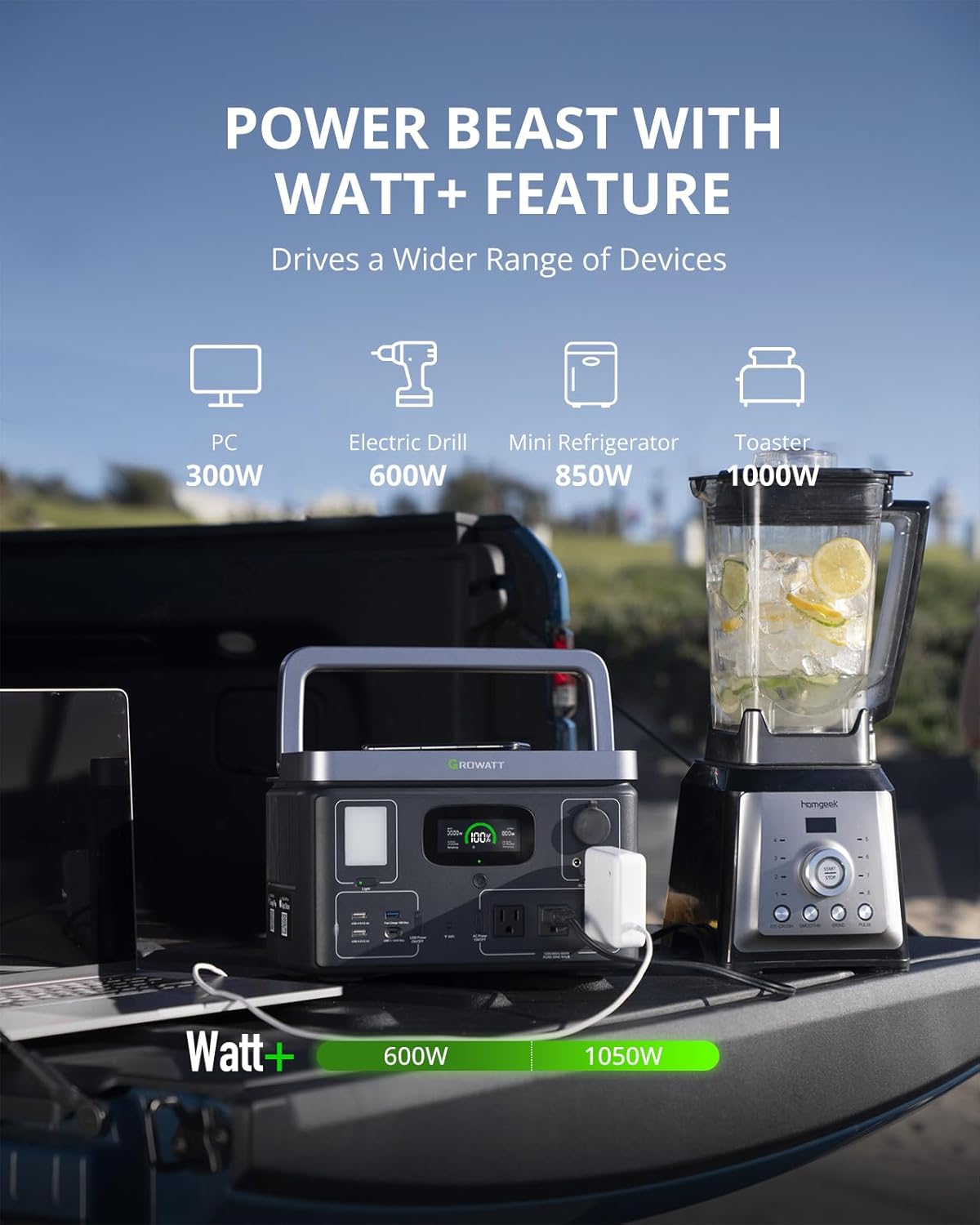
Figure 6.1: The VITA550 can power up to 11 devices simultaneously.
6.2. Watt+ Feature
The Watt+ feature allows the VITA550 to power devices requiring more than its rated 600W AC output, up to 1050W, by dynamically adjusting the output voltage. This is ideal for resistive loads like kettles or toasters.

Figure 6.2: The Watt+ feature enables the VITA550 to drive a wider range of high-wattage appliances.
6.3. Wireless Charging
Place your Qi-compatible smartphone on the designated wireless charging pad on top of the unit for convenient charging.

Figure 6.3: Enjoy effortless wireless charging for compatible devices.
6.4. Built-in LED Light
The VITA550 includes a powerful LED light with adjustable brightness and an SOS flashing mode for emergencies.

Figure 6.4: The integrated LED light provides versatile illumination for various situations.
6.5. App Control
Monitor and control your VITA550 remotely via the dedicated GROWATT app, available for both iOS and Android devices. The app allows for real-time status display, power on/off control for outlets, and personalized settings.

Figure 6.5: Manage your VITA550 conveniently through the GROWATT mobile application.
6.6. Uninterruptible Power Supply (UPS) Functionality
When connected to a wall outlet and devices are plugged into its AC outputs, the VITA550 can act as a Plug&Play UPS. In case of a power outage, it automatically switches to battery power within 20ms, ensuring continuous operation for critical devices like computers or servers.

Figure 6.6: The VITA550 provides reliable backup power with its rapid UPS switchover.
Video 6.1: An overview of the Growatt VITA 550, showcasing its compact size and various possibilities for use.
7. Maintenance
Proper maintenance ensures the longevity and optimal performance of your VITA550.
7.1. Battery Care
The VITA550 uses EV-grade LiFePO4 battery cells, known for their long lifespan of over 3000 cycles, which translates to 8-10 years of typical use. To maximize battery life:
- Avoid fully discharging the battery frequently.
- Store the unit in a cool, dry place when not in use.
- Recharge the unit to 50-80% every 3-6 months if stored for extended periods.

Figure 7.1: LiFePO4 batteries offer significantly more charge cycles and a longer lifespan compared to NMC batteries.
7.2. Cleaning and Storage
- Wipe the unit with a dry, soft cloth. Do not use abrasive cleaners or solvents.
- Ensure the unit is completely dry before storing.
- Store in a well-ventilated area, away from direct sunlight and extreme temperatures.
8. Troubleshooting
If you encounter issues with your VITA550, refer to the following common problems and solutions:
| Problem | Possible Cause | Solution |
|---|---|---|
| Unit not turning on | Battery fully discharged; Power button not pressed correctly. | Charge the unit; Press and hold the power button for 3 seconds. |
| AC output not working | AC output not enabled; Overload protection activated. | Press the AC output button to enable; Reduce load, then restart AC output. |
| Slow charging via solar panel | Insufficient sunlight; Panel not optimally angled; Dirty panel. | Ensure direct sunlight; Adjust panel angle; Clean panel surface. |
| Wireless charging not working | Phone not Qi-compatible; Phone not placed correctly; Obstruction. | Check phone compatibility; Reposition phone; Remove case or foreign objects. |
If the problem persists, please contact GROWATT customer support.
9. Specifications
| Feature | Specification |
|---|---|
| Brand | GROWATT |
| Model Name | VITA 550 |
| Battery Type | LiFePO4 |
| Battery Capacity | 538Wh |
| AC Output (Rated) | 600W |
| AC Output (Watt+) | 1050W |
| Max Solar Input | 240W |
| AC Charging Time (0-100%) | 1.6 hours |
| Solar Charging Time (0-100%) | 2.5 hours (with 200W solar panel) |
| Item Weight | 17.99 Pounds |
| Product Dimensions | 12.2"L x 8.4"W x 7.8"H |
| Total Power Outlets | 11 |
| Certification | ETL Listed |
10. Warranty and Support
The GROWATT VITA550 Portable Power Station comes with a 2-Year Warranty. For warranty claims, technical support, or any inquiries, please refer to the contact information provided in your Warranty Card included in the package.
You can also visit the official GROWATT store on Amazon for more information and support: GROWATT Amazon Store.
A digital version of this user manual is available for download: Download User Manual (PDF).
Related documentsVITA 550


Ask a question about this manual
Ask about setup, troubleshooting, compatibility, parts, safety, or missing instructions. Manuals+ will review the question and use this page’s manual context to help answer it.