Introduction
This manual provides comprehensive instructions for the Meliconi Gumbody Personal 2+ Remote Control, designed as a dedicated replacement for LG brand TV remote controls. It is ready to use without programming and offers all original infrared functions. The remote features an ergonomic design with an anti-shock rubber body for enhanced durability.

Image: The Meliconi Gumbody Personal 2+ Remote Control, black with various function buttons.
Setup
The Meliconi Gumbody Personal 2+ Remote Control is designed for immediate use with LG brand televisions. No complex programming or setup is required.
- Insert Batteries: Open the battery compartment cover on the back of the remote control. Insert two AAA batteries, ensuring correct polarity (+/-).
- Ready to Use: Close the battery compartment. The remote control is now ready to operate your LG TV.

Image: The Meliconi Gumbody Personal 2+ Remote Control shown in its packaging, highlighting its "Ready to Use" feature.
Operating Instructions
This remote control replicates all essential infrared functions of your original LG TV remote. Refer to the button layout below for specific functions.
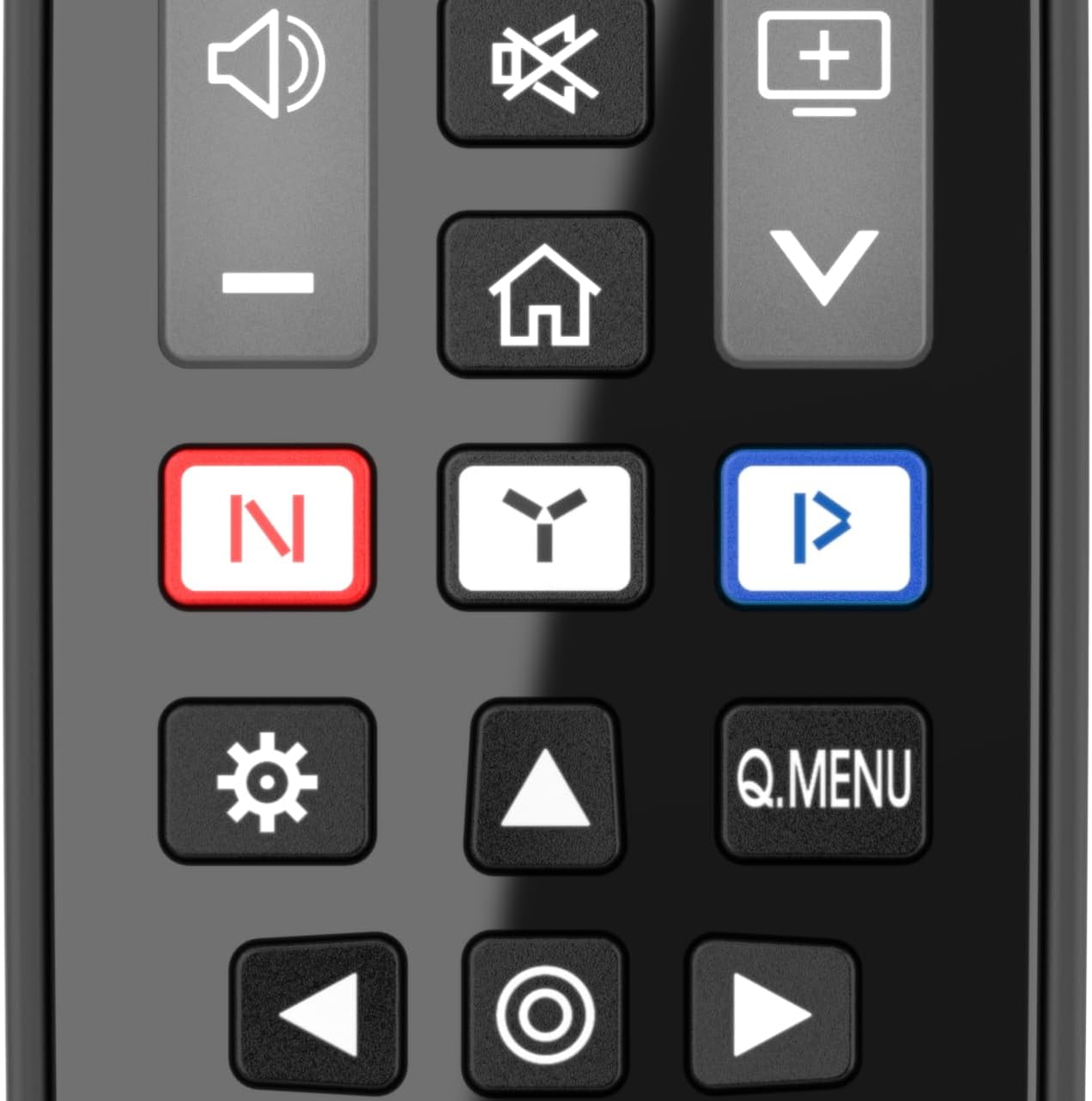
Image: A close-up view of the central buttons on the Meliconi Gumbody Personal 2+ Remote Control, showing navigation, volume, and channel controls.
Key Functions:
- Power Button: Located at the top right, used to turn the TV on or off.
- Number Buttons (0-9): For direct channel selection.
- Volume Control (+/-): Adjusts the TV volume.
- Channel Up/Down: Changes TV channels sequentially.
- Navigation Pad (Up/Down/Left/Right/OK): Used for menu navigation and selection.
- Back/Exit: Returns to the previous screen or exits a menu.
- Smart TV/Streaming Buttons: Dedicated buttons for quick access to major streaming platforms (e.g., Netflix, YouTube, Prime Video, Rakuten TV).
- LEARN Function: This remote can capture signals from other remote controls. This is particularly useful for controlling the volume of external audio devices like soundbars or home audio systems connected to your TV. Refer to the detailed user manual on the Meliconi website for specific instructions on using the LEARN function.
For a complete list of button functions and their corresponding original functions, please consult the specific tables available on the Meliconi website.

Image: The Meliconi Gumbody Personal 2+ Remote Control resting on a couch next to a person using a game controller, demonstrating its use in a home entertainment setting.
Maintenance
Proper care will ensure the longevity and optimal performance of your remote control.
- Cleaning: Use a soft, dry cloth to clean the remote control. For stubborn dirt, slightly dampen the cloth with water or a mild, non-abrasive cleaner. Avoid harsh chemicals or solvents.
- Battery Replacement: Replace batteries when the remote's response becomes sluggish or stops working. Always replace both batteries simultaneously with new AAA batteries.
- Protection: The remote's ergonomic shape and soft rubber body are designed to protect it from minor bumps and falls. However, avoid dropping it from significant heights or exposing it to extreme temperatures or moisture.
- Storage: When not in use for extended periods, remove the batteries to prevent leakage and potential damage to the remote control.

Image: The Meliconi Gumbody Personal 2+ Remote Control resting on a clean kitchen counter, illustrating its durable design suitable for various home environments.
Troubleshooting
If you encounter issues with your remote control, try the following steps:
- Remote Not Responding:
- Check if the batteries are inserted correctly with the correct polarity.
- Replace old batteries with new AAA batteries.
- Ensure there are no obstructions between the remote control and the TV's infrared receiver.
- Confirm you are pointing the remote directly at the TV.
- Specific Buttons Not Working:
- Verify that the button function is supported by your specific LG TV model.
- If using the LEARN function, re-perform the learning process for the problematic button.
- Interference:
- Bright sunlight or certain types of lighting can interfere with infrared signals. Try operating the remote in different lighting conditions.
If problems persist, please refer to the Meliconi website for further assistance or contact technical support.
Specifications
| Feature | Detail |
|---|---|
| Model Number | 806073 |
| Brand | Meliconi |
| Compatibility | Dedicated for LG brand Televisions |
| Special Feature | No Programming Required, LEARN Function, Anti-Shock Rubber Body |
| Power Source | 2 x AAA Batteries (not included) |
| Color | Black |
| Product Dimensions | 9.09 x 2.05 x 0.79 inches (23.09 x 5.21 x 2.01 cm) |
| Item Weight | 4.2 ounces (119 grams) |
Warranty Information
For detailed warranty information regarding your Meliconi Gumbody Personal 2+ Remote Control, please refer to the documentation included with your purchase or visit the official Meliconi website. Warranty terms and conditions may vary by region and retailer.
Support
Meliconi provides comprehensive support resources for its products:
- Website Support: Visit the official Meliconi website for specific support resources, including key/function matching tables, the full user manual, video guides, and frequently asked questions (FAQs).
- Telephone Technical Assistance: Specialized telephone technical assistance is available. Please refer to the Meliconi website or product packaging for contact details relevant to your region.
For the most up-to-date support information, always consult the official Meliconi channels.


