
1. Introduction
Thank you for choosing the Alpicool XD55 Portable Fridge. This versatile 42-quart unit functions as both a refrigerator and a freezer, providing reliable cooling for your outdoor adventures, road trips, camping, fishing, and more. Designed for convenience and efficiency, it operates on 12V/24V DC and 100-240V AC power sources. Please read this manual thoroughly before operation to ensure proper use, maintenance, and safety.
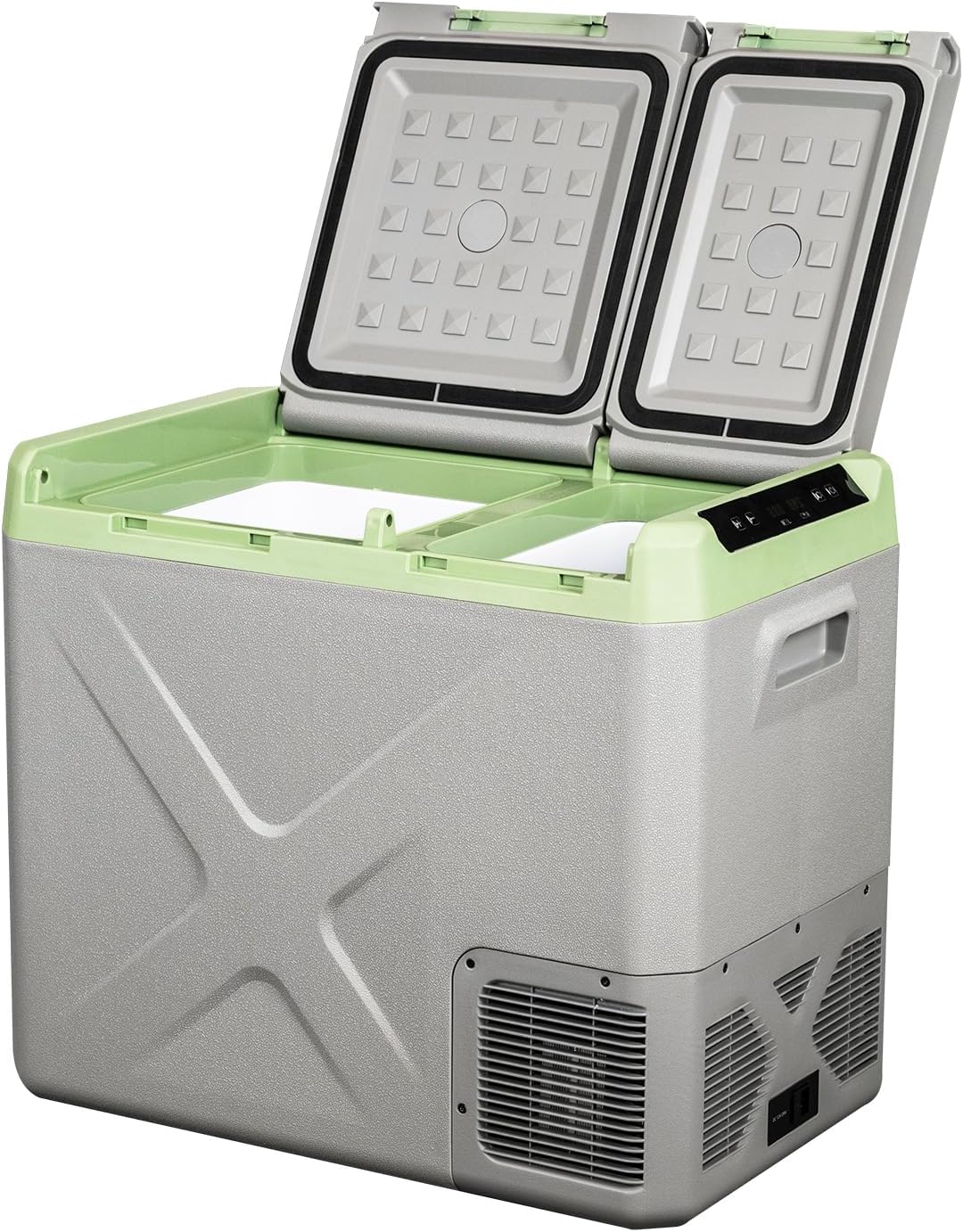
Image: The Alpicool XD55 Portable Fridge with its dual lids open, revealing the two separate cooling compartments.
2. Safety Instructions
To prevent injury to yourself and others or damage to your appliance, please observe the following safety instructions:
- Ensure the power supply voltage matches the voltage specified on the appliance's rating label.
- Do not operate the appliance if it is visibly damaged.
- Do not block the ventilation openings; ensure adequate airflow around the unit.
- Avoid placing the appliance near heat sources or in direct sunlight.
- Do not use electrical devices inside the refrigerator unless they are recommended by the manufacturer.
- Keep the appliance dry and avoid contact with water or other liquids.
- Always disconnect the power supply before cleaning or performing maintenance.
- This appliance is not intended for use by persons (including children) with reduced physical, sensory or mental capabilities, or lack of experience and knowledge, unless they have been given supervision or instruction concerning use of the appliance by a person responsible for their safety.
3. Product Features
The Alpicool XD55 Portable Fridge is equipped with several features designed for optimal performance and user convenience:
- Digital Control Panel: Features dual temperature control, allowing you to use the unit as both a freezer and a fridge simultaneously.
- Practical Door Lid: Includes two integrated cup holders to prevent spills.
- Generous Capacity: A 42-quart capacity, capable of holding up to 58 cans of 330ml cola or 47 bottles of 500ml water.
- Easy Cleaning: Designed with a bottom drain plug for convenient cleaning.
- Portability: Recessed handles facilitate easy movement and transport.
- Versatile Application: Ideal for use in trucks, vehicles, RVs, road trips, fishing, and other outdoor activities.
- Temperature Memory Function: Retains your last temperature setting.
- 3-Level Battery Protection: Offers Low, Med, and High settings to protect your vehicle's battery from running down.
- Powerful Chilling Performance: Achieves temperatures from -4°F (-20°C) to 68°F (20°C).
- Efficient Insulation: Features reliable sealing and thick, high-density foam insulation for sustained cooling performance.

Image: Detailed views of the Alpicool XD55's key features, including its detachable door, integrated cup holders, recessed handle, LED display, durable latch, and convenient drain plug.
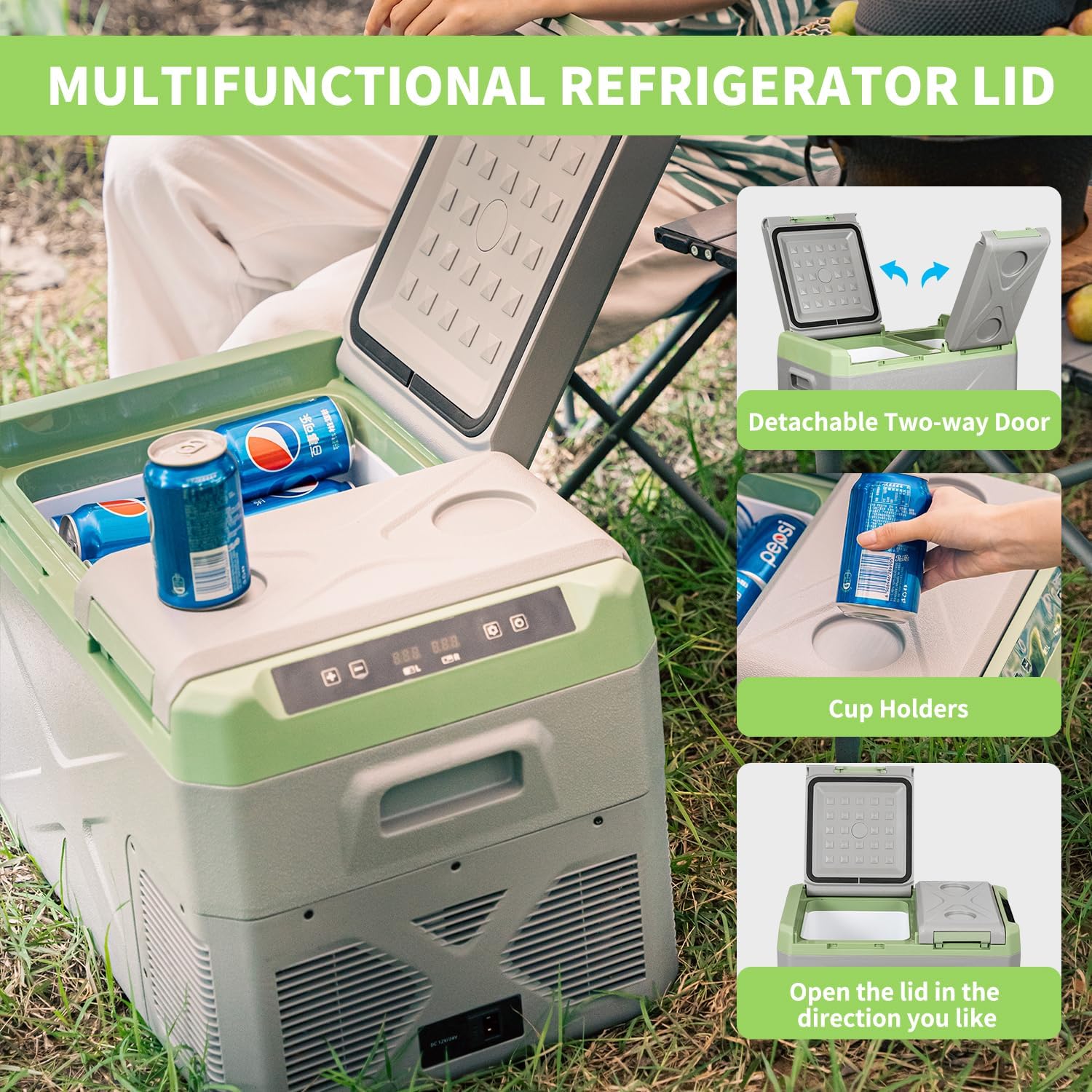
Image: Illustrations highlighting the multifunctional lid, showcasing its detachable two-way door and built-in cup holders for user convenience.
4. Setup
4.1 Unpacking
Carefully remove the Alpicool XD55 from its packaging. Inspect the unit for any signs of damage. Retain the packaging for future transport or storage.
4.2 Placement and Ventilation
Place the portable fridge on a stable, level surface. Ensure there is adequate space around the unit for proper ventilation. Do not block the air vents on the sides or back of the unit.
4.3 Power Connection
The Alpicool XD55 supports both DC (12V/24V) and AC (100-240V) power inputs.
- DC Power: Connect the DC power cable to the DC 12V/24V input port on the unit and then to your vehicle's cigarette lighter socket or a compatible 12V/24V power source.
- AC Power: Connect the AC power adapter to the AC input port on the unit, then plug the adapter into a standard 100-240V AC wall outlet.
Video: An official Alpicool video demonstrating the setup and key features of the portable car refrigerator, including power connection and lid operation.

Image: Visual representation of the flexible power options for the Alpicool XD55, including outdoor solar/power station, standard AC, and vehicle DC connections.
4.4 Reversible Doors
The XD55 features reversible doors, allowing you to change the opening direction to suit your preference or space constraints. To reverse the doors, carefully detach them and re-attach them on the opposite side according to the instructions provided in the packaging or online resources.

Image: A diagram illustrating the reversible door feature of the Alpicool XD55, showing how the lids can be installed to open from either the left or right side.
5. Operating Instructions
5.1 Control Panel Overview
The Alpicool XD55 features an intuitive digital control panel for easy operation:
- '+' Button: Increase the temperature setting.
- '-' Button: Decrease the temperature setting.
- 'L' Indicator: Indicates the left compartment.
- 'R' Indicator: Indicates the right compartment.
- Setting Button: Access various settings, including battery protection mode.
- On/Off Button: Power the unit on or off.

Image: A detailed view of the simple control panel and its easy-to-understand operation icons for the Alpicool XD55.
5.2 Setting Temperature
To set the desired temperature for each compartment:
- Press the 'Setting' button to select the compartment you wish to adjust (L or R).
- Use the '+' or '-' buttons to increase or decrease the temperature. The display will show the target temperature.
- The unit will automatically adjust to reach and maintain the set temperature.
The Alpicool XD55 can maintain temperatures from -4°F (-20°C) to 68°F (20°C). For optimal cooling, it is recommended to pre-cool the unit before loading it with items.

Image: Information on maintaining food freshness, including suggested temperatures for various items and the energy-saving ECO (45W) and fast-cooling MAX (60W) modes.
5.3 Battery Protection Settings
The unit features a 3-level battery protection system to prevent your vehicle's battery from draining. To adjust this setting:
- With the unit powered on, press and hold the 'Setting' button for 3 seconds.
- The current battery protection mode (H, M, or L) will flash on the display.
- Press the 'Setting' button repeatedly to cycle through the modes: H (High), M (Medium), L (Low).
- Release the button to select the desired mode. The setting will be saved automatically.
- High (H): Provides the most protection for your vehicle battery, cutting off power at a higher voltage. Recommended for starting batteries.
- Medium (M): A balanced setting for most applications.
- Low (L): Allows the unit to draw power for longer, cutting off at a lower voltage. Recommended for deep cycle batteries or when the engine is running.
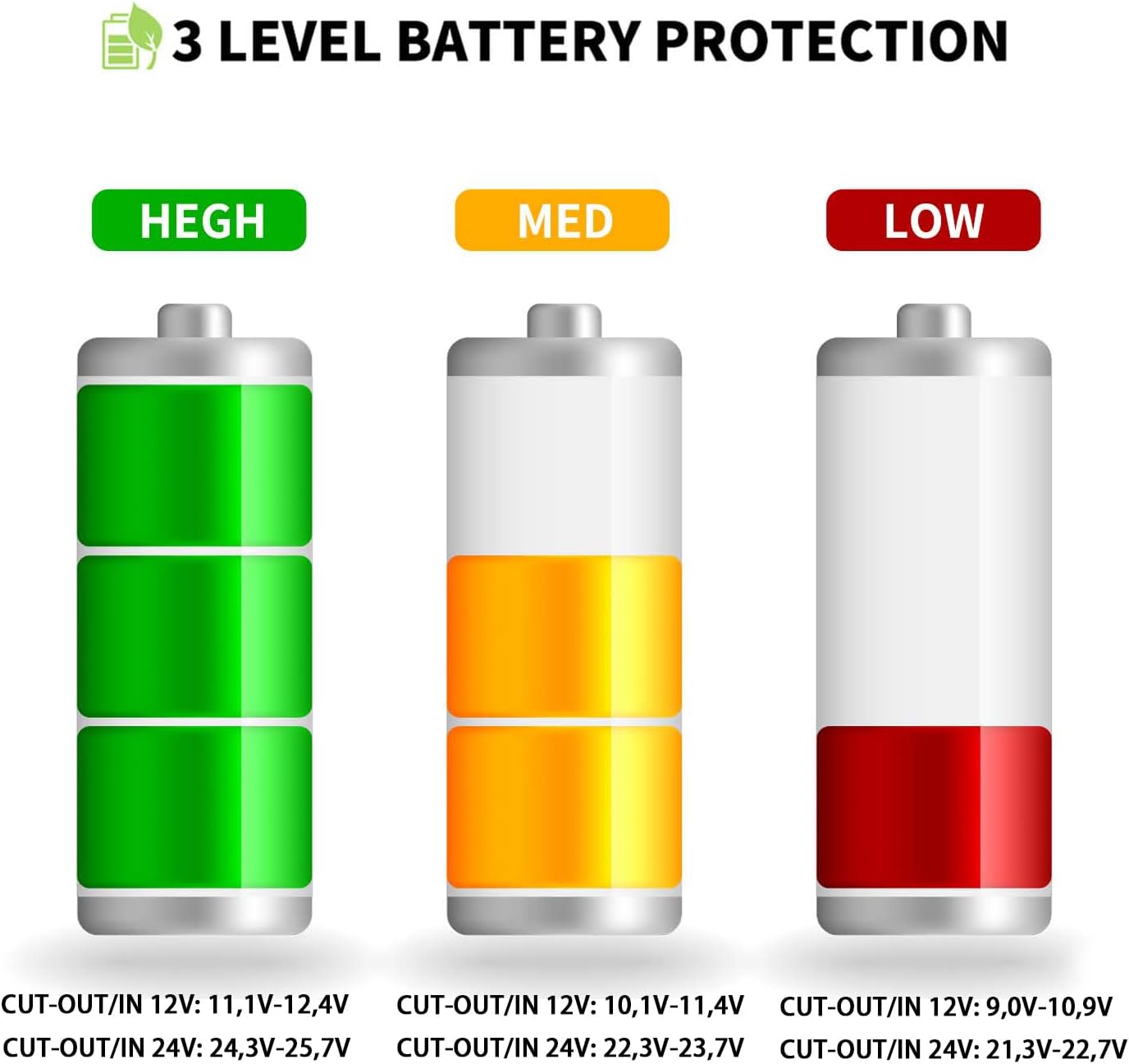
Image: A visual guide to the 3-level battery protection system, showing the voltage thresholds for High, Medium, and Low settings for both 12V and 24V systems.
6. Maintenance
6.1 Cleaning
Regular cleaning helps maintain the efficiency and longevity of your portable fridge.
- Disconnect the unit from all power sources.
- Empty the contents.
- Use the bottom drain plug to remove any accumulated water or melted ice.
- Wipe the interior and exterior with a damp cloth and mild detergent. Avoid abrasive cleaners or solvents.
- Ensure the unit is completely dry before reconnecting power or storing.
6.2 Storage
When storing the unit for extended periods, ensure it is clean and dry. Leave the lids slightly ajar to prevent odors and mildew growth. Store in a dry, well-ventilated area.
7. Troubleshooting
If you encounter issues with your Alpicool XD55, please refer to the following common problems and solutions:
| Problem | Possible Cause | Solution |
|---|---|---|
| Unit not powering on | No power supply; loose connection; vehicle battery low; blown fuse. | Check power cable connections; ensure power source is active; adjust battery protection mode to 'Low' or charge vehicle battery; check vehicle's fuse box. |
| Not cooling sufficiently | Lids not closed properly; blocked ventilation; ambient temperature too high; too many items loaded; ECO mode selected. | Ensure lids are sealed; clear vents; move unit to cooler area; reduce load; switch to MAX mode. |
| Display error codes | Internal fault. | Refer to the full user manual for specific error code meanings or contact customer support. |
| Excessive noise | Unit not level; fan obstruction. | Ensure unit is on a flat surface; check for debris near fan. |
If the problem persists after attempting these solutions, please contact Alpicool customer support for further assistance.
8. Specifications
| Feature | Specification |
|---|---|
| Brand | Alpicool |
| Model Name | XD55 Portable Fridge |
| Item Weight | 29.1 pounds |
| Product Dimensions | 14.38 x 23.93 x 20.19 inches |
| Installation Type | Freestanding |
| Color | Green |
| Voltage | 12 Volts (DC), 100-240 Volts (AC) |
| Wattage | 60 watts |
| Door Hinges | Top |
| Door Material Type | Plastic |
| Shelves | 1 |
| Capacity | 42 Quart |
| Temperature Range | -4°F (-20°C) to 68°F (20°C) |
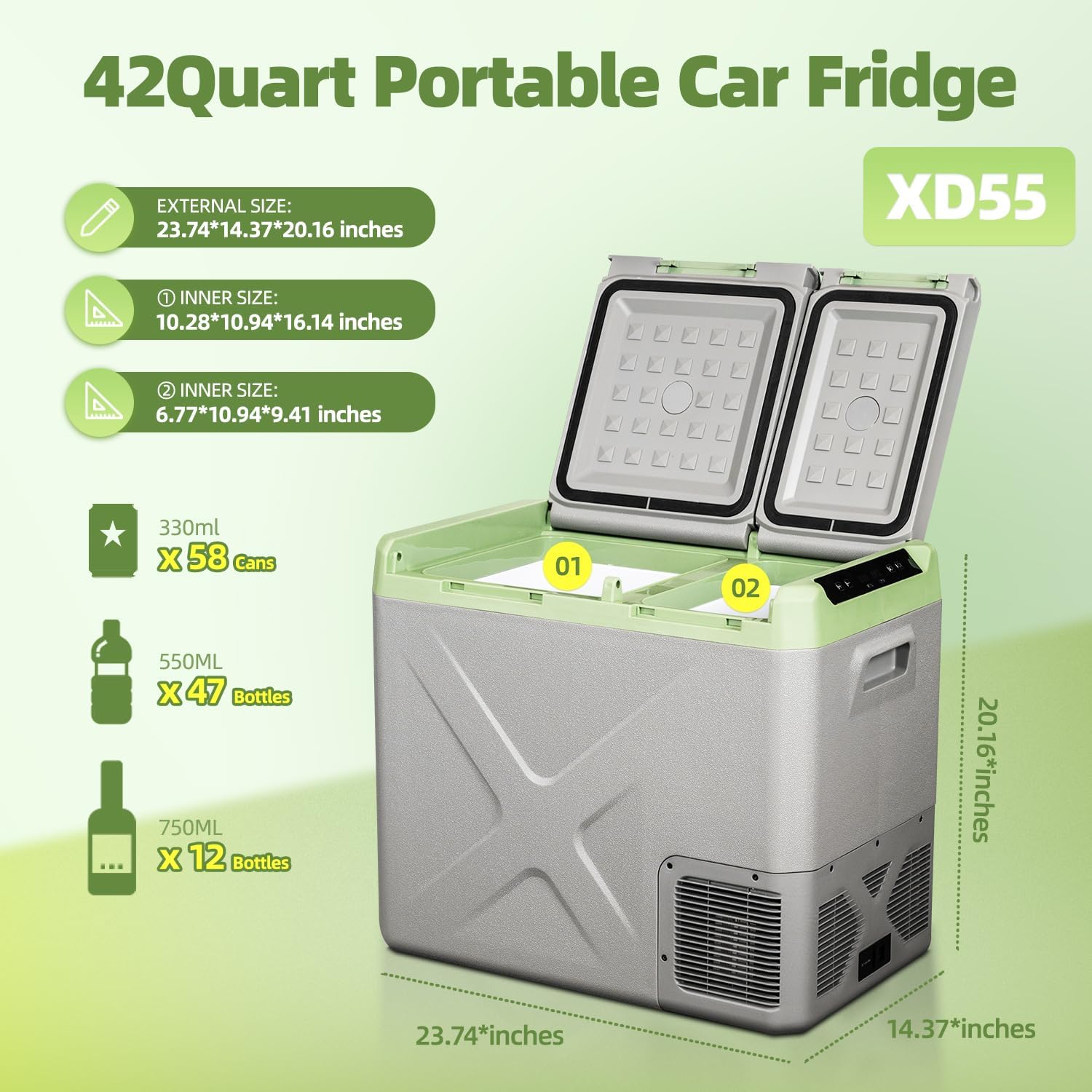
Image: A detailed infographic displaying the external and internal dimensions of the Alpicool XD55, alongside its capacity for various beverage sizes.
9. Warranty and Support
Alpicool products are manufactured to the highest quality standards. This product comes with a manufacturer's warranty against defects in materials and workmanship. For specific warranty terms and conditions, please refer to the warranty card included with your product or visit the official Alpicool website.
For technical support, troubleshooting assistance, or warranty claims, please contact Alpicool customer service through their official channels. When contacting support, please have your product model (XD55) and purchase information ready.


