
Introduction
This manual provides essential information for setting up, operating, maintaining, and troubleshooting your Xiaomi Redmi Note 11R 5G smartphone. The Redmi Note 11R 5G is designed for reliable performance, featuring a MediaTek Dimensity 700 Octa-core processor, a 6.58-inch IPS LCD display, a dual-camera system, and a long-lasting 5000 mAh battery with 18W fast charging. It operates on Android 12 with MIUI 13.
What's in the Box
Upon unboxing your Xiaomi Redmi Note 11R 5G, please verify that all the following items are included:
- Xiaomi Redmi Note 11R 5G Smartphone
- USB Cable
- Power Adapter
- Fast Car Charger
Setup Guide
1. Inserting SIM Cards and MicroSD Card
The Redmi Note 11R 5G supports dual Nano SIM cards and a MicroSD card for expanded storage. Locate the SIM tray on the side of the device.

Image Description: A side view of the Xiaomi Redmi Note 11R 5G smartphone in Polar Blue, highlighting the location of the SIM card tray on the left edge of the device. This tray accommodates both Nano SIM cards and a MicroSD card.
- Gently insert the SIM ejector tool (not included, but typically comes with smartphones) into the small hole on the SIM tray.
- Pull out the tray.
- Place your Nano SIM cards and/or MicroSD card into the designated slots, ensuring the gold contacts face downwards.
- Carefully reinsert the tray into the phone.
2. Initial Charging and Power On
Before first use, it is recommended to fully charge your device.
- Connect the USB cable to the power adapter and then to your phone's charging port.
- Plug the power adapter into a wall outlet. The phone supports 18W fast charging.
- Once sufficiently charged, press and hold the power button (usually on the right side) until the Xiaomi logo appears.
3. Network Compatibility
This device is an unlocked 4G VoLTE smartphone. For optimal 4G LTE service in the USA market, it is designed to work with carriers operating under the T-Mobile network, such as T-Mobile, Metro by T-Mobile, Mint Mobile, Ultra Mobile, and Tello. Please note that this device will NOT work on Verizon, AT&T, Boost Mobile, Cricket Wireless, Metro PCS (if not T-Mobile network), or any CDMA carrier.
4. Initial Software Setup
Follow the on-screen prompts to complete the initial setup, which includes selecting your language, connecting to Wi-Fi, signing in with your Google account, and setting up security features like the side-mounted fingerprint sensor.
Operating Your Device
1. Basic Navigation
The Redmi Note 11R 5G features a responsive touchscreen display. Navigate through menus, open apps, and interact with content using taps, swipes, and pinch gestures. The operating system is Android 12 with Xiaomi's MIUI 13 interface.
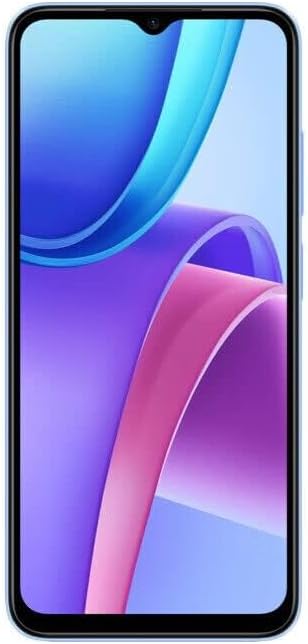
Image Description: A front view of the Xiaomi Redmi Note 11R 5G smartphone in Polar Blue, showcasing its 6.58-inch IPS LCD display with a vibrant wallpaper. The front camera is visible at the top center.
2. Fingerprint Sensor
Your device includes a side-mounted fingerprint sensor for secure and quick unlocking. To set it up, go to Settings > Password & Security > Fingerprint unlock and follow the instructions to register your fingerprints.
3. Camera Usage
The phone is equipped with a dual rear camera system (13 MP wide + 2 MP depth) and a 5 MP front camera. Open the Camera app to capture photos and videos.

Image Description: A back view of the Xiaomi Redmi Note 11R 5G smartphone in Polar Blue. The prominent black rectangular module at the top houses the dual rear cameras and LED flash, with "Redmi" branding vertically aligned.
- Rear Camera: Features include LED flash, HDR, and panorama. Video recording is supported at 1080p@30fps.
- Front Camera: Ideal for selfies and video calls.
4. Connectivity
Your device supports various connectivity options:
- Wi-Fi: Connect to wireless networks via Settings > Wi-Fi. Supports 802.11 a/b/g/n/ac, dual-band, Wi-Fi Direct, and hotspot functionality.
- Bluetooth: Pair with other Bluetooth devices via Settings > Bluetooth.
- GPS: Built-in GPS for navigation and location services.
Maintenance
1. Battery Care
The Redmi Note 11R 5G has a non-removable Li-Po 5000 mAh battery. To prolong battery life:
- Avoid extreme temperatures.
- Use the provided charger for optimal charging speed and safety.
- Avoid completely draining the battery frequently.
2. Software Updates
Regularly check for system updates to ensure your device has the latest features, security patches, and performance improvements. Go to Settings > About phone > MIUI version to check for updates.
3. Cleaning Your Device
Use a soft, lint-free cloth to clean the screen and body of your phone. Avoid harsh chemicals or abrasive materials. The device is built with a glass front, plastic frame, and plastic back.
4. Storage Management
Your device comes with 128 GB of internal storage. To manage storage effectively, regularly clear unnecessary files, uninstall unused apps, and utilize cloud storage or the MicroSD card slot for larger media files.
Troubleshooting
This section addresses common issues you might encounter with your Redmi Note 11R 5G.
1. Device Not Powering On
- Ensure the battery is charged. Connect the phone to the charger for at least 15-30 minutes.
- Press and hold the power button for 10-15 seconds to force a restart.
2. Network Connectivity Issues
- Verify your SIM card is correctly inserted and active.
- Check if your carrier is compatible with the device (refer to "Network Compatibility" in the Setup Guide).
- Toggle Airplane Mode on and off.
- Restart the device.
- Reset network settings via Settings > Connection & sharing > Reset Wi-Fi, mobile networks, and Bluetooth.
3. Slow Performance
- Close unused applications running in the background.
- Clear cache and data for problematic apps.
- Ensure sufficient storage space is available.
- Restart the device regularly.
4. Battery Draining Quickly
- Check battery usage in Settings > Battery to identify power-hungry apps.
- Reduce screen brightness and screen timeout.
- Disable unnecessary features like GPS, Bluetooth, or Wi-Fi when not in use.
- Limit background app refresh.
5. Factory Reset
If persistent issues occur, a factory reset may resolve them. Warning: This will erase all data on your phone. Back up important data before proceeding. Go to Settings > About phone > Factory reset.
Specifications
Detailed technical specifications for the Xiaomi Redmi Note 11R 5G:
| Feature | Specification |
|---|---|
| Model Name | Note 11R |
| Operating System | Android 12, MIUI 13 |
| Processor | MediaTek MT6833 Dimensity 700 (7 nm) Octa-core (2x2.2 GHz Cortex-A76 & 6x2.0 GHz Cortex-A55) |
| GPU | Mali-G57 MC2 |
| Display | 6.58 inches IPS LCD, 1080 x 2408 pixels resolution |
| RAM | 4 GB |
| Internal Storage | 128 GB |
| Rear Camera | Dual: 13 MP (wide), PDAF + 2 MP (depth) with LED flash, HDR, panorama. Video: 1080p@30fps |
| Front Camera | 5 MP (wide) |
| Battery | Non-removable Li-Po 5000 mAh, 18W Fast Charging |
| Sensors | Side-mounted fingerprint, accelerometer, gyro, proximity, compass |
| Connectivity | Wi-Fi 802.11 a/b/g/n/ac (dual-band, Wi-Fi Direct, hotspot), Bluetooth, GPS |
| Dimensions | 164 x 76.1 x 8.9 mm (6.46 x 3.00 x 0.35 inches) |
| Weight | 201 grams (7.09 oz) |
| Build | Glass front, plastic frame, plastic back |
| Audio Jack | 3.5 mm |

Image Description: A close-up image of a certification label, likely from the product packaging or a display unit, showing various technical details and regulatory compliance marks for the Redmi Note 11R. This includes model number, processor type, display specifications, battery capacity, and camera details, along with regional certifications.
Warranty and Support
For warranty information, please refer to the warranty card included with your product or visit the official Xiaomi website. For technical support, product registration, or service inquiries, please contact Xiaomi customer service or the authorized reseller from whom you purchased the device. Keep your proof of purchase for warranty claims.
You can often find support resources, FAQs, and contact information on the official Xiaomi support portal.


