
Introduction
This manual provides comprehensive instructions for the installation, use, and maintenance of your AWH Hardshell Shield Case, Keyboard Cover, and Screen Protector. This product is designed to offer robust protection for your MacBook Pro 14-inch, safeguarding it from scratches, scuffs, and minor impacts.
Please read this manual carefully before installation to ensure proper fit and maximum protection for your device.

Image: The AWH Hardshell Shield Case (black), along with the included black keyboard cover and clear screen protector.
Compatibility
The AWH Hardshell Shield Case is ONLY compatible with the following MacBook Pro 14-inch models:
- MacBook Pro 14-inch 2022 Release (Model: A2442)
- MacBook Pro 14-inch 2021 Release (Model: A2442)
- Models with M1 Pro / M1 Max chip and Liquid Retina XDR Display & Touch ID
- Specific model numbers: MKGP3LL/A, MKGQ3LL/A, MKGR3LL/A, MKGT3LL/A
WARNING: This case is NOT compatible with any other MacBook models or other laptop brands. Please verify your MacBook's model number before installation.
To find your model number, turn your MacBook over. The model number "A2xxx" is printed on the back cover, near the hinge.

Image: A diagram illustrating how to locate the model number (A2442) on the back of the MacBook Pro 14-inch, emphasizing compatibility with this specific model.
Package Contents
Your AWH Hardshell Shield Case package includes the following items:
- 1 x AWH Hardshell Top Cover (Black)
- 1 x AWH Hardshell Bottom Cover (Black)
- 1 x AWH Black Keyboard Cover
- 1 x AWH Screen Protector
Key Features
- Full Protection: Designed to protect your MacBook Pro 14-inch from scrapes, scratches, and minor impacts.
- No Cut Out Design: The Apple logo is visible through the case, with transparency varying by color.
- Fully Vented: The bottom cover features ventilation slots for safe heat disbursement, preventing overheating.
- Full Access: Precision cutouts ensure full access to all ports, buttons, and features without removing the case.
- Easy Installation & Removal: The two-piece snap-on design allows for easy attachment and removal.
- Additional Protection: Includes a black keyboard cover to protect against spills and dust, and a screen protector for display safeguarding.
- Enhanced Grip: Anti-slip properties help prevent accidental drops.
- Water Resistant: Offers a degree of resistance against splashes.
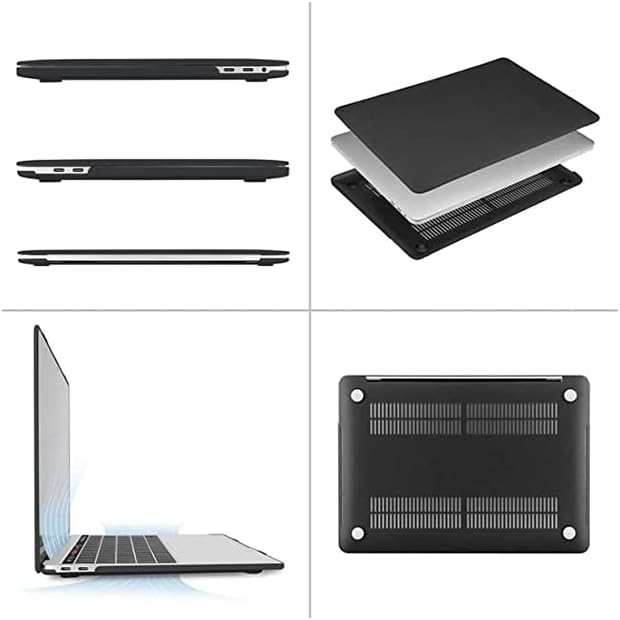
Image: Various views of the hardshell case, highlighting the ventilation slots on the bottom cover and the precise cutouts for ports on the sides.
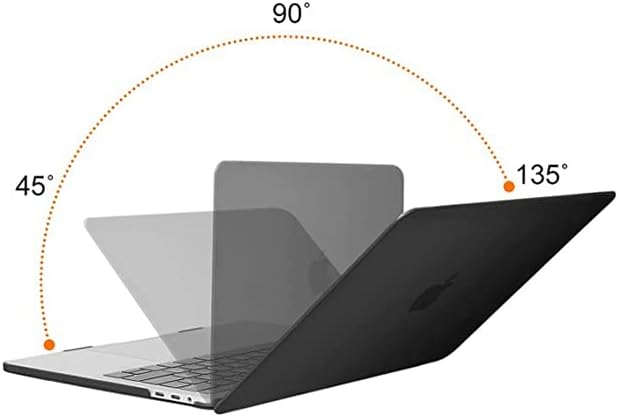
Image: A visual representation of the MacBook Pro with the AWH case, demonstrating the ability to open the laptop screen from 45 to 135 degrees without obstruction.
Installation Guide
Installing the Hardshell Case
Follow these steps to properly install the AWH Hardshell Case on your MacBook Pro 14-inch:
- Identify Clips: Locate the clips on both the top and bottom covers. The top cover has 4 clips, and the bottom cover has 6 clips.
- Attach Bottom Cover (Hinge First): Place your MacBook Pro on a clean, flat surface. Align the bottom cover with the hinge area of your MacBook. There are 2 clips designed to secure the back side (hinge side) of the bottom cover. Gently press to snap these into place first.
- Secure Bottom Cover (Front): Apply gentle force to the 2 clips at the front side of the bottom cover. Ensure all clips are securely fastened.
- Attach Top Cover (Hinge First): Align the top cover with the hinge location of your MacBook's display. Gently attach the top cover at the hinge location first.
- Secure Top Cover (Front): Apply gentle force to snap the remaining clips on the top cover into place, working your way around the edges. Ensure the top cover is flush and secure.
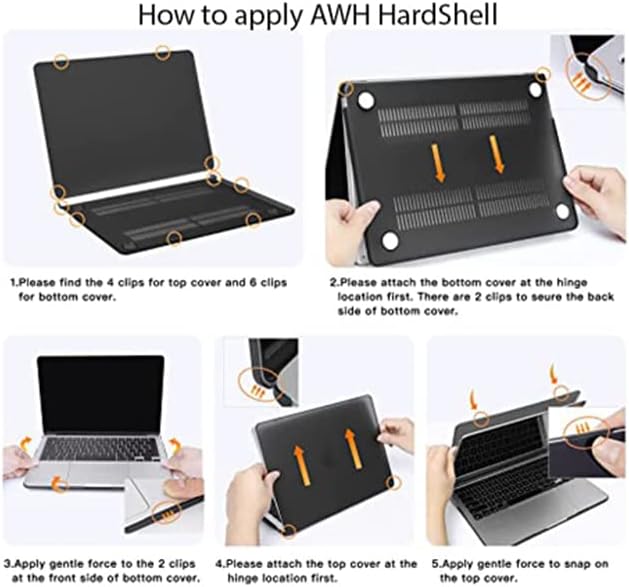
Image: A visual step-by-step guide demonstrating the proper method for installing the AWH hardshell top and bottom covers onto a MacBook Pro, showing clip locations and attachment points.
Installing the Keyboard Cover
The keyboard cover is designed to fit precisely over your MacBook's keyboard. Simply align the cover with the keys and gently lay it down. The cover will adhere to the keyboard surface due to its flexible material, protecting against dust, spills, and wear.
Installing the Screen Protector
For best results, install the screen protector in a dust-free environment.
- Clean Screen: Thoroughly clean your MacBook's screen using a microfiber cloth to remove any dust, smudges, or fingerprints.
- Peel Backing: Carefully peel back a small portion of the protective film from one edge of the screen protector.
- Align and Apply: Align the exposed edge of the screen protector with one edge of your MacBook's screen. Slowly and steadily lower the protector onto the screen, using a credit card or squeegee (not included) to smooth out any air bubbles as you go.
- Remove Remaining Film: Once the protector is fully applied, gently peel off the remaining protective film from the top surface.
Operation and Usage
Once installed, your AWH Hardshell Shield Case, Keyboard Cover, and Screen Protector will provide continuous protection during daily use. The case allows full access to all ports, buttons, and the Touch ID sensor. The bottom cover's ventilation slots ensure proper heat dissipation during operation.

Image: A person working on a MacBook Pro with the AWH hardshell case installed, demonstrating its seamless integration into daily use.
Care and Maintenance
To keep your AWH protective accessories in optimal condition:
- Cleaning the Case: Wipe the hardshell case with a soft, damp cloth. For stubborn marks, a mild soap solution can be used. Avoid abrasive cleaners or solvents.
- Cleaning the Keyboard Cover: The keyboard cover can be gently washed with water and mild soap. Allow it to air dry completely before placing it back on the keyboard.
- Cleaning the Screen Protector: Use a microfiber cloth specifically designed for electronics to gently wipe the screen protector. Do not use harsh chemicals.
- Avoid Extreme Temperatures: Do not expose the case or accessories to extreme heat or cold, as this may affect their material integrity.
Troubleshooting
If you encounter any issues with your AWH protective accessories, please refer to the following common solutions:
- Case Not Fitting:
- Double-check your MacBook's model number (A2442) to ensure compatibility. This case is specifically designed for the MacBook Pro 14-inch 2021/2022 Release.
- Ensure you are installing the top cover on the display and the bottom cover on the base of the laptop.
- Verify that the clips are aligned correctly before applying pressure. Sometimes a slight adjustment is needed.
- Difficulty Snapping On/Off:
- Apply gentle, even pressure. Do not force the case.
- When removing, gently unclip one corner at a time, working your way around.
- Air Bubbles Under Screen Protector:
- Ensure the screen is thoroughly cleaned before application. Dust particles are the most common cause of bubbles.
- Use a flat edge (like a credit card wrapped in a soft cloth) to push bubbles towards the nearest edge during application.
Specifications
| Feature | Detail |
|---|---|
| Brand | AWH |
| Compatible Model | MacBook Pro 14-inch (2021/2022 Release, Model A2442) |
| Material | Hardshell Plastic |
| Color | Black |
| Case Dimensions (L x W x H) | 12.4 x 8.8 x 0.62 inches (approx.) |
| Product Weight | 149 g (approx.) |
| Special Features | Anti-Fingerprint, Anti-Slip, Flexible, Heavy Duty Protection, Water Resistant, Fully Vented |
Warranty and Support
AWH is committed to providing high-quality products. For any questions, concerns, or support inquiries regarding your AWH Hardshell Shield Case, Keyboard Cover, or Screen Protector, please contact the seller or refer to your purchase documentation for specific warranty details.
Please retain your proof of purchase for any warranty claims.