
1. Introduction
The Prorelax ThermoTENS is a versatile, battery-powered heating pad designed for pain relief. It combines Transcutaneous Electrical Nerve Stimulation (TENS) with heat therapy to target muscle and nerve pain. This reusable device offers 15 intensity levels and two temperature settings up to 43°C, adapting comfortably to various body parts and can be worn discreetly under clothing.
1.1 Package Contents
- Prorelax ThermoTENS Heating Pad (Model 15100)
- Rechargeable Lithium-polymer Battery (pre-installed)
- Gel Pads (for adhesion and conductivity)
- Charging Cable
- User Manual
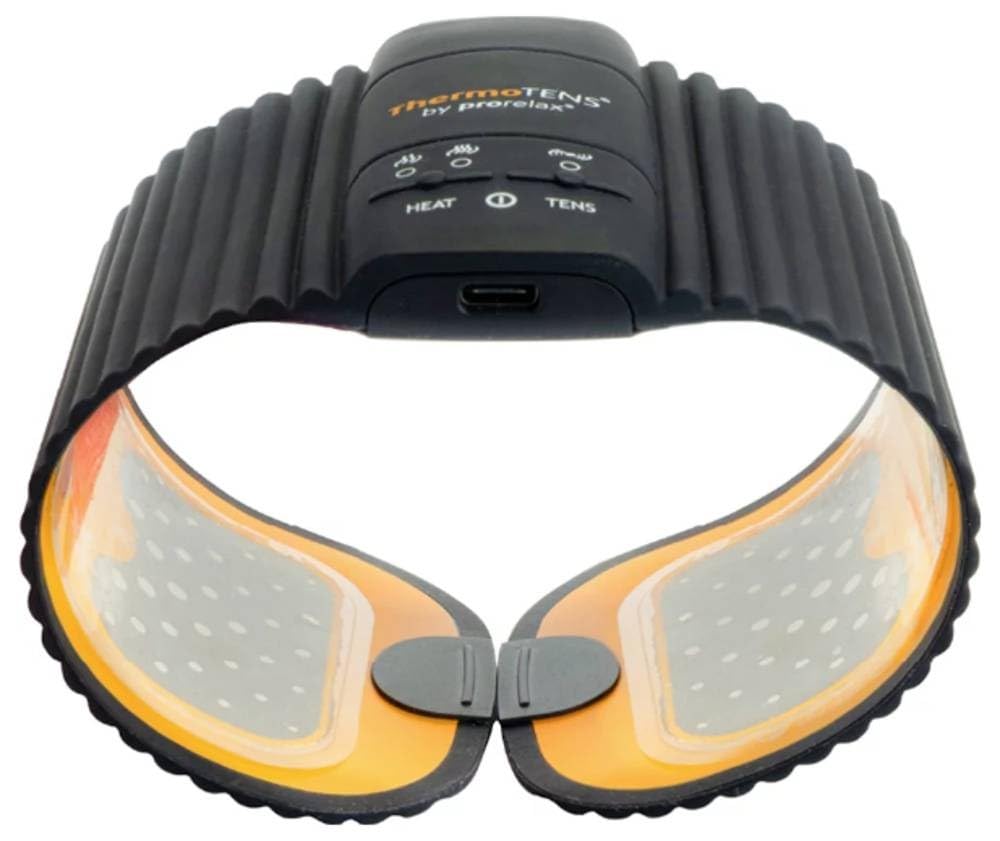
Figure 1: Prorelax ThermoTENS Heating Pad. This image shows the compact and flexible design of the device, highlighting its main body and attachment points for gel pads.
2. Important Safety Information
Please read all safety warnings and instructions carefully before using the Prorelax ThermoTENS device. Failure to do so may result in injury or damage to the device.
- Do not use this device if you have a pacemaker, implanted defibrillator, or any other implanted metallic or electronic device.
- Consult your physician before use if you have a heart condition, epilepsy, cancer, or are pregnant.
- Do not apply the device over open wounds, broken skin, swollen, red, infected, or inflamed areas, or skin eruptions (e.g., phlebitis, thrombophlebitis, varicose veins).
- Avoid using the device while sleeping, driving, or operating machinery.
- Keep out of reach of children and pets.
- Do not use in the presence of flammable gases or liquids.
- If you experience any adverse reactions, discontinue use immediately and consult a medical professional.
- Only use accessories and replacement parts supplied or recommended by Prorelax.
3. Setup
3.1 Initial Charging
- Connect the charging cable to the device's charging port.
- Plug the other end of the charging cable into a suitable USB power adapter (not included) or a computer USB port.
- Allow approximately 2.5 hours for a full charge. The charging indicator light will change (e.g., from red to green) when charging is complete.
3.2 Attaching Gel Pads
- Ensure the device is turned off.
- Carefully peel the protective film from the gel pads. Avoid touching the adhesive surface excessively.
- Attach the gel pads firmly to the designated areas on the back of the ThermoTENS device.
- Before applying to skin, ensure the skin area is clean, dry, and free of lotions or oils for optimal adhesion and conductivity.
4. Operating Instructions
4.1 Applying the Device
- Once the gel pads are attached, place the ThermoTENS device directly onto the desired area of your body where you experience muscle or nerve pain.
- Press firmly to ensure good contact between the gel pads and your skin. The device's flat and flexible design allows it to be worn comfortably under clothing.
4.2 Powering On/Off
- To turn on: Press and hold the Power button (usually marked with an 'On/Off' symbol) for a few seconds until the indicator light illuminates.
- To turn off: Press and hold the Power button again until the indicator light turns off. The device also features an automatic shut-off after each therapy cycle.
4.3 Selecting a Therapy Mode
The Prorelax ThermoTENS offers three therapy modes:
- TENS: Provides electrical impulses for nerve and muscle stimulation.
- WARMTH: Delivers soothing heat therapy.
- TENS + WARMTH: Combines both therapies for comprehensive relief.
Use the Mode button (refer to device markings) to cycle through the available therapy modes until your desired mode is selected.
4.4 Adjusting Intensity and Temperature
- TENS Intensity: Use the '+' and '-' buttons on the device to increase or decrease the TENS intensity. There are 15 levels available. Start with the lowest setting and gradually increase until you feel a comfortable, yet effective, sensation.
- Temperature: The device offers 2 temperature levels, up to 43°C. Use the Temperature button (if separate) or the Mode button (if integrated) to select your preferred heat level.
5. Maintenance and Care
5.1 Cleaning the Device
- Turn off the device and disconnect it from any power source before cleaning.
- Wipe the main body of the device with a soft, slightly damp cloth. Do not use abrasive cleaners, alcohol, or harsh chemicals.
- For the gel pads, gently wipe the adhesive surface with a damp cloth if they lose stickiness due to dust or lint. Allow them to air dry completely before re-applying the protective film.
- Do not immerse the device in water or any other liquid.
5.2 Storage
- After each use, re-apply the protective film to the gel pads to preserve their adhesive quality and extend their lifespan.
- Store the device in a cool, dry place, away from direct sunlight and extreme temperatures.
- Ensure the device is fully charged before long-term storage to maintain battery health.
6. Troubleshooting
| Problem | Possible Cause | Solution |
|---|---|---|
| Device does not turn on. | Battery is depleted. | Charge the device for approximately 2.5 hours. |
| No TENS sensation or heat. | Intensity/temperature set too low; poor contact with skin; worn-out gel pads. | Increase intensity/temperature. Ensure gel pads are firmly applied to clean, dry skin. Replace gel pads if they have lost their stickiness. |
| Gel pads are not sticking. | Skin is oily/dirty; gel pads are dirty or worn out. | Clean skin thoroughly before application. Gently clean gel pads with a damp cloth and allow to air dry. Replace gel pads if they are no longer adhesive. |
| Device turns off unexpectedly. | Automatic shut-off activated; low battery. | This is normal behavior after a therapy cycle. If it happens prematurely, recharge the battery. |
7. Specifications
- Product Name: ThermoTENS
- Brand: Prorelax
- Model Number: 15100
- Dimensions (L x W x H): 30 x 10 x 1.5 cm
- Weight: 103 grams
- Battery: 1 Lithium-polymer (included)
- Charging Time: Approximately 2.5 hours
- Temperature Levels: 2 levels, up to 43°C
- TENS Intensity Levels: 15
- Manufacturer: Euromedics
- ASIN: B0BS6F11MN
8. Warranty and Support
For warranty information and customer support, please refer to the documentation provided with your purchase or contact your retailer. You may also visit the official Prorelax website for further assistance.
Please retain your proof of purchase for any warranty claims.