Introduction
This manual provides essential information for the safe operation, maintenance, and setup of your RIDGID R8657B 18V Brushless Cordless 7-1/4 inch Circular Saw. Please read and understand all instructions before using the tool to ensure proper function and prevent injury.
The RIDGID R8657B is a powerful cordless circular saw designed for efficient cutting. Key features include:
- Brushless motor for extended runtime and motor life.
- 5400 RPM for fast and efficient cutting.
- 2-9/16 inch depth of cut.
- 56° bevel capacity for versatile angle cuts.
- Heavy-duty aluminum base for durability.
Note: This product is sold as a bare tool. Battery and charger are sold separately.
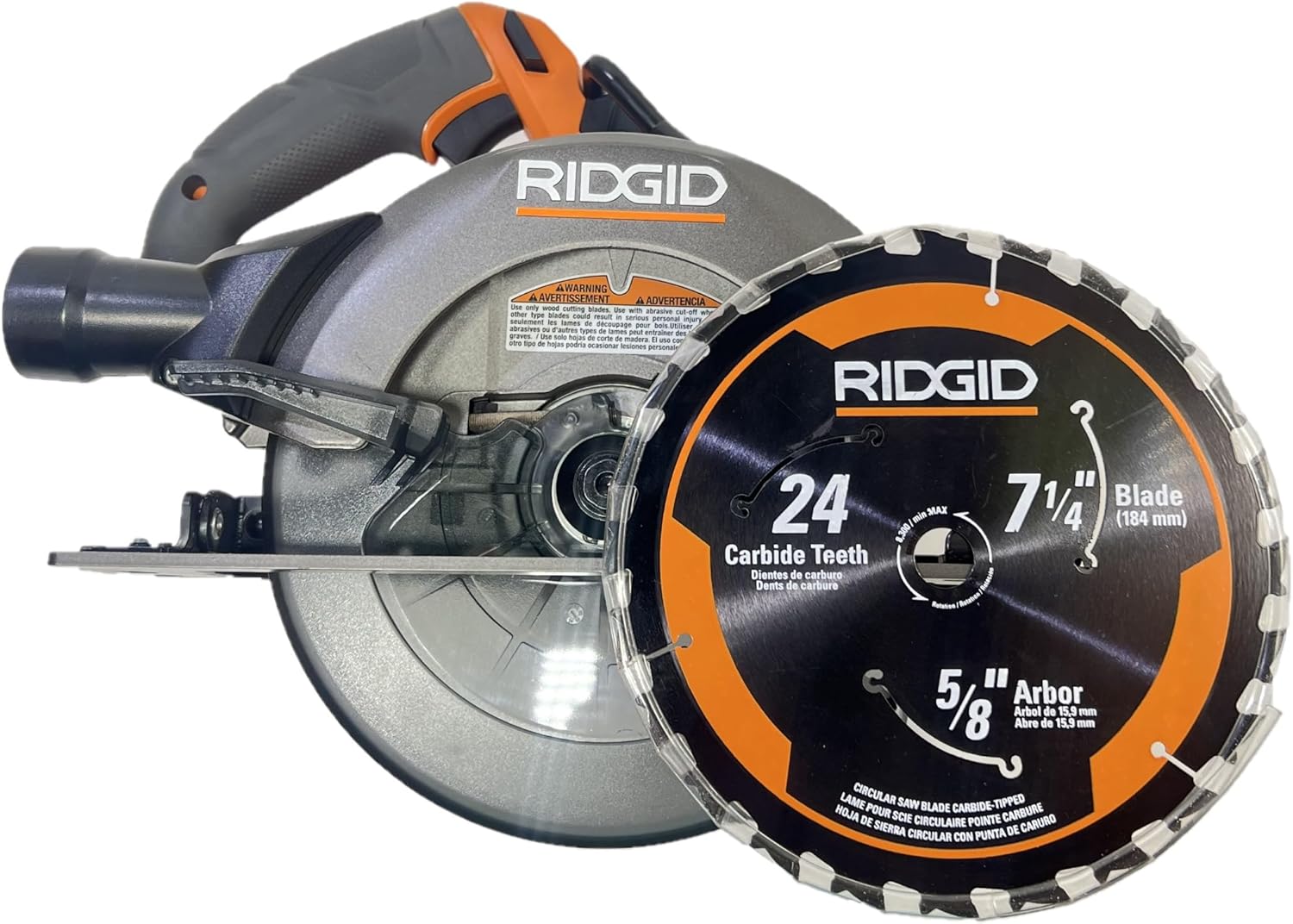
Image: The RIDGID R8657B 18V Brushless Cordless 7-1/4 inch Circular Saw, shown with a 7-1/4 inch blade. The saw features an orange and gray housing with a black handle.
General Safety Information
Always follow basic safety precautions when using power tools to reduce the risk of fire, electric shock, and serious personal injury. Keep this manual for future reference.
- Work Area Safety: Keep your work area clean and well-lit. Cluttered or dark areas invite accidents. Do not operate power tools in explosive atmospheres, such as in the presence of flammable liquids, gases, or dust.
- Electrical Safety: Avoid body contact with earthed or grounded surfaces. Do not expose power tools to rain or wet conditions.
- Personal Safety: Always wear eye protection. Use hearing protection when operating power tools for extended periods. Dress properly; avoid loose clothing or jewelry. Secure long hair.
- Tool Use and Care: Do not force the power tool. Use the correct power tool for your application. Disconnect the battery pack from the power tool before making any adjustments, changing accessories, or storing power tools.
- Kickback Prevention: Maintain a firm grip on the saw with both hands. Ensure the blade is clear of the workpiece before starting the saw. Avoid cutting small pieces that cannot be securely clamped.
Product Overview
Familiarize yourself with the components of your RIDGID R8657B Circular Saw:
- Blade: 7-1/4 inch diameter, 24 carbide teeth, 5/8 inch arbor.
- Blade Guard: Upper and lower guards protect the blade.
- Handle: Ergonomic grip for comfortable operation.
- Base Plate: Heavy-duty aluminum for stability and durability.
- Bevel Adjustment: Allows for angled cuts up to 56 degrees.
- Depth Adjustment: Controls the cutting depth up to 2-9/16 inches.
- Brushless Motor: Provides efficient power and longer tool life.

Image: Side view of the RIDGID R8657B Circular Saw, highlighting the blade guard and motor housing.

Image: The RIDGID R8657B Circular Saw showing the bevel adjustment mechanism on the front of the base plate.

Image: Top view of the RIDGID R8657B Circular Saw, showing the main handle, auxiliary handle, and motor housing.
Setup
Battery Installation
- Ensure the saw is turned off and the trigger lock is engaged.
- Align the battery pack with the battery port on the saw handle.
- Slide the battery pack into the port until it clicks securely into place.
- To remove, press the battery release button and slide the battery pack out.
Important: This tool requires an 18V RIDGID battery and compatible charger, which are sold separately.

Image: A graphic stating "BATTERY & CHARGER SOLD SEPARATELY" in green text on a white background.
Blade Installation/Removal
- Disconnect the battery pack before performing any adjustments or maintenance.
- Locate the arbor lock button and press it to secure the blade.
- Use the provided blade wrench to loosen the arbor nut by turning it counter-clockwise.
- Retract the lower blade guard and carefully remove the old blade.
- Install the new 7-1/4 inch blade, ensuring the teeth are pointing in the direction of rotation indicated on the saw.
- Tighten the arbor nut clockwise with the blade wrench while holding the arbor lock button. Do not overtighten.

Image: A close-up view of the 7-1/4 inch circular saw blade, showing the 24 carbide teeth and 5/8 inch arbor size markings.
Operating Instructions
Adjusting Depth of Cut
To adjust the cutting depth, loosen the depth adjustment lever, move the base plate up or down to the desired depth (up to 2-9/16 inches), and then securely tighten the lever. For optimal performance and safety, set the blade depth so that the blade extends approximately 1/8 inch below the workpiece.
Adjusting Bevel Angle
For angled cuts, loosen the bevel adjustment lever, tilt the saw base to the desired angle (up to 56 degrees), and then securely tighten the lever. Always ensure the bevel scale is clearly visible and set accurately.
Making a Cut
- Ensure the workpiece is securely clamped and stable.
- Position the saw with the front of the base plate resting on the workpiece, ensuring the blade is not touching the material.
- Engage the trigger lock and press the trigger to start the saw. Allow the blade to reach full speed (5400 RPM) before beginning the cut.
- Slowly and steadily guide the saw through the material, maintaining a firm grip with both hands.
- Once the cut is complete, release the trigger and allow the blade to stop completely before lifting the saw from the workpiece.
Maintenance
Cleaning
Regularly clean the saw's ventilation openings to prevent overheating. Use a soft brush or compressed air to remove dust and debris. Do not use solvents or harsh chemicals, as they may damage plastic parts.
Blade Care
Inspect the blade before each use for sharpness, cracks, or missing teeth. A dull or damaged blade can cause kickback and reduce cutting efficiency. Replace damaged blades immediately. Keep blades clean and free of pitch buildup.
General Inspection
Periodically check all screws and fasteners for tightness. Ensure the blade guards operate freely and return to their closed position automatically. Inspect the base plate for any damage or warping.
Troubleshooting
| Problem | Possible Cause | Solution |
|---|---|---|
| Saw does not start | Battery not charged or improperly installed; trigger lock engaged. | Ensure battery is fully charged and correctly seated. Disengage trigger lock. |
| Blade binds or cuts slowly | Dull or damaged blade; incorrect cutting depth; workpiece not supported. | Replace blade. Adjust cutting depth. Securely clamp workpiece. |
| Excessive vibration | Loose blade; damaged blade; worn bearings. | Tighten blade. Replace damaged blade. If problem persists, seek professional service. |
| Lower blade guard sticks | Accumulation of sawdust or debris; damaged guard mechanism. | Clean the guard area. Ensure the guard moves freely. |
Specifications
- Model: R8657B
- Voltage: 18 Volts
- Blade Diameter: 7-1/4 inches
- Arbor Size: 5/8 inches
- No-Load Speed: 5400 RPM
- Max. Depth of Cut (90°): 2-9/16 inches
- Max. Bevel Capacity: 56 degrees
- Blade Material: High Speed Steel (Carbide Tipped)
- Item Weight: 9.35 Pounds
- Product Dimensions: 15.5"L x 8.98"W x 9.13"H
- UPC: 715450445225
Warranty and Support
This RIDGID R8657B Circular Saw is covered by a limited warranty. Please refer to the warranty documentation provided with your purchase for specific terms and conditions.
Important Note: This product is not eligible for the Lifetime Service Agreement.

Image: A graphic stating "NOT ELIGIBLE FOR THE LIFETIME SERVICE AGREEMENT" in red text on a white background.
For technical assistance, replacement parts, or warranty claims, please contact RIDGID customer support. Visit the official RIDGID website for the most current contact information and support resources.
Bulk Packaging: This product may come in bulk packaging and not retail packaging.
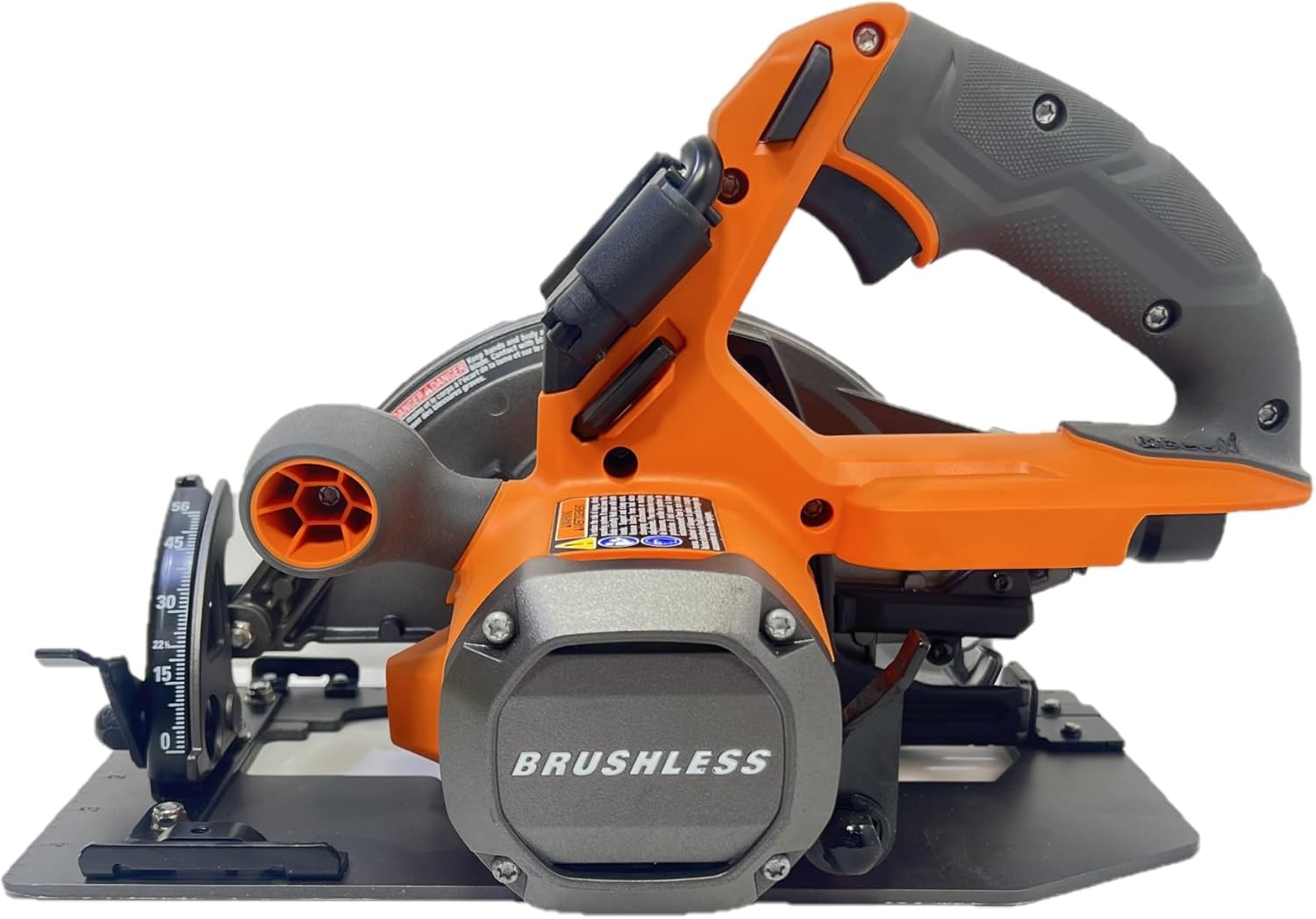
Image: A graphic stating "COMES IN BULK PACKAGING, NO RETAIL PACKAGING" in red text on a white background.


