
Introduction
The Barrina Grow Lights Panel DC10 provides full-spectrum lighting for indoor plants, designed to support all stages of plant growth from seedling to flowering. This ultra-thin panel features adjustable spectrum modes, dimmable levels, and an automatic on/off timer for convenient and effective plant care. This manual provides detailed instructions for the proper installation, operation, and maintenance of your grow light panels.
What's Included
Carefully unpack the box and ensure all items are present. The package includes:
- 4 x Barrina Grow Light Panels
- 1 x AC/DC Adaptor
- 1 x Power Cord with Turn On/Off Timer Controller
- 3 x Connecting Cords (39.4 inches each)
- 1 x Hook and Loop Tape
- 16 x Snap-in Adhesives
- 32 x Cable Ties

Image: Contents of the Barrina Grow Lights Panel DC10 package, showing 4 grow light panels, AC/DC adaptor, power cord with timer, connecting cords, hook and loop tape, snap-in adhesives, and cable ties.
Setup and Installation
The Barrina Grow Lights Panel DC10 offers two primary installation methods for versatility.
Installation Methods:
- Option 1: Snap-in Adhesive
- Attach the snap-in adhesives to the four corners on the back of each grow light panel.
- Tear off the backing paper from the snap-in adhesives.
- Carefully paste the panel onto a clean and dry surface, such as the underside of a shelf or cabinet.
- Option 2: Cable Ties
- Pass cable ties through the designated holes on the four corners of each grow light panel.
- Securely install the panel onto a plant stand, wire shelving, or other suitable structure using the cable ties.

Image: Visual guide demonstrating two installation methods: using snap-in adhesives for flat surfaces and cable ties for wire racks or plant stands.
Connecting Multiple Panels:
The Barrina Grow Lights Panel DC10 is designed to be linkable. You can connect up to 4 grow light panels in a series using the provided connecting cords and a single AC/DC adaptor. Ensure all connections are secure before powering on the unit.

Image: Diagram illustrating the connection of multiple Barrina Grow Light Panels in a series using connecting cords and a single power adapter.
Operating Instructions
The included power cord features an integrated controller for easy management of the grow light's functions.

Image: Close-up of the inline controller, detailing buttons for dimmable levels, spectrum modes, timing modes, and the power switch.
Power On/Off:
Press the Power Switch Button (red circle icon) on the controller to turn the lights on or off.
Dimmable Levels:
The lights offer 8 dimmable levels to adjust light intensity according to your plants' needs. Use the +/- buttons to cycle through the brightness settings: 100%, 87.5%, 75%, 62.5%, 50%, 37.5%, 25%, and 12.5%.
Spectrum Modes:
Select from 3 spectrum modes to optimize light for different growth stages. Press the Spectrum Mode button (circular arrow icon) to switch between:
- Yellow + Red + Pink: Full spectrum for all growth stages.
- Yellow + Red: Ideal for vegetative growth.
- Pink + Red: Optimized for flowering and fruiting.
Auto On/Off Timer:
The integrated timer allows for automatic daily cycling. Press the Timer button (clock icon) to select a duration:
- 3 Hours: Lights stay on for 3 hours, then off for 21 hours.
- 6 Hours: Lights stay on for 6 hours, then off for 18 hours.
- 12 Hours: Lights stay on for 12 hours, then off for 12 hours.
Once set, the timer will automatically turn the lights on and off at the same time each day. No need to manually unplug or re-plug.
Video: A general product video showcasing the Barrina Grow Lights Panel in various plant settings. This video demonstrates the lights in action and their application for indoor plant cultivation.
Maintenance
Proper maintenance ensures the longevity and optimal performance of your Barrina Grow Lights Panel.
Cleaning:
Periodically wipe the surface of the grow light panels with a soft, dry cloth to remove dust and debris. Ensure the lights are unplugged before cleaning. Avoid using harsh chemicals or abrasive materials that could damage the water-resistant surface coating.
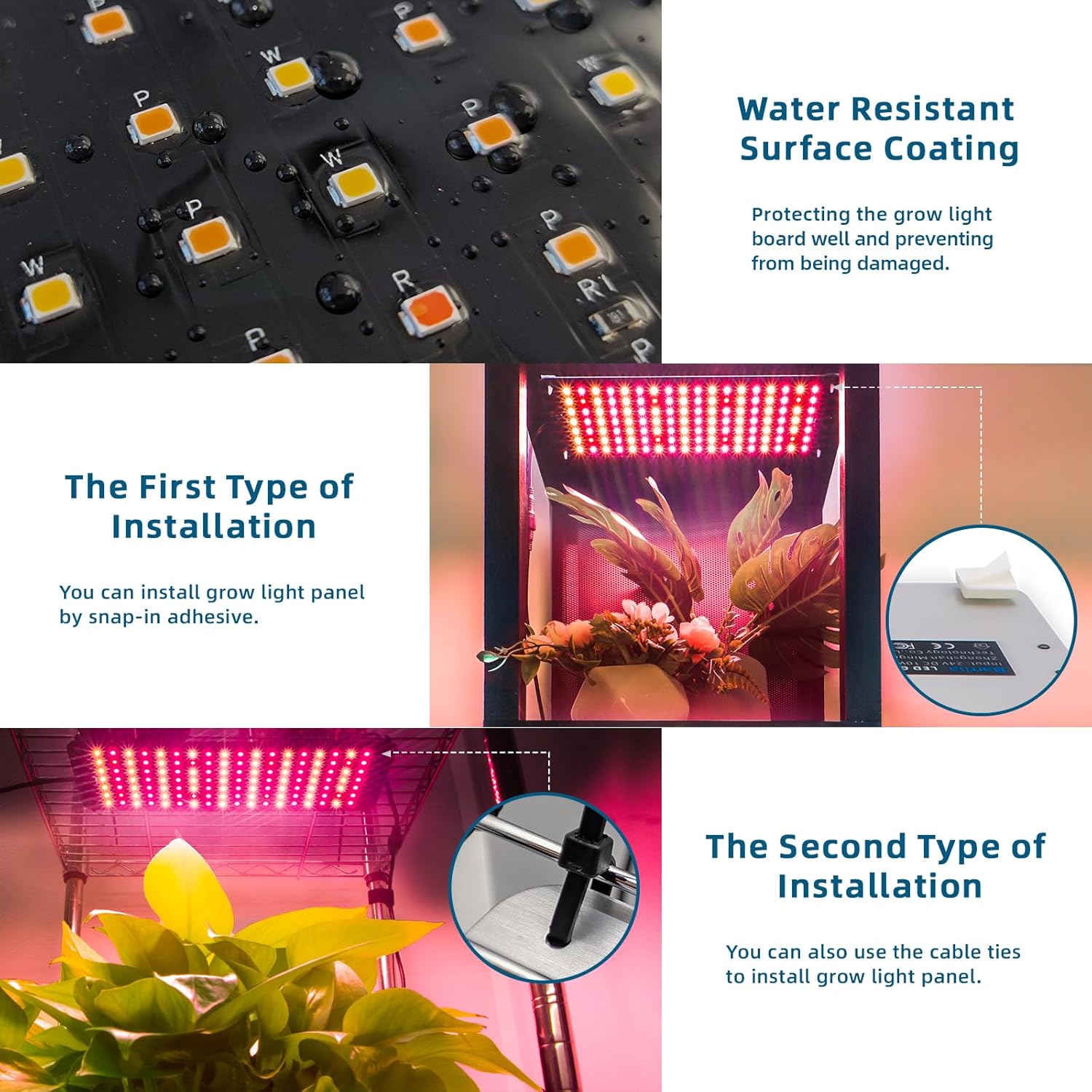
Image: Detail of the grow light panel's water-resistant surface coating, highlighting its protective feature against moisture.
Heat Dissipation:
The ultra-thin aluminum design provides excellent heat dissipation. Ensure adequate airflow around the panels to prevent overheating and maintain optimal operating temperatures.
Troubleshooting
If you encounter issues with your Barrina Grow Lights Panel, refer to the following common solutions:
- Lights not turning on:
- Check if the power cord is securely plugged into a working outlet.
- Ensure all connecting cords between panels are firmly attached.
- Press the power button on the controller to ensure it is turned on.
- Timer not functioning correctly:
- The controller does not retain settings after a power outage. If power is interrupted, you may need to reset the timer and desired settings manually.
- Ensure you have selected one of the 3/6/12 hour timer options.
- Inconsistent brightness or spectrum:
- Verify that the dimmable levels and spectrum modes are set as desired using the controller buttons.
- Ensure no physical obstruction is blocking the light output.
If problems persist, please contact Barrina customer support for further assistance.
Specifications
| Model Number | DC10 |
| Brand | Barrina |
| Light Source Type | LED |
| Wattage (Total) | 40 Watts (4 x 10W panels) |
| Voltage | 120 Volts (AC) |
| Material | Aluminum, Polycarbonate (PC) |
| Dimensions (L x W x H) | 14.17"L x 4.72"W x 0.35"H (per panel) |
| Item Weight | 2.2 Pounds |
| Special Features | Dimmable, Linkable, Full Spectrum, Auto On/Off Timer |
| Number of Light Sources | 4 |
| Color Modes | 3 Spectrum Modes |

Image: PPFD (Photosynthetic Photon Flux Density) measurements for a single grow light panel at various heights (8in, 12in, 16in) above plants.
Warranty and Support
Warranty Information:
The Barrina Grow Lights Panel DC10 comes with a 2-year manufacturer's warranty. This warranty covers defects in materials and workmanship under normal use. Please retain your proof of purchase for warranty claims.
Customer Support:
For technical assistance, troubleshooting, or warranty inquiries, please contact Barrina customer service. Refer to the product packaging or the official Barrina website for the most current contact information.