
1. Introduction
This manual provides comprehensive instructions for the safe and efficient operation, installation, and maintenance of your QNK 7.5KW 10HP 220V AC 33A Variable Frequency Drive (VFD). This VFD is designed to convert single-phase or three-phase 220 VAC input into three-phase 220 VAC output, with a frequency range of 0-2,000 Hz, making it suitable for various applications including CNC spindle motors, milling machines, pumps, compressors, and grinders.
Key features include low-noise operation, low electromagnetic interference, V/F control, vector control, and multiple protective functions for enhanced safety and durability.

Figure 1: QNK 7.5KW 10HP 220V VFD Converter with included cable.
2. Safety Information
WARNING: Risk of electric shock. Wait 5 minutes for capacitor discharge after disconnecting power supply.
Always ensure the VFD is properly grounded. Do not connect the VFD’s output terminals with capacitive loads. Ensure the input voltage is within the specified range (+/- 15%). For heavy loads, consider a higher power level VFD or consult with a professional for model selection. Disconnect power before performing any installation, maintenance, or troubleshooting.

Figure 2: The VFD includes multiple protection features such as overload, overheat, over-voltage, low-voltage, fuse, stall, reset, and short circuit protection.
3. Product Overview
3.1 Components
The QNK VFD features a robust design with a user-friendly control panel, efficient cooling system, and durable internal components.
- Control Panel: Digital display with intuitive buttons for setting parameters and monitoring status. It can be separated for remote operation.
- Cooling Fan: Independent air duct design for strong cooling effect and heat dissipation.
- Capacitors: Equipped with four capacitors for larger capacity, improved temperature, and pressure resistance.
- Housing: Nonflammable ABS flame retardant material case for enhanced safety and durability.

Figure 3: The VFD features a separate control panel for flexible installation and operation.

Figure 4: The VFD incorporates a powerful cooling fan with an independent air duct design for effective heat dissipation.

Figure 5: Internal view of the VFD, highlighting the circuit board and multiple capacitors for stable performance.
4. Specifications
| Specification | Value |
|---|---|
| Model Number | 7.5KW220V |
| Power (Wattage) | 7.5 KW |
| Horsepower (HP) | 10 HP |
| Input Voltage | 1-phase/3-phase 220 VAC (+/- 15%) |
| Output Voltage | 3-phase 220 VAC |
| Input Current | 0-33 A |
| Output Current | 0-33 A |
| Frequency Range | 0-2,000 Hz |
| Item Weight | 6.45 pounds |
| Product Dimensions | 5.8 x 4.6 x 8.7 inches |
| Material | Copper (internals), ABS Flame Retardant (exterior) |

Figure 6: External and installation dimensions of the QNK VFD.
5. Setup
5.1 Wiring Diagram
Refer to the following diagram for proper electrical connections. Ensure all connections are secure and comply with local electrical codes.
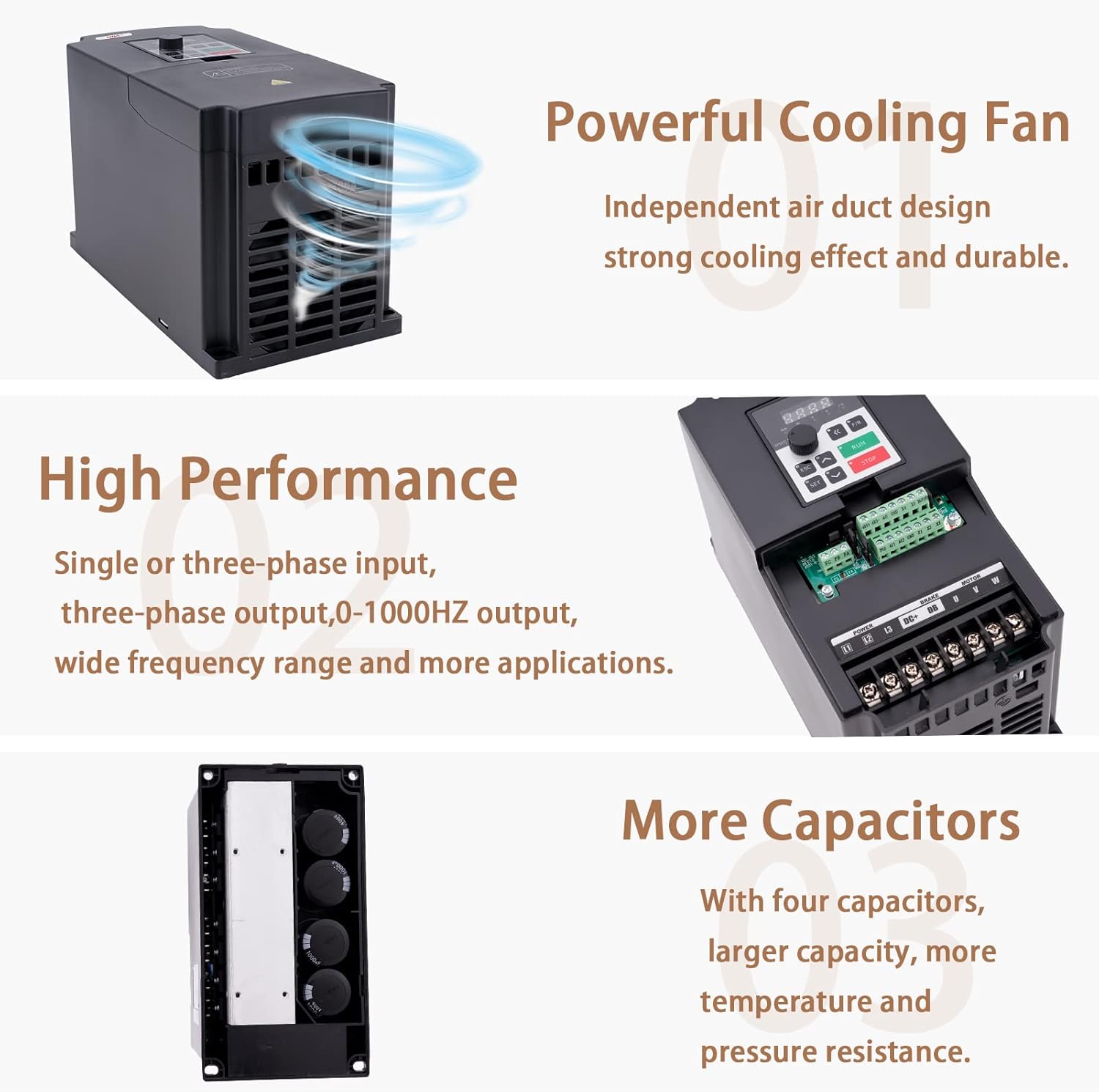
Figure 7: Detailed VFD connection diagram for power input, motor output, and control signals.
5.2 Initial Connection
- Connect the power input (L1/L2/L3 for 3-phase, L1/L2 for single-phase) to the VFD's input terminals.
- Connect the motor to the VFD's output terminals (U, V, W).
- Ensure proper grounding of the VFD and motor.
- If using an external resistor, connect it to the DC+/DB terminals.
- For external control, connect multi-function digital input terminals (X1-X6/Y1F0) and analog input terminals (AI1, AI2) as required.
- The VFD supports RS485 communication (MODBUS protocol) for advanced control.
6. Operating Instructions
6.1 Control Panel Functions
The VFD's control panel allows for parameter setting and operational control. The main buttons and their functions are:
| Button Icon | Button's Name | Function Description |
|---|---|---|
| SET | SET | Go to the menu, or a certain parameter, and confirm the parameter. |
| ESC | ESC | Return |
| ▲ | UP | Modify and select parameters |
| ▼ | DOWN | Modify and select parameters |
| « | SHIFT | Monitor different operation status and switch digit place. |
| F/R | F/R | Change the running direction of motor |
| RUN | RUN | Run command |
| STOP | STOP | Stop command/abnormal reset command |
6.2 Adjusting Rated Frequency
The VFD's factory setting for rated frequency is 400Hz. If your motor requires a different frequency, such as 60Hz, you will need to adjust the parameters. The following video demonstrates how to change the rated frequency and speed settings on the QNK VFD.
Video: How to Change the Rated Frequency of QNK Inverters. This video demonstrates the steps to adjust the VFD's frequency and speed parameters to match your motor's specifications, for example, changing from 400Hz to 60Hz.
The VFD frequency setting modes include digital setting, analog setting, serial communication setting (RS485 with MODBUS), and PID setting.
7. Maintenance
Regular maintenance ensures the longevity and optimal performance of your VFD. The multi-grid design provides sufficient cooling space and helps prevent dust and water mist from entering the circuit board section.
- Keep the VFD clean and free from dust and debris.
- Ensure adequate ventilation around the unit to facilitate proper heat dissipation.
- Periodically inspect all wiring connections for tightness and signs of wear.
- Avoid exposing the VFD to excessive moisture or extreme temperatures.
8. Troubleshooting
If you encounter an error code or operational issues, please refer to the full user manual (PDF) for detailed troubleshooting steps. Common issues may include incorrect parameter settings or environmental factors.
If you are unable to resolve the issue, please contact customer support.
9. Warranty and Support
For any questions regarding the product, operation, or error codes, please feel free to contact QNK customer support. Our team is available to assist you within 24 hours.
You can also download the complete User Manual in PDF format for more detailed information: Download User Manual (PDF)
