1. Product Overview
The QNK 5.5KW 7.5HP Variable Frequency Drive (VFD) is designed to convert single-phase or three-phase 220 VAC input into three-phase 220 VAC output, allowing for precise control of motor speed and frequency. It is suitable for a wide range of industrial and home applications, including CNC routers, milling machines, pumps, compressors, and grinders.

Figure 1: Front view of the QNK 5.5KW VFD unit.
This VFD incorporates PMW control technology for low-noise operation and reduced electromagnetic interference. It features both V/F control and Vector Control modes, offering flexible frequency setting options including digital, analog, serial communication (RS485 MODBUS), and PID settings for advanced control.

Figure 2: Dimensions of the QNK 5.5KW VFD. The unit measures approximately 22cm (8.7 inches) in height, 11.8cm (4.6 inches) in width, and 14.8cm (5.8 inches) in depth.
2. Safety Information
WARNING: Risk of electric shock. Always turn off power before wiring or performing any maintenance. Wait at least 5 minutes for capacitor discharge after disconnecting power supply. Use proper safety equipment (PPE) when handling electrical components.
This VFD is equipped with multiple protective functions including overload, fuse, over-voltage (DC voltage > 400V), under-voltage (DC voltage < 200V), restart, stall, short circuit, and overheat protection. Its design includes copper coil internals and a non-flammable exterior for enhanced durability and safety. A multi-grid design ensures adequate cooling and prevents dust and water mist from entering the circuit board.

Figure 3: Overview of the multiple protection features integrated into the QNK VFD, including overload, overheat, over-voltage, low-voltage, fuse, stall, reset, and short circuit protection.
- This VFD supports external resistors.
- If your motor is heavy load, choose a higher power level VFD or consult for model selection.
- The VFD cannot be used as a power source for other equipment or to drive a motor with a supply voltage lower than 80V.
- Do not connect the VFD’s output terminals with capacitive loads.
- For heavy equipment like cranes or compressors, select a VFD with a larger power output (e.g., a 5.5 Kw motor should be connected to a 7.5 Kw VFD).
- If a generator powers the VFD, ensure its output voltage is within +/-15%.
3. Installation and Wiring
Proper installation and wiring are crucial for the safe and effective operation of your QNK VFD. Always ensure the power is turned off before beginning any wiring procedures. Wear appropriate personal protective equipment (PPE).
3.1. Wiring the VFD
This video demonstrates the wiring process for the QNK VFD. Please follow the instructions carefully.
Video 1: How to wire the QNK VFD. This video provides a step-by-step guide on connecting the power and motor wires to the VFD.
Step-by-Step Wiring Guide:
- Power Off: Ensure the power supply is completely disconnected before starting any wiring.
- Connect Power Wires: For a 220V single-phase power supply, connect the power wires to terminals L1 and L2 on the VFD. Ensure connections are firm.
- Connect Motor Wires: Connect the three motor wires to terminals U, V, and W on the VFD. Ensure connections are firm.
- Verify Connections: Double-check that all power and motor wires are correctly and firmly connected to their respective terminals.
- Secure Cover: Once wiring is complete and verified, securely replace the terminal cover.

Figure 4: Detailed connection diagram for the QNK VFD, showing terminals for power input, motor output, brake resistor, and control signals.
The VFD also features an RS485 communication interface for advanced control and monitoring, adopting the standard international MODBUS main circuit control.
5. Operating Instructions
After successful installation and wiring, you can proceed with operating the VFD. Always wear personal protective gear before powering up the unit.
5.1. Initial Power-Up and Frequency Setting
- Power On: Turn on the power supply to the VFD.
- Set Frequency: Turn the knob clockwise fully. The panel should display 50 Hz. Ensure the motor's rated frequency matches the inverter's rated frequency.
- Adjust Acceleration/Deceleration Times: If your motor drives high-torque equipment, set the acceleration and deceleration times to a higher value. For example, if the current setting is 10 Hz, you can adjust it to 15 Hz or 20 Hz. F015 refers to the deceleration time; adjust it to 20 Hz if needed.
- Run Motor: Once settings are confirmed, press the RUN button to start the motor.

Figure 5: Description of the control panel buttons and their functions. This includes SET (menu/parameter confirmation), ESC (return), UP/DOWN (modify/select parameters), SHIFT (monitor status/switch digit place), F/R (change motor direction), RUN (run command), and STOP (stop/reset command).
5.2. Changing Motor Rotation Direction
If the motor is rotating in a reverse direction from desired, you can exchange the locations of any two wires connected to the output terminals (U, V, and W). For example, you can exchange the U and W wires.
- Power Off: Turn off the power to the VFD and wait until the VFD comes to a full stop. This may take some time for the power to fully dissipate.
- Remove Cover: Carefully remove the terminal cover.
- Exchange Wires: Randomly exchange the locations of two of the three motor output wires (U, V, or W). Ensure the wires are tied firmly after the exchange.
- Secure Cover: Replace the terminal cover securely.
- Power On and Test: Power up the VFD again and run the motor to verify the new rotation direction.
6. Maintenance
Regular maintenance ensures the longevity and optimal performance of your QNK VFD. The unit features a powerful cooling fan with an independent air duct design for strong cooling effect and durability. It also includes four capacitors for larger capacity, improved temperature, and pressure resistance.
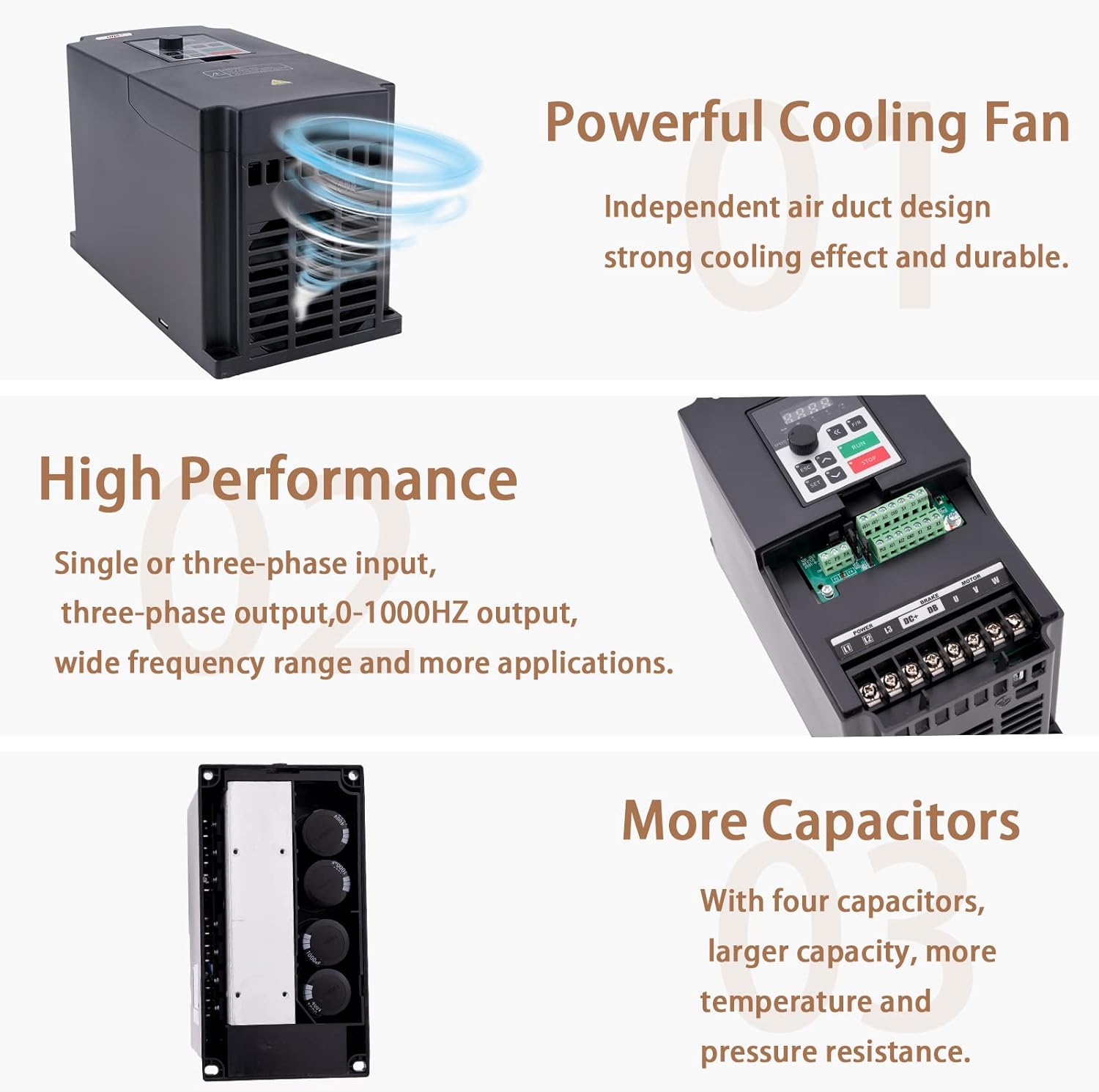
Figure 6: Illustration highlighting the powerful cooling fan and internal capacitors of the QNK VFD, contributing to its durability and heat dissipation.
- Keep the VFD clean and free from dust and debris.
- Ensure proper ventilation around the unit to facilitate effective cooling.
- Periodically check all wiring connections for tightness and signs of wear.
- Avoid exposing the VFD to excessive moisture or extreme temperatures.
7. Troubleshooting
If you encounter any issues or error codes with your QNK VFD, please refer to the following general advice. For specific error codes or complex problems, contact customer support.
- Motor Not Starting:
- Check all power and motor connections for proper seating and tightness.
- Verify the input voltage matches the VFD's requirements (220V AC).
- Ensure the motor's rated frequency matches the VFD's settings.
- Check for any error codes displayed on the VFD panel.
- Motor Rotating in Reverse:
- Follow the steps in Section 5.2 to exchange two of the motor output wires (U, V, W).
- Unusual Noise or Vibration:
- Ensure the motor is properly mounted and balanced.
- Check for loose connections or internal components.
- Verify the acceleration/deceleration times are set appropriately for the load.
If there is an error code displayed and you are unsure how to proceed, or for any other questions regarding this product, please feel free to contact QNK Customer Support Team. They will assist you within 24 hours.
8. Specifications
| Feature | Specification |
|---|---|
| Manufacturer | QNK |
| Part Number | QNK |
| Item Weight | 5.7 pounds |
| Package Dimensions | 10.39 x 8.19 x 6.85 inches |
| Item Model Number | 5.5KW220V |
| Size | 5.5KW(7.5HP 220V) |
| Color | Black |
| Style | 5.5KW 7.5HP 220V |
| Material | copper |
| Power Source | 220v |
| Voltage | 220 Volts |
| Display Style | LCD or LED |
| Included Components | VFD |
| Batteries Included? | No |
| Batteries Required? | No |
| Recommended Uses For Product | Home |
9. Customer Support
For any inquiries, technical assistance, or warranty claims, please contact QNK Customer Support. The Customer Support Team is committed to helping you as soon as possible, typically within 24 hours.
You can also visit the official QNK store for more information and products: QNK Store on Amazon