
Introduction
Welcome to the user manual for your new ODK Reversible L-Shaped Gaming Desk. This desk is designed to provide a spacious and functional workspace for gaming, studying, and office tasks, featuring integrated power and storage solutions. Please read this manual carefully to ensure proper assembly, operation, and maintenance of your desk.

Figure 1: The ODK Reversible L-Shaped Gaming Desk, showcasing its design and functionality.
Product Features
The ODK L-Shaped Gaming Desk offers a range of features designed for convenience and efficiency:
- Integrated USB Charging Ports and Power Outlets: Equipped with 2 power outlets and 2 USB charging ports, allowing convenient charging of electronic devices such as smartphones, gaming equipment, and Bluetooth devices directly from your desk.
- Reversible L-Shape Design: The versatile L-shaped design fits perfectly into corners, maximizing limited space. Its reversible configuration allows for flexible setup to suit your room layout.
- Ample Workspace and Storage: Provides a large surface area (120 x 80 x 88 cm) capable of accommodating multiple monitors and laptops. Features a lower shelf and storage compartments for your PC, books, files, and other accessories. A side storage bag is included for small office items.
- Sturdy and Durable Construction: Constructed from high-quality metal and MDF board, ensuring stability, durability, and resistance to scratches and water. Adjustable anti-slip pads protect your floor and maintain stability on uneven surfaces.
- Integrated Monitor Stand: A raised shelf provides an ergonomic monitor placement, helping to improve posture.
Visual Overview

Figure 2: Integrated USB Charging Ports and Power Outlets. This feature allows for direct power access for your electronic devices.

Figure 3: Integrated Monitor Stand. The raised platform helps improve ergonomic posture during use.
Setup and Assembly
Your ODK L-Shaped Gaming Desk is designed for straightforward assembly. All necessary parts are clearly labeled, and detailed instructions are provided in the packaging.
Before You Begin:
- Unpack all components and verify against the parts list provided in the assembly manual.
- Ensure you have adequate space for assembly.
- Keep small parts out of reach of children.
- It is recommended to assemble the desk with at least two people for ease and safety.
Assembly Steps:
- Identify all structural components, including the metal frame pieces and MDF board sections.
- Follow the step-by-step diagrams in the included assembly manual to connect the frame pieces using the provided hardware.
- Attach the desk surfaces and shelves to the assembled frame. Pay attention to the reversible design to configure the L-shape to your preference (left or right orientation).
- Install the integrated power strip and USB module into the designated slot on the desk surface.
- Attach the side storage bag to the frame as indicated in the manual.
- Adjust the anti-slip pads on the bottom of the desk legs to ensure stability on your floor.
Dimensions and Configuration:
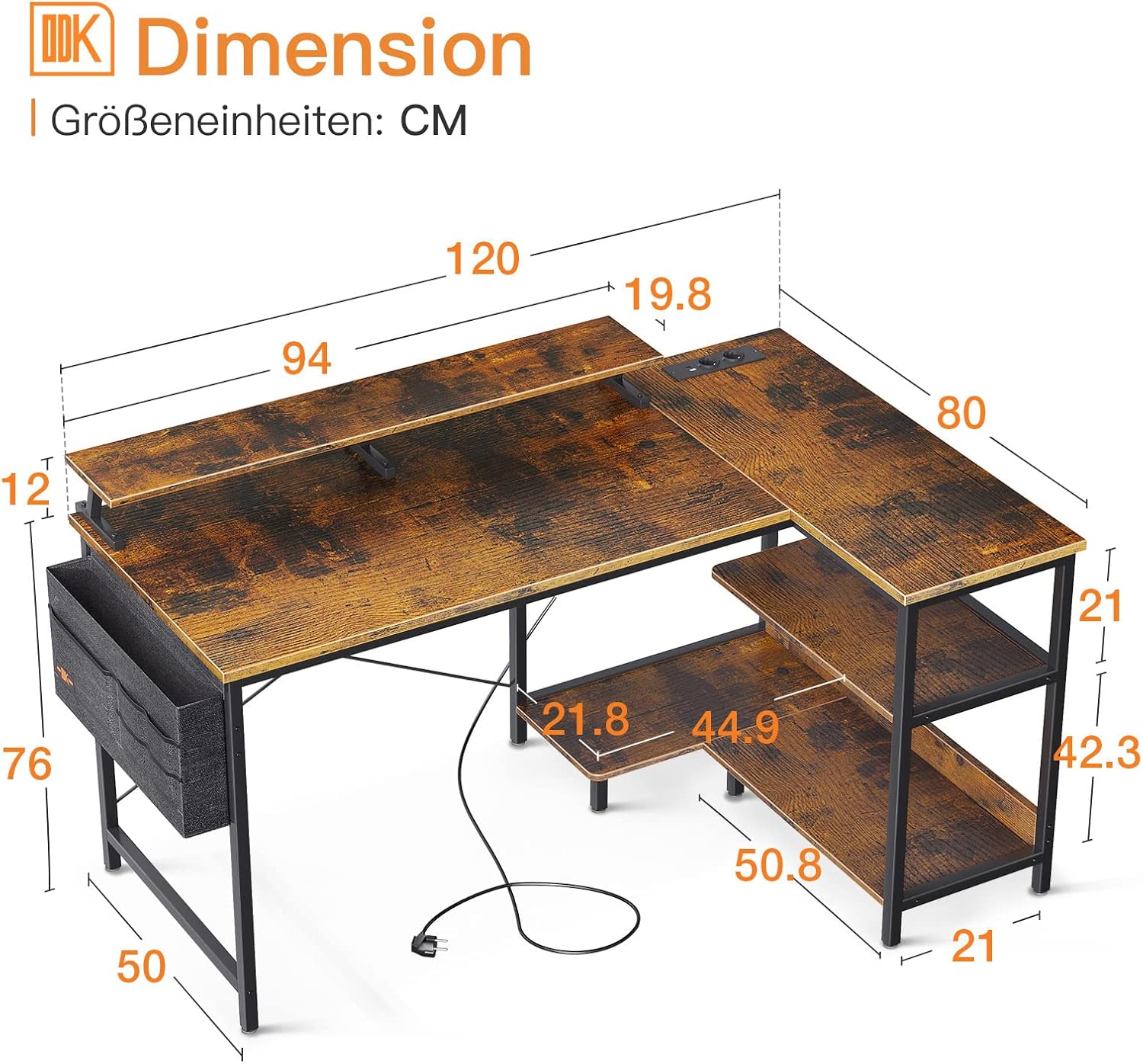
Figure 4: Desk Dimensions. Refer to this diagram for precise measurements and to plan your space effectively.

Figure 5: Flexible Configuration. The reversible design allows for various setups, including combining multiple units for an extended workspace.
Operating Instructions
Using your ODK L-Shaped Gaming Desk is straightforward. Once assembled, you can begin utilizing its features.
Power and USB Ports:
- Connect the power cord from the integrated power strip to a standard wall outlet.
- Plug your electronic devices into the available AC outlets or USB ports for charging and power.
- Ensure that the total power draw of connected devices does not exceed the rated capacity of the power strip.
Workspace Utilization:
- Place your monitors on the integrated monitor stand for optimal viewing height.
- Utilize the spacious desktop for your keyboard, mouse, and other peripherals.
- Organize books, files, and your PC tower on the lower shelves and storage compartments.
- Use the side storage bag for quick access to smaller items like pens, notebooks, or cables.
Maintenance and Care
Proper care will extend the life and maintain the appearance of your ODK L-Shaped Gaming Desk.
- Cleaning: Wipe surfaces with a soft, damp cloth. Avoid harsh chemicals or abrasive cleaners, which can damage the laminated finish.
- Spills: Immediately wipe up any spills to prevent water damage to the MDF board.
- Heat: Avoid placing hot items directly on the desk surface. Use coasters or protective pads if necessary.
- Weight Distribution: Distribute weight evenly across the desk surface and shelves to prevent stress on the structure.
- Inspections: Periodically check all screws and connections to ensure they remain tight. Retighten if necessary.
Troubleshooting
This section addresses common issues you might encounter with your ODK L-Shaped Gaming Desk.
Desk Instability/Wobbling:
- Cause: Uneven floor or loose connections.
- Solution: Adjust the anti-slip pads on the bottom of the desk legs to compensate for uneven flooring. Check and tighten all assembly screws.
Power Outlets/USB Ports Not Working:
- Cause: Not plugged into wall outlet, tripped circuit breaker, or faulty device.
- Solution: Ensure the desk's power cord is securely plugged into a functioning wall outlet. Check your home's circuit breaker. Test the outlets with a different device to rule out a faulty device. If the issue persists, contact customer support.
Missing or Damaged Parts:
- Cause: Packaging error or shipping damage.
- Solution: Refer to the assembly manual's parts list. If parts are missing or damaged upon arrival, contact ODK customer support immediately with your purchase details.
Specifications
| Attribute | Detail |
|---|---|
| Brand | ODK |
| Model Numbers | DBDJFZ-01, USBDBFZ |
| Color | Brown |
| Product Dimensions (L x W x H) | 120 x 88 x 80 cm (47.2 x 34.6 x 31.5 inches) |
| Item Weight | 16.7 Kilograms (36.8 lbs) |
| Material | Metal Frame, Engineered Wood (MDF) Top |
| Desk Design | L-Shape Computer Desk |
| Finish Type | Laminated |
| Special Features | Reversible, Compact, Integrated USB Port & Power Outlet, Scratch Resistant, Integrated Monitor Stand |
| Country of Origin | China |
Warranty and Support
ODK is committed to providing high-quality products and excellent customer service.
Customer Support:
If you encounter any issues with your ODK L-Shaped Gaming Desk, such as damage, missing parts, or scratches, please contact our professional customer support team. We aim to resolve any problems within 24 hours.
Contact Information:
Please refer to your purchase documentation or the ODK official website for the most current contact methods (e.g., email, phone number, support portal).
When contacting support, please provide your product model number (DBDJFZ-01 / USBDBFZ) and details of your purchase to expedite assistance.


