Introduction
This manual provides instructions for the ALLIMITY Replacement Remote Control, designed to be compatible with Cisco Remote Control Model RC1534820/04B. This remote offers a direct replacement solution, requiring no complex programming for basic functionality.
Please read this manual thoroughly to ensure proper setup and operation of your new remote control.
Setup: Battery Installation
The remote control requires two (2) AAA alkaline batteries for operation. Batteries are not included with the remote control.
- Locate the battery compartment on the back of the remote control.
- Slide the battery compartment cover downwards and lift it off.
- Insert two (2) AAA alkaline batteries, ensuring the positive (+) and negative (-) terminals align correctly with the markings inside the compartment.
- Replace the battery compartment cover by sliding it back into place until it clicks securely.

Image: Rear view of the ALLIMITY remote control with the battery cover removed, illustrating the correct orientation for AAA battery insertion.
Once batteries are installed, the remote control is ready for use with compatible Cisco devices.
Operating Instructions
This ALLIMITY remote control is designed as a direct replacement for the Cisco Remote Control Model RC1534820/04B. It typically requires no programming or setup beyond battery installation to function with compatible devices.
Basic Functionality
After installing batteries, point the remote control towards your Cisco device (e.g., set-top box) and press the desired function buttons. Common functions include:
- Power: Turns the device on or off.
- Channel Up/Down: Changes channels.
- Volume Up/Down: Adjusts audio volume.
- Mute: Silences the audio.
- Number Pad (0-9): Direct channel entry.
- Menu/Guide: Accesses on-screen menus or program guides.
- Navigation (Arrow keys, OK): Navigates through menus.
- Playback Controls (Play, Pause, Stop, Record, Rewind, Fast Forward): Controls media playback.

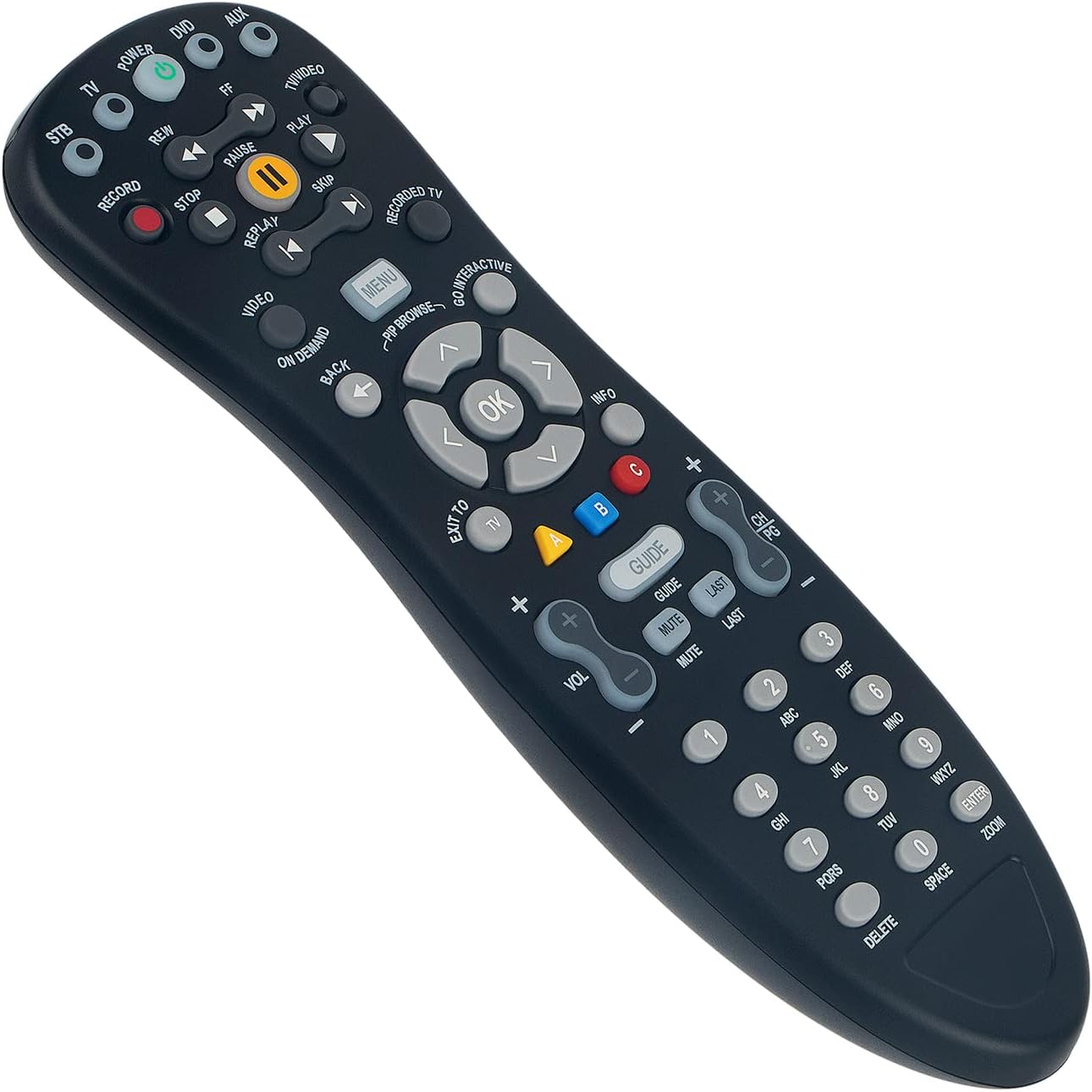
Images: Front views of the ALLIMITY remote control, showcasing the button layout and design.
For specific functions related to your Cisco device, refer to the original device's user manual.
Maintenance
Cleaning
To clean the remote control, use a soft, dry cloth. For stubborn dirt, slightly dampen the cloth with water or a mild, non-abrasive cleaner. Avoid using harsh chemicals, solvents, or abrasive materials, as these can damage the remote's surface or internal components.
Battery Care
- Replace batteries when the remote's performance degrades or stops working.
- Always replace both batteries at the same time with new ones of the same type (AAA alkaline).
- Do not mix old and new batteries, or different types of batteries.
- If the remote control will not be used for an extended period, remove the batteries to prevent leakage and potential damage.
- Dispose of used batteries according to local regulations.
Troubleshooting
- Remote is not responding:
- Ensure batteries are inserted correctly with the correct polarity (+/-).
- Replace old batteries with new AAA alkaline batteries.
- Ensure there are no obstructions between the remote control and the device's infrared receiver.
- Confirm the remote is pointed directly at the device.
- Remote does not control my specific device (e.g., U-Verse, cable box):
This ALLIMITY remote is a direct replacement for the Cisco Model RC1534820/04B. It is designed to work with devices that were originally controlled by that specific Cisco model. It is not a universal remote control and does not require programming codes. If your original device was not controlled by the Cisco RC1534820/04B, this replacement remote may not be compatible.
- No programming instructions or codes provided:
As a direct replacement, this remote control is pre-programmed to emulate the original Cisco RC1534820/04B. It does not require user programming or input of device codes. If your device requires a programmable remote, this model may not be suitable.
Specifications
| Model Number | RC1534820-04B |
| Brand | ALLIMITY |
| Product Dimensions | 7 x 1.5 x 0.6 inches |
| Item Weight | 2 ounces |
| Power Supply | 2 x AAA Batteries (Not Included) |
| Special Feature | No Programming Required |
| Compatible Devices | Home Theater (specifically devices compatible with Cisco RC1534820/04B) |
Warranty and Support
This ALLIMITY remote control comes with a 60-day warranty from the date of purchase. This warranty covers manufacturing defects and ensures the product functions as described under normal use.
For warranty claims or technical support, please contact your retailer or the ALLIMITY customer service department with your purchase details.


