
CAPHAUS B0BS16YYMR
CAPHAUS 51 Inch L-Shaped Desk User Manual
Model: B0BS16YYMR
Introduction
This manual provides detailed instructions for the assembly, operation, maintenance, and troubleshooting of your CAPHAUS 51 Inch L-Shaped Desk. Designed for home office, gaming, and study, this desk offers a spacious and durable workspace with integrated storage.
Important Safety Information
Please read and understand all safety warnings before assembly and use. Failure to follow these instructions may result in injury or damage to the product.
- Ensure the desk is not overloaded; it has a maximum weight capacity of 220 lbs (100 kg).
- During assembly, carefully follow all instructions to ensure stability and safety.
- The desk is designed for single-person assembly, but assistance may be helpful.
- Properly anchor the desk if necessary to ensure stability and prevent tipping, especially if children or pets are present.
- Keep small parts and packaging materials away from children.
Setup and Assembly
The CAPHAUS L-Shaped Desk features a tool-free assembly process. All necessary parts are numbered, and visual instructions are provided to guide you through the setup.
- Unpack Components: Carefully remove all parts from the packaging. Verify that all numbered parts are present according to the included parts list.
- Assemble Frame: The steel frame is pre-attached. Simply unfold or connect the L-shaped sections as indicated in the visual guide.
- Install Desktop Panels: Slot the P2 wooden board desktop panels into the designated areas on the steel frame. Ensure they are securely seated.
- Attach Shelves: Position and secure the two adjustable integrated shelves. Each shelf is designed to hold up to 45 lbs.
- Install Headphone Hook: Attach the dedicated headphone hook to the side of the desk as desired.
- Adjust Leveling Feet: Use the adjustable leg pads at the bottom of the desk legs to ensure the desk is stable and level on uneven surfaces.

Image: This diagram illustrates the overall dimensions of the 51-inch L-shaped desk, showing its length, width, and height for planning your space.

Image: A detailed specification image highlighting the 220 lbs weight capacity of the desk and 45 lbs capacity per shelf, along with key dimensions in both inches and centimeters.

Image: This visual demonstrates the high-quality materials, including the 15mm thickened P2 grade desktop and the strong 25x25mm metal legs, ensuring durability and stability.
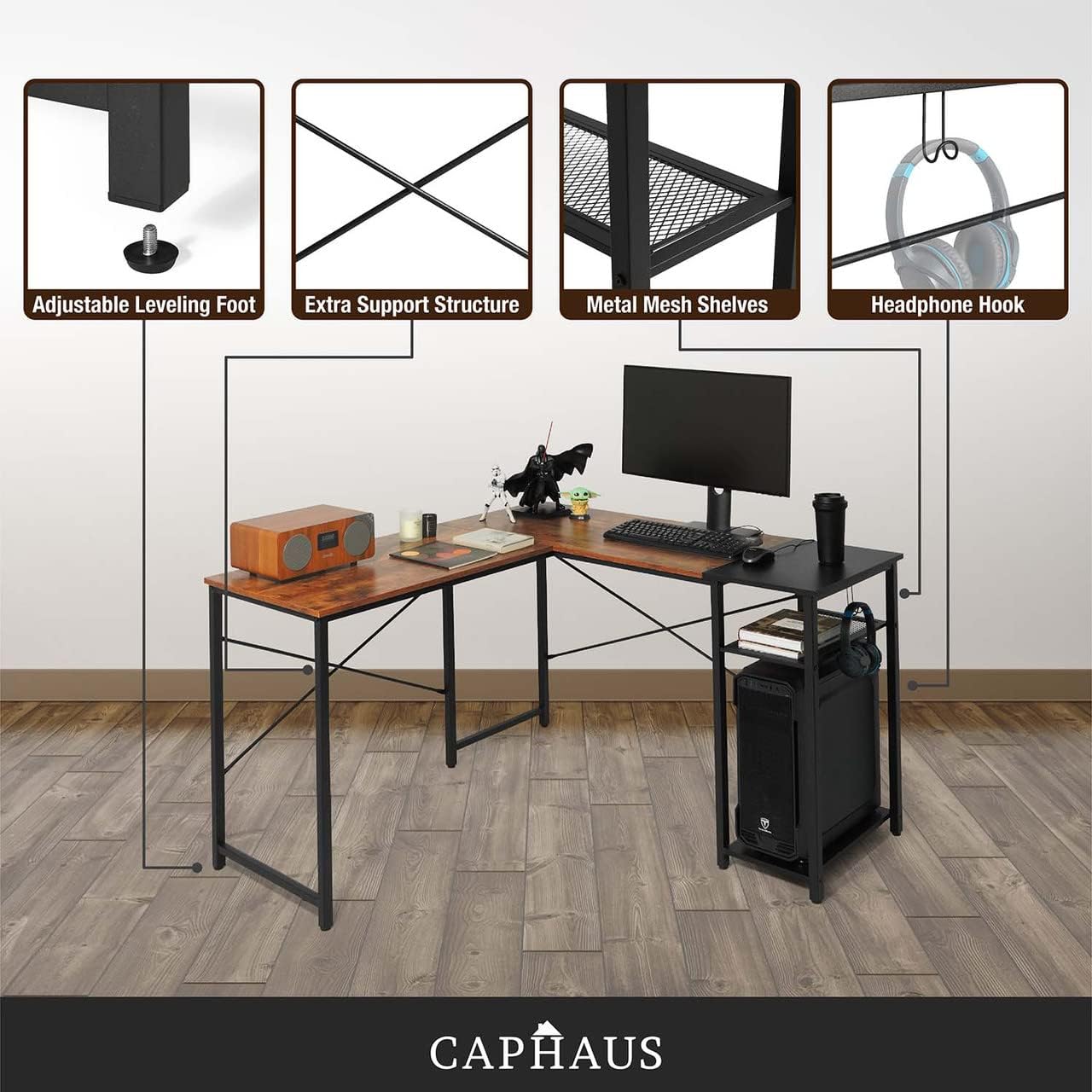
Image: An overview of key features such as adjustable leveling feet for stability, extra support structures for rigidity, metal mesh shelves for storage, and a convenient headphone hook.
Operating Instructions
Your CAPHAUS L-Shaped Desk is designed for versatile use in various settings. Here are guidelines for optimal operation:
- Workspace Utilization: The expansive 51-inch desktop provides ample space for multi-monitor setups, gaming equipment, or study materials. Arrange your devices and accessories to maximize comfort and efficiency.
- Storage Management: Utilize the two removable tiered shelves for organizing books, office supplies, or gaming accessories. Each shelf can support up to 45 lbs.
- Headphone Organization: Use the built-in headphone hook to keep your headset easily accessible and your workspace tidy.
- Stability Check: Periodically check the adjustable leg pads to ensure the desk remains stable and level, especially after moving it.

Image: A view of the CAPHAUS L-Shaped Desk in a typical setup, demonstrating its capacity for multiple monitors, a computer tower, and various office or gaming accessories, highlighting its functional design.
Maintenance
Proper maintenance will extend the life and appearance of your CAPHAUS L-Shaped Desk.
- Cleaning: Wipe surfaces with a soft, damp cloth. Avoid harsh chemicals or abrasive cleaners, which can damage the P2 wooden board and steel frame finish.
- Spills: Immediately wipe up any spills to prevent moisture damage to the desktop.
- Hardware Check: Periodically check all screws and connections to ensure they are tight. Re-tighten if necessary to maintain stability.
- Weight Distribution: Distribute weight evenly across the desktop and shelves to prevent stress on the frame.
Troubleshooting
If you encounter any issues with your desk, refer to the following common troubleshooting tips:
| Problem | Possible Cause | Solution |
|---|---|---|
| Desk wobbles or is unstable. | Uneven floor; loose connections; overloaded. | Adjust the leveling feet at the bottom of the legs. Ensure all assembly screws are tightened. Reduce weight on the desk if it exceeds 220 lbs. |
| Shelves are not level or secure. | Improper installation; overloaded shelf. | Re-check shelf installation to ensure it's correctly slotted. Ensure weight on each shelf does not exceed 45 lbs. |
| Parts do not fit during assembly. | Incorrect orientation; manufacturing defect. | Double-check the visual instructions for correct part orientation. If parts still do not fit, contact customer support. |
Specifications
| Feature | Detail |
|---|---|
| Brand | CAPHAUS |
| Model | 51-Inch L (B0BS16YYMR) |
| Product Dimensions (D x W x H) | 51"D x 51"W x 29.6"H |
| Color | Rustic Oak and Black |
| Material | Engineered Wood (P2 Board), Alloy Steel |
| Maximum Weight Recommendation | 220 Pounds (100 kg) |
| Shelf Weight Capacity (Each) | 45 Pounds (20.4 kg) |
| Assembly Required | Yes (Tool-Free) |
| Special Features | Space Saving, 2-Tier Shelves, Headphone Hook, Adjustable Leveling Feet |
Warranty and Support
CAPHAUS is committed to providing high-quality products and customer satisfaction.
Return Policy
This product is eligible for a return within 30 days of purchase for a refund or replacement, subject to the retailer's return policy.
Protection Plans
Extended protection plans are available for purchase to cover your product beyond the standard return period. Options include:
- 2-Year Protection Plan
- 3-Year Protection Plan
- Complete Protect (monthly plan covering eligible purchases)
For details on coverage and pricing, please refer to the product listing or contact your retailer.
Customer Support
For any questions, concerns, or assistance with your CAPHAUS product, please visit the official CAPHAUS store or contact their customer service. CAPHAUS aims to provide prompt support and ensure an extraordinary shopping experience.
You can find more information and contact details by visiting the CAPHAUS Store on Amazon.
Related documentsB0BS16YYMR

Ask a question about this manual
Ask about setup, troubleshooting, compatibility, parts, safety, or missing instructions. Manuals+ will review the question and use this page’s manual context to help answer it.