
1. Important Safety Information
Please read this instruction manual carefully before using the MassaMAX MD906 massage chair. Retain this manual for future reference.
- Ensure the chair is placed on a stable, level surface.
- Keep children and pets away from the chair during operation.
- Do not use the chair if you have any medical conditions that may be aggravated by massage, or if you are pregnant. Consult a physician if unsure.
- Unplug the chair from the power outlet when not in use or before cleaning.
- Do not attempt to disassemble or repair the chair yourself. Contact customer support for assistance.
2. Setup and Assembly
The MassaMAX MD906 massage chair is designed for quick and easy setup, arriving mostly pre-assembled.
2.1 Unpacking and Placement
The chair arrives approximately 90% pre-assembled. Carefully remove all packaging materials. Due to the chair's weight (approximately 156 pounds), it is recommended to have at least two people for moving and placement.

Figure 2.1: Minimum Doorway Width. The chair requires a minimum doorway width of 29.92 inches for entry.
2.2 Footrest Attachment
Only the footrest requires attachment, which typically takes about 5 minutes. Follow the instructions provided in the separate quick start guide for precise steps on securing the footrest to the main chair body.
2.3 Power Connection
Once assembled, connect the power cord to the chair and then to a grounded electrical outlet. Ensure the power switch on the chair is in the 'Off' position before plugging it in.
3. Operating Instructions
The MassaMAX MD906 offers a variety of massage techniques and programs for a personalized relaxation experience.
3.1 Control Panel and Hand Controller
The chair features a user-friendly touch screen hand controller and quick access buttons for easy operation.

Figure 3.1: Hand Controller

Figure 3.2: Quick Access Buttons
3.2 Automatic Body Scanning
Upon starting a program, the chair performs an automatic body scan to detect your body's unique contours and adjust the massage rollers for optimal coverage and effectiveness from your neck to your thighs.

Figure 3.3: Auto Body Scan in progress.
3.3 Massage Techniques and Programs
The MD906 features a 53.15-inch SL track and intelligent mechanical massage hands to provide a comprehensive massage experience.

Figure 3.4: S+L Massage Track coverage.

Figure 3.5: Multiple Massage Techniques and Features.
Choose from 5 massage styles:
- Kneading
- Tapping
- Knocking
- Shiatsu
- Combination of Kneading & Knocking
The chair also includes 12 preset automatic programs designed for various needs. Refer to the hand controller interface for details on each program.
3.4 Specialized Features
- Zero Gravity Recline: This position elevates your legs above your heart, reducing pressure on your spine and enhancing the massage experience.
- Yoga Stretch: The chair gently stretches your body, helping to decompress the spine and relieve muscle tension.
- Full-Body Airbag Compression: Strategically placed airbags inflate and deflate to provide compression massage to various muscle groups, promoting circulation and relaxation.
- Lower Back Heating Therapy: Gentle heat is applied to the lumbar area to soothe muscles and enhance the massage effect.
- Foot Rollers Massage: The foot massage area combines rolling, scraping, and air compression techniques to rejuvenate tired feet.
- AI Voice Control: Control various functions of the chair using simple voice commands.
- Bluetooth Speaker: Connect your device via Bluetooth to enjoy music or audio during your massage session.

Figure 3.6: Zero Gravity Recline.
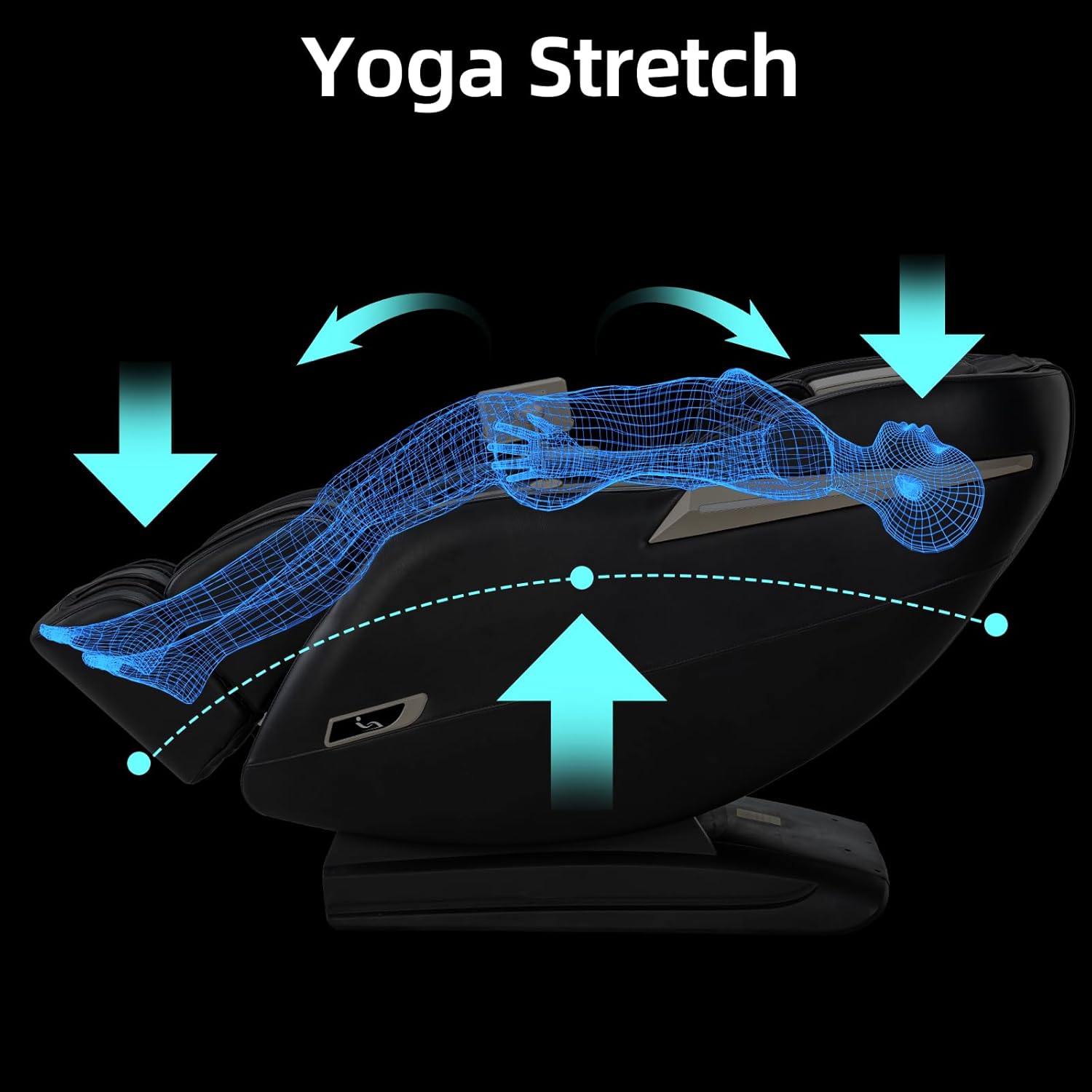
Figure 3.7: Yoga Stretch function.
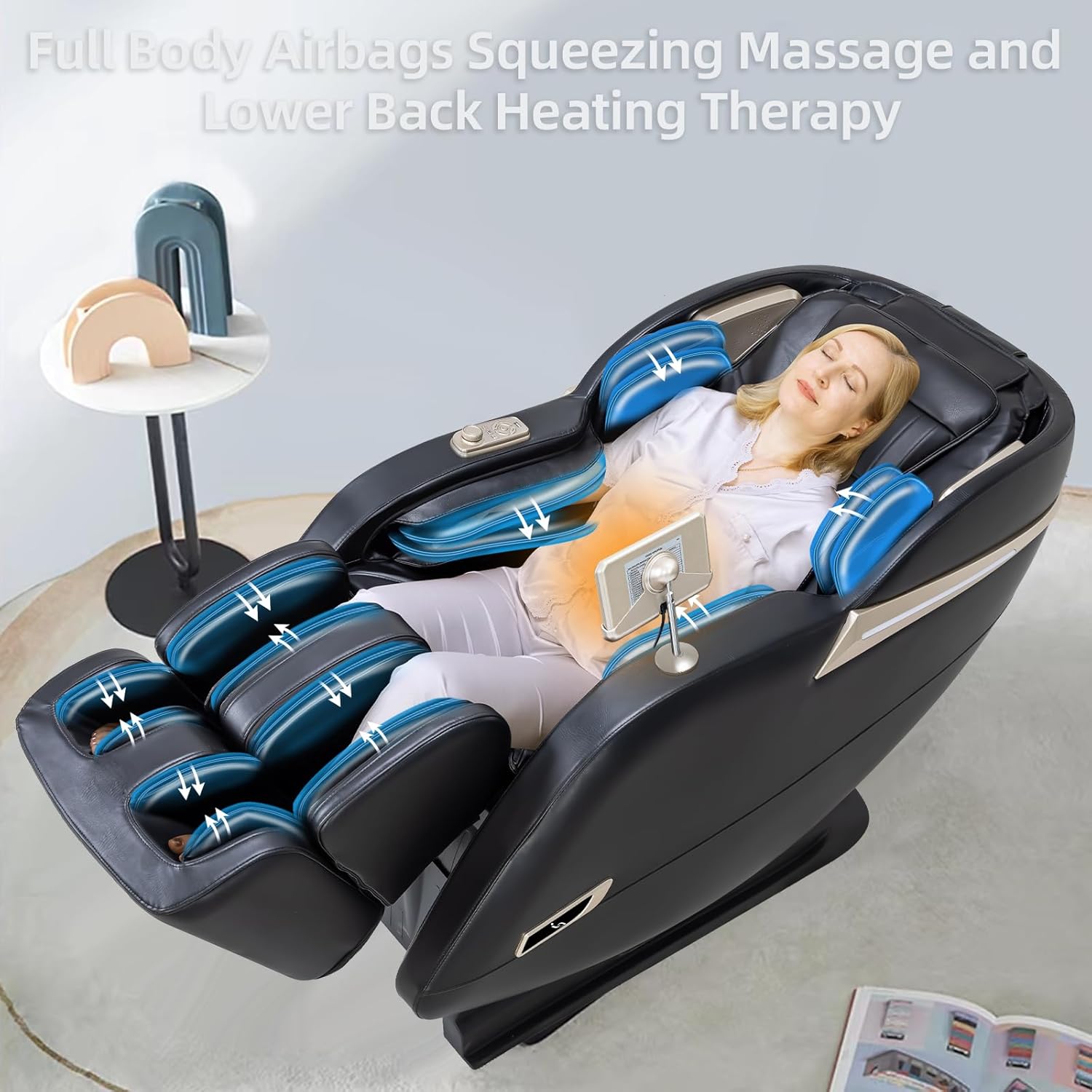
Figure 3.8: Full Body Airbags Squeezing Massage.

Figure 3.9: Lower Back Heating Therapy.

Figure 3.10: Foot Rollers Massage.

Figure 3.11: AI Voice Control commands.

Figure 3.12: Bluetooth Speaker.
4. Maintenance and Care
Proper maintenance ensures the longevity and optimal performance of your massage chair.
4.1 Cleaning
For general cleaning, use a soft, damp cloth to wipe down the surfaces. For specific stains, spot clean with a mild detergent. Do not use abrasive cleaners or solvents, as they may damage the chair's upholstery.
4.2 Storage
When not in use for extended periods, unplug the chair and store it in a cool, dry place away from direct sunlight and extreme temperatures.
5. Troubleshooting
If you encounter any issues with your MassaMAX MD906 massage chair, please refer to the following common troubleshooting tips. If the problem persists, contact customer support.
- Chair does not power on: Ensure the power cord is securely plugged into both the chair and a working electrical outlet. Check the power switch on the chair.
- Massage intensity is too strong: Adjust the intensity settings using the hand controller. If a cushion was provided, try placing it on the backrest to reduce direct contact with the rollers.
- Unusual noises during operation: Minor operational sounds are normal. If you hear loud or persistent grinding/clunking noises, discontinue use and contact customer support.
- Footrest not functioning correctly: Verify that the footrest is securely attached as per assembly instructions. Check for any obstructions.
- Chair not responding to commands: Ensure the hand controller is properly connected and charged (if applicable). Try restarting the chair by unplugging it for a few minutes and then plugging it back in.
6. Specifications
| Feature | Detail |
|---|---|
| Brand | MassaMAX |
| Model Name | MD906 |
| Color | Black |
| Product Dimensions (D x W x H) | 57.87"D x 29.92"W x 43.7"H |
| Item Weight | 156 pounds |
| Maximum Weight Recommendation | 260 Pounds |
| Massage Track | SL Track (53.15 inches) |
| Massage Techniques | Kneading, Tapping, Knocking, Shiatsu, Combination |
| Automatic Programs | 12 Preset Programs |
| Special Features | Zero Gravity, Yoga Stretch, Full-Body Airbags, Lower Back Heating, Foot Rollers, Auto Body Scan, AI Voice Control, Bluetooth Speaker |
| Assembly Required | Minimal (footrest attachment) |
| Product Care Instructions | Spot Clean |
| UPC | 850036071280 |
7. Warranty and Support
MassaMAX is committed to providing high-quality products and excellent customer service.
7.1 Warranty Information
Your MassaMAX MD906 massage chair is backed by a 3-year protection plan. This warranty covers manufacturing defects and significant malfunctions under normal use. Please retain your proof of purchase for warranty claims.
7.2 Customer Support
For any questions, assistance, or technical support, our customer service team is available 24/7.
- Customer Service Phone: 866-909-6062
- Online Support: You can also reach our support team through the Amazon seller page.


