
kinstone KST102SA_ROW
Kinstone 10.1" 4G LTE Android Tablet User Manual
Model: KST102SA_ROW
1. Introduction
Welcome to the Kinstone 10.1" 4G LTE Android Tablet user manual. This guide provides comprehensive instructions for setting up, operating, and maintaining your new tablet. Designed for both work and play, this tablet features an octa-core processor, 8GB RAM, 128GB internal storage (expandable up to 1TB), an 8000mAh battery, and dual SIM slots for enhanced connectivity.

Figure 1.1: Front and back view of the Kinstone 10.1" Android Tablet, showcasing its sleek design and camera module.
2. Product Overview
2.1 Components and Features
Your Kinstone tablet is equipped with advanced features for a superior user experience. Key components include:
- Display: 10.1-inch Full HD IPS screen with 1920x1200 resolution, 178° wide viewing angle, and low blue light technology for eye comfort.
- Processor: High-performance octa-core processor (hexa-core @2.0 GHz Cortex-A55 and dual-core @1.8 GHz Cortex-A75) with 2025 AI Chip.
- Memory & Storage: 8GB RAM and 128GB internal storage, expandable up to 1TB via microSD card.
- Cameras: 13MP rear camera and 5MP front camera.
- Battery: 8000mAh battery for extended usage.
- Connectivity: 4G VoLTE dual SIM support, Bluetooth 5.0, 2.4/5G dual-band Wi-Fi.
- Audio: Dual speakers for stereo effect.
- Ports: Type-C charging port, 3.5mm earphone jack.

Figure 2.1: Overview of the Android 12 OS features, highlighting efficiency, safety, entertainment, and display enhancements.

Figure 2.2: Visual summary of the Kinstone Android tablet's core features and specifications.
3. Setup
3.1 Initial Charging
Before first use, fully charge your tablet. Connect the provided Type-C charging cable to the tablet's charging port and the other end to the charger. Plug the charger into a power outlet. The charging indicator will show the charging status. A full charge typically takes approximately 2 hours.

Figure 3.1: Illustration of the tablet's long-lasting 8000mAh battery life, supporting various activities.
3.2 Powering On/Off
- To Power On: Press and hold the Power button until the Kinstone logo appears on the screen.
- To Power Off: Press and hold the Power button until the power options menu appears. Select "Power off" and confirm.
- To Restart: From the power options menu, select "Restart".
3.3 Initial Setup Wizard
Upon first power-on, the tablet will guide you through an initial setup wizard. Follow the on-screen prompts to:
- Select your language.
- Connect to a Wi-Fi network.
- Sign in with your Google account (or create one).
- Set up screen lock (PIN, pattern, password, or Face ID).
- Review and accept terms and conditions.
4. Operating Instructions
4.1 Navigating the Android Interface
Your tablet runs on Android 12, offering an intuitive user interface. Common gestures include:
- Tap: To select an item or open an app.
- Swipe: To scroll through screens or lists.
- Pinch-to-zoom: To zoom in or out on images and web pages.
- Long press: To access contextual menus or move app icons.
4.2 Installing Applications
Applications can be downloaded and installed from the Google Play Store. Ensure you are connected to the internet before downloading.
- Open the Play Store app.
- Search for the desired application.
- Tap Install and follow the on-screen instructions.
4.3 Using Face ID
The tablet supports Face Recognition for unlocking. To set up Face ID:
- Go to Settings > Security & privacy > Face unlock.
- Follow the prompts to register your face.

Figure 4.1: Display features, including Face Recognition for secure and fast unlocking.
5. Connectivity
5.1 Wi-Fi Connection
Connect to Wi-Fi for internet access:
- Go to Settings > Network & internet > Internet.
- Turn on Wi-Fi.
- Select your desired network and enter the password if required.

Figure 5.1: Connectivity options, including dual-band Wi-Fi for fast and stable connections.
5.2 Bluetooth Pairing
Pair your tablet with Bluetooth devices like headphones or speakers:
- Go to Settings > Connected devices > Connection preferences > Bluetooth.
- Turn on Bluetooth.
- Select the device you wish to pair from the list of available devices.
5.3 4G LTE and Dual SIM
The tablet supports 4G VoLTE with dual SIM slots, allowing for simultaneous calls and browsing. You can use two SIM cards or one SIM card and one microSD card.
- Locate the SIM card tray on the side of the tablet.
- Use the provided SIM ejector tool to open the tray.
- Insert your Nano-SIM cards and/or microSD card into the designated slots.
- Gently push the tray back into the tablet.

Figure 5.2: Dual card slot functionality for SIM cards and expandable storage.
6. Camera Usage
Your tablet is equipped with a 13MP rear camera and a 5MP front camera for capturing photos and videos, and for video calls.
- Open the Camera app from the home screen or app drawer.
- Switch between front and rear cameras using the camera icon.
- Tap the shutter button to take a photo or the record button to start/stop video recording.
- Access various camera modes and settings within the app.
7. Battery Management
The 8000mAh battery provides ample power for daily use. To optimize battery life:
- Reduce screen brightness.
- Turn off Wi-Fi, Bluetooth, and 4G when not in use.
- Close background applications.
- Enable battery saver mode in Settings > Battery.
The tablet supports fast charging via its Type-C port.
8. Storage Management
Your tablet comes with 128GB of internal storage, which can be expanded up to 1TB using a microSD card.
- To check storage usage: Go to Settings > Storage.
- To free up space: Delete unnecessary files, uninstall unused apps, or move large files to a microSD card.

Figure 8.1: Visual representation of the tablet's generous storage capabilities.
9. Maintenance
To ensure the longevity and optimal performance of your Kinstone tablet:
- Keep the tablet clean using a soft, lint-free cloth. Avoid harsh chemicals.
- Protect the screen with a screen protector (one is included).
- Avoid exposing the tablet to extreme temperatures, direct sunlight, or moisture.
- Regularly update the operating system and applications to the latest versions.
- Perform periodic backups of important data.
10. Troubleshooting
If you encounter issues with your tablet, refer to the following common solutions:
| Problem | Possible Solution |
|---|---|
| Tablet not turning on | Ensure the battery is charged. Press and hold the power button for at least 10-15 seconds to force a restart. |
| Wi-Fi connection issues | Restart your Wi-Fi router. Go to Settings > Network & internet > Internet, forget the network, and reconnect. Ensure the tablet is within range. |
| Apps freezing or crashing | Close the app and reopen it. Clear the app's cache (Settings > Apps > [App Name] > Storage & cache > Clear cache). Ensure the app is updated. |
| Slow performance | Close unused apps. Clear cache and temporary files. Check storage space and free up if necessary. Restart the tablet. |
| Battery draining quickly | Reduce screen brightness. Disable unnecessary features like GPS, Bluetooth, or Wi-Fi when not in use. Check battery usage in settings to identify power-hungry apps. |
If problems persist, contact Kinstone customer support for further assistance.
11. Specifications
Detailed technical specifications for your Kinstone tablet:
| Feature | Specification |
|---|---|
| Model Number | KST102SA_ROW |
| Operating System | Android 12 |
| Screen Size | 10.1 Inches |
| Screen Resolution | 1920x1200 Pixels |
| Processor | 2 GHz Octa-Core (Unisoc) |
| RAM | 8 GB DDR4 SDRAM |
| Internal Storage | 128 GB (Flash Memory) |
| Expandable Storage | Up to 1 TB via MicroSD |
| Graphics Coprocessor | Mali-G57 MP1 |
| Wireless Type | 802.11a, 802.11ac (2.4G/5G Dual-band Wi-Fi) |
| Bluetooth | 5.0 |
| Rear Camera | 13 MP |
| Front Camera | 5 MP |
| Battery Capacity | 8000 mAh (Lithium Polymer) |
| Average Battery Life | 8 Hours |
| Item Weight | 2 pounds |
| Product Dimensions | 15.8 x 24.1 x 0.8 inches |
| Color | Gray |
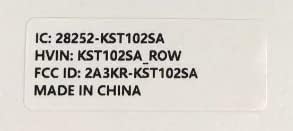
Figure 11.1: Product label with model number and regulatory information.
12. Warranty and Support
12.1 Warranty Service
Kinstone provides a warranty service for your tablet. Within three months from the date of purchase, Kinstone offers replacement services for eligible issues, not repair. Please retain your proof of purchase.
12.2 Customer Support
For any questions, technical assistance, or warranty claims, please contact Kinstone customer support. You may also be eligible to receive a compatible leather case by contacting the seller after receiving your tablet.
Visit the official Kinstone store for more information and support: Kinstone Store on Amazon
Ask a question about this manual
Ask about setup, troubleshooting, compatibility, parts, safety, or missing instructions. Manuals+ will review the question and use this page’s manual context to help answer it.