
Introduction
This manual provides comprehensive instructions for the COMAP C411017001 wired electronic programmable thermostat. This device is designed for precise temperature regulation in 24V underfloor heating and cooling systems, ensuring optimal thermal comfort and energy efficiency. Please read this manual thoroughly before installation and operation to ensure correct usage and maximize the product's lifespan.
Product Overview
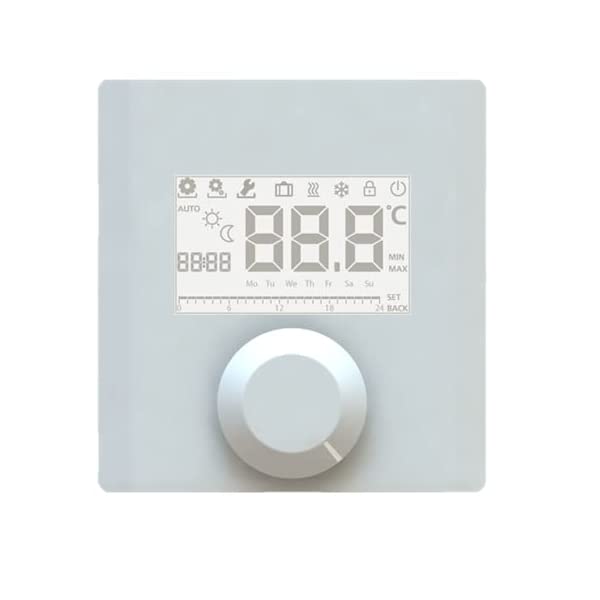
Image: Front view of the COMAP C411017001 electronic programmable thermostat. The device features a clear LCD screen and control buttons for temperature adjustment and programming.
The COMAP C411017001 is an advanced electronic thermostat featuring a clear, backlit LCD display for easy readability. It includes an integrated time program and pilot clock output for optimized comfort and energy savings. Designed for 24V systems, it offers silent switching via a Triac output and supports both heating and cooling applications. Key features include an NTC sensor, inputs for ambient temperature reduction, heating/cooling switchover, and an external temperature sensor. It also incorporates a cooling lockout function for heating/cooling versions, integrated NC and NO switching, and an automatic anti-freeze device set at 5 °C, along with valve protection.
Setup and Installation
Installation of the COMAP C411017001 thermostat should be performed by a qualified professional to ensure safety and proper functionality. The device is designed for easy wiring.
Wiring Connections
- Power Supply: Connect the 24V AC/DC power supply to the designated terminals.
- Heating/Cooling System: Connect the thermostat to your underfloor heating or cooling system. The device features silent switching Triac output for 24V systems and integrated NC (Normally Closed) and NO (Normally Open) switching capabilities.
- External Sensors/Inputs:
- Ambient Temperature Reduction Input: Connect an external device or switch to lower the ambient temperature setting.
- Heating/Cooling Switchover Input: Connect for automatic or manual switching between heating and cooling modes.
- External Temperature Sensor Input: Connect an optional external NTC temperature sensor for enhanced temperature monitoring.
Mounting
Mount the thermostat in a suitable indoor location, away from direct sunlight, drafts, or heat sources that could affect temperature readings. Ensure it is mounted at an appropriate height for easy access and visibility of the LCD display.
Operating Instructions
The COMAP C411017001 thermostat features an intuitive interface for setting and controlling your heating and cooling system.
LCD Display and Backlight
The easy-to-read LCD display shows the current temperature, setpoint, operating mode, and program status. The backlight activates with button presses for visibility in low-light conditions.
Setting the Temperature
Use the ergonomic setpoint adjustment controls to increase or decrease the desired temperature. The thermostat allows for restriction of the temperature setting range to prevent extreme adjustments.
Programming the Schedule
The integrated time program allows you to set different temperature levels for various times of the day and week, optimizing comfort and energy consumption. Refer to the detailed programming section in the full manual for step-by-step instructions on setting daily and weekly schedules.
Heating/Cooling Mode Selection
Depending on your system configuration, you can switch between heating and cooling modes. For heating/cooling versions, a cooling lockout function is available to prevent simultaneous heating and cooling operations, enhancing efficiency.
Safety Features
- Automatic Anti-freeze: The thermostat includes an automatic anti-freeze device that activates if the ambient temperature drops to 5 °C, protecting your system from freezing.
- Valve Protection: A built-in valve protection device helps prolong the life of your system's valves.
Maintenance
The COMAP C411017001 thermostat requires minimal maintenance to ensure continued optimal performance.
- Cleaning: Periodically wipe the thermostat's surface with a soft, dry cloth. Do not use abrasive cleaners, solvents, or chemical sprays, as these can damage the display or casing.
- Inspection: Ensure that the thermostat's vents (if any) are free from dust and obstructions.
- Power: The device does not require batteries. It operates on an AC/DC power type.
Troubleshooting
If you encounter issues with your COMAP C411017001 thermostat, refer to the following common troubleshooting steps:
- No Display/Power: Check the 24V power supply connections. Ensure the circuit breaker for the system is not tripped.
- Incorrect Temperature Reading: Ensure the thermostat is not exposed to direct sunlight, drafts, or heat sources. Verify the external NTC sensor (if used) is correctly installed and functioning.
- System Not Heating/Cooling: Check the operating mode (heating/cooling). Verify the setpoint temperature is appropriate. Ensure there are no error messages on the display. Check the wiring connections to the heating/cooling system.
- Programming Issues: Review the programming schedule to ensure settings are correct for the desired operation times and temperatures.
If problems persist after attempting these steps, contact a qualified technician or COMAP customer support for assistance.
Specifications
| Manufacturer | COMAP |
| Model Number | C411017001 |
| Dimensions (L x W x H) | 10.5 x 10 x 5 cm |
| Weight | 150 grams |
| Power Type | AC/DC (24V) |
| Quantity per package | 1 |
| Components Included | Thermostat |
| Batteries Required | No |
| ASIN | B0BRY7PW2X |
Warranty and Support
For warranty information, technical support, or inquiries regarding spare parts availability, please contact COMAP customer service directly. Information regarding spare parts availability for this product is not provided in the product details. Always refer to the official COMAP website or your retailer for the most current support information.
COMAP Contact Information: Please visit www.comap.com for contact details and support resources.