
1. Product Overview
The QIYIDA X99 H9 Motherboard is designed for high-performance computing, specifically supporting Intel Xeon E5 LGA2011-3 series processors (including V3 and V4 series) and DDR4 memory. It features a robust design suitable for gaming and demanding applications, offering multiple connectivity options including USB 3.0, SATA, and NVMe M.2 support.

Figure 1.1: Front view of the QIYIDA X99 H9 Motherboard, showcasing its layout with CPU socket, RAM slots, and various connectors.
Key Features:
- CPU Socket: LGA2011-3, compatible with Intel Xeon E5 V3 and V4 series processors.
- Memory: 4 x DDR4 memory slots, supporting speeds up to 2666/2400/2133/1866 MHz.
- Storage: NVMe M.2 support and multiple SATA ports.
- Connectivity: USB 3.0 ports, Gigabit Ethernet, and audio interfaces.
- Power Interface: Standard 24-pin + 8-pin power connectors.
2. Specifications
| Feature | Detail |
|---|---|
| Brand | QIYIDA |
| Model | X99 H9 |
| CPU Socket | LGA 2011-3 |
| Compatible Processors | Intel Xeon E5 V3/V4 Series |
| Chipset | Q87/H81/B85 (randomly selected) |
| Memory Technology | DDR4 |
| Memory Slots | 4 x DDR4 DIMM |
| Memory Speed Support | 2666/2400/2133/1866 MHz |
| Max Memory Capacity | 32 GB |
| Storage Interfaces | NVMe M.2, SATA 3.0 |
| USB Ports | USB 3.0, USB 2.0 |
| Ethernet | Gigabit Ethernet |
| Power Connectors | 24-pin ATX, 8-pin CPU |
| Motherboard Dimensions | 23.5 cm x 18.5 cm |
| Compatible Operating System | Windows 10 |
3. Setup Guide
3.1 Component Identification
Before installation, familiarize yourself with the various components and connectors on the motherboard. Refer to the diagram below for key component locations.

Figure 3.1: Labeled diagram of the QIYIDA X99 H9 Motherboard, indicating CPU fan pin, 24-pin power supply, 4*SATA 3.0, NVME M.2, 8-pin CPU power, 4*DDR4 slots, WIFI, USB 2.0, USB 3.0, Gigabit Ethernet, Audio interface, PCIe 16X, and Front Audio/Power headers.
3.2 Installation Steps
- Prepare Your System: Ensure your computer case is ready and you have all necessary components (CPU, RAM, power supply, storage, etc.).
- Install CPU: Carefully open the LGA2011-3 CPU socket lever. Align the CPU with the socket's notches and gently place it in. Close the lever to secure the CPU.
- Install CPU Cooler: Attach your compatible CPU cooler according to its manufacturer's instructions.
- Install RAM: Insert DDR4 memory modules into the designated DIMM slots. Ensure they are fully seated by pressing down until the clips on both sides lock into place.
- Mount Motherboard: Secure the motherboard into your PC case using appropriate standoffs and screws.
- Connect Power: Connect the 24-pin ATX power connector and the 8-pin CPU power connector from your power supply to the motherboard. Note: A power supply of at least 500W is recommended for stable operation.
- Install Storage Devices: Connect SATA drives to the SATA 3.0 ports. For NVMe M.2 SSDs, insert them into the M.2 slot and secure with a screw.
- Connect Peripherals: Connect front panel headers (power button, reset, USB, audio), USB devices, and other peripherals to their respective ports.
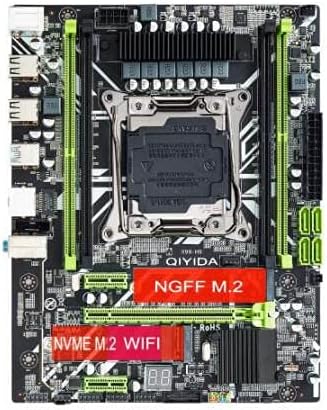
Figure 3.2: Top-down view of the QIYIDA X99 H9 Motherboard, showing the NVMe M.2 and NGFF M.2 slots.
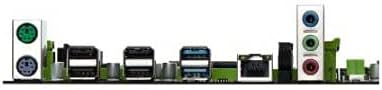
Figure 3.3: Rear I/O panel of the QIYIDA X99 H9 Motherboard, displaying various ports for external device connections.
4. Operating Instructions
Once all components are installed and connected, you can power on your system. The motherboard will initiate the Power-On Self-Test (POST) process. Ensure your operating system is installed on a compatible storage device.
4.1 BIOS/UEFI Setup
To access the BIOS/UEFI settings, press the designated key (commonly DEL, F2, or F10) during the initial boot sequence. From here, you can configure boot order, system time, and other advanced settings.
4.2 Driver Installation
After installing your operating system (e.g., Windows 10), install the necessary drivers for the motherboard's chipset, audio, network, and other integrated components. These drivers are typically provided on a CD/DVD or can be downloaded from the manufacturer's website.
5. Maintenance
Proper maintenance ensures the longevity and optimal performance of your motherboard.
- Dust Removal: Regularly clean dust from the motherboard and other internal components using compressed air. Ensure the system is powered off and unplugged before cleaning.
- BIOS Updates: Periodically check for BIOS/UEFI updates from the manufacturer's website. Updates can improve compatibility, stability, and performance. Follow update instructions carefully to avoid system damage.
- Cable Management: Ensure all cables are neatly routed to promote better airflow and prevent interference.
6. Troubleshooting
This section addresses common issues you might encounter with your QIYIDA X99 H9 Motherboard.
6.1 Common Issues and Solutions
- System Fails to Power On:
- Check Power Supply: Ensure your power supply is connected correctly to both the 24-pin ATX and 8-pin CPU power connectors. The platform requires strong power; ensure your power supply is sufficient (at least 500W recommended).
- Verify Connections: Double-check all power cables, front panel headers, and component connections.
- No Display Output:
- Check Graphics Card: Ensure the graphics card is properly seated in its PCIe slot and has adequate power connected.
- Monitor Connection: Verify the monitor cable is securely connected to both the graphics card and the monitor.
- System Instability or Crashes:
- Memory Issues: Reseat RAM modules. Test with one RAM stick at a time to identify a faulty module. Ensure RAM is compatible with DDR4 2666/2400/2133/1866 MHz.
- Overheating: Ensure CPU cooler is properly installed and fans are spinning. Check for adequate case airflow.
- Driver Issues: Ensure all necessary drivers are installed and up to date.
- Component Compatibility:
- Chipset Variation: Note that the main chipset (Q87/H81/B85) may vary. This does not affect core functionality but is a manufacturing variation.
7. Warranty and Support
For warranty information and technical support, please refer to the documentation provided with your purchase or visit the official QIYIDA website. Keep your proof of purchase for warranty claims.
Note: The battery shown in some motherboard photos is removed before shipment due to shipping regulations. This does not affect the product's functionality. Product images are for reference only; actual product may vary slightly based on available components.
