
1. Introduction
Thank you for choosing the GOSONKT 19.7" Low Profile Ceiling Fan with Lights. This manual provides detailed instructions for the safe installation, operation, and maintenance of your new ceiling fan. Please read this manual thoroughly before installation and keep it for future reference.
2. Safety Information
To reduce the risk of electric shock, fire, or injury to persons, always follow these basic precautions:
- Always turn off power at the main circuit breaker or fuse box before beginning installation or performing any maintenance.
- Ensure all electrical connections comply with local codes and ordinances, and with the National Electrical Code (NEC). If you are unfamiliar with proper electrical wiring, consult a qualified electrician.
- The fan is designed for indoor use only.
- Do not operate the fan with a damaged cord or plug.
- This low-profile fan features concealed blades for enhanced safety, reducing the risk of contact with rotating parts.
- Keep hands, hair, and clothing away from the fan blades during operation.
3. Product Overview & Features
The GOSONKT Low Profile Ceiling Fan combines modern design with advanced functionality, offering both illumination and air circulation for various indoor spaces.

Figure 3.1: GOSONKT 19.7 inch Low Profile Ceiling Fan with Lights and Remote.
Key Features:
- Dimmable LED Ceiling Fan with Light: Adjustable light from bright to dark, and color temperature from warm to white. Settings are remembered when turned off with the remote.
- Reversible Blades & No Noise Motor: DC motor and 5 blades provide smooth, quiet operation and strong airflow. Reversible function allows for year-round use (downward airflow for cooling in summer, upward airflow for air circulation in winter).
- Multi-Speed & Timing Function: Features 6 wind speeds and timing settings (1/2 hour) for customized comfort without disturbing sleep.
- Easy to Install & Clean: Invisible fan blades direct air efficiently. No assembly required, and easy to clean.
- Safety Design: Concealed, leafless design enhances safety, especially for low ceilings and children's rooms.

Figure 3.2: Overview of product parameters and key features.

Figure 3.3: The fan operates quietly, with noise levels around 30dB, ideal for various activities.
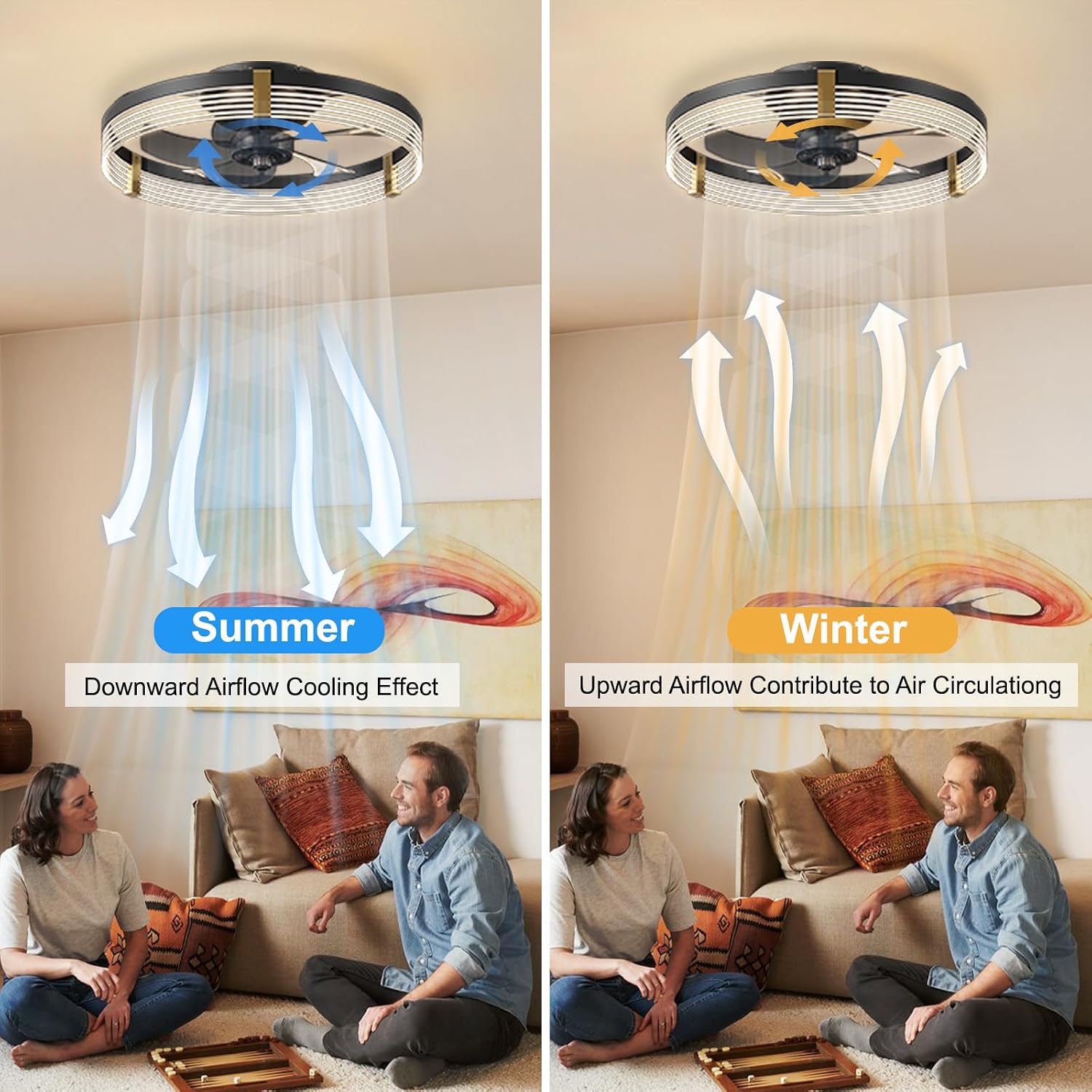
Figure 3.4: Reversible airflow for seasonal comfort.

Figure 3.5: Adjustable light temperature and brightness.
4. Specifications
| Attribute | Value |
|---|---|
| Brand | GOSONKT |
| Color | Black |
| Material | Acrylic, Metal |
| Style | Modern |
| Light Fixture Form | Ceiling |
| Product Dimensions | 19.69"L x 19.69"W x 5.91"H |
| Indoor/Outdoor Usage | Indoor |
| Power Source | Corded Electric |
| Installation Type | Flush Mount |
| Special Feature | Dimmable |
| Control Method | Remote |
| Light Source Type | LED |
| Voltage | 110 Volts |
| Item Weight | 7.9 Pounds |
| Assembly Required | No |
| Model Name | Low Profile Ceiling Fan with Lights |
| UPC | 724723444353 |
5. Package Contents
Verify that all components are present before beginning installation:
- Ceiling Fan Light Kit
- Remote Control
- User Manual (this document)
6. Setup & Installation
The GOSONKT Low Profile Ceiling Fan is designed for easy installation with no assembly required. Follow these steps for a smooth setup:
- Prepare for Installation:
- Turn off power at the circuit breaker or fuse box to avoid electrical shock.
- Ensure the mounting surface is structurally sound and can support the weight of the fan.
- Mount the Bracket:
- Secure the mounting bracket to the ceiling junction box using the provided screws.
- Connect Wiring:
- Connect the fan's electrical wires to your household wiring. The fan uses push-in connectors for simplified wiring. Ensure all connections are secure and correct (e.g., live to live, neutral to neutral, ground to ground).
- Attach the Fan:
- Carefully lift the fan and hang it from the mounting bracket using the designated hook.
- Align the fan with the bracket and twist it into place. Secure the fan to the bracket with the four screws.
- Restore Power:
- Once the fan is securely installed and wired, restore power at the circuit breaker.

Figure 6.1: Components and installation features.
7. Operating Instructions
Your GOSONKT ceiling fan can be controlled via the included remote control or a dedicated mobile application. Ensure the wall switch connected to the fan remains ON for remote/app functionality.
7.1 Remote Control Operation

Figure 7.1: Remote control and mobile application interface.
- Power On/Off: Use the 'Light On/Off' button for the light and the 'Fan On/Off' button for the fan. 'ALL ON/OFF' controls both.
- Fan Speeds: Select from 6 wind speeds using the numbered buttons (1-6).
- Timing Function: Set the fan to turn off automatically after 1 or 2 hours using the '1H' and '2H' buttons.
- Light Brightness: Adjust brightness using the 'Brightness +/-' buttons.
- Color Temperature: Change light color from warm to cool using the 'Color Temperature +/-' buttons.
- Reversible Function: Press the 'Reversible' button to switch between downward (summer) and upward (winter) airflow.
- Night Light: Activate the lowest brightness setting for a night light using the 'Night Light' button.
- Pairing Remote: When using for the first time, you may need to pair the remote. Refer to the remote's specific instructions for pairing code or button sequence.
7.2 Mobile Application Control
For advanced control and convenience, download the dedicated mobile application. Scan the QR code provided in Figure 7.1 or visit https://www.jasonghost.com/fanlamppro/ to download the app. Follow the in-app instructions for pairing your fan.
8. Maintenance
Regular maintenance ensures the longevity and optimal performance of your ceiling fan.
- Cleaning: The fan is designed for easy cleaning. Turn off power before cleaning. Use a soft, damp cloth to wipe down the exterior surfaces. Do not use abrasive cleaners or solvents.
- Blade Cleaning: The concealed blades can be cleaned by wiping the interior surfaces of the fan.
- Light Source: The LED light source is integrated and designed for long life. It does not require replacement under normal use.
9. Troubleshooting
If you encounter issues with your ceiling fan, refer to the following common problems and solutions:
| Problem | Possible Cause | Solution |
|---|---|---|
| Fan does not operate / Light does not turn on | No power supply; Loose wiring; Remote control battery low/dead; Remote not paired. | Check circuit breaker/fuse; Ensure wall switch is ON; Verify all wiring connections are secure; Replace remote battery; Re-pair remote control (refer to Section 7.1). |
| Fan makes unusual noise | Loose mounting screws; Obstruction. | Ensure all mounting screws are tightened; Check for any foreign objects inside the fan housing. |
| Remote control not responding consistently | Battery low; Interference; Remote not paired correctly. | Replace remote battery; Ensure no strong interference sources nearby; Re-pair the remote control. If issues persist, try resetting the main circuit breaker for a few minutes. |
| Airflow is weak | Incorrect fan speed setting; Reversible function set to winter mode. | Increase fan speed; Ensure fan is set to summer mode (downward airflow) for cooling effect. |
10. Warranty and Support
GOSONKT is committed to providing high-quality products and customer satisfaction. If you have any questions regarding the installation, quality, or operation of your ceiling fan, please contact our customer service team.
To contact support, log in to your purchase account, locate your order ID, and click the "Contact Seller" option. Our customer service team aims to resolve your issue within 24 hours.