
1. Introduction
This manual provides instructions for the Prism CLAYMORE Fan V600/V600+ Dedicated Storage Pouch (Model: CLFN-V610WG-P). This pouch is designed to safely store and transport your CLAYMORE Fan V600 or V600+ (fan sold separately). Please read this manual thoroughly before use to ensure proper handling and care of your storage pouch.
2. Product Overview
The Prism CLAYMORE Fan Storage Pouch is a custom-designed carrying solution for your CLAYMORE Fan V600 or V600+ portable fan. It features a durable polyester construction, a convenient carrying handle, and internal compartments for accessories.
2.1 Key Features
- Dedicated storage for CLAYMORE Fan V600/V600+.
- Integrated handle for easy portability.
- Internal mesh pocket for USB cables and small accessories.
- Internal elastic band to secure a dedicated tripod stand.
- Durable polyester material.
- Warm Gray color.
2.2 Product Components

Figure 2.2.1: Closed Prism CLAYMORE Fan Storage Pouch. This image shows the pouch fully zipped, with the CLAYMORE logo visible on the front and the carrying handle on top.

Figure 2.2.2: Open Prism CLAYMORE Fan Storage Pouch, empty. The pouch is unzipped, revealing the main storage compartment and the internal mesh pocket on the lid.

Figure 2.2.3: Internal mesh pocket of the Prism CLAYMORE Fan Storage Pouch. This close-up shows the zippered mesh pocket located on the inside of the pouch lid, suitable for small accessories.
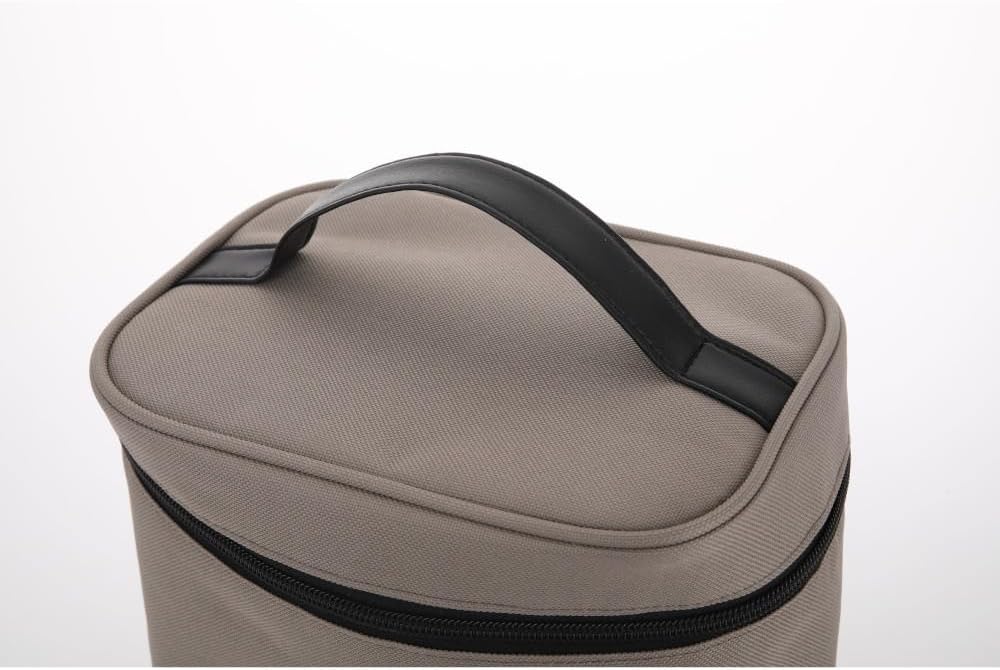
Figure 2.2.4: Carrying handle of the Prism CLAYMORE Fan Storage Pouch. A close-up view of the sturdy black handle attached to the top of the pouch for easy transport.

Figure 2.2.5: Dual zippers of the Prism CLAYMORE Fan Storage Pouch. This image highlights the two black zipper pulls that secure the main compartment of the pouch.
3. Setup and Storage
- Open the Pouch: Unzip the pouch completely using the dual zippers to fully open the main compartment.
- Insert Fan: Carefully place your CLAYMORE Fan V600 or V600+ into the main compartment of the pouch. Ensure it sits snugly at the bottom.
- Secure Tripod (Optional): If you have a dedicated tripod stand for your fan, use the internal elastic band to secure it upright within the pouch.
- Store Accessories: Place USB cables, charging adapters, or other small accessories into the zippered mesh pocket located on the inside of the lid.
- Close the Pouch: Zip the pouch closed completely to secure its contents.

Figure 3.1: Pouch with fan and tripod inside. This image demonstrates how the CLAYMORE Fan V600/V600+ and its dedicated tripod stand fit securely within the storage pouch.
4. Operating (Transport)
The pouch is designed for convenient transport of your CLAYMORE fan. To carry the pouch, simply use the integrated top handle. Always ensure that the zippers are fully closed before lifting or transporting the pouch to prevent any items from falling out.
Video 4.1: Demonstration of the Prism CLAYMORE Fan Storage Pouch. This video shows the pouch being handled, opened, and closed, highlighting its design and functionality for storing the fan.
5. Maintenance
- Cleaning: To clean the exterior of the pouch, use a soft, damp cloth. Avoid using harsh chemicals, abrasive cleaners, or scrubbing brushes, as these may damage the material.
- Drying: After cleaning, allow the pouch to air dry completely before storing or using it again. Do not machine wash or tumble dry.
- Storage: Store the pouch in a cool, dry place away from direct sunlight when not in use to preserve its material and color.
- Zippers: If the zippers become stiff or difficult to operate, apply a small amount of zipper lubricant to the teeth.
6. Troubleshooting
This section addresses common concerns regarding the storage pouch.
| Problem | Possible Cause | Solution |
|---|---|---|
| Fan does not fit inside the pouch. | Incorrect fan model. | Ensure you are using a CLAYMORE Fan V600 or V600+. This pouch is specifically designed for these models. |
| Zippers are stiff or difficult to close. | Dirt or lack of lubrication. | Clean the zipper teeth with a small brush. Apply a small amount of zipper lubricant or wax to the zipper teeth. |
| Pouch appears misshapen. | Improper storage or heavy items placed on top. | Store the pouch in a manner that maintains its shape. Avoid placing heavy objects on it when empty or full. |
7. Specifications
| Feature | Detail |
|---|---|
| Model Number | CLFN-V610WG-P |
| Brand | Prism |
| Compatibility | CLAYMORE Fan V600/V600+ |
| Dimensions (D x W x H) | Approx. 210mm x 160mm x 235mm |
| Material | Polyester |
| Color | Warm Gray |
| Item Weight | 0.18 kg |
8. Warranty and Support
This Prism CLAYMORE Fan V600/V600+ Dedicated Storage Pouch comes with a 1-year manufacturer's warranty from the date of purchase. This warranty covers defects in materials and workmanship under normal use.
For warranty claims, technical support, or any inquiries regarding your product, please contact Prism customer service or visit the official Prism website. Please retain your proof of purchase for warranty validation.
Note: The CLAYMORE Fan V600/V600+ itself is sold separately and has its own warranty. This pouch warranty applies only to the storage pouch.