
1. Introduction
This manual provides essential information for the safe and effective operation, setup, and maintenance of your Ingco 115mm Cordless Angle Grinder. This powerful tool is designed for various grinding and cutting tasks, featuring a brushless motor for enhanced efficiency and durability. Please read this manual thoroughly before using the tool and keep it for future reference.
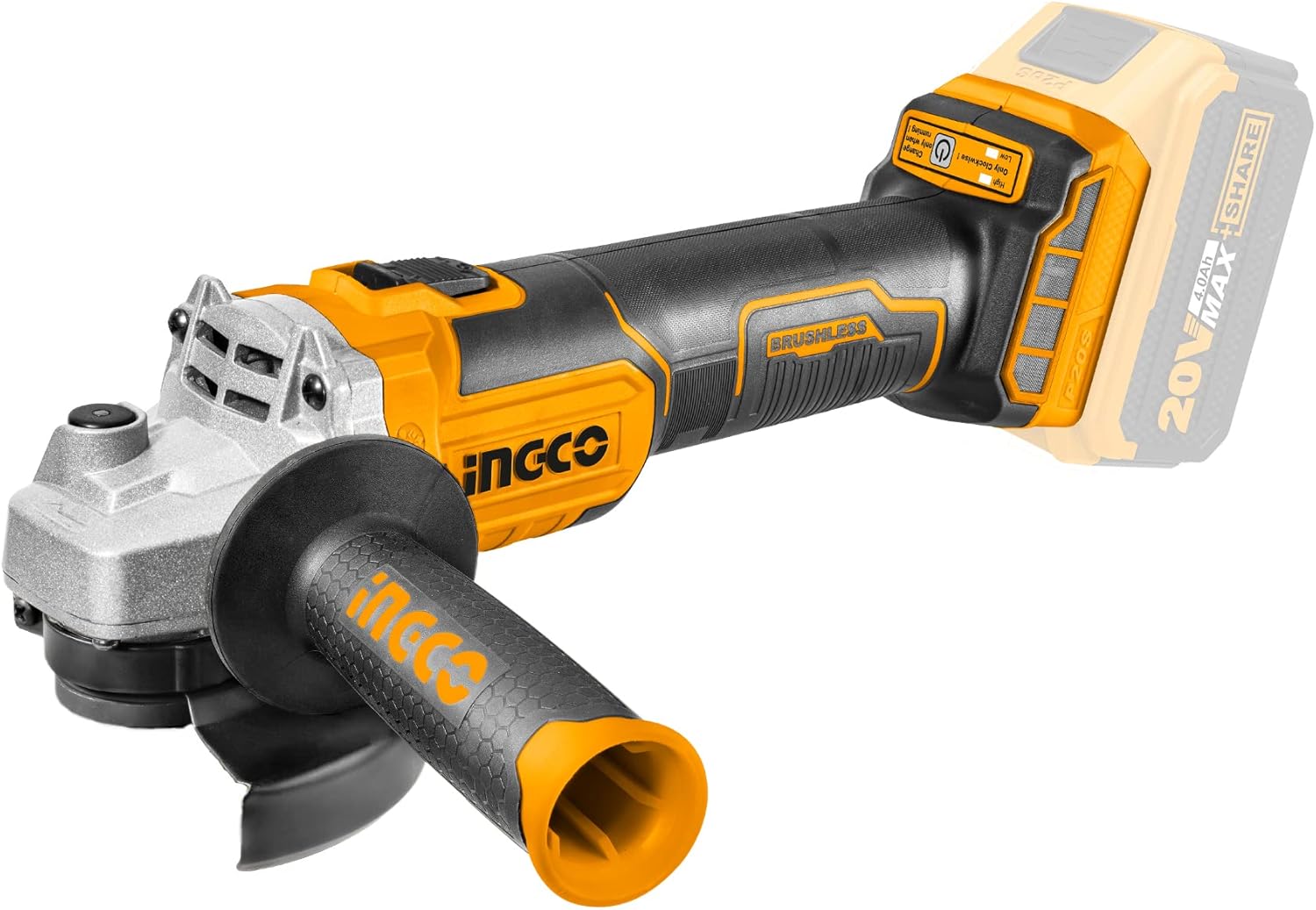
Figure 1: Ingco 115mm Cordless Angle Grinder with its main components, including the battery and auxiliary handle.
2. Safety Instructions
Always follow basic safety precautions to reduce the risk of fire, electric shock, and personal injury when using power tools. This tool features double insulation for enhanced safety.
General Safety Guidelines:
- Work Area Safety: Keep your work area clean and well-lit. Cluttered or dark areas invite accidents. Do not operate power tools in explosive atmospheres, such as in the presence of flammable liquids, gases, or dust.
- Electrical Safety: Avoid body contact with earthed or grounded surfaces (e.g., pipes, radiators, ranges, refrigerators). This tool is double insulated; however, always exercise caution.
- Personal Safety: Always wear appropriate personal protective equipment (PPE), including safety glasses, hearing protection, gloves, and a dust mask. Secure loose clothing and long hair.
- Tool Use and Care: Do not force the power tool. Use the correct power tool for your application. Ensure the switch is in the off-position before connecting to a power source, picking up, or carrying the tool.
- Anti-Rotation Protective Guard: Always ensure the anti-rotation protective guard is correctly installed and adjusted to provide maximum protection during operation. This guard is designed to protect the user from flying debris and disc fragments.
- Battery Tool Use and Care: Prevent unintentional starting. Ensure the switch is in the off-position before connecting to battery pack, picking up or carrying the tool. Disconnect the battery pack from the tool before making any adjustments, changing accessories, or storing power tools.
3. Package Contents
Carefully unpack the contents and check for any damage. Ensure all items listed below are present. If any parts are missing or damaged, contact your supplier immediately.
- 1 x Ingco Cordless Angle Grinder (115mm)
- 1 x Auxiliary Handle
- 1 x Spanner
- 1 x 20V 4.0Ah Battery
- 1 x Battery Charger
4. Setup
4.1 Battery Charging and Installation
Before first use, fully charge the battery. The charger is designed for the supplied 20V 4.0Ah battery pack.
- Connect the charger to a suitable power outlet.
- Slide the battery pack onto the charger until it clicks into place. The charging indicator lights will show the charging status.
- Once fully charged, remove the battery from the charger.
- To install the battery into the grinder, align the battery pack with the battery port on the tool and slide it in until it locks securely.
- To remove the battery, press the release button and slide the battery out.

Figure 2: The 20V 4.0Ah battery and its dedicated charger, illustrating the charging process.
4.2 Auxiliary Handle Installation
The auxiliary handle can be installed in multiple positions for optimal control and comfort, reducing vibration during operation.
- Identify the threaded holes on the grinder's gear housing.
- Screw the auxiliary handle into the desired position (left, right, or top) until it is firmly secured.

Figure 3: The angle grinder showing the three possible positions for attaching the auxiliary handle, allowing for versatile use.
4.3 Disc Installation and Guard Adjustment
Always ensure the tool is switched off and the battery is removed before installing or changing discs.
- Press the spindle lock button to prevent the spindle from rotating.
- Place the inner flange onto the spindle.
- Position the grinding or cutting disc onto the inner flange, ensuring it sits flat.
- Screw the outer flange onto the spindle and tighten it firmly using the supplied spanner.
- Adjust the anti-rotation protective guard to cover the maximum possible area of the disc, directing sparks and debris away from you. The guard should click into position.
5. Operating Instructions
Ensure all safety precautions are followed and the work area is clear before operating the grinder.
5.1 Powering On/Off and Speed Adjustment
- To turn the tool ON, slide the power switch forward.
- To turn the tool OFF, slide the power switch backward.
- This grinder features two-speed regulation: 3000 RPM and 8500 RPM. Use the speed selector switch to choose the appropriate speed for your task. Lower speeds are generally for polishing or lighter tasks, while higher speeds are for cutting and heavy grinding.
- The tool also includes an automatic lock function for continuous operation. Refer to the tool's body for the specific mechanism to engage and disengage this function.
5.2 Grinding and Cutting Techniques
Always hold the grinder firmly with both hands using the main handle and the auxiliary handle. Apply light, even pressure. Let the tool do the work.
- Grinding: Hold the grinder at a 15-30 degree angle to the workpiece. Move the tool back and forth evenly across the surface.
- Cutting: Hold the grinder perpendicular (90 degrees) to the workpiece. Make shallow passes, allowing the disc to cut through the material gradually. Do not twist or bind the disc in the cut.

Figure 4: An operator using the Ingco angle grinder for a cutting task, demonstrating proper handling and spark direction.

Figure 5: The angle grinder being used to cut a metal rebar, highlighting its application in heavy-duty tasks.

Figure 6: A collage illustrating the versatility of the Ingco angle grinder across different applications, including surface grinding and material cutting.
6. Maintenance
Regular maintenance ensures the longevity and safe operation of your tool. Always disconnect the battery before performing any maintenance.
- Cleaning: The tool features a dust-resistant structure. After each use, clean the tool with a dry cloth to remove dust and debris. Do not use water or chemical cleaners. Ensure ventilation openings are clear.
- Disc Replacement: Replace worn or damaged grinding/cutting discs immediately. Always use discs appropriate for the tool's specifications (115mm diameter, M14 spindle thread).
- Battery Care: Store batteries in a cool, dry place away from direct sunlight. Do not store fully discharged batteries. Charge them periodically if not in use for extended periods.
- Storage: Store the tool and accessories in a secure, dry place out of reach of children.
7. Troubleshooting
If you encounter issues with your angle grinder, refer to the following common problems and solutions:
| Problem | Possible Cause | Solution |
|---|---|---|
| Tool does not start | Battery not charged or improperly installed | Charge the battery fully and ensure it is securely installed. |
| Reduced performance/power | Low battery charge; Worn or incorrect disc | Recharge the battery. Replace the disc if worn or ensure it is suitable for the task. |
| Excessive vibration | Damaged or unbalanced disc; Loose auxiliary handle | Replace the disc. Tighten the auxiliary handle. |
| Tool stops during operation | Overload protection activated; Battery depleted | Reduce pressure on the tool. Allow the tool to cool down. Recharge or replace the battery. |
8. Specifications
Technical specifications for the Ingco Cordless Angle Grinder Model CAGLI2011582.
| Feature | Specification |
|---|---|
| Manufacturer | Ingco |
| Model Number | CAGLI2011582 |
| Motor Type | Brushless |
| Voltage | 20 Volts |
| Battery Capacity | 4.0 Ampere-hour (Ah) |
| No-load Speed | 3000 / 8500 RPM (Revolutions Per Minute) |
| Blade Diameter | 115 mm |
| Spindle Thread | M14 |
| Material | Stainless steel rubber, iron, and aluminum |
| Item Weight | 209 grams |
| Product Dimensions | 10 x 20 x 37 cm |
| Color | Orange |
9. Warranty and Support
Specific warranty information for this product is not provided in the available data. For warranty details, technical support, or service inquiries, please contact your retailer or the official Ingco customer service in your region. Keep your purchase receipt as proof of purchase.


