
NICE DIGI X1
NICE DIGI Smart Door Lock User Manual
Model: X1
Product Overview
The NICE DIGI Smart Door Lock (Model X1) provides advanced security and convenient access for your home, apartment, Airbnb, or office. This keyless entry system integrates multiple unlocking methods including fingerprint, smartphone application, passcode, key fobs, and traditional keys. It is designed for easy DIY installation and offers robust functionality for modern access control.
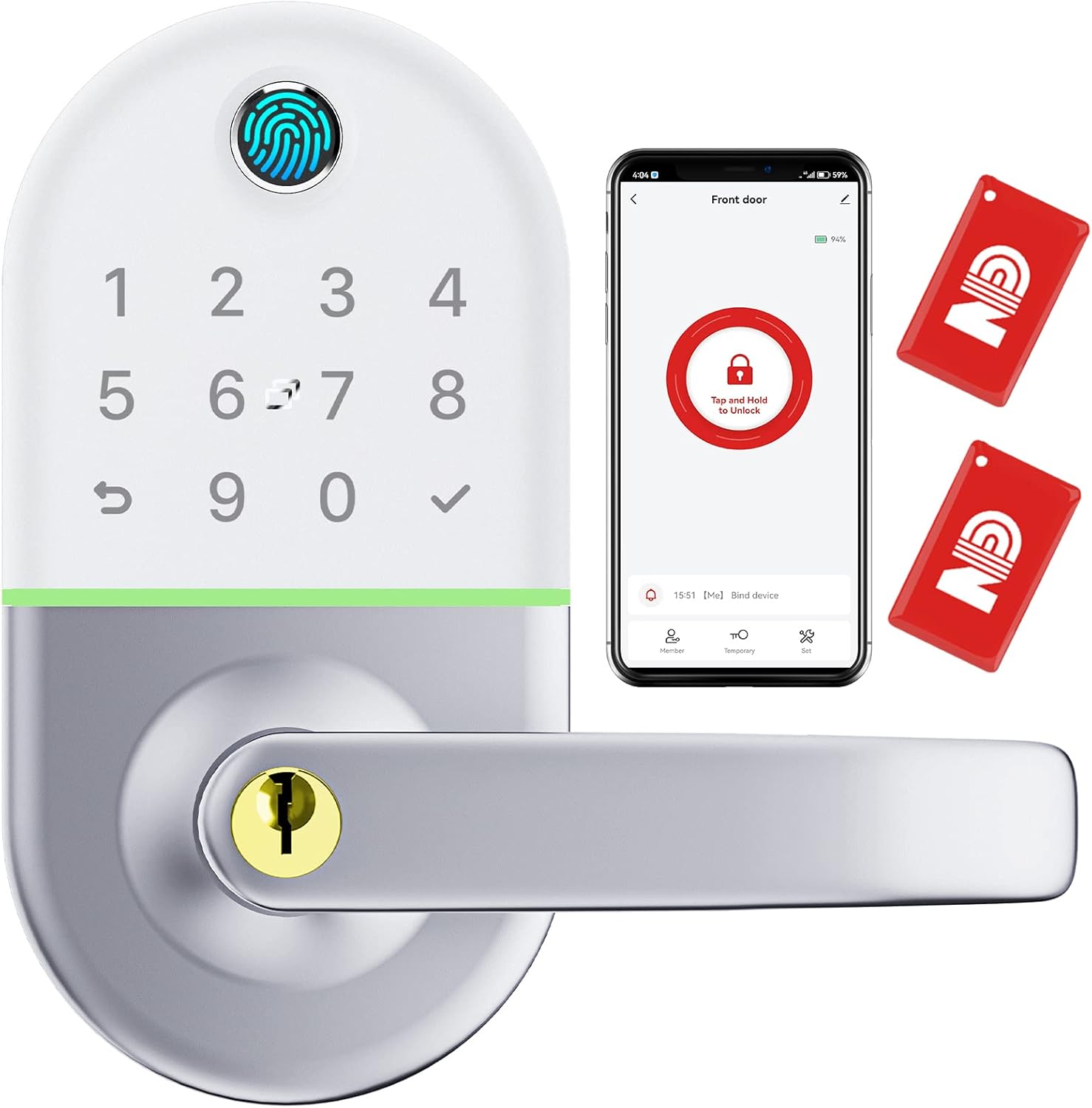
Image: The NICE DIGI Smart Door Lock, featuring its sleek design, integrated keypad, and fingerprint sensor. The accompanying smartphone app interface and key fobs highlight its versatile access options.
Package Contents
Verify that all components are present before beginning installation.
- Face Plate
- Back Plate
- Hardware Assembly (screws, spindle, etc.)
- Rubber Gasket
- User Manual (this document)
- Traditional Keys
Setup and Installation
The NICE DIGI Smart Door Lock is designed for easy DIY installation, typically requiring only a screwdriver. It is compatible with various door types, including those with existing lever, knob, deadbolt, and lock set replacements.
Installation Steps:
- Prepare the Door: Ensure your door meets the required thickness (1 3/8" to 2") and that the existing boreholes are compatible.
- Install the Latch: Insert the latch into the door edge and secure it with screws.
- Install the Exterior Assembly: Place the exterior part of the lock (with keypad and handle) onto the door, aligning the spindle with the latch.
- Install the Interior Assembly: Attach the interior part of the lock, connecting the necessary cables and securing it with screws from the hardware assembly.
- Insert Batteries: Open the battery compartment on the interior assembly and insert 4 AA batteries (not included).
- Test Functionality: After installation, test the mechanical operation with the traditional key and ensure the handle moves freely.

Image: Visual guide for DIY installation, illustrating how the lock components fit together and providing key dimensions for compatibility.

Image: The reversible handle feature, allowing adjustment for both left and right-handed door configurations.

Image: Illustrations demonstrating the lock's wide compatibility with various existing door hardware, including lever-only setups and combinations with deadbolts or knobs.
Operating Instructions
The NICE DIGI Smart Door Lock offers multiple convenient ways to access your property.
Access Methods:
- Fingerprint: Place your registered finger on the sensor for quick access.
- Smartphone APP: Use the NICE DIGI APP to unlock the door via Bluetooth.
- Passcode: Enter your unique numerical code on the keypad.
- Key Fobs: Tap a registered key fob on the lock's sensor.
- Traditional Key: Use the physical key as a backup or primary access method.
- Alexa Voice Unlock: (NICE DIGI Wifi Gateway Required) Integrate with Alexa for voice commands.

Image: Visual representation of the multiple keyless access options available, including smartphone app, fingerprint, passcode, and key fob.
Smartphone APP Functions:
The NICE DIGI APP provides comprehensive control and management features:
- Remote Management: Manage and control your smart lock from your smartphone.
- Access Permissions: Set up and manage access for family members, friends, or guests.
- Access Records: Monitor a detailed log of all lock and unlock events for enhanced security.
- Time-Limited Passcodes: Generate and share temporary passcodes, ideal for rental properties.

Image: A user interacting with the NICE DIGI smartphone application to control the smart lock.

Image: Demonstrates the feature of setting time-limited access, useful for guests or temporary users.

Image: The access log feature within the app, displaying a history of lock operations for security monitoring.

Image: Illustrates the versatility of the smart lock for different applications, including residential, commercial, and rental properties, all managed via the app.
Automatic Locking:
The lock features an auto-lock function for added security, automatically securing the door after a set period.

Image: Depiction of the automatic locking feature, ensuring the door is secured without manual intervention.
Voice Control (Alexa Integration):
For voice control functionality with Amazon Alexa, a NICE DIGI Wifi Gateway is required (sold separately). Once connected, you can use voice commands to lock or unlock your door.

Image: Illustrates the voice control capability through Amazon Alexa, requiring the separate NICE DIGI Wifi Gateway.
Maintenance
Proper maintenance ensures the longevity and optimal performance of your NICE DIGI Smart Door Lock.
Battery Replacement:
The lock requires 4 AA batteries. Replace them when the low battery indicator appears or when performance degrades. Always use new, high-quality alkaline batteries.

Image: The battery compartment, illustrating where to insert the four AA batteries for power.
Emergency Power:
In case of complete battery depletion, the lock features a Type-C port for emergency power. Connect a portable power bank to temporarily power the lock and gain access.

Image: The Type-C port for emergency power, allowing temporary operation with an external power source.
Cleaning:
Wipe the lock's surface with a soft, damp cloth. Avoid abrasive cleaners or solvents that could damage the finish or electronic components.
Weather Resistance:
The lock has an IP66 rating, indicating strong resistance to dust and water jets. While durable, avoid direct submersion or prolonged exposure to extreme weather conditions.

Image: Illustrates the IP66 water resistance rating, showing the lock's durability against water exposure.
Troubleshooting
| Problem | Possible Cause | Solution |
|---|---|---|
| Lock not responding to input. | Low batteries; incorrect input. | Replace batteries. Ensure correct fingerprint, passcode, or key fob is used. Use traditional key as backup. |
| Fingerprint not recognized. | Fingerprint not registered; dirty sensor; dry/wet finger. | Ensure fingerprint is properly registered. Clean the sensor. Ensure finger is clean and dry. Try different angle. |
| App connection issues. | Bluetooth off; app not updated; lock out of range. | Ensure Bluetooth is enabled on your phone. Update the app to the latest version. Move closer to the lock. |
| Lock does not auto-lock. | Auto-lock feature disabled or setting incorrect. | Check auto-lock settings in the NICE DIGI APP and enable it. |
Specifications
| Brand | NICE DIGI |
| Model Name | X1 |
| Lock Type | APP + Fingerprint + Key Fob + Code + Key Access |
| Material | Stainless Steel, Aluminum |
| Color | Silver and White |
| Item Dimensions (L x W x H) | 3 x 0.74 x 5.5 inches |
| Item Weight | 1.76 pounds |
| Connectivity Protocol | Bluetooth |
| Controller Type | Google Assistant, Amazon Alexa, iOS, Android (with Gateway) |
| Power Source | 4 x AA Batteries (not included) |
| Emergency Power | Type-C Port |
| Recommended Uses | Home, Airbnb, Rental Apartment, Office |
| Special Features | Compact Size, 5 Keyless Accesses + Traditional Key, Full APP Control, IP66 Water Resistance |
| UPC | 764742888639 |
Warranty and Support
NICE DIGI is committed to your satisfaction.
- 30-Day Money-Back Guarantee: If you are not satisfied, you may return the product within 30 days for a full refund.
- 1-Year Product Warranty: Covers defects in materials and workmanship for one year from the date of purchase.
- Lifetime After-Sales Support: Dedicated support is available for the lifetime of the product to assist with any questions or issues.
For support, please refer to the contact information provided with your purchase or visit the official NICE DIGI website.
Related documentsX1


Ask a question about this manual
Ask about setup, troubleshooting, compatibility, parts, safety, or missing instructions. Manuals+ will review the question and use this page’s manual context to help answer it.