
1. Introduction
The Moiswell VP240 Commercial Dehumidifier is engineered for efficient moisture removal in large commercial and residential spaces up to 8,500 square feet. This manual provides comprehensive instructions for the safe operation, proper installation, routine maintenance, and effective troubleshooting of your dehumidifier. Adhering to these guidelines will ensure optimal performance and longevity of the unit.
2. Safety Information
Please read and understand all safety warnings and operating instructions before using this appliance. Failure to follow these instructions may result in electric shock, fire, property damage, or personal injury.
- Always ensure the unit is connected to a properly grounded electrical outlet.
- Do not block the air inlet or outlet grilles. Maintain adequate clearance around the unit for proper airflow.
- Keep children and pets away from the dehumidifier during operation.
- Unplug the unit from the power source before performing any cleaning, maintenance, or servicing.
- If the unit has been transported horizontally, allow it to stand upright for at least 24 hours before plugging it in and operating. This allows the refrigerant to settle.
- Do not operate the unit with a damaged power cord or plug. If the power cord is damaged, it must be replaced by the manufacturer, its service agent, or similarly qualified persons to avoid a hazard.
- Do not use the dehumidifier in areas where flammable liquids or gases are stored.
3. Product Overview
The Moiswell VP240 is a robust commercial-grade dehumidifier designed for high-capacity moisture removal. Key features include a powerful compressor, an integrated pump for continuous drainage, and a user-friendly control panel.
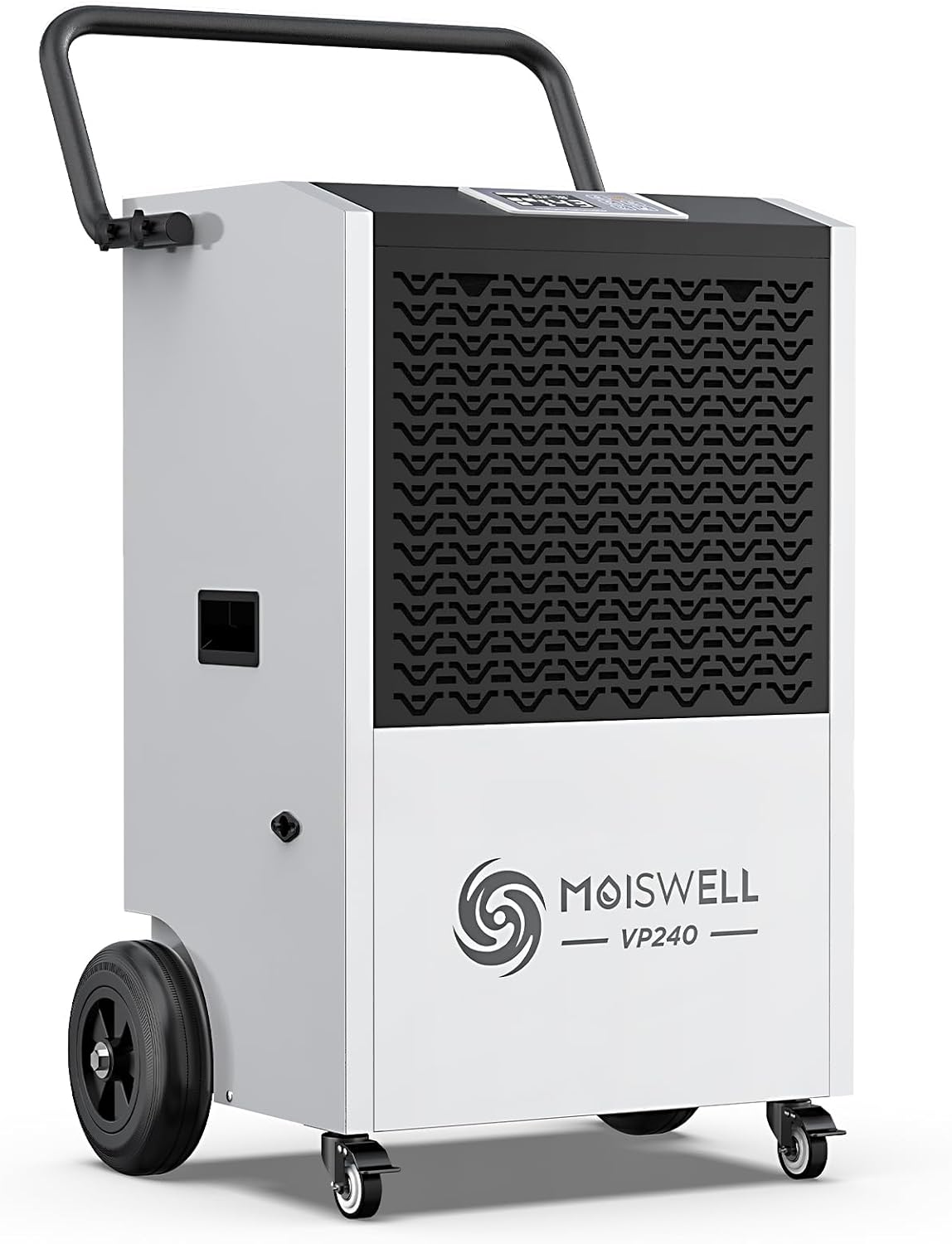
Figure 3.1: Front-side view of the Moiswell VP240 Commercial Dehumidifier, showcasing its robust design, integrated wheels, and ergonomic handle for portability.
Key Features:
- High Capacity: Removes up to 240 pints of moisture per day (116 Pints/day at AHAM standard).
- Wide Coverage: Effective in spaces up to 8,500 square feet.
- Powerful Airflow: 370 CFM (Cubic Feet Per Minute) for rapid drying.
- Built-in Pump: Automatic drainage with a 16-foot vertical and horizontal lift capability, eliminating manual water disposal.
- Intelligent Control: Features a programmable humidistat, 24-hour ON/OFF timer, and auto defrost function.
- Portability: Equipped with two large 6-inch wheels, two swivel casters, and a sturdy push-and-pull handle for easy movement.

Figure 3.2: An illustration highlighting the Moiswell VP240's superior moisture removal capacity of 240 pints per day compared to other models.
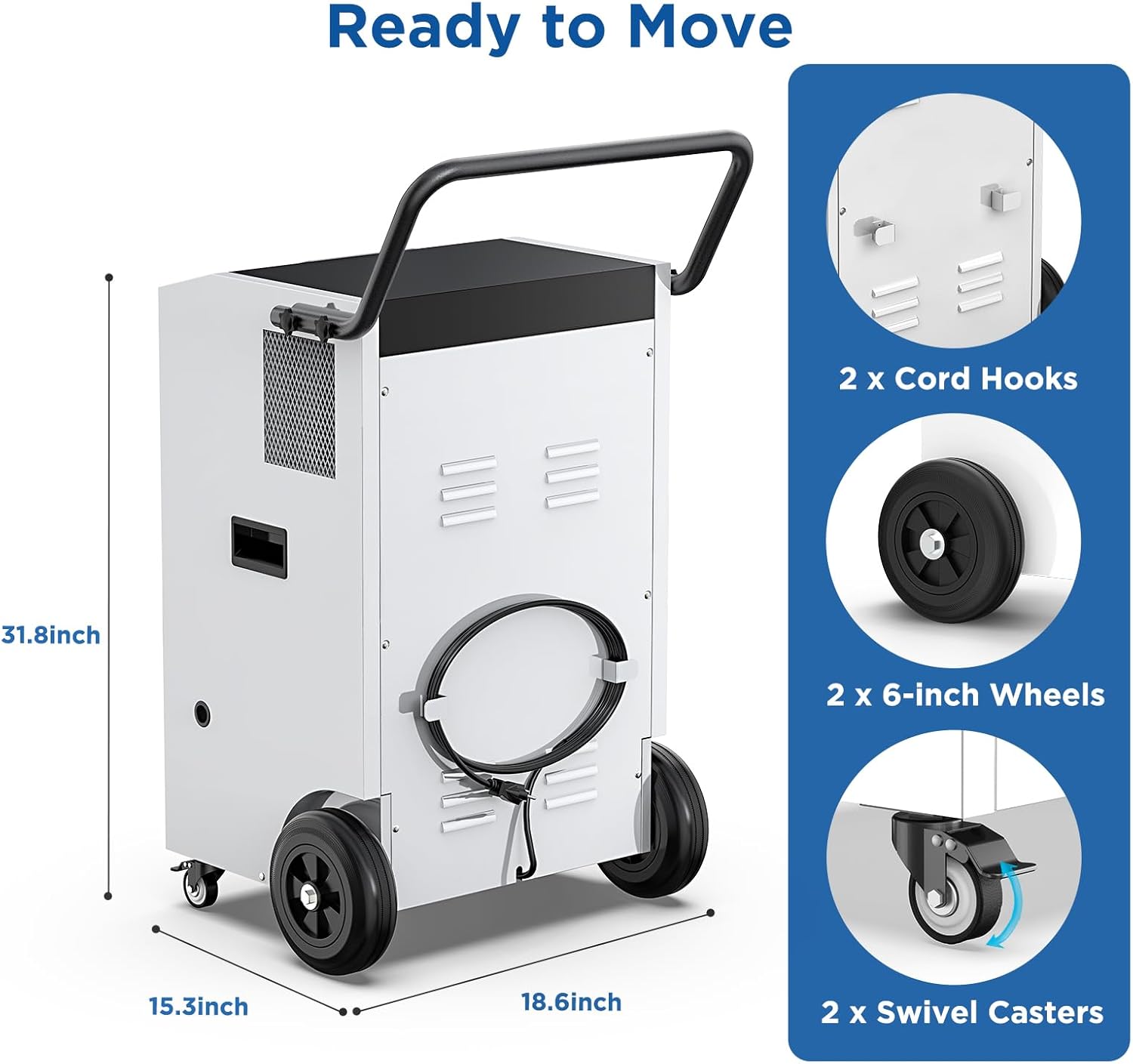
Figure 3.3: An image detailing the dimensions of the Moiswell VP240 and its portability features, including two large 6-inch wheels, two swivel casters, and cord hooks for convenient storage.
4. Setup and Installation
4.1 Unpacking
- Carefully remove the dehumidifier from its packaging.
- Inspect the unit for any shipping damage. If damage is found, contact your retailer immediately.
- Allow the unit to stand upright for 24 hours before plugging it in, especially if it was not transported in an upright position.
4.2 Placement
- Place the dehumidifier on a level, stable surface.
- Ensure there is at least 12 inches (30 cm) of space around the air inlet and outlet for unrestricted airflow.
- Avoid placing the unit near heat sources or in direct sunlight.
- For optimal performance, operate the unit in an enclosed area. Close all doors and windows to the space being dehumidified.
4.3 Drainage Setup
The Moiswell VP240 features a built-in condensate pump for continuous drainage, eliminating the need for manual emptying of a water tank.
- Locate the drain outlet on the unit.
- Connect the provided drain hose securely to the drain outlet.
- Route the drain hose to a suitable drainage point, such as a sink, floor drain, or outside. The built-in pump can lift water up to 16 feet vertically or extend 16 feet horizontally.
- Ensure the hose is not kinked or obstructed to allow for continuous water flow.
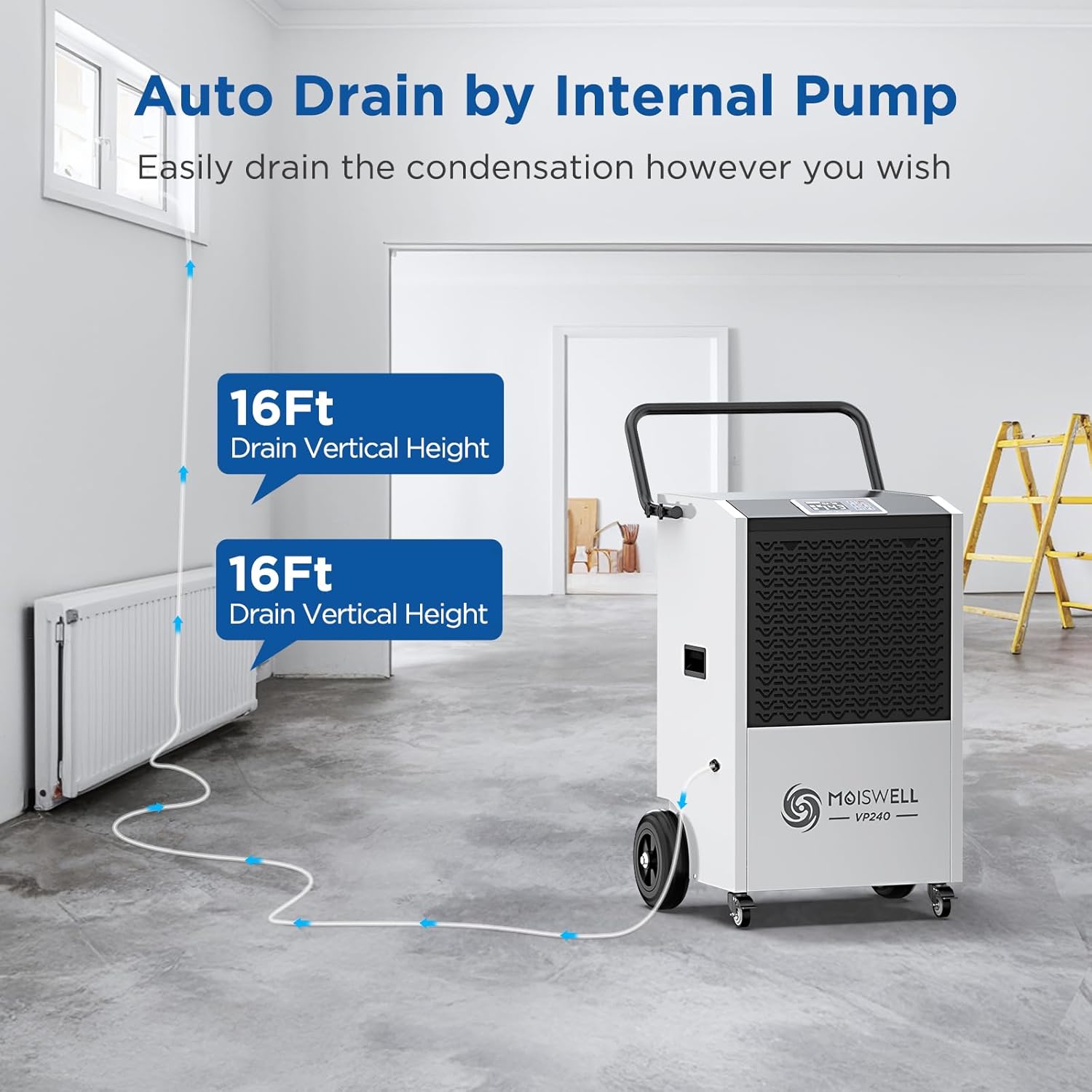
Figure 4.1: The Moiswell VP240 dehumidifier connected to a drain hose, demonstrating its built-in pump's capability to discharge water up to 16 feet vertically or horizontally.
4.4 Power Connection
Plug the power cord into a dedicated, grounded electrical outlet that matches the voltage requirements of the unit.
5. Operation
5.1 Control Panel
The control panel allows you to manage the dehumidifier's settings and monitor its status.

Figure 5.1: A detailed view of the dehumidifier's intelligent control panel, featuring a digital display for humidity and temperature, along with buttons for power, settings, timer, and pump purge.
- Power Button: Turns the unit ON or OFF.
- Up/Down Buttons: Adjust the desired humidity level or timer settings.
- OK Button: Confirms selections.
- Timer Button: Sets the 24-hour ON/OFF timer.
- Purge Button: Manually activates the built-in pump to drain collected water.
- Display: Shows current humidity, set humidity, and timer status.
5.2 Setting Desired Humidity
- Press the Power button to turn on the unit.
- Use the Up or Down buttons to set your desired humidity level. The recommended humidity range for most environments is between 45% and 55% relative humidity.
- The unit will automatically operate to maintain the set humidity level, turning on and off as needed.
5.3 Timer Function
The 24-hour timer allows you to program the unit to turn ON or OFF automatically.
- To set Auto-ON: With the unit OFF, press the Timer button, then use Up/Down to set the desired delay time (in hours) until the unit turns ON. Press OK to confirm.
- To set Auto-OFF: With the unit ON, press the Timer button, then use Up/Down to set the desired delay time (in hours) until the unit turns OFF. Press OK to confirm.
5.4 Auto Defrost
The unit is equipped with an automatic defrost function. If frost builds up on the evaporator coils, the unit will temporarily stop dehumidifying and run the fan to melt the frost. This is a normal operation and ensures efficient performance in cooler conditions.
5.5 Pump Purge
The Purge button allows for manual activation of the built-in pump to drain any accumulated water. This can be useful for ensuring the drain line is clear or for draining the unit before moving it.
6. Maintenance
Regular maintenance ensures the efficient and long-lasting operation of your dehumidifier.
6.1 Air Filter Cleaning
The air filter should be cleaned every two weeks or more frequently depending on usage and air quality.
- Unplug the dehumidifier from the power outlet.
- Locate and remove the air filter (refer to the unit's exterior for filter access). The filter is designed for easy removal.
- Wash the filter with warm, soapy water. Rinse thoroughly and allow it to air dry completely before reinstallation. Do not use a dishwasher.
- Reinsert the dry filter into the unit.
6.2 Unit Cleaning
- Wipe the exterior of the unit with a soft, damp cloth. Do not use harsh chemicals or abrasive cleaners.
- Ensure the air inlet and outlet grilles are free from dust and debris. Use a vacuum cleaner with a brush attachment if necessary.
6.3 Drain Hose Inspection
Periodically check the drain hose for any kinks, blockages, or signs of wear. Ensure it remains securely connected to the unit and the drainage point.
7. Troubleshooting
Before contacting customer support, please review the following common issues and solutions.
| Problem | Possible Cause | Solution |
|---|---|---|
| Dehumidifier does not turn on. | No power supply. Power cord not plugged in. Circuit breaker tripped. | Ensure unit is plugged into a live, grounded outlet. Check circuit breaker. |
| Unit is running but not removing moisture. | Air filter is dirty. Humidity setting is too high. Room temperature is too low. Doors/windows are open. | Clean the air filter. Lower the desired humidity setting. Ensure room temperature is above 41°F (5°C). Close all doors and windows. |
| Water is not draining. | Drain hose is kinked or blocked. Drain hose is not properly connected. Pump malfunction. | Check and clear the drain hose. Ensure secure connection. If pump issue persists, contact customer support. |
| Unit is noisy. | Unit not on a level surface. Air filter dirty. Fan obstruction. | Place unit on a level surface. Clean air filter. Check for obstructions in fan area. |
| Frost on coils. | Normal operation in low temperatures (auto defrost will activate). | Allow auto defrost cycle to complete. Unit will resume normal operation. |
If the problem persists after attempting these solutions, please contact Moiswell customer support for assistance.
8. Specifications
Detailed technical specifications for the Moiswell VP240 Commercial Dehumidifier.
| Specification | Detail |
|---|---|
| Brand | Moiswell |
| Model Name | VP240 |
| Dehumidification Capacity | 240 Pints/Day (at 90°F, 90% RH); 116 Pints/Day (AHAM) |
| Coverage Area | Up to 8,500 Sq Ft |
| Air Flow Capacity | 370 CFM |
| Product Dimensions (D x W x H) | 18.6" x 15.3" x 31.8" |
| Item Weight | 104.7 Pounds |
| Wattage | 1300 watts |
| Material | Alloy Steel |
| Special Features | Adjustable Humidity Control, Automatic Defrost, Automatic Restart, Built-In Pump, Portable |
| Drainage | Built-in Pump with 16ft vertical/horizontal lift |
9. Warranty and Support
Moiswell stands behind the quality of its products.
9.1 Warranty Information
- The Moiswell VP240 Commercial Dehumidifier comes with a 2-Year Full Warranty.
- Additionally, a 5-Year Limited Warranty is provided.
- For specific warranty terms and conditions, please refer to the warranty card included with your product or contact Moiswell customer service.

Figure 9.1: Information regarding the Moiswell VP240's warranty, specifying a 2-year full warranty and a 5-year limited warranty.
9.2 Customer Support
For technical assistance, warranty claims, or any questions regarding your Moiswell VP240 dehumidifier, please contact Moiswell customer service. Contact details can typically be found on the product packaging, the official Moiswell website, or your purchase documentation. Please have your model number (VP240) and purchase date available when contacting support.