1. Introduction
Thank you for choosing the MESTEK IR01D Infrared Laser Thermometer. This device is designed for safe, non-contact surface temperature measurement. It features a wide temperature range, adjustable emissivity, and a clear LCD display, making it suitable for various applications from industrial use to home cooking. Please read this manual thoroughly before use to ensure proper operation and safety.
2. Safety Information
WARNING: Laser Radiation
- Do not stare directly into the laser beam.
- Do not point the laser beam at people or animals.
- Avoid direct eye exposure to the laser beam.
- Do not disassemble the device. Unauthorized modifications may cause damage and void the warranty.
- Keep out of reach of children.
- This device is not intended for medical use or measuring human body temperature.
Always use the device responsibly and in accordance with local safety regulations.
3. Product Overview
The MESTEK IR01D is a professional-grade infrared thermometer equipped with advanced features for accurate and reliable temperature readings.
3.1 Key Features
- Non-contact infrared temperature measurement.
- Wide temperature range: -50°C to 800°C (-58°F to 1472°F).
- 12-point laser targeting for precise aiming.
- Distance-to-Spot ratio (D:S) of 12:1.
- Adjustable emissivity (0.10 to 1.00) for various surfaces.
- Color LCD display with backlight for clear readings.
- High/Low temperature alarm function.
- Celsius (°C) / Fahrenheit (°F) unit conversion.
- Data HOLD function.
- Low battery indicator and auto power-off.
- Integrated temperature and humidity sensor (HTU20).
3.2 Device Components

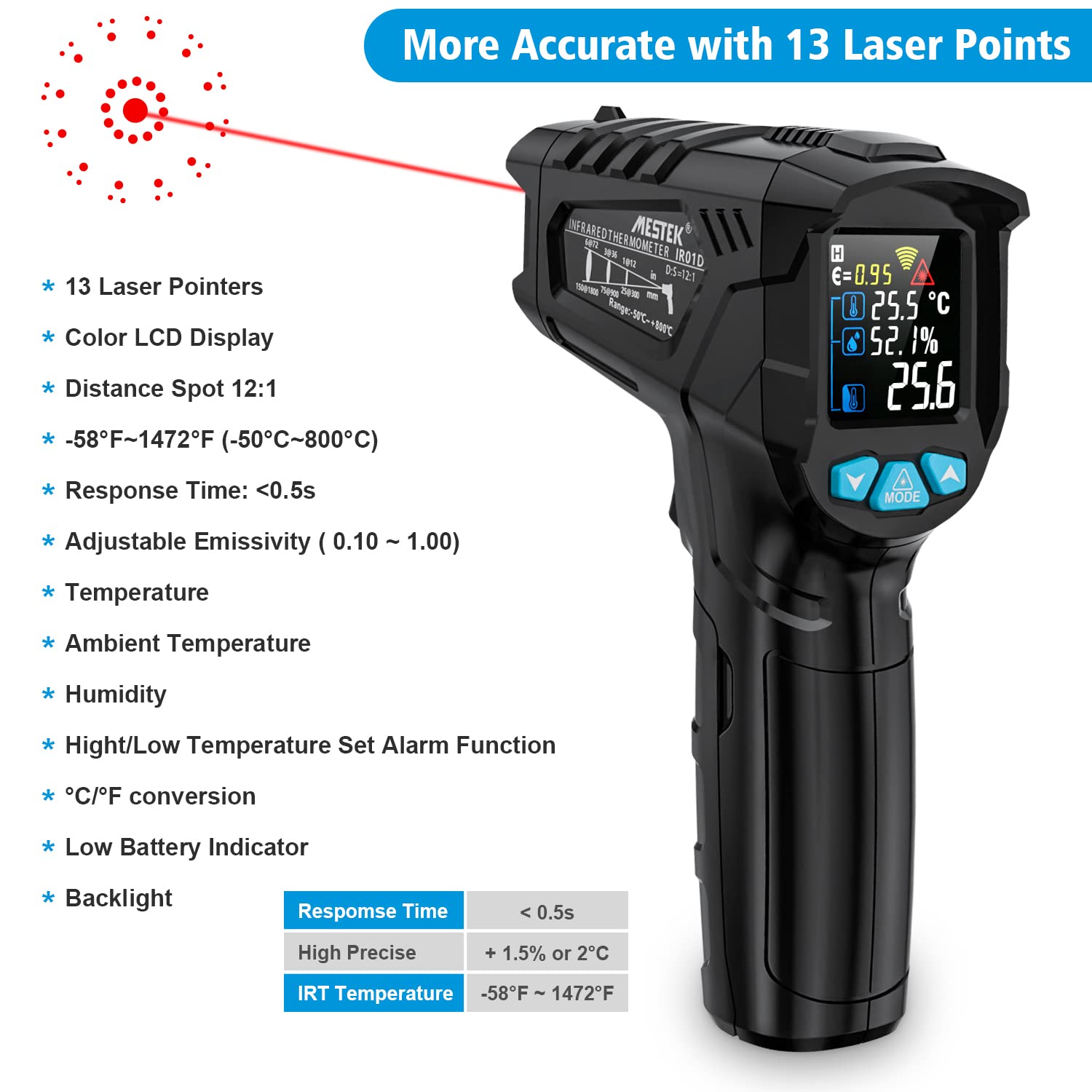

4. Setup
4.1 Battery Installation
- Locate the battery compartment cover at the bottom of the handle.
- Open the cover by gently pulling it downwards or sliding it off.
- Insert two AAA alkaline batteries, ensuring correct polarity (+/-).
- Close the battery compartment cover securely.

5. Operating Instructions
5.1 Basic Temperature Measurement
- Point the thermometer at the target surface.
- Press and hold the trigger to activate the laser and begin measurement. The temperature reading will appear on the LCD display.
- Release the trigger to hold the reading on the display. The device will automatically power off after 30 seconds of inactivity to conserve battery.
Note: The optimal measurement distance is determined by the D:S ratio (Distance-to-Spot). For the MESTEK IR01D, the D:S is 12:1, meaning that at a distance of 12 inches, the measurement spot diameter is 1 inch. Ensure the target area is larger than the spot size for accurate readings.
5.2 Adjustable Emissivity
Emissivity (ε) is the ability of a material to emit thermal energy. Different materials have different emissivity values. For accurate measurements, adjust the emissivity setting to match the target material.
- Press the "MODE" button to enter emissivity adjustment mode.
- Use the up/down arrow buttons to adjust the emissivity value from 0.10 to 1.00.
- Refer to the emissivity table provided in the full manual for common materials.

5.3 High/Low Temperature Alarm
The device can be set to alert you when a measured temperature exceeds or falls below a specified threshold.
- Press the "MODE" button repeatedly until the alarm setting appears.
- Use the up/down arrow buttons to set the desired high or low temperature alarm threshold.
- When the measured temperature reaches the set value, a red indicator light will illuminate.
5.4 Unit Conversion (°C/°F)
To switch between Celsius and Fahrenheit temperature units:
- Press the unit switch button (often integrated with the "MODE" button or a dedicated button) to toggle between °C and °F.

6. Applications
The MESTEK IR01D Infrared Laser Thermometer is versatile and can be used in various settings:
- Cooking and Baking: Measuring oven, grill, pizza stone, or food surface temperatures.
- Automotive Maintenance: Checking engine components, tires, or HVAC systems.
- Home Inspections: Identifying insulation issues, checking radiator temperatures, or freezer performance.
- Industrial Use: Monitoring electrical panels, mechanical equipment, or HVAC systems.

7. Maintenance
- Cleaning: Use a soft, damp cloth to clean the device casing. Do not use abrasive cleaners or solvents.
- Lens Care: The infrared lens is the most delicate part. Clean it carefully with a soft cloth or cotton swab and water or rubbing alcohol.
- Storage: Store the device in a cool, dry place when not in use. Remove batteries if storing for extended periods to prevent leakage.
8. Troubleshooting
- No Power: Check battery installation and ensure batteries are not depleted. Replace if necessary.
- Inaccurate Readings:
- Ensure the emissivity setting matches the target material.
- Verify the distance-to-spot ratio is appropriate for the measurement.
- Clean the infrared lens if it is dirty.
- Avoid measuring through glass or other transparent surfaces, as infrared thermometers measure the surface temperature of the glass itself.
- Laser Not Working: Check if the laser function is enabled (if applicable) or if the battery is low.
If problems persist, please contact customer support.
9. Specifications
| Feature | Specification |
|---|---|
| Model | IR01D |
| Temperature Range | -50°C to 800°C (-58°F to 1472°F) |
| Accuracy | ±1.5% or ±1.5°C (±2.7°F) |
| Distance Spot Ratio (D:S) | 12:1 |
| Emissivity | Adjustable 0.10 - 1.00 |
| Response Time | <0.5 seconds |
| Spectral Response | 8-14µm |
| Laser Pointer | 12-point circle laser |
| Display | Color LCD with backlight |
| Power Supply | 2 x AAA batteries (included) |
| Auto Power Off | 30 seconds (approx.) |
| Special Functions | High/Low Temperature Alarm, Data Hold, Low Battery Indicator |
| Material | ABS |
| Certifications | CE, EN61010-1, EN60825 |
10. Warranty and Support
MESTEK provides a 36-month after-sales service and lifetime technical support for this product. If you encounter any issues or have questions, please contact our customer service team for assistance.
Contact information can typically be found on the product packaging or the official MESTEK website.


