
SUPERJARE 7947ZC
SUPERJARE L Shaped Desk User Manual
Model: 7947ZC
Brand: SUPERJARE
Product Overview
The SUPERJARE L Shaped Desk is a versatile and functional computer desk designed for home and office environments. It features an L-shaped configuration, integrated power outlets, LED lighting, and ample storage solutions, including shelves and a fabric drawer. Its reversible design allows for flexible installation to suit various room layouts.

Image: Fully assembled SUPERJARE L Shaped Desk showcasing its design and functionality.
Key Features
- Integrated LED Lighting: Features 20 color options, 6 dynamic modes, 5 adjustable brightness levels, and 5 flicker frequencies for customizable ambiance.
- Built-in Power Outlets: Equipped with 4 standard AC outlets and 2 USB ports for convenient charging of electronic devices.
- Reversible L-Shaped Design: Can be configured in two directions to adapt to different room layouts and user preferences.
- Ample Storage: Includes a grid bookshelf under the desk and a fabric drawer for organizing office supplies, documents, and personal items.
- Sturdy Construction: Crafted from heavy-duty powder-coated steel and P2 Particle Board for durability and long-term stability.
- Adjustable Feet: Ensures stability on uneven surfaces and protects flooring from scratches.
Safety Information
Always exercise caution when handling heavy components during assembly. Ensure all connections are secure and the desk is stable before placing items on it or using the integrated power features. Keep the work area clear of obstructions and adhere strictly to all assembly instructions provided to prevent injury or damage.
Setup and Assembly
Assembly of the SUPERJARE L Shaped Desk requires careful attention to detail. It is recommended to assemble the desk with two people for ease and safety. All parts are clearly labeled to facilitate the process. Follow the included graphical instructions step-by-step.
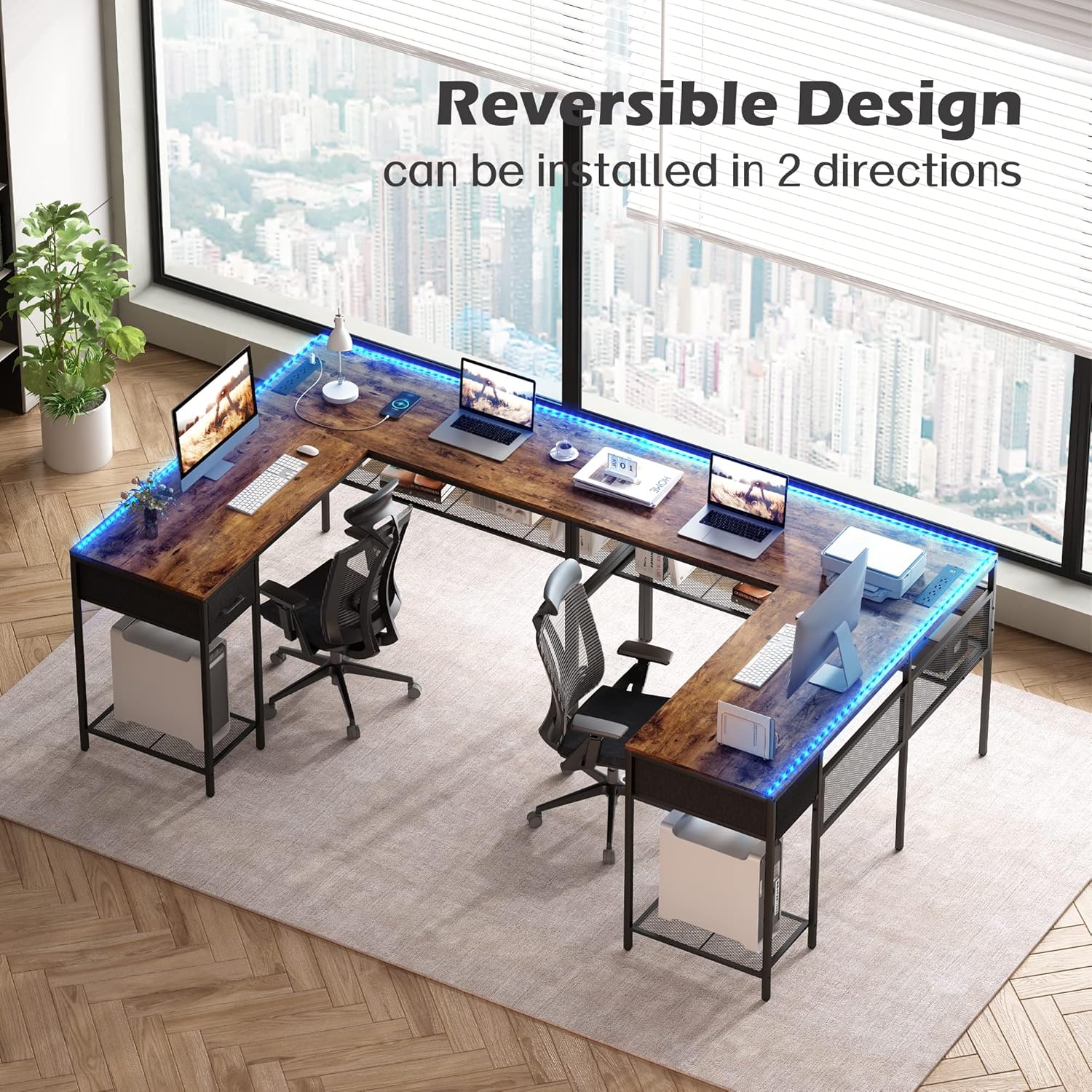
Image: Illustration demonstrating the reversible L-shaped configuration of the desk, allowing it to be set up in two different orientations.
Reversible Design
The desk features a reversible design, allowing you to configure the longer and shorter sections to either the left or right side, depending on your room layout and preference. Ensure you decide on the desired orientation before beginning assembly, as this will dictate the placement of certain components.

Image: Visual representation of the desk's reversible capability, showing both left and right configurations.
Adjustable Feet
The desk is equipped with adjustable feet at the base of each leg. These feet can be rotated to fine-tune the desk's height and ensure stability on uneven flooring. Adjust them until the desk is level and does not wobble.

Image: Detail of the adjustable foot mechanism, designed to stabilize the desk on various floor surfaces.
Operating Instructions
Power Outlets and USB Ports
The desk includes a built-in power strip with 4 standard AC outlets (125V/12A) and 2 USB ports (5V/2A). To use, simply plug the desk's main power cord into a wall outlet. You can then connect your devices, such as laptops, phones, and other office equipment, directly to the integrated outlets and USB ports for convenient charging and power supply.
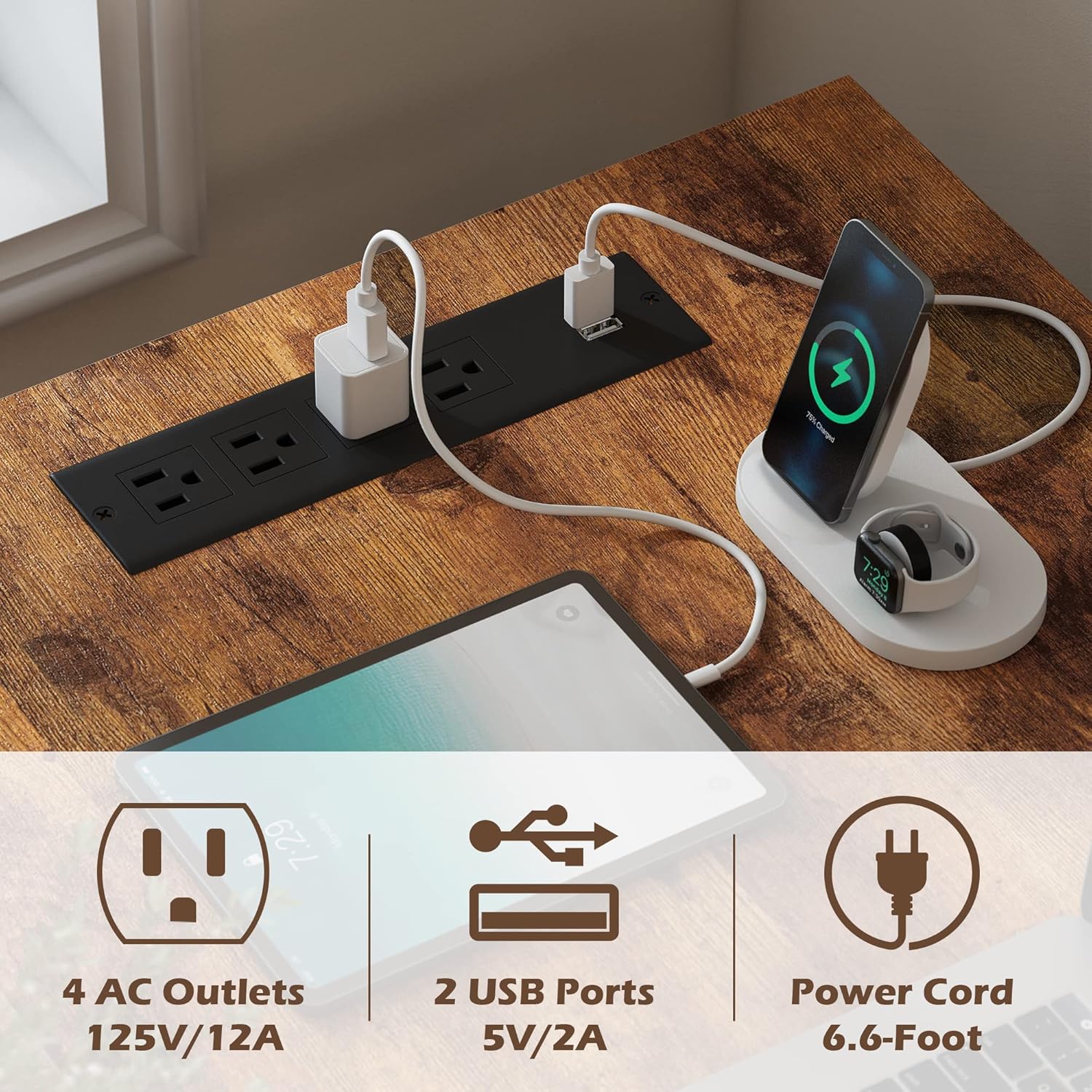
Image: The integrated power strip on the desk surface, showing 4 AC outlets and 2 USB ports in use.
LED Lighting System
The desk is equipped with LED light strips that offer a range of customization options. Use the provided RF wireless remote control to manage the lighting. The system supports 20 color changes, 6 dynamic modes (Jump, Constant, Fade, Flash), 5 adjustable brightness levels, and 5 flicker frequencies. Ensure the LED strips are properly connected to the power source as per assembly instructions.

Image: The RGB LED strips illuminating the desk, alongside the remote control detailing its functions for color, mode, brightness, and frequency adjustments.
Storage Features
The desk provides various storage solutions to keep your workspace organized. The fabric drawer is ideal for storing stationery, small personal items, or documents, offering privacy and easy access. The open grid bookshelves beneath the desk provide ample space for books, binders, computer towers, or decorative items.

Image: A detailed view of the fabric drawer, highlighting its dimensions and capacity for storing various items.

Image: The mesh grid shelves under the desk, demonstrating their use as a bookshelf and for general storage.
Maintenance
To ensure the longevity and appearance of your SUPERJARE L Shaped Desk, follow these maintenance guidelines:
- Cleaning: Wipe surfaces with a soft, damp cloth. Avoid harsh chemicals or abrasive cleaners, which can damage the finish. For the metal frame, a mild soap solution can be used.
- Spills: Immediately wipe up any spills to prevent staining or damage to the wood surface.
- Electrical Components: Ensure the power outlets and USB ports are kept dry. Do not attempt to disassemble or repair the electrical components yourself.
- Structural Integrity: Periodically check all screws and fasteners to ensure they remain tight. Re-tighten if necessary to maintain stability.
- Fabric Drawer: The fabric drawer can be spot cleaned with a mild detergent and water. Allow to air dry completely.
Troubleshooting
This section addresses common issues you might encounter with your SUPERJARE L Shaped Desk.
| Problem | Possible Cause | Solution |
|---|---|---|
| Desk wobbles or is unstable. | Uneven floor; loose fasteners; incorrect assembly. | Adjust the leveling feet at the bottom of the desk legs. Check and tighten all screws and bolts. Review assembly instructions to ensure all parts are correctly installed. |
| LED lights are not working. | Power cord not plugged in; remote control battery low; LED strip connection loose; LED strip damaged. | Ensure the desk's main power cord is securely plugged into a working wall outlet. Check the battery in the remote control and replace if necessary. Verify that the LED strip is properly connected to its power adapter and the desk's power unit. If issues persist, contact customer support. |
| Power outlets/USB ports not functioning. | Desk's main power cord not plugged in; circuit breaker tripped; device not properly plugged in. | Confirm the desk's main power cord is fully inserted into a live wall outlet. Check your home's circuit breaker. Ensure devices are firmly plugged into the desk's outlets/ports. Test with another device to rule out device issues. |
| Difficulty during assembly. | Misinterpretation of instructions; parts oriented incorrectly. | Carefully re-read and review the assembly instructions, paying close attention to diagrams and part orientations. Ensure parts are not confused (e.g., left vs. right, front vs. back). A second person can often help identify overlooked details. |
Specifications
| Attribute | Detail |
|---|---|
| Brand | SUPERJARE |
| Model Number | 7947ZC |
| Product Dimensions | 19"D x 55.1"W x 29.5"H |
| Color | Rustic Brown With Led Lights |
| Style | Modern |
| Base Material | Metal |
| Top Material Type | Engineered Wood |
| Finish Type | Powder Coated |
| Special Feature | Reversible |
| Room Type | Office, Bedroom, Study Room |
| Recommended Uses | Office, Working, Writing, Gaming |
| Mounting Type | Floor Mount |
| Included Components | Desk, Keyboard Tray, Monitor Arm (Note: Keyboard tray and monitor arm may be optional or vary by package) |
| Maximum Weight Recommendation | 150 Kilograms (330 lbs) |
| Number of Drawers | 1 (Fabric Drawer) |
| Number Of Shelves | 2 (Grid Bookshelves) |
| Item Weight | 43 Pounds |

Image: Comprehensive diagram illustrating the full dimensions of the SUPERJARE L Shaped Desk.
Warranty and Support
For any questions regarding assembly, operation, maintenance, or troubleshooting that are not covered in this manual, please contact SUPERJARE customer support. Keep your purchase receipt for warranty claims. Specific warranty details may vary; refer to the product packaging or the official SUPERJARE website for the most current warranty information.
You can visit the official SUPERJARE store for more information and support: SUPERJARE Store on Amazon
Ask a question about this manual
Ask about setup, troubleshooting, compatibility, parts, safety, or missing instructions. Manuals+ will review the question and use this page’s manual context to help answer it.