
1. Introduction
This manual provides detailed instructions for the installation, operation, and maintenance of your XTRONS PE62GPFL Android 12 Car Stereo. This unit is specifically designed for Fiat Grande Punto (2010-2016) and Punto Evo models, offering advanced features such as GPS navigation, Wi-Fi connectivity, Apple CarPlay, and Android Auto. Please read this manual thoroughly before using the device to ensure proper functionality and safety.

Figure 1.1: Front view of the XTRONS PE62GPFL car stereo, highlighting its Octa-Core processor, DSP, and Android 12 operating system.
2. Setup and Installation
2.1 Package Contents
Before beginning installation, verify that all components are present in the package. The standard package includes the main head unit, power cables, USB cables, GPS antenna, and a user manual. Optional accessories such as a 4G internet dongle, DAB+ module, or TPMS kit are sold separately.
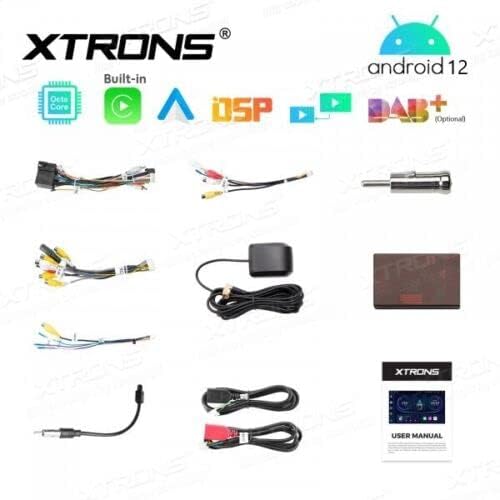
Figure 2.1: Overview of included cables and accessories, such as USB cables, GPS antenna, and wiring harnesses.
2.2 Wiring and Connections
Connect the main power harness to your vehicle's wiring. Ensure all connections are secure to prevent electrical issues. The unit supports two USB inputs and two Micro SD card inputs for media and data transfer. A dedicated input is available for a rear-view camera and DVR. The unit also features a CANBUS connection for integrating with your vehicle's steering wheel controls.
- Power Harness: Connect to vehicle's power supply.
- GPS Antenna: Mount in a location with clear sky view for optimal signal reception.
- USB Inputs: For USB drives (up to 128GB) or 4G dongle.
- Micro SD Inputs: For Micro SD cards (up to 64GB).
- Rear Camera Input: Connect compatible rear-view camera.
- DVR Input: Connect compatible DVR unit.
- CANBUS: For steering wheel control integration.
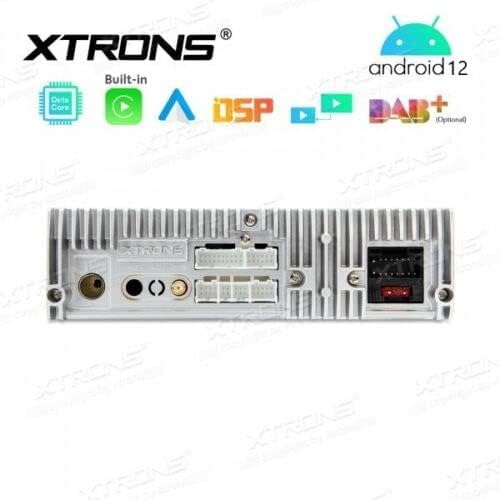
Figure 2.2: Rear view of the head unit, showing various connection ports for power, USB, GPS, and other accessories.
2.3 Initial Power-On and Basic Settings
After installation, turn on your vehicle's ignition. The unit should power on automatically. Follow the on-screen prompts to set the language, time zone, and initial Wi-Fi connection. Ensure the GPS antenna is connected and positioned correctly for accurate navigation data.
3. Operating Instructions
3.1 Android 12 Interface
The unit runs on Android 12, providing a familiar and intuitive user interface. Navigate through applications using the 6.2-inch touchscreen. The home screen displays essential information and quick access to frequently used apps.

Figure 3.1: The main home screen of the Android 12 interface, showing time, date, and quick access icons.
3.2 Navigation (GPS)
The integrated GPS module provides accurate navigation. Open the pre-installed navigation application or download your preferred GPS app from the Google Play Store. Ensure the GPS antenna has a clear line of sight to satellites for optimal performance.

Figure 3.2: Example of the navigation interface displaying a map and route information.
3.3 Connectivity (Wi-Fi, 4G, Bluetooth)
- Wi-Fi: Connect to a Wi-Fi hotspot (e.g., from your smartphone) to access online features, download apps, and browse the internet. The unit supports dual-band Wi-Fi.
- 4G: An optional 4G internet dongle (not included) can be connected via USB for mobile data access.
- Bluetooth 5.0: Pair your smartphone for hands-free calling, audio streaming, and contact synchronization.
3.4 Apple CarPlay & Android Auto
The unit features built-in Apple CarPlay and Android Auto. Connect your compatible smartphone via USB to access phone functions, navigation, music, and messaging apps directly on the car stereo display. This provides a safer way to use your phone while driving.

Figure 3.3: Display showing the Apple CarPlay interface with various compatible applications.
3.5 Media Playback
Play audio and video files from USB drives (up to 128GB) or Micro SD cards (up to 64GB). The unit supports various media formats. The built-in Digital Sound Processor (DSP) enhances audio quality.
3.6 Steering Wheel Controls
With the CANBUS connection, the unit integrates with your vehicle's original steering wheel controls, allowing you to manage volume, tracks, and calls without taking your hands off the wheel.
4. Maintenance
4.1 Cleaning the Unit
To clean the touchscreen and unit exterior, use a soft, dry, lint-free cloth. For stubborn marks, slightly dampen the cloth with water or a screen-safe cleaner. Avoid abrasive materials or harsh chemicals, as these can damage the screen and finish.
4.2 Software Updates
Periodically check the XTRONS official website for available software updates. Updates can improve performance, add new features, and fix bugs. Follow the instructions provided with the update package carefully.
5. Troubleshooting
- No Power: Check all power connections and the vehicle's fuse box. Ensure the ignition is on.
- No Sound: Verify speaker connections. Check volume levels and audio output settings. Ensure the mute function is not active.
- GPS Signal Loss: Ensure the GPS antenna is securely connected and has an unobstructed view of the sky. Move the vehicle to an open area if necessary.
- Wi-Fi/Bluetooth Connectivity Issues: Ensure the Wi-Fi hotspot or Bluetooth device is active and within range. Re-pair Bluetooth devices if necessary.
- Touchscreen Unresponsive: Try restarting the unit. If the issue persists, a factory reset might be required (note: this will erase all user data).
For further assistance, please refer to the XTRONS support website or contact customer service.
6. Specifications
| Model Name | PE62GPFL |
| Operating System | Android 12 |
| Processor | Octa-Core |
| RAM | 2GB DDR4 |
| Internal Storage (ROM) | 32GB SSD (expandable) |
| Screen Size | 6.2 Inches |
| Connectivity | Wi-Fi (Dual-band), Bluetooth 5.0, 4G (via optional dongle) |
| Inputs | 2x USB (max 128GB), 2x Micro SD (max 64GB), Rear Camera, DVR |
| Special Features | GPS Navigation, Apple CarPlay, Android Auto, Screen Mirroring, CANBUS Steering Wheel Control, Built-in DSP |
| Compatible Devices | Smartphone |
| Vehicle Service Type | Car |

Figure 6.1: Dimensional diagram of the XTRONS PE62GPFL unit.
7. Warranty and Support
Warranty information for the XTRONS PE62GPFL is typically provided with your purchase documentation. Please retain your proof of purchase for warranty claims. For technical support, frequently asked questions, or to download the latest software updates, please visit the official XTRONS website or contact their customer service department.
Manufacturer: XTRONS