
1. Introduction
This manual provides instructions for the Generic Original Replacement Remote Control, designed for use with Global Media Box and Plus TV Box devices. Please read this manual carefully before use to ensure proper operation and to avoid damage.
Important Compatibility Note:
This remote control is specifically compatible with the standard Global Media Box and Plus TV Box. It is NOT compatible with the Plus TV Box PRO model. Please verify your device model before attempting to use this remote.

Image 1.1: Compatibility comparison. The remote on the right (Global Remote) is compatible, while the one on the left (Global Pro Remote) is not. This image helps users identify the correct remote for their device.

Image 1.2: The remote control shown with compatible devices: Global Media Box and Plus TV Box. This illustrates the devices the remote is designed to operate.
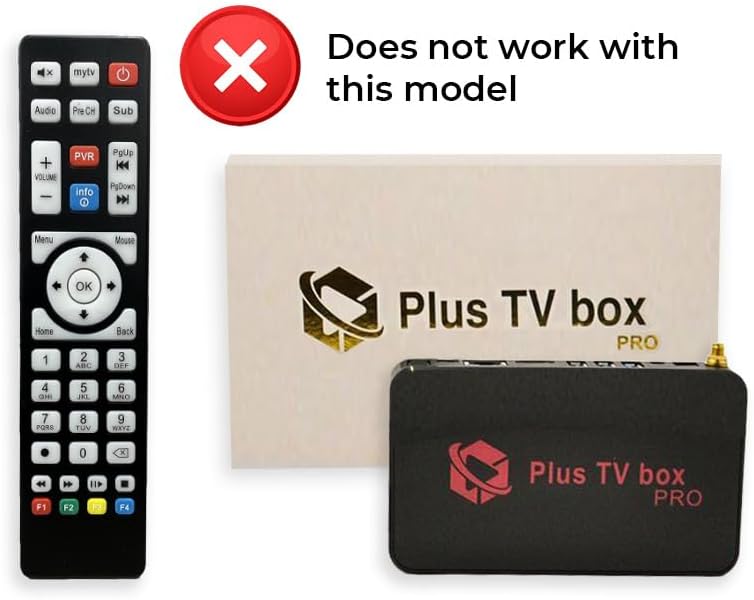
Image 1.3: The remote control shown with an incompatible device: Plus TV Box PRO. This image highlights a device that will not work with this remote.
2. Setup
2.1 Battery Installation
The remote control requires two (2) AAA batteries (not included) for operation. Follow these steps to install the batteries:
- Locate the battery compartment cover on the back of the remote control.
- Slide the cover downwards or press the latch (if present) to open the compartment.
- Insert two AAA batteries, ensuring the positive (+) and negative (-) terminals align correctly with the markings inside the compartment.
- Close the battery compartment cover by sliding it back into place until it clicks securely.
Once batteries are installed, the remote is ready for use. No additional pairing or programming is typically required for compatible devices.
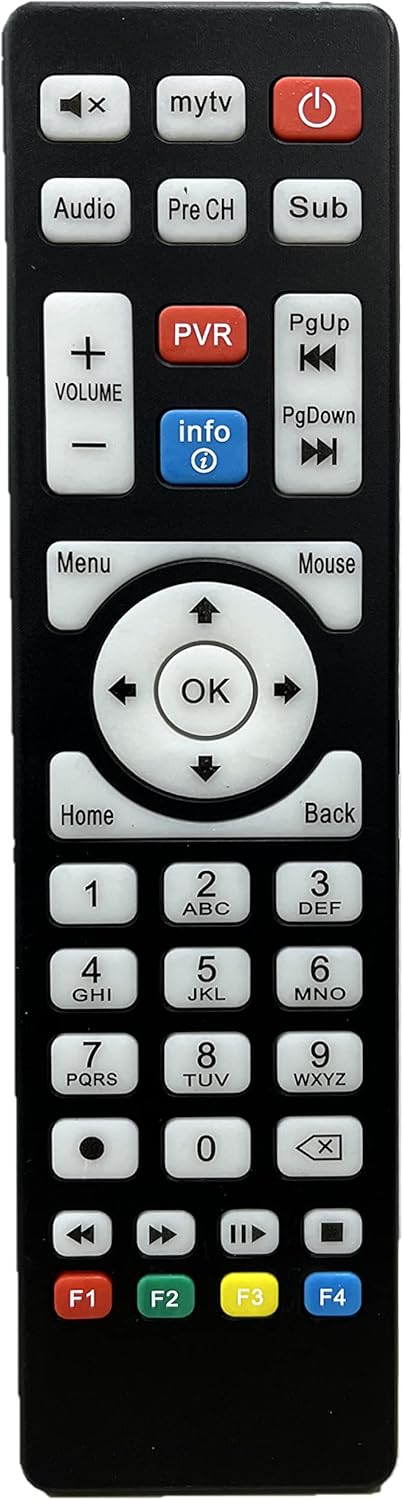
Image 2.1: Front view of the remote control, showing button layout. The battery compartment is on the reverse side.

Image 2.2: Side view of the remote control, illustrating its ergonomic design and profile.
3. Operating Instructions
This section details the functions of the buttons on your remote control.
| Button | Function |
|---|---|
| Power (⏻) | Turns the connected device (Global Media Box/Plus TV Box) on or off. |
| Mute (🔇) | Mutes or unmutes the audio output. |
| MyTV | Accesses the "MyTV" or main television interface. |
| Audio | Selects audio tracks or language options. |
| Pre CH | Returns to the previously viewed channel. |
| Sub | Activates or deactivates subtitles/closed captions. |
| Volume (+/-) | Adjusts the volume level up or down. |
| PVR | Accesses Personal Video Recorder functions. |
| PgUp / PgDown | Navigates through pages or lists. |
| Info | Displays program information or system details. |
| Menu | Opens the main menu of the device. |
| Mouse | Activates or deactivates mouse pointer mode (if supported by device). |
| Navigation (Up, Down, Left, Right) | Navigates through menus and selections. |
| OK | Confirms a selection or enters a menu item. |
| Home | Returns to the main home screen. |
| Back | Returns to the previous screen or menu. |
| Number Pad (0-9) | Direct channel entry or text input. |
| F1, F2, F3, F4 | Function keys, their specific use depends on the application or device. |
| Playback Controls (Play, Pause, Stop, Rewind, Fast Forward) | Controls media playback. |
4. Maintenance
4.1 Cleaning
To clean the remote control, gently wipe its surface with a soft, dry cloth. For stubborn dirt, slightly dampen the cloth with water or a mild, non-abrasive cleaner. Avoid using harsh chemicals or excessive moisture, as these can damage the remote.
4.2 Battery Replacement
Replace batteries when the remote's responsiveness decreases or it stops functioning. Always replace both batteries at the same time with new AAA batteries. Do not mix old and new batteries, or different types of batteries, as this can lead to leakage or malfunction.
Battery Safety:
- Remove batteries if the remote will not be used for an extended period to prevent leakage.
- Dispose of used batteries according to local regulations.
- Keep batteries out of reach of children.
5. Troubleshooting
If you experience issues with your remote control, please refer to the following common solutions:
- Remote is not responding:
- Check if the batteries are inserted correctly with the correct polarity (+/-).
- Replace the batteries with fresh AAA batteries.
- Ensure there is a clear line of sight between the remote control and the device's infrared (IR) receiver. Remove any obstructions.
- Confirm that the remote is pointed directly at the device.
- Device is not responding correctly:
- Verify that your device is a Global Media Box or Plus TV Box. This remote is not compatible with the Plus TV Box PRO or other models. Refer to the compatibility images in the Introduction section.
- Ensure the device itself is powered on and functioning correctly.
6. Specifications
| Feature | Detail |
|---|---|
| Brand | Generic |
| Model Number | 00628451717393 |
| Compatible Devices | Global Media Box, Plus TV Box |
| Power Source | 2 x AAA Batteries (not included) |
| Product Dimensions | 7 x 2 x 1 inches |
| Item Weight | 2.89 ounces |
| Color | Black |
| Special Feature | Ergonomic |
7. Warranty Information
Warranty information for this product is not explicitly provided in the available product details. Please refer to your purchase documentation or contact the seller for specific warranty terms and conditions.
8. Customer Support
Customer support contact information is not explicitly provided in the available product details. For assistance, please refer to the seller's contact information on your purchase platform or documentation.