
Product Overview
The Zendure SuperBase Pro 1500 is a portable power station designed to provide reliable power for various applications, from outdoor adventures to emergency home backup. It features a 1440 Wh capacity and a 1500W output, capable of powering a wide range of electronic devices and appliances.

Figure 1: Front view of the Zendure SuperBase Pro 1500, showing the main display and control buttons.
Setup Guide
1. Unboxing and Initial Inspection
Carefully remove the SuperBase Pro 1500 from its packaging. Inspect the unit for any signs of damage during transit. Ensure all accessories listed in the packing list are present.
2. Initial Charging
Before first use, it is recommended to fully charge the SuperBase Pro 1500. Connect the provided AC charging cable to the AC input port on the unit and then to a standard wall outlet. The display will indicate the charging status and battery percentage.
- Charging time may vary based on the input power source.
- For optimal battery life, avoid completely draining the battery before recharging.

Figure 2: Side view of the SuperBase Pro 1500, highlighting the AC output ports and DC output port.
Operating Instructions
1. Powering On/Off
To power on the unit, press and hold the main power button for approximately 3 seconds. The display will illuminate. To power off, press and hold the main power button again until the display turns off.
2. Understanding the Display
The LCD display provides real-time information about the power station's status:
- Battery Level: Shows the current battery percentage.
- Input Power: Indicates the power (in Watts) being drawn into the unit during charging.
- Output Power: Shows the power (in Watts) being consumed by connected devices.
- Remaining Runtime/Recharge Time: Estimates how long the unit can power devices or how long until fully charged.
- Port Status Indicators: Icons for AC, DC, USB, and other ports indicate if they are active.
3. Connecting Devices
The SuperBase Pro 1500 offers various output ports:
- AC Output: Press the AC power button to enable the AC outlets. Connect your AC-powered devices (e.g., laptops, small appliances) to these ports. Ensure the total power consumption does not exceed 1500W.
- DC Output: Press the DC power button to enable the DC output ports. These are suitable for devices requiring 12V DC power.
- USB Output: Connect USB-powered devices (e.g., smartphones, tablets) to the USB-A or USB-C (PD 100W, PD 20W) ports. These ports are typically always active when the unit is on.
4. Charging the SuperBase Pro 1500
The unit can be charged using multiple methods:
- AC Wall Outlet: Connect the AC charging cable to a standard wall outlet.
- Solar Panels (Optional): Connect compatible solar panels to the solar input port. Ensure the solar panel voltage and current are within the specified limits.
- Car Charger (Optional): Use a car charger adapter to charge the unit from your vehicle's 12V cigarette lighter port.
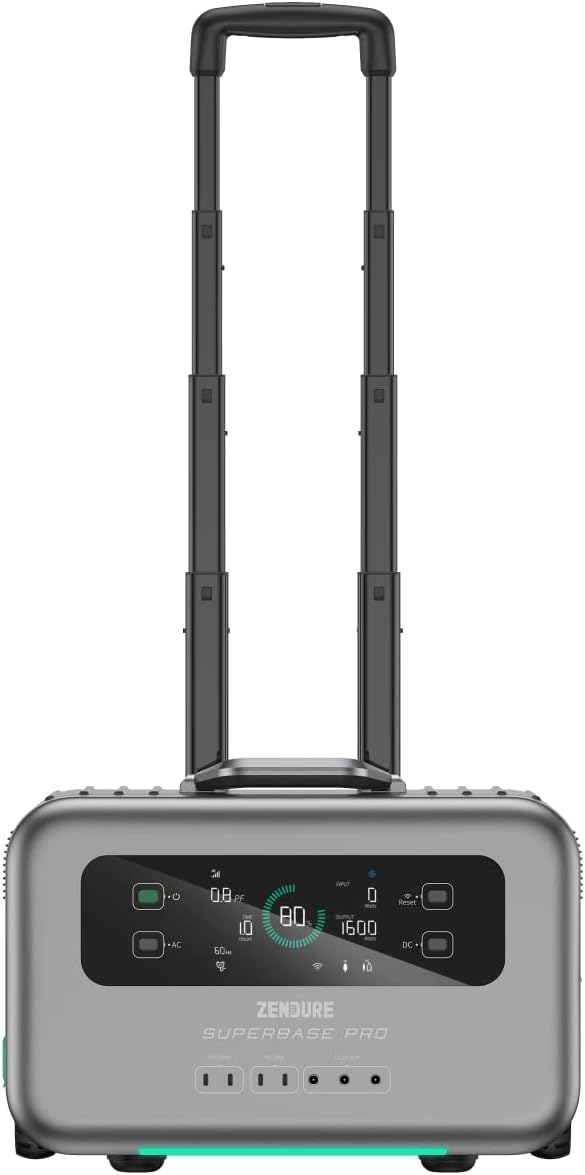
Figure 3: The SuperBase Pro 1500 with its retractable handle extended for easy transport.
Maintenance
1. Cleaning
Regularly clean the exterior of the unit with a soft, dry cloth. Do not use abrasive cleaners or solvents. Ensure all ports are free of dust and debris.
2. Storage
When storing the SuperBase Pro 1500 for extended periods, ensure it is charged to approximately 50-80% capacity. Store it in a cool, dry place, away from direct sunlight and extreme temperatures. Recharge the unit every 3-6 months to maintain battery health.
3. Battery Care
The SuperBase Pro 1500 uses a lithium-ion battery. To maximize its lifespan:
- Avoid frequent full discharges.
- Do not expose the unit to temperatures below -10°C (14°F) or above 45°C (113°F) for prolonged periods.
- If the unit will not be used for a long time, charge it to 80% every 3 months.
Troubleshooting
| Problem | Possible Cause | Solution |
|---|---|---|
| Unit does not power on. | Battery is completely depleted. | Connect to an AC outlet and charge for at least 10 minutes before attempting to power on. |
| No AC output. | AC output not enabled; Overload protection activated. | Press the AC power button to enable. Reduce the load on AC outlets; restart the unit. |
| No DC output. | DC output not enabled; Overload protection activated. | Press the DC power button to enable. Reduce the load on DC outlets; restart the unit. |
| Unit not charging. | Charging cable not properly connected; Input source issue. | Ensure all charging cables are securely connected. Verify the wall outlet or solar panel is functioning correctly. |
| Display shows an error code. | Internal system error. | Note the error code and refer to the Zendure support website or contact customer service for assistance. |
Specifications
| Feature | Detail |
|---|---|
| Model | SUPERBASE PRO |
| Capacity | 1440 Wh |
| AC Output Power | 1500 Watts (Rated) |
| Battery Type | Lithium-ion |
| Dimensions (L x W x H) | 50 x 50 x 28 cm |
| Weight | 10.89 kg |
| Voltage | 1.5E+3 Volts (DC) |
| Color | Black |
| UPC | 850020422692 |
Warranty Information
Zendure products typically come with a limited warranty. For detailed information regarding the warranty period, coverage, and terms and conditions for your SuperBase Pro 1500, please refer to the warranty card included with your product or visit the official Zendure website.
Keep your proof of purchase for warranty claims.
Customer Support
For technical assistance, troubleshooting not covered in this manual, or service inquiries, please contact Zendure customer support.
Contact information and support resources can typically be found on the official Zendure website:
- Zendure Official Support Page (Example link, actual URL may vary)
- Refer to the product packaging or included documentation for specific regional contact details.


